
Perkenalan
The Vivitar 450PZ is a compact 35mm camera designed for ease of use, featuring fully automatic operation. This manual provides essential information for setting up, operating, maintaining, and troubleshooting your camera to ensure optimal performance.
The camera incorporates automatic focusing and exposure, a 38 to 70mm zoom lens, an automatic flash with red-eye reduction, and motorized film handling. An electronic self-timer is also included for convenience.
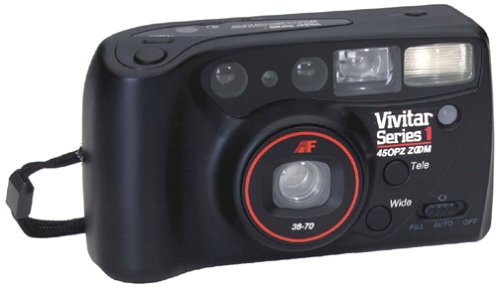
Gambar: Depan view of the Vivitar 450PZ 35mm Camera, showcasinkarena desain dan lensa yang ringkas.
Pengaturan
1. Pemasangan Baterai
- Temukan penutup kompartemen baterai pada bodi kamera.
- Buka penutupnya dengan menggeser atau mengangkatnya sesuai dengan indikator.
- Insert the required CR123A type batteries, ensuring correct polarity (+/-) as indicated inside the compartment.
- Tutup penutup ruang baterai dengan rapat.
2. Memuat Film
- Open the camera back by sliding the latch.
- Place a 35mm film cartridge into the film chamber.
- Pull the film leader across to the film take-up spool, aligning it with the start mark.
- Tutup penutup belakang kamera. Kamera akan secara otomatis memajukan film ke bingkai pertama.
3. Wrist Strap Attachment
Attach the provided wrist strap to the designated loop on the camera body. This helps prevent accidental drops and provides a secure grip during use.
Mengoperasikan Kamera
1. Daya Hidup/Mati
Locate the power button or switch, typically near the shutter button. Press or slide it to turn the camera on or off.
2. Mengambil Gambar
- Lihat melalui viewpenemu untuk menyusun bidikan Anda.
- Press the shutter button halfway down to activate the autofocus and exposure systems. The camera will automatically set the focus and exposure.
- Tekan tombol rana sepenuhnya untuk mengambil gambar. Film akan secara otomatis maju ke bingkai berikutnya.
3. Fungsi Zoom
Use the zoom control (usually a lever or buttons near the shutter) to adjust the focal length between 38mm (wide-angle) and 70mm (telephoto). This allows you to bring subjects closer or capture a wider scene.
4. Pengoperasian Flash
- Lampu Kilat Otomatis: The flash will automatically fire in dimly lit conditions to ensure proper exposure.
- Mengurangi Mata Merah: When activated, the camera emits a series of pre-flashes before the main flash to reduce the red-eye effect in portraits.
- Flash Off Mode: For situations where flash is not desired (e.g., museums, theater), locate the flash mode button and select the 'flash off' setting.
5. Pengatur Waktu Otomatis
To use the self-timer, press the self-timer button. A flashing LED indicator will typically signal the countdown. After a set delay (e.g., 10 seconds), the camera will automatically take the picture, allowing the photographer to be included in the shot.
6. Film Rewind
When the film roll is complete, the camera will automatically rewind the film back into the cartridge. A mid-roll rewind function may also be available, allowing you to rewind the film before the roll is finished by pressing a specific button (refer to camera markings if available).
Pemeliharaan
Membersihkan Kamera
- Gunakan kain lembut dan tidak berbulu untuk menyeka badan kamera dengan lembut.
- For the lens, use a specialized lens cleaning cloth and lens cleaning solution. Avoid touching the lens surface with your fingers.
- Do not use abrasive cleaners or solvents, as these can damage the camera's finish and optical components.
Penyimpanan
- Saat tidak digunakan, simpan kamera di tempat yang sejuk dan kering, jauh dari sinar matahari langsung dan suhu ekstrem.
- Lepaskan baterai jika kamera tidak akan digunakan dalam jangka waktu lama untuk mencegah kebocoran.
Penyelesaian Masalah
Kamera Tidak Menyala
- Periksa apakah baterai telah dimasukkan dengan benar dan dengan polaritas yang tepat.
- Ganti baterai lama atau yang habis dengan yang baru.
- Pastikan sakelar daya dalam posisi 'Aktif'.
Film Not Advancing
- Verify that the film is correctly loaded and the leader is engaged with the take-up spool.
- Check if the film door is securely closed.
- Ensure there is enough power from the batteries for the motor to operate.
Flash Tidak Menyala
- Confirm that the flash is not set to 'Flash Off' mode.
- Allow sufficient time for the flash to charge (indicated by a flash ready lamp).
- Ensure ambient light conditions are dark enough for the automatic flash to activate.
Spesifikasi
| Fitur | Detil |
|---|---|
| Merek | Vivitar |
| Nama Model | 450PZ |
| Jenis Format Film | ukuran 35mm |
| Lensa | 38-70mm Zoom |
| Kontrol Paparan | Otomatis |
| Sistem Fokus | 14-zone Autofocus |
| Kilatan | Automatic with Red-Eye Reduction |
| Film Handling | Motorized Loading, Advance, and Rewind |
| Fitur Khusus | Built-In Flash, Compact Design, Electronic Self-Timer |
| Berat Barang | 15.2 ons |
| Komponen yang Termasuk | Badan & Lensa Kamera |
Garansi dan Dukungan
Informasi Garansi
The Vivitar 450PZ camera comes with a warranty covering one year on parts and 90 days on labor from the date of purchase. Please retain your proof of purchase for warranty claims.
Dukungan Pelanggan
For technical assistance, service, or further inquiries regarding your Vivitar 450PZ camera, please refer to the contact information provided with your product packaging or visit the official Vivitar websitus untuk sumber daya dukungan.