
1. Pendahuluan
This manual provides detailed instructions for the safe and effective operation, setup, and maintenance of your Associated Equipment Model 6042 Digital Electrical System Tester. This device is designed for testing 12V and 24V electrical systems, including batteries, starters, and charging systems, with a capacity of up to 500 amps.
The Associated Equipment 6042 is engineered for high quality and versatility, featuring digital displays for precise readings and heavy-duty leads for reliable testing. It is proudly made in the USA.
2. Petunjuk Keselamatan
Always prioritize safety when operating this equipment. Failure to follow these instructions may result in injury or damage to equipment.
- Always wear eye protection when working on an engine.
- Batteries produce explosive gases during normal operation. Do not smoke or allow flame or sparks near the battery or engine. Ensure adequate ventilation.
- Avoid fan belts and other hot or moving parts of the engine. Be aware that electric fans may start automatically.
- Engine exhaust contains carbon monoxide, a deadly poison. Operate vehicles only in a well-ventilated area.
- Do not connect or remove test clamps while a load is applied.
- Do not connect test clamps to the carburetor, fuel lines, or sheet metal parts of the frame. Connect to appropriate battery terminals or designated test points.
3. Fitur dan Komponen Produk
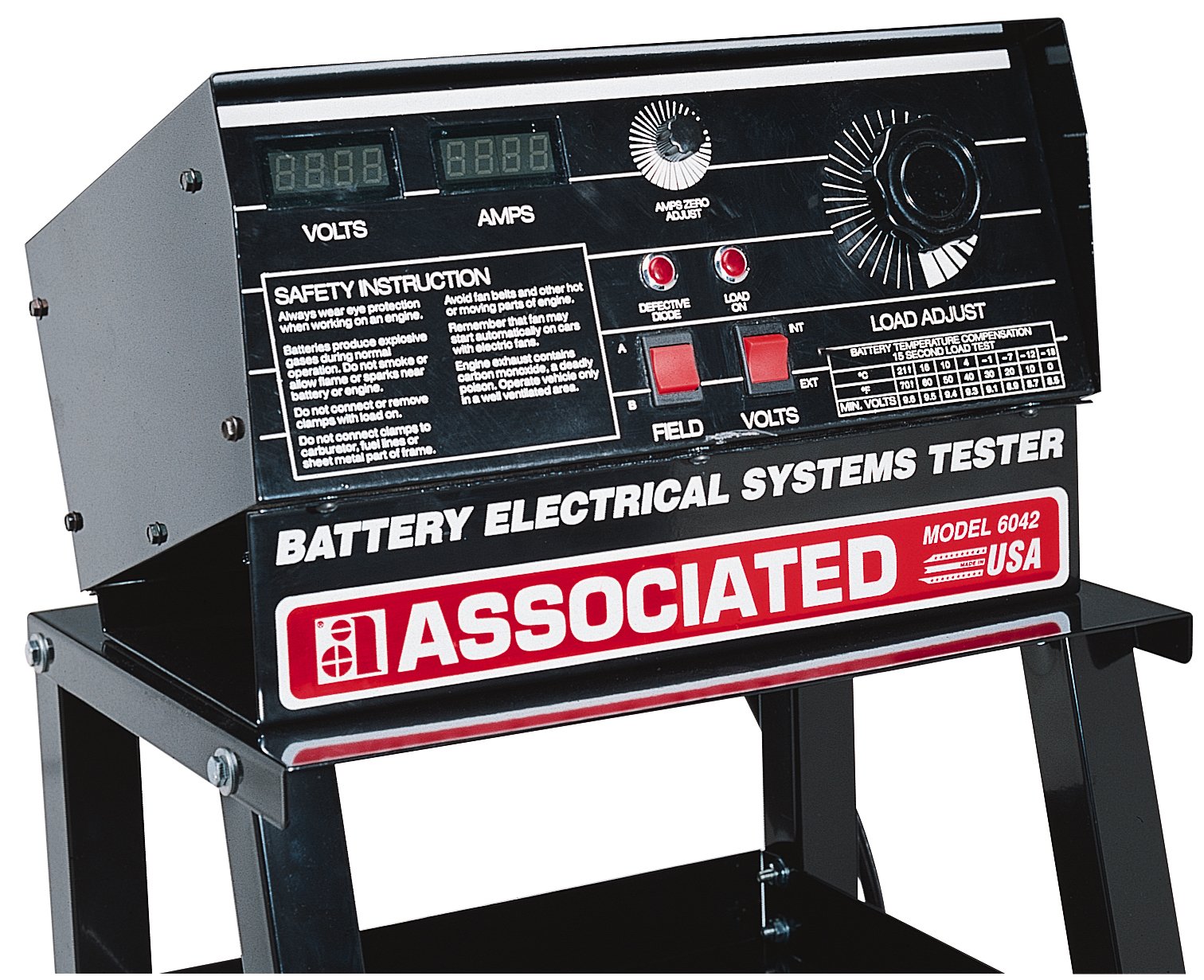
Gambar 1: Associated Equipment Model 6042 Digital Electrical System Tester. This image displays the front panel with digital readouts for Volts and Amps, control knobs for Amps Zero Adjust and Load Adjust, indicator lights for Defective Diode and Load On, and connection points for Field and Volts. A table for Battery Temperature Compensation is also visible.
The Model 6042 features a robust design for professional use. Key components and features include:
- Digital Volts Display: Memberikan vol yang tepattage bacaan.
- Digital AmpTampilan: Shows positive and negative amperage for diagnosing current leakage.
- Amps Zero Adjust Knob: For calibrating the amptampilan usia.
- Load Adjust Knob: Controls the load applied during testing.
- Defective Diode Indicator: Illuminates if a defective diode is detected.
- Load On Indicator: Shows when a load is being applied.
- Field/Volts Connections: Input terminals for various test configurations.
- Heavy-Duty Leads: Single extruded leads designed for testing up to 15 feet apart.
- Curved Discs: Unique design to prevent hot spots during load testing.
- Battery Temperature Compensation Table: Provides minimum voltage values for 15-second load tests based on battery temperature.
4. Pengaturan dan Persiapan
- Membongkar: Carefully remove the tester from its packaging. Inspect for any shipping damage.
- Penempatan: Position the tester on a stable, level surface in a well-ventilated area, away from flammable materials.
- Sumber Daya: The unit is battery-powered. Ensure the internal battery is charged or functioning correctly for accurate readings, especially for the amps probe.
- Inspeksi Awal: Check all cables and connections for wear or damage before each use.
5. Petunjuk Pengoperasian
This section outlines general operating procedures. Refer to specific test procedures for detailed steps.
5.1. Basic Connection
- Ensure the vehicle ignition is off and all accessories are disconnected.
- Connect the positive (+) test clamp ke terminal baterai positif.
- Connect the negative (-) test clamp to the negative battery terminal or a good chassis ground point, away from the battery.
- Ensure connections are secure before proceeding.
5.2. Amps Zero Adjustment
- Before applying any load, turn the "Amps Zero Adjust" knob until the digital Amps display reads "0.00". This calibrates the current sensor.
5.3. Penerbangantage Pengukuran
- Once connected, the digital Volts display will show the current battery voltage.
5.4. Load Testing (Battery)
- With the tester connected and Amps zeroed, slowly turn the "Load Adjust" knob clockwise to apply a load to the battery.
- Observe the digital Volts and Amps displays. The "Load On" indicator will illuminate.
- Refer to the "Battery Temperature Compensation 15 Second Load Test" table on the unit for minimum acceptable voltage readings based on battery temperature.
- Apply the load for no more than 15 seconds to prevent battery damage or overheating of the tester.
- After 15 seconds, turn the "Load Adjust" knob counter-clockwise to remove the load.
- Compare the observed voltage under load with the values in the compensation table.
5.5. Alternator/Charging System Test
- Connect the tester as described in "5.1. Basic Connection".
- Nyalakan mesin kendaraan.
- Observe the Volts display. A healthy charging system should show voltage typically between 13.5V and 14.5V.
- Itu Amps display can indicate charging current. Positive amps indicate current flowing into the battery, while negative amps could indicate a discharge or parasitic draw.
- If the "Defective Diode" indicator illuminates, it suggests a potential issue with the alternator's rectifier diodes.
5.6. Battery Temperature Compensation Table
This table provides the minimum acceptable voltage for a 15-second load test at various battery temperatures.
| Suhu | 21°C (70°F) | 18°C (65°F) | 10°C (50°F) | 4°C (40°F) | -1°C (30°F) | -7°C (20°F) | -12°C (10°F) | -18°C (0°F) |
|---|---|---|---|---|---|---|---|---|
| Min. Volts | 9.6 | 9.5 | 9.4 | 9.3 | 9.1 | 8.9 | 8.7 | 8.5 |
6. Pemeliharaan dan Perawatan
- Pembersihan: Lap unit dengan kain lembut dan kering. Jangan gunakan pembersih atau pelarut abrasif.
- Penyimpanan: Store the tester in a clean, dry environment when not in use. Protect it from extreme temperatures and direct sunlight.
- Pemeriksaan Kabel: Regularly inspect test leads and clamps for cuts, cracks, or corrosion. Replace damaged components immediately.
- Baterai Internal: Itu amps probe is battery operated. Ensure its battery is maintained and replaced as needed for accurate readings.
7. Penyelesaian masalah
| Masalah | Kemungkinan Penyebab | Larutan |
|---|---|---|
| No display or incorrect readings | Loose connections, discharged internal battery (for amps probe), damaged leads. | Check all connections. Ensure the amps probe battery is functional. Inspect and replace damaged leads. |
| Amps display not zeroing | Amps probe not calibrated, external magnetic interference. | Adjust the "Amps Zero Adjust" knob. Move the tester away from strong magnetic fields. |
| "Defective Diode" indicator illuminates | Faulty alternator rectifier diodes. | Further diagnosis of the alternator is required. Consult a qualified technician. |
| Tester gets hot during load test | Excessive load duration, insufficient cooling. | Limit load tests to 15 seconds. Allow the unit to cool between tests. Ensure proper ventilation. |
8. Spesifikasi
| Fitur | Spesifikasi |
|---|---|
| Nomor Model | 6042 |
| Jil.tage Kompatibilitas | Tegangan 12V/24V |
| Maksimal Ampmarah | 500 Amps |
| Jenis Pengukuran | Ammeter, Voltmeter |
| Sumber Daya | Bertenaga Baterai |
| Berat Barang | 48 pon (sekitar 21.77 kg) |
| Dimensi Produk (P x L x T) | 19 x 36 x 8 inci (sekitar 48.26 x 91.44 x 20.32 cm) |
| UPC | 099684000505, 099684003605 |
| Pabrikan | Peralatan Terkait |
| Negara Asal | Amerika Serikat |
9. Garansi dan Dukungan
For warranty information or technical support, please refer to the documentation included with your purchase or contact Associated Equipment directly. This product is proudly made in the USA, reflecting a commitment to quality and durability.