
1. Pendahuluan
This manual provides detailed instructions for the setup, operation, maintenance, and troubleshooting of your Inland Pro Bluetooth Optical Mouse (Model 07347). Please read this manual thoroughly before using the device to ensure proper functionality and to prevent damage.
The Inland Pro Bluetooth Optical Mouse offers wireless convenience and precise optical tracking for various computing tasks. Its ergonomic design aims to provide comfortable use.
2. Isi Paket
Verifikasi bahwa semua item yang tercantum di bawah ini ada dalam kemasan produk Anda:
- Inland Pro Bluetooth Optical Mouse (Model 07347)
- User Manual (dokumen ini)
- Note: 2 AAA batteries are required for operation and are not included.
3. Produk Lebihview
The Inland Pro Bluetooth Optical Mouse is designed for ease of use and reliable performance. Key features include:
- Bluetooth Wireless Interface: Provides a cable-free connection to your compatible device.
- Optical Technology: Delivers accurate and responsive cursor control.
- Desain Ergonomis: Shaped for comfortable handling during extended use.
- Two Buttons and Scroll Wheel: Standard navigation controls for efficient interaction.
- Sensor 1000 DPI: Offers a fixed sensitivity for general computing tasks.
Komponen Tikus
Refer to the image below for an illustration of the mouse components.
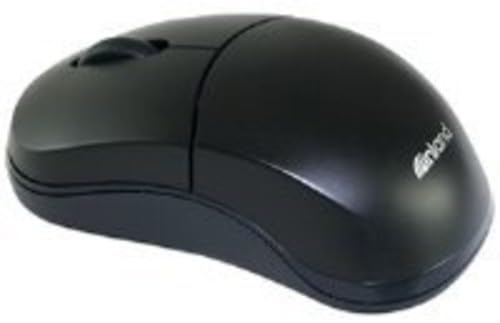
Figure 1: Inland Pro Bluetooth Optical Mouse (Model 07347). This image displays the top and side profile of the black optical mouse, highlighting its ergonomic shape and standard button layout.
- Tombol Klik Kiri
- Tombol Klik Kanan
- Roda Gulir
- Optical Sensor (located on the underside)
- Battery Compartment (located on the underside)
- Bluetooth Connection/Pairing Button (located on the underside)
- Power On/Off Switch (located on the underside)
4. Pengaturan
4.1. Memasang Baterai
- Turn the mouse over to access the underside.
- Temukan penutup kompartemen baterai. Geser atau angkat penutup untuk membukanya.
- Masukkan dua (2) baterai AAA, pastikan terminal positif (+) dan negatif (-) sejajar dengan tanda di dalam kompartemen.
- Pasang kembali penutup kompartemen baterai dengan aman.
- Slide the Power On/Off switch to the 'On' position.
4.2. Pemasangan Bluetooth
Follow these steps to connect your mouse to a compatible device:
- Ensure the mouse has fresh batteries and is powered on.
- On your computer or device, enable Bluetooth and open the Bluetooth settings or device manager.
- Tekan dan tahan tombol Bluetooth Connection/Pairing Button on the underside of the mouse for approximately 3-5 seconds. An indicator light on the mouse (if present) may flash to indicate pairing mode.
- On your device, search for new Bluetooth devices. The mouse should appear as "Inland Pro Mouse" or a similar identifier.
- Select the mouse from the list of available devices to initiate the connection.
- If prompted for a passkey, enter "0000" or consult your device's Bluetooth instructions. Some devices may not require a passkey.
- Once connected, the mouse indicator light may stop flashing or turn solid, and your device should confirm the successful pairing.
Kompatibilitas Catatan: This mouse is compatible with Windows 2000, Windows XP, Windows Vista, and Mac OS. Compatibility with other operating systems or specific Bluetooth adapters may vary.
5. Petunjuk Pengoperasian
After successful pairing, the mouse is ready for use.
- Menggerakkan Kursor: Move the mouse across a flat, non-reflective surface to control the cursor on your screen.
- Klik kiri: Tekan tombol kiri untuk memilih item, membuka tautan, atau mengaktifkan fungsi.
- Klik kanan: Tekan tombol kanan untuk membuka menu konteks atau mengakses opsi tambahan.
- Roda Gulir: Gulirkan roda gulir ke atas atau ke bawah untuk menavigasi dokumen dan web pages. The scroll wheel can also be pressed as a middle click button for some functions.
6. Pemeliharaan
6.1. Membersihkan Mouse
Untuk mempertahankan kinerja dan penampilan yang optimal:
- Pastikan mouse dimatikan sebelum membersihkan.
- Gunakan kain lembut dan bebas serat untuk sedikit membersihkannya.ampdengan air atau larutan pembersih ringan.
- Wipe the exterior surfaces of the mouse gently.
- Hindari penggunaan bahan kimia keras, pembersih abrasif, atau kelembapan berlebihan, karena hal ini dapat merusak mouse.
- Do not spray cleaners directly onto the mouse.
6.2. Penggantian Baterai
When the mouse's performance degrades or it stops responding, it may be time to replace the batteries. Follow the steps in Section 4.1 to replace the two (2) AAA batteries.
Catatan: Buang baterai bekas secara bertanggung jawab sesuai dengan peraturan setempat.
7. Penyelesaian masalah
If you encounter issues with your Inland Pro Bluetooth Optical Mouse, refer to the following common problems and solutions:
- Mouse does not respond or cursor does not move:
- Ensure the mouse is powered on. Check the On/Off switch on the underside.
- Ganti baterainya dengan baterai AAA yang baru.
- Ensure the mouse is within the effective range of your Bluetooth device (typically up to 10 meters).
- Verify that the mouse is properly paired with your device. If not, re-pair it following the steps in Section 4.2.
- Try connecting the mouse to a different Bluetooth-enabled device to rule out an issue with your primary device's Bluetooth adapter.
- Connection fails or mouse frequently disconnects:
- Ensure there are no other strong wireless signals or devices interfering with the Bluetooth connection.
- Turn the mouse off and then on again using the power switch on the underside. This can often re-establish the connection.
- Remove the mouse from your device's Bluetooth paired devices list and then re-pair it.
- Perbarui driver Bluetooth komputer Anda.
- If your device requests a code during pairing and none was provided, try common codes like "0000" or "1234". If issues persist, consult your device's operating system documentation.
- Pergerakan kursor tidak menentu atau tidak tepat:
- Bersihkan sensor optik pada bagian bawah mouse dengan kain lembut dan kering.
- Use the mouse on a clean, uniform, non-reflective surface. Avoid highly reflective or transparent surfaces.
8. Spesifikasi
| Merek | Pedalaman |
| Nomor Model | 07347 |
| Teknologi Konektivitas | Bluetooth, Wireless (2.4 GHz Radio Frequency, 802.11abg) |
| Teknologi Deteksi Gerakan | Optik |
| DPI (Titik Per Inci) | 1000dpi |
| Jumlah Tombol | 2 (plus scroll wheel click) |
| Warna | Hitam |
| Kompatibilitas Sistem Operasi | Windows 2000, Windows XP, Windows Vista, Mac OS |
| Baterai Diperlukan | 2 x AAA (tidak termasuk) |
| Berat Barang | 109 gram |
| Dimensi Produk (P x L x T) | 20.32 x 6.35 x 18.29 cm (dimensi kemasan perkiraan) |
9. Garansi dan Dukungan
For warranty information, please refer to the documentation provided at the time of purchase or contact your retailer. Inland typically offers a limited warranty against defects in materials and workmanship.
For technical support or further assistance, please visit the official Inland webAnda dapat mengunjungi situs web mereka atau menghubungi departemen layanan pelanggan mereka. Detail kontak biasanya tersedia pada kemasan produk atau situs web produsen. weblokasi.