
Arrow Fastener JT27
Arrow JT27 Light Duty Staple Gun Instruction Manual
Model: JT27
Perkenalan
The Arrow JT27 Light Duty Staple Gun is designed for various light-duty applications such as upholstery, crafts, and office tasks. It is compatible with 1/4", 5/16", or 3/8" thin wire staples. This manual provides essential information for the safe and effective operation, maintenance, and troubleshooting of your staple gun.

Figure 1: The Arrow JT27 Light Duty Staple Gun.
Fitur Utama
- Bottom-Load Magazine: Facilitates easy reloading and jam clearing.
- Pinch Release: Designed for quick and hassle-free staple loading.
- Kunci Pegangan: Secures the handle for safe storage and portability.
- Pokok Viewjendela: Allows monitoring of staple levels to prevent unexpected depletion.
- Lightweight Steel Housing: Ensures durability and ease of use.

Figure 2: Diagram highlighting the key features of the JT27 staple gun, including the staple viewing window, handle lock, bottom-load magazine, and pinch release.
Informasi Keselamatan
Always prioritize safety when operating any tool. Read and understand all instructions before use.
- Selalu kenakan pelindung mata yang sesuai.
- Keep fingers and body parts clear of the staple exit area.
- Jangan pernah mengarahkan alat penyemat staples ke diri sendiri atau orang lain.
- Ensure the handle lock is engaged when the tool is not in use or during storage.
- Use only genuine Arrow JT21 staples of the correct size for optimal performance and to maintain warranty validity.
- Do not attempt to staple into extremely hard materials that may cause staples to ricochet.
Pengaturan
1. Staple Selection
The Arrow JT27 uses Arrow JT21 series thin wire staples. These are available in 1/4" (6mm), 5/16" (8mm), and 3/8" (10mm) leg lengths. Selecting the correct staple length is crucial for effective fastening and depends on the thickness and type of material being stapled.
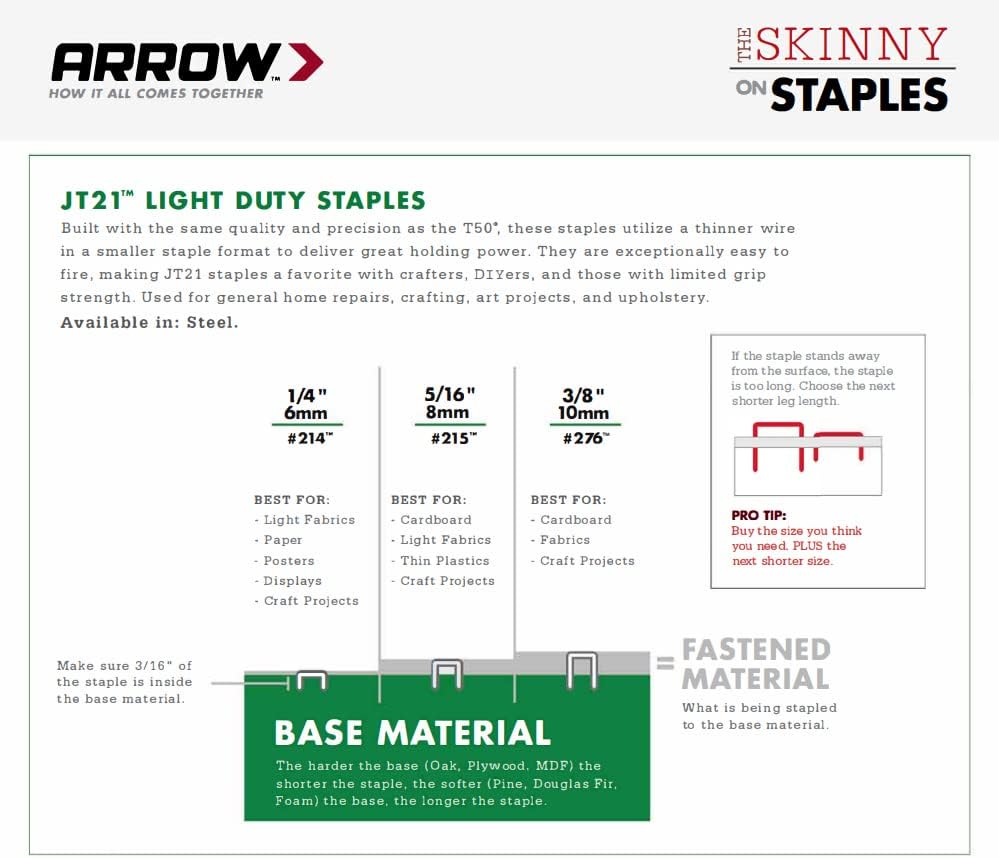
Figure 3: Guide for selecting the appropriate JT21 staple length based on material type and thickness. For best results, if the staple stands away from the surface, choose the next shorter size.
2. Memuat Staples
- Ensure the handle lock is engaged for safety.
- Turn the staple gun upside down.
- Locate the bottom-load magazine at the rear of the tool.
- Press the pinch release mechanism to open the magazine.
- Insert a strip of Arrow JT21 staples into the magazine with the staple points facing down.
- Tutup magazin dengan rapat hingga terkunci pada tempatnya.

Gambar 4: Tampilan jarak dekat view of the bottom-load magazine and pinch release mechanism for loading staples.
Petunjuk Pengoperasian
- Siapkan Benda Kerja: Ensure the material to be stapled is clean, dry, and properly positioned.
- Buka Pegangannya: Disengage the handle lock.
- Position the Staple Gun: Place the nose of the staple gun firmly against the surface where the staple is to be driven. Ensure the tool is held perpendicular to the surface for best results.
- Fire a Staple: Squeeze the handle firmly and completely to drive a staple.
- Check Staple Level: Periodically check the staple viewing window to monitor staple supply.
- Aktifkan Kunci Pegangan: After use, engage the handle lock for safe storage.

Figure 5: Proper technique for using the staple gun, demonstrating firm placement against the material.
Pemeliharaan
- Keep the staple gun clean and free of debris.
- Simpan alat di tempat yang kering dengan kunci pegangan terpasang.
- Do not lubricate the staple gun unless specifically instructed by the manufacturer.
- Inspect the tool regularly for any signs of wear or damage. Discontinue use if damage is observed and contact support.
Penyelesaian Masalah
Staple Jams
The JT27's bottom-load magazine with pinch release is designed to make clearing jams straightforward.
- Pastikan Keamanan: Always engage the handle lock before attempting to clear a jam.
- Buka Majalah: Press the pinch release and open the bottom-load magazine.
- Remove Staples: Carefully remove any remaining staples from the magazine.
- Bersihkan Kemacetan: Inspect the staple channel for any bent or jammed staples. Use pliers or a small tool to gently remove the obstruction. Never use excessive force.
- Muat ulang: Once the channel is clear, reload new staples as described in the "Loading Staples" section and close the magazine.
- Tes: Test the staple gun on a scrap piece of material.
Staples Not Driving Fully
- Ensure the staple gun is held firmly and squarely against the workpiece.
- Verify that the correct staple length is being used for the material thickness. Refer to the "Staple Selection" guide.
- Check if the material is excessively hard for a light-duty staple gun.
Spesifikasi
| Fitur | Detil |
|---|---|
| Nomor Model | JT27 |
| Merek | Pengikat Panah |
| Jenis Pokok | Arrow JT21 Thin Wire Staples |
| Ukuran Staples | 1/4" (6mm), 5/16" (8mm), 3/8" (10mm) |
| Bahan | Baja Paduan |
| Mode Operasi | Buku petunjuk |
| Berat Barang | 15.5 ons |
| Dimensi Produk | 8.5x9.5x1 inci |
| Warna | Perak |
Informasi Garansi
Arrow Fastener warrants that all its products will be free from manufacturing defects in materials and workmanship for 90 days from the original purchase date. If your product fails due to manufacturing defects within this period, Arrow will repair or replace it with an equivalent product at no charge to the original purchaser.
Kondisi Garansi Penting: To ensure warranty repair and optimal performance, use only genuine Arrow Staples. This warranty does not cover damage or defects caused by the use of non-genuine staples.
For specific product warranty details and care instructions, please refer to the Arrow FAQ on their official weblokasi.
Dukungan dan Kontak
For further assistance, product information, or to explore other Arrow Fastener products, please visit the official Arrow Fastener Store.
Ask a question about this manual
Ask about setup, troubleshooting, compatibility, parts, safety, or missing instructions. Manuals+ will review the question and use this page’s manual context to help answer it.