
1. Pendahuluan
The Nikon COOLPIX L120 is a 14.1-megapixel digital camera designed for ease of use and powerful zoom capabilities. Featuring a 21x optical zoom NIKKOR glass lens, this camera allows you to capture detailed photos and HD videos from a distance. Its intuitive design and automatic features make it suitable for various photography situations, from everyday snapshots to sporting events.
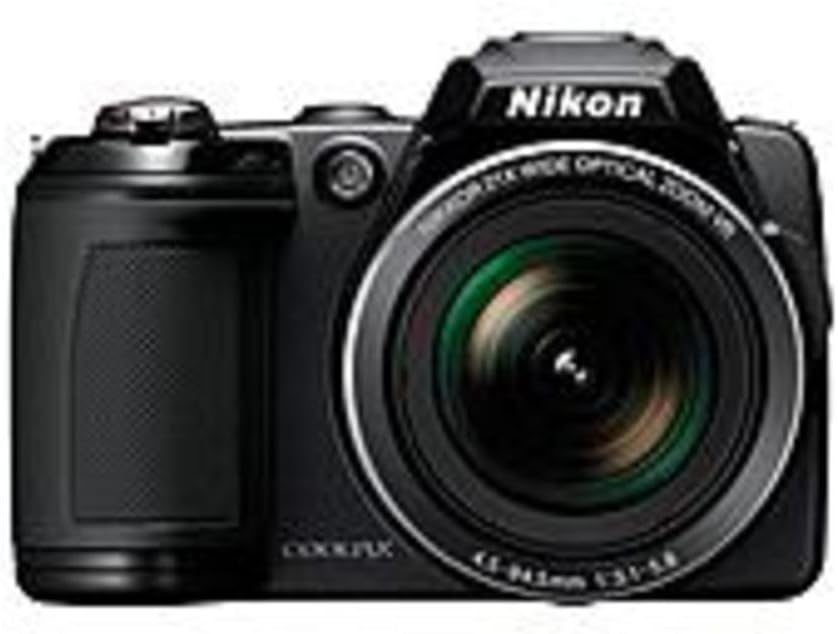
Depan view of the Nikon COOLPIX L120 Digital Camera, showcasing its lens and grip.
2. Pengaturan
2.1 Memasang Baterai
The COOLPIX L120 operates on four AA batteries. For optimal performance and battery life, it is recommended to use alkaline, lithium, or rechargeable Ni-MH batteries.
- Buka penutup ruang baterai yang terletak di bagian bawah kamera.
- Insert four AA batteries, ensuring correct polarity (+/-) as indicated inside the chamber.
- Tutup penutup ruang baterai dengan rapat.
2.2 Memasukkan Kartu Memori
Kamera ini mendukung kartu memori SD, SDHC, dan SDXC. Kartu memori diperlukan untuk menyimpan foto dan video.
- Open the memory card slot cover, usually located near the battery chamber.
- Masukkan kartu memori dengan label menghadap ke depan kamera hingga berbunyi klik dan terpasang dengan benar.
- Tutup penutup slot kartu memori.
2.3 Attaching the Strap and Lens Cap
- Thread the camera strap through the strap eyelets on the camera body to prevent accidental drops.
- Attach the LC-CP22 lens cap to the lens when the camera is not in use to protect the lens surface.
3. Mengoperasikan Kamera
3.1 Menghidupkan/Mematikan
Press the power button located on the top of the camera to turn it on or off. Ensure the lens cap is removed before powering on to avoid errors.
3.2 Fotografi Dasar
- Arahkan kamera ke subjek Anda.
- Use the zoom control to adjust the focal length.
- Press the shutter button halfway down to focus. The focus indicator will illuminate.
- Tekan tombol rana sepenuhnya untuk mengambil gambar.
3.3 Fungsi Pembesaran
The camera features a 21x optical zoom lens. Use the zoom lever around the shutter button to zoom in (telephoto) or zoom out (wide-angle). The 5-way VR Image Stabilization system helps reduce blur, especially at longer zoom settings.
3.4 Mode Pemandangan
The COOLPIX L120 offers 17 scene modes to optimize camera settings for specific shooting conditions. Rotate the mode dial to select a scene mode that matches your environment, such as Landscape, Portrait, or Sports.
3.5 Flash Control
The built-in flash can be set to Auto, On, Off, Slow Synch, or Rear Curtain Synch. Access flash settings through the camera's menu to adjust for different lighting needs.
3.6 Merekam Video HD
To record a video, simply press the dedicated movie-record button. The camera captures 720p HD video with stereo sound. You can use the optical zoom during video recording. Press the button again to stop recording.
3.7 Pemutaran dan Ulangview
Tekan tombol putar untuk view your photos and videos on the 3-inch, 921,000-dot LCD screen. Use the multi-selector to navigate through images and videos. The anti-glare coating and wide viewing angle enhance visibility.
3.8 Menghubungkan ke Perangkat Eksternal
- Koneksi USB: Use the supplied UC-E6 USB cable to connect the camera to a computer for transferring images and videos.
- Keluaran HDMI: Connect the camera to an HDTV using an HDMI cable (not supplied) to view your media on a larger screen.
- Audio/Video Cable: Use the supplied EG-CP16 Audio/Video cable for standard definition output to a TV.
4. Fitur Lanjutan
4.1 Image Enhancement Technologies
- Penghitung Senyum: Secara otomatis mengambil foto saat mendeteksi senyuman.
- Peringatan Kedipan Mata: Alerts you if a subject may have blinked, suggesting a retake.
- AF Prioritas Wajah: Detects and focuses on up to 12 faces automatically.
- Perbaikan Mata Merah Langsung di Kamera: Corrects red-eye automatically after a photo is taken.
- Skin Softening: Smoothes skin tones for improved portraits.
4.2 Pemotretan Beruntun
The Sport Continuous Shooting mode allows the camera to take photos continuously in quick succession, ideal for capturing fast-moving subjects.
4.3 In-Camera Editing
After shooting, you can apply various edits directly on the camera:
- D-Lighting: Adjusts contrast and brightness to recover details in shadows and highlights.
- Pilihan Warna: Choose from Standard, Vivid, Black & White, Sepia, and Cyanotype.
4.4 Fotografi Makro
The COOLPIX L120 can focus on subjects as close as 0.4 inches (1 cm), enabling detailed close-up shots of small objects.
5. Pemeliharaan
5.1 Membersihkan Kamera
- Tubuh Kamera: Wipe gently with a soft, dry cloth. Do not use alcohol, thinners, or other volatile chemicals.
- Lensa: Gunakan sikat lensa untuk membersihkan debu, lalu usap perlahan dengan kain pembersih lensa. Hindari menyentuh permukaan lensa dengan jari Anda.
- Layar LCD: Use a soft cloth to wipe the screen. For stubborn smudges, lightly dampen kain dengan air.
5.2 Perawatan Baterai
- Lepaskan baterai jika kamera tidak akan digunakan dalam jangka waktu lama.
- Simpan baterai di tempat sejuk dan kering.
- Buang baterai yang sudah habis sesuai dengan peraturan setempat.
5.3 Penyimpanan
Store the camera in a dry, well-ventilated area away from direct sunlight, high temperatures, and humidity. Use a camera bag to protect it from dust and impacts.
6. Penyelesaian masalah
| Masalah | Larutan |
|---|---|
| Kamera tidak menyala. | Check if batteries are inserted correctly and fully charged. Ensure the battery chamber cover is closed securely. |
| Gambar buram. | Ensure the lens is clean. Hold the camera steady or use a tripod. Check if VR Image Stabilization is active. Adjust lighting conditions. |
| Lampu kilat tidak menyala. | Check flash settings in the menu; ensure it's not set to "Off". The flash may not fire if the battery level is low. |
| Kesalahan kartu memori. | Ensure the memory card is inserted correctly. Try formatting the card (this will erase all data). Use a different compatible memory card. |
| Tidak dapat mentransfer foto ke komputer. | Ensure the USB cable is securely connected to both the camera and the computer. Check computer's device recognition. Try restarting both devices. |
7. Spesifikasi
- Model: COOLPIX L120
- Sensor Gambar: CCD 14.1 Megapiksel
- Lensa: NIKKOR 21x Optical Zoom Lens (25-525mm equivalent)
- Stabilisasi Gambar: 5-way VR Image Stabilization (Sensor-shift)
- Layar LCD: 3-inch, 921,000-dot Clear Color Display
- Sensitivitas ISO: ISO Minimum yang Diperluas 80, ISO Maksimum yang Diperluas 6400
- Kecepatan Rana: 1/4000 hingga 4 detik
- Rekaman Video: HD 720p (MJPEG format)
- Media Penyimpanan: SD, SDHC, SDXC memory cards
- Konektivitas: USB 2.0, HDMI, Audio/Video Out
- Sumber Daya: 4 AA Alkaline/Lithium/Ni-MH batteries
- Daya Tahan Baterai: Approximately 330 shots (Alkaline batteries)
- Dimensi (T x L x D): Tingginya sekitar 3.03 inci.
- Berat: Approximately 15.2 ounces (without batteries and memory card)
- Prosesor: EXPEED C2
- Tipe Fokus: Auto Focus (Contrast Detection, Face Detection, Multi-area)
- Mode Flash: Auto, On, Off, Slow Synch, Rear Curtain Synch
8. Apa yang ada di dalam kotak
Upon opening your Nikon COOLPIX L120 package, you should find the following items:
- Kamera Digital Nikon COOLPIX L120
- Tutup Lensa LC-CP22
- Tali AN-CP22
- Kabel USB UC-E6
- Kabel Audio/Video EG-CP16
- Baterai Alkaline 4 AA
- Nikon View NX 2 CD-ROM (Software)
9. Garansi dan Dukungan
Untuk informasi garansi, silakan lihat kartu garansi yang disertakan dengan produk Anda atau kunjungi situs resmi Nikon. website. For technical support, product registration, or service inquiries, please contact Nikon customer support through their official channels. Keep your proof of purchase for warranty claims.
Anda dapat menemukan informasi dan dukungan lebih lanjut di Toko Nikon di Amazon.