
1. Pendahuluan
This instruction manual provides essential information for the safe and efficient installation, operation, and maintenance of the Danfoss EKC202B Refrigeration Control Unit (Model 084B8522). Please read this manual thoroughly before attempting any installation or operation to ensure proper function and to prevent damage to the unit or associated equipment.
The Danfoss EKC202B is designed for precise temperature control in various refrigeration applications, featuring automatic defrost capabilities and adjustable temperature settings.
2. Informasi Keselamatan
- Bahaya Listrik: Always disconnect power to the unit and associated equipment before performing any installation, wiring, or maintenance. Failure to do so can result in serious injury or death.
- Personil Berkualitas: Installation and servicing should only be performed by qualified and authorized personnel familiar with electrical systems and refrigeration equipment.
- Pembumian yang Tepat: Pastikan unit tersebut terhubung ke ground dengan benar sesuai dengan peraturan kelistrikan setempat dan nasional.
- Kondisi Lingkungan: Jangan biarkan unit terkena kelembapan berlebihan, debu, atau suhu ekstrem di luar rentang pengoperasian yang ditentukan.
- Suku Cadang Asli: Use only original Danfoss spare parts and accessories.
3. Produk Lebihview
The Danfoss EKC202B is a compact refrigeration control unit. It features a front-mounted display for monitoring and adjusting parameters, and rear-mounted terminal blocks for electrical connections.
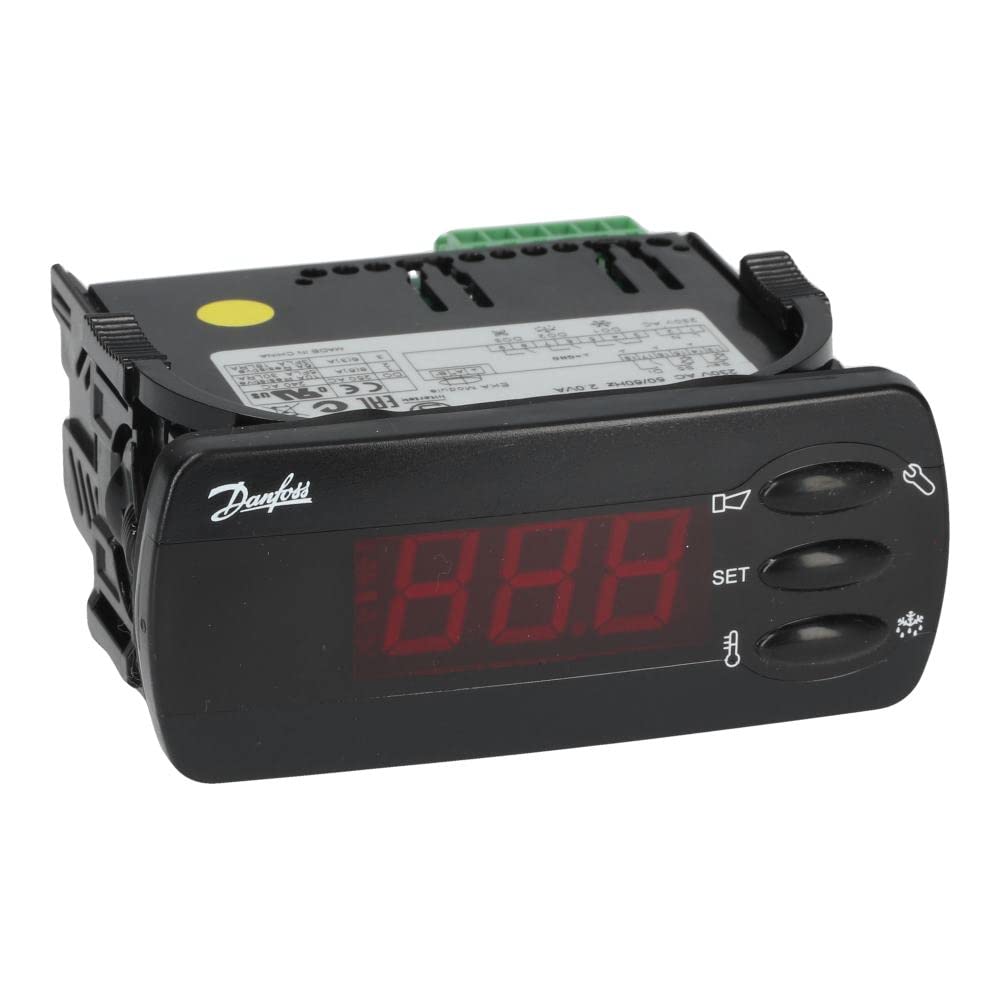
This image shows the Danfoss EKC202B refrigeration control unit. The front panel features a display, while the rear side is equipped with multiple green terminal blocks for electrical connections. The unit is housed in a black casing.
Komponen Utama:
- Panel Tampilan: Shows current temperature, status, and menu options.
- Tombol Kontrol: For navigation and parameter adjustment.
- Blok Terminal: For power supply, sensor inputs, and output connections (e.g., compressor, fan, defrost heater).
4. Pengaturan dan Instalasi
4.1 Pemasangan
The EKC202B is designed for freestanding installation, typically panel-mounted. Ensure adequate space for ventilation and access to wiring terminals. Secure the unit firmly using appropriate mounting hardware.
4.2 Sambungan Listrik
PERINGATAN: Pastikan aliran listrik terputus sebelum melakukan pemasangan kabel.
- Connect the main power supply (230V AC, 50/60Hz) to the designated power terminals. Refer to the wiring diagram on the unit's label or in the full technical documentation for precise terminal assignments.
- Connect temperature sensors to the appropriate input terminals. Ensure sensors are correctly placed within the refrigeration system for accurate readings.
- Connect control outputs (e.g., compressor, fan, defrost heater) to their respective terminals. Verify that the load ratings of connected devices do not exceed the unit's output specifications.
- Pastikan semua sambungan aman dan terisolasi dengan benar.
4.3 Penyalaan Awal
After all connections are verified, restore power to the unit. The display should illuminate, indicating the unit is operational. The unit will typically show the current measured temperature.
5. Petunjuk Pengoperasian
5.1 Mengatur Suhu
The EKC202B features adjustable temperature control. Typically, a dedicated button (often labeled 'Set' or similar) allows access to the setpoint adjustment. Use the up/down arrow buttons to change the desired temperature, then confirm the setting.
5.2 Navigasi Menu
The unit's menu system allows access to various parameters such as defrost cycles, alarm settings, and sensor calibration. Consult the detailed technical manual for specific menu structures and parameter definitions. Use the navigation buttons to scroll through options and adjust values.
5.3 Pencairan Otomatis
The EKC202B is equipped with an automatic defrost system. Defrost cycles are typically initiated based on time intervals or evaporator temperature. Parameters for defrost duration and frequency can usually be adjusted within the unit's menu.
6. Pemeliharaan
6.1 Pembersihan
Keep the exterior of the control unit clean. Use a soft, damp cloth for cleaning. Do not use abrasive cleaners, solvents, or excessive moisture, as these can damage the unit.
6.2 Inspeksi
Periodically inspect all electrical connections for tightness and signs of corrosion or damage. Ensure that ventilation openings are clear of obstructions. Any signs of damage or malfunction should be addressed by qualified service personnel.
The Danfoss EKC202B contains no user-serviceable parts internally. Do not attempt to open the unit casing.
7. Penyelesaian masalah
Before contacting technical support, perform the following basic checks:
- Tidak Ada Tampilan/Tidak Ada Daya: Check the main power supply and all power connections. Verify that the circuit breaker or fuse is not tripped.
- Pembacaan Suhu yang Salah: Ensure temperature sensors are correctly connected and positioned. Check for sensor damage.
- Unit Not Controlling: Verify that the setpoint temperature is correctly configured. Check wiring to the compressor or other controlled devices.
- Kode Kesalahan: If an error code appears on the display, refer to the full technical manual for a list of codes and their corresponding troubleshooting steps.
If the issue persists after performing these checks, contact a qualified service technician or Danfoss technical support.
8. Spesifikasi
| Merek | Danfoss |
| Nomor Model | Nomor telepon 084B8522 |
| Nama Produk | EKC202B Refrigeration Control Unit |
| Catu Daya | 230V AC, 50 / 60Hz |
| Sistem Pencairan | Otomatis |
| Kontrol Suhu yang Dapat Disesuaikan | Ya |
| Jenis Instalasi | Freestanding |
| Warna | Gray (Unit casing is black) |
9. Garansi dan Dukungan
The Danfoss EKC202B Refrigeration Control Unit is covered by a manufacturer's warranty. For specific warranty terms and conditions, please refer to the documentation provided with your purchase or visit the official Danfoss weblokasi.
For technical assistance, spare parts, or service inquiries, please contact your authorized Danfoss distributor or Danfoss customer support. When contacting support, please have your model number (084B8522) and serial number readily available.