1. Pendahuluan
Thank you for choosing the Melitta MKM-531-W Pure White Aroma Thermo Stainless Coffee Maker. This manual provides essential information for the safe and efficient operation, maintenance, and care of your new coffee maker. Please read these instructions thoroughly before first use and keep them for future reference.

Gambar 1: Melitta MKM-531-W Coffee Maker. This image shows the complete coffee maker unit with its thermal carafe and filter cone.
2. Petunjuk Keselamatan Penting
- Baca semua petunjuk sebelum menggunakan alat ini.
- Jangan sentuh permukaan yang panas. Gunakan gagang atau kenop.
- Untuk melindungi orang dari kebakaran, sengatan listrik, dan cedera, jangan merendam kabel, steker, atau peralatan di dalam air atau cairan lainnya.
- Pengawasan ketat diperlukan saat peralatan apa pun digunakan oleh atau di dekat anak-anak.
- Cabut steker dari stopkontak saat tidak digunakan dan sebelum membersihkan. Biarkan dingin sebelum memasang atau melepas komponen, dan sebelum membersihkan alat.
- Jangan mengoperasikan peralatan apa pun dengan kabel atau steker yang rusak atau setelah peralatan tersebut tidak berfungsi dengan baik, atau telah rusak dengan cara apa pun. Kembalikan peralatan ke pusat layanan resmi terdekat untuk diperiksa, diperbaiki, atau disesuaikan.
- Penggunaan aksesori tambahan yang tidak direkomendasikan oleh produsen alat dapat mengakibatkan kebakaran, sengatan listrik, atau cedera pada orang.
- Jangan gunakan di luar ruangan.
- Jangan biarkan kabel menggantung di tepi meja atau meja dapur, atau menyentuh permukaan panas.
- Jangan menaruhnya di atas atau di dekat kompor gas atau listrik yang panas, atau di dalam oven yang sedang dipanaskan.
- Selalu pasang steker ke alat terlebih dahulu, lalu colokkan kabel ke stopkontak. Untuk melepas, putar kontrol ke posisi "off", lalu cabut steker dari stopkontak.
- Jangan menggunakan alat ini untuk tujuan lain selain yang dimaksudkan.
- Panas dapat terjadi jika tutup dibuka selama siklus penyeduhan.
3. Identifikasi Bagian
Familiarize yourself with the components of your Melitta coffee maker:
- Tandon air
- Indikator Level Air
- Dudukan Filter (dapat dilepas)
- Drip Stop Mechanism
- Thermal Carafe with Lid
- Heating Plate (for filter holder, not for carafe warming)
- Saklar Daya dengan Lampu Indikator
- Kabel Listrik

Gambar 2: View of the filter basket area. This image highlights the internal structure of the filter holder where the coffee grounds are placed.

Gambar 3: Diagram of the filter's drip stop mechanism. This illustration shows how the stopper at the bottom of the filter interacts with the carafe to prevent dripping when the carafe is removed.
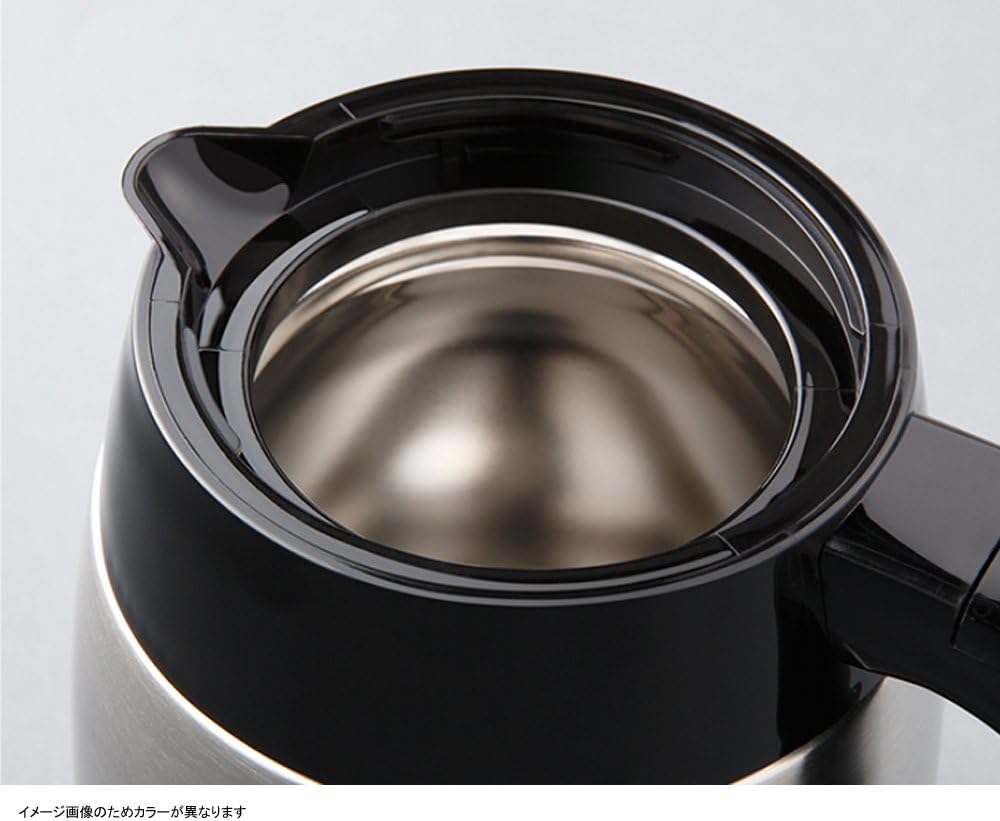
Gambar 4: Atas view of the thermal carafe. This image displays the opening of the stainless steel thermal carafe, designed to keep coffee warm.
4. Pengaturan dan Penggunaan Pertama
- Membongkar: Lepaskan semua bahan kemasan dengan hati-hati dan pastikan semua bagian lengkap.
- Membersihkan: Wash the thermal carafe, its lid, and the removable filter holder in warm, soapy water. Rinse thoroughly and dry. Wipe the exterior of the coffee maker with a damp kain.
- Siklus Pembuatan Bir Pertama (Pembersihan):
- Fill the water reservoir with cold water up to the maximum fill line.
- Place the empty thermal carafe with its lid on the heating plate.
- Jangan tambahkan ampas kopi untuk siklus ini.
- Plug the coffee maker into a grounded electrical outlet.
- Press the power switch to start the brewing cycle.
- Allow the full cycle to complete. Discard the hot water.
- Repeat this cleaning cycle once more with fresh water.
- Pembuat kopi Anda sekarang siap digunakan.
5. Petunjuk Pengoperasian
Ikuti langkah-langkah berikut untuk menyeduh kopi:
- Isi Reservoir Air: Open the lid of the water reservoir and fill it with fresh, cold water to your desired level, indicated by the water level markings. Do not exceed the maximum fill line.
- Sisipkan Filter: Place a Melitta #1x2 or #1x4 cone-shaped paper filter (depending on model variant, check your filter holder size) into the removable filter holder.
- Tambahkan Bubuk Kopi: Add your desired amount of ground coffee into the paper filter. A general guideline is one tablespoon of coffee per cup (5 oz). Adjust to taste.
- Posisi Teko: Ensure the thermal carafe, with its lid securely attached, is placed correctly on the heating plate beneath the filter holder. The lid must be properly aligned to activate the drip stop mechanism.
- Mulai Menyeduh: Plug the coffee maker into a grounded electrical outlet. Press the power switch. The indicator light will illuminate, and brewing will begin.
- Pematian Otomatis: The coffee maker will automatically shut off approximately 10 minutes after the brewing cycle is complete. The indicator light will turn off.
- Melayani: Once brewing is complete, carefully remove the thermal carafe to serve. The thermal carafe is designed to keep coffee warm for an extended period without a heating plate.

Gambar 5: Power indicator light showing auto-off. This image illustrates the power indicator light, showing it illuminated during operation and off approximately 10 minutes after brewing, indicating the automatic shut-off feature.
6. Pembersihan dan Pemeliharaan
Pembersihan rutin memastikan kinerja optimal dan memperpanjang umur pembuat kopi Anda.
Pembersihan Harian:
- Selalu cabut steker pembuat kopi sebelum membersihkan.
- Buang ampas kopi bekas dan kertas filter.
- Wash the thermal carafe, its lid, and the removable filter holder in warm, soapy water. Rinse thoroughly and dry. These parts are generally not dishwasher safe; refer to specific markings if present.
- Lap bagian luar pembuat kopi dengan lembut, damp kain. Jangan gunakan pembersih abrasif atau sabut gosok.
- Jangan pernah merendam unit utama mesin pembuat kopi ke dalam air atau cairan lainnya.
Pembersihan kerak (Bulanan atau sesuai kebutuhan):
Mineral deposits from water can build up and affect performance. Descale your coffee maker regularly.
- Prepare a descaling solution according to the descaler manufacturer's instructions, or use a solution of white vinegar and water (e.g., 1 part vinegar to 2 parts water).
- Tuangkan larutan pembersih kerak ke dalam wadah air.
- Place the empty thermal carafe with its lid on the heating plate.
- Mulailah siklus penyeduhan. Biarkan setengah dari larutan terseduh, lalu matikan mesin kopi dan biarkan selama 15-20 menit agar larutan tersebut bekerja.
- Nyalakan kembali mesin pembuat kopi dan biarkan sisa larutan meresap hingga selesai.
- Discard the solution and rinse the carafe.
- Run two full cycles with fresh, cold water to rinse out any remaining descaling solution.
7. Penyelesaian masalah
| Masalah | Kemungkinan Penyebab | Larutan |
|---|---|---|
| Kopi tidak diseduh. | Coffee maker not plugged in; power switch not on; no water in reservoir. | Ensure plug is securely in outlet; press power switch; fill water reservoir. |
| Kopi rasanya lemah. | Not enough coffee grounds; coffee too coarsely ground; water reservoir overfilled. | Add more coffee grounds; use finer ground coffee; ensure water level matches desired cups. |
| Kopi meluap dari saringan. | Too much coffee grounds; filter not seated correctly; clogged drip stop; carafe not positioned correctly. | Reduce coffee grounds; ensure filter is properly seated; clean drip stop; ensure carafe is fully pushed in. |
| Kopinya tidak cukup panas. | Thermal carafe not pre-warmed; carafe lid not sealed properly. | Rinse carafe with hot water before brewing; ensure carafe lid is tightly closed. |
| Proses pembuatan bir itu lambat. | Mineral deposits (scale) in the coffee maker. | Perform a descaling cycle as described in the maintenance section. |
8. Spesifikasi Produk
| Fitur | Detil |
|---|---|
| Nomor Model | MKM-531 |
| Merek | Melitta |
| Kapasitas | 0.7 Liter (sekitar 5 cangkir) |
| Warna | White (with stainless steel accents) |
| Mode Operasi | Sepenuhnya Otomatis |
| Berat Barang | 1.7 Kilogram (3.74 pon) |
| Dimensi Paket | 12.68x11.02x6.54 inci |
| Tanggal Pertama Tersedia | 21 April 2013 |
9. Garansi dan Dukungan
Melitta products are manufactured to high-quality standards. For specific warranty information, please refer to the warranty card included with your purchase or visit the official Melitta website. If you encounter any issues not covered in the troubleshooting section, or require further assistance, please contact Melitta customer support.
Melitta Customer Support: Silahkan kunjungi www.melitta.com untuk detail kontak dan informasi produk lebih lanjut.