
1. Pendahuluan
This manual provides instructions for the installation, configuration, and operation of the D-Link DGS-1210-28P Web Smart 24-Port Gigabit PoE Switch. This device is designed to provide a high-performance, cost-effective solution for small to medium-sized businesses, offering advanced management features and Power over Ethernet (PoE) capabilities.
2. Informasi Keselamatan
- Pastikan ventilasi yang tepat di sekitar sakelar untuk mencegah panas berlebih.
- Do not place the switch in areas with high humidity or extreme temperatures.
- Gunakan hanya adaptor daya yang disertakan dengan perangkat.
- Putuskan sambungan daya sebelum membersihkan atau melakukan pemeliharaan.
- This device should be installed by qualified personnel in accordance with all local and national electrical codes.
3. Isi Paket
Verifikasi bahwa paket Anda berisi item berikut:
- DGS-1210-28P Web Smart 24-Port Gigabit PoE Switch
- Kabel Listrik
- Kit Pemasangan Rak (braket dan sekrup)
- Kaki Karet (untuk pemasangan di desktop)
- Kabel Konsol (RJ-45 hingga DB-9)
- Panduan Instalasi Cepat
- CD-ROM (containing product documentation)
Jika ada barang yang hilang atau rusak, silakan hubungi reseller D-Link setempat untuk mendapatkan bantuan.
4. Physical Description and Hardware Overview
The DGS-1210-28P switch features 24 Gigabit Ethernet ports with PoE support and 4 SFP slots for fiber optic connections. Below are diagrams illustrating the front and rear panels of the device.
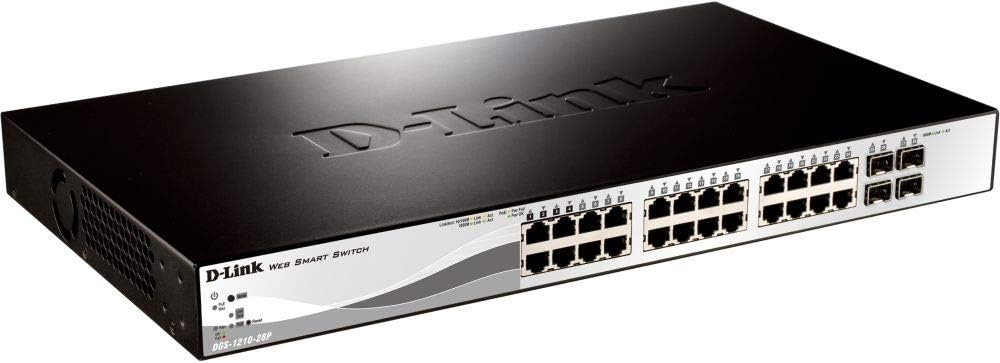
Gambar 4.1: Panel Depan View
This image displays the front panel of the DGS-1210-28P switch, showing 24 RJ-45 Gigabit Ethernet ports, each with LED indicators for link/activity and PoE status. To the right, there are 4 SFP (Small Form-Factor Pluggable) slots for fiber optic transceivers. The D-Link logo and model number are visible on the left side of the panel.

Gambar 4.2: Panel Belakang View
This image shows the rear panel of the DGS-1210-28P switch. The primary feature visible is the AC power input connector on the right side, labeled "AC LINE" with voltage and current specifications (100-240VAC, 50/60Hz, 0.5 A MAX). The D-Link brand name is embossed on the top surface of the switch casing.
4.1 Indikator Panel Depan
- Daya LED: Menunjukkan status daya sakelar.
- Sistem LED: Menunjukkan status sistem.
- LED Tautan/Tindakan (per port): Green for Gigabit link/activity, Amber for 10/100 Mbps link/activity.
- LED Status PoE (per port PoE): Menunjukkan status pengiriman daya PoE.
4.2 Konektor Panel Belakang
- Input Daya AC: Terhubung ke kabel daya yang disediakan.
5. Pengaturan
5.1 Instalasi Desktop
- Pasang kaki karet yang disertakan ke bagian bawah sakelar.
- Letakkan sakelar di permukaan yang datar, stabil, dan memiliki ventilasi yang memadai.
5.2 Pemasangan Rak
- Attach the two rack-mounting brackets to the side grooves of the switch using the provided screws.
- Amankan sakelar ke rak peralatan standar 19 inci menggunakan sekrup rak yang sesuai (tidak disertakan).
5.3 Menghubungkan Sakelar
- Connect your network devices (computers, servers, access points, IP cameras) to the RJ-45 ports on the front panel using standard Ethernet cables.
- For fiber optic connections, insert compatible SFP transceivers into the SFP slots and connect fiber optic cables.
- Connect the power cord to the AC power input on the rear panel of the switch and then to a suitable power outlet.
- Pastikan LED Daya pada panel depan menyala.
6. Mengoperasikan Sakelar
6.1 Initial Access to Web-Manajemen berbasis
The DGS-1210-28P is a Web Smart switch, meaning it can be configured and managed via a web peramban.
- Ensure your computer is connected to one of the switch's Ethernet ports.
- By default, the switch has a pre-configured IP address (e.g., 192.168.0.1). Refer to the Quick Installation Guide or product documentation for the exact default IP address.
- Configure your computer's IP address to be in the same subnet as the switch (e.g., if the switch is 192.168.0.1, set your computer to 192.168.0.10 with subnet mask 255.255.255.0).
- Buka sebuah web browser (e.g., Chrome, Firefox, Edge) and enter the switch's default IP address in the address bar.
- You will be prompted for a username and password. The default credentials are typically "admin" for both username and password. Refer to the documentation for specific defaults.
- Upon successful login, you will access the switch's web management interface, where you can configure various network settings, VLANs, QoS, PoE settings, and more.
Penting: For security reasons, it is highly recommended to change the default password immediately after initial login.
6.2 Fungsionalitas Power over Ethernet (PoE)
The DGS-1210-28P supports PoE, allowing it to deliver power to compatible devices (e.g., IP phones, wireless access points, IP cameras) over the Ethernet cable. This eliminates the need for separate power outlets for these devices.
- Connect PoE-compatible devices to any of the 24 Gigabit Ethernet ports.
- The switch will automatically detect and provide power to compliant devices.
- Monitor PoE status via the port LEDs or the web antarmuka manajemen.
- The total power budget for the switch is 193 Watts. Ensure the total power consumption of connected PoE devices does not exceed this limit.
7. Pemeliharaan
- Pembersihan: Gunakan kain lembut dan kering untuk membersihkan bagian luar sakelar. Jangan gunakan pembersih cair atau aerosol.
- Pembaruan Firmware: Periksa dukungan D-Link secara berkala. website for firmware updates to ensure optimal performance and security. Follow the instructions provided with the firmware update package.
- Ventilasi: Ensure that the ventilation openings on the switch are not blocked to prevent overheating.
- Konfigurasi Cadangan: Regularly back up your switch configuration settings through the web management interface to facilitate quick recovery in case of a reset or failure.
8. Penyelesaian masalah
| Masalah | Kemungkinan Penyebab | Larutan |
|---|---|---|
| Tidak ada indikasi LED Daya | Kabel daya tidak tersambung atau masalah stopkontak. | Verify power cord connection to the switch and power outlet. Test the outlet with another device. |
| No Link/Act LED on a connected port | Faulty cable, incorrect cable type, or device not powered on. | Check the Ethernet cable for damage. Ensure the connected device is powered on and functioning correctly. Try a different port or cable. |
| Tidak dapat mengakses web antarmuka manajemen | Incorrect IP address, subnet mismatch, or browser issue. | Verify the switch's IP address and your computer's IP settings. Ensure they are in the same subnet. Clear browser cache or try a different browser. Reset the switch to factory defaults if necessary (refer to documentation for procedure). |
| Perangkat PoE tidak menerima daya | Perangkat tidak kompatibel dengan PoE, masalah kabel, atau batas daya terlampaui. | Ensure the device is PoE compliant. Check the Ethernet cable. Verify the total PoE power consumption in the web interface and ensure it does not exceed 193 Watts. |
9. Spesifikasi
| Model | DGS-1210-28P |
| Pelabuhan | 24 x 10/100/1000BASE-T PoE Ports, 4 x Gigabit SFP Ports |
| Standar PoE | IEEE 802.3af / at |
| Total Anggaran Daya PoE | 193 Watt |
| Kapasitas Pengalihan | Kecepatan 56 Gbps |
| Tingkat Penerusan | 41.67Mbp |
| Ukuran Tabel Alamat MAC | 16K entri |
| Bingkai Jumbo | 10,000 Byte |
| Dimensi (L x D x T) | 440 x 210 x 44 mm (17.32 x 8.27 x 1.73 inci) |
| Berat | 3.63 kg (8 pon) |
| Masukan Daya | 100-240 VAC, 50/60 Hz Internal Universal Power Supply |
| Suhu Operasional | 0°C hingga 50°C (32°F hingga 122°F) |
| Suhu Penyimpanan | -20°C hingga 70°C (-4°F hingga 158°F) |
| Kelembaban Operasional | 0% hingga 95% non-kondensasi |
10. Garansi dan Dukungan
D-Link provides a limited warranty for this product. For detailed warranty information, please refer to the warranty card included with your product or visit the official D-Link weblokasi.
For technical support, product documentation, and firmware updates, please visit the D-Link support portal:
You can also find additional resources and community forums on the D-Link weblokasi.