
1. Pendahuluan
This manual provides essential information for the safe and efficient operation, installation, and maintenance of your Carrier Durakool Plus 42KGL-024D+51MSG-024RD Split Air Conditioner. Please read this manual thoroughly before using your AC unit and retain it for future reference. Proper use and maintenance will ensure optimal performance and longevity of your appliance.
2. Informasi Keselamatan
Petunjuk Keselamatan Penting: Selalu ikuti tindakan pencegahan keselamatan dasar untuk mengurangi risiko kebakaran, sengatan listrik, atau cedera.
- Installation must be performed by qualified personnel in accordance with all applicable national wiring standards.
- Pastikan catu daya sesuai dengan voltagseperti yang tertera pada pelat nama unit.
- Do not operate the AC unit with wet hands or when standing on a wet surface.
- Jauhkan anak-anak dari unit dan kendali jarak jauh.
- Jangan memasukkan benda apa pun ke dalam lubang keluar atau masuk udara.
- Matikan catu daya sebelum membersihkan atau melakukan pemeliharaan apa pun.
- In case of abnormal operation (e.g., burning smell), immediately turn off the unit and disconnect the power supply. Contact a qualified service technician.
3. Produk Lebihview
The Carrier Durakool Plus 42KGL-024D+51MSG-024RD is a 2 Ton, 2 Star rated split air conditioner designed for residential use. It features a robust rotary compressor and an anti-bacterial filter for improved air quality.
Fitur Utama:
- 2 Ton Capacity, 2 Star Energy Rating
- Rotary Compressor for efficient cooling
- Anti Bacterial Filter and Electrostatic Dust Filter for cleaner air
- Sleep Mode and Auto Restart functions
- LCD Remote Control and LED Panel Display
- Auto Fan Speed, Auto Swing, Real Time Clock, Auto Mode, Turbo Mode
Komponen yang Termasuk:
- 1 x Main Unit (Indoor Unit)
- 1 x Outdoor Unit (Required, not explicitly listed in "whats_in_the_box" but implied by "Split AC" and "Is Outdoor Unit Required: Yes")
- 1x Kontrol Jarak Jauh
- 1 x Kartu Garansi
- User Manual (dokumen ini)
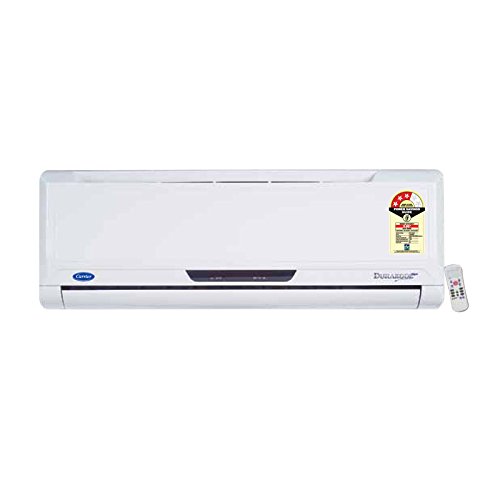
Figure 3.1: Carrier Durakool Plus Split AC Indoor Unit. This image shows the white indoor unit of the air conditioner, typically mounted on a wall.
4. Pengaturan
The Carrier Durakool Plus is a split system air conditioner, requiring both an indoor and an outdoor unit. Professional installation is mandatory to ensure proper functioning, safety, and warranty validity.
4.1 Instalasi Profesional
Due to the complexity of refrigerant handling, electrical connections, and structural mounting, installation must be carried out by a certified HVAC technician. Attempting self-installation may void your warranty and pose significant safety risks.
4.2 Pemilihan Lokasi
- Unit dalam ruangan: Pilih lokasi yang memungkinkan distribusi udara merata di seluruh ruangan, jauh dari sinar matahari langsung atau sumber panas. Pastikan ada ruang yang cukup di sekitar unit untuk perawatan.
- Unit Luar Ruangan: Choose a well-ventilated area, free from obstructions, and away from direct sunlight or excessive dust. Ensure the unit is placed on a stable, level surface. The outdoor unit should be easily accessible for maintenance.
4.3 Koneksi Listrik
The unit requires a dedicated power circuit. The electrical wiring must comply with local and national electrical codes. Ensure the power source is properly grounded. Refer to the wiring diagram provided with the outdoor unit for specific connection details.
5. Petunjuk Pengoperasian
Your Carrier Durakool Plus AC unit is controlled via an LCD remote control. Familiarize yourself with the remote's functions for optimal use.
5.1 Fungsi Kontrol Jarak Jauh
The remote control allows you to adjust temperature, fan speed, operating mode, and set timers. An LED display on the indoor unit will show current settings. Refer to the remote control's specific user guide for detailed button functions and display indicators.
- Tombol Daya: Menyalakan atau mematikan unit.
- Tombol Mode: Berganti-ganti mode pengoperasian: Otomatis, Dingin, Kering, Kipas, Panas (jika berlaku).
- Tombol Suhu (▲/▼): Menyesuaikan suhu ruangan yang diinginkan.
- Tombol Kecepatan Kipas: Memilih kecepatan kipas (Otomatis, Rendah, Sedang, Tinggi).
- Tombol Ayun: Activates or deactivates the automatic vertical air swing.
- Mode tidur: Mengoptimalkan suhu dan kecepatan kipas untuk tidur yang nyaman dan penghematan energi.
- Pengatur waktu HIDUP/MATI: Sets a specific time for the unit to turn ON or OFF.
- Mode Turbo: Provides rapid cooling by operating at maximum fan speed and cooling capacity.
- Mulai Ulang Otomatis: If power is interrupted, the unit will automatically restart with previous settings once power is restored.
6. Pemeliharaan
Perawatan rutin memastikan pengoperasian yang efisien dan memperpanjang umur pakai AC Anda. Selalu putuskan aliran listrik sebelum melakukan perawatan apa pun.
6.1 Pembersihan Filter Udara
The unit is equipped with an electrostatic dust filter and an active carbon filter. Clean these filters regularly (every 2-4 weeks, depending on usage and air quality) to maintain cooling efficiency and air quality.
- Turn off the AC unit and disconnect the power supply.
- Buka panel depan unit dalam-ruang.
- Lepaskan filter udara dengan hati-hati.
- Clean the filters using a vacuum cleaner or wash them with lukewarm water and a mild detergent. Rinse thoroughly.
- Biarkan filter mengering sepenuhnya di tempat teduh sebelum dipasang kembali.
- Tutup panel depan dan hidupkan kembali daya.
6.2 Pembersihan Umum
- Bersihkan bagian luar unit dalam dengan kain lembut dan kering.amp kain. Jangan gunakan bahan kimia keras atau pembersih abrasif.
- Ensure the outdoor unit's coils are free from debris, leaves, and dirt. Use a soft brush or vacuum to clean the fins.
6.3 Pemeliharaan Musiman
It is recommended to have your AC unit professionally serviced annually, especially before the cooling season, to check refrigerant levels, electrical connections, and overall system performance.
7. Penyelesaian masalah
Sebelum menghubungi layanan, harap periksa masalah umum berikut:
| Masalah | Kemungkinan Penyebab | Larutan |
|---|---|---|
| Unit tidak memulai | Tidak ada aliran listrik; Baterai remote control habis; Pemutus sirkuit terputus. | Periksa sambungan daya; Ganti baterai jarak jauh; Setel ulang pemutus arus. |
| Pendinginan tidak memadai | Filter udara kotor; Pintu/jendela terbuka; Pengaturan suhu terlalu tinggi; Unit luar ruangan terhalang. | Bersihkan filter udara; Tutup pintu/jendela; Turunkan pengaturan suhu; Bersihkan penghalang dari unit luar ruangan. |
| Kebisingan yang tidak biasa | Bagian-bagian yang longgar; Unit tidak rata; Kotoran di kipas. | Ensure unit is securely mounted; Check for and remove debris. If noise persists, contact service. |
| Kebocoran air dari unit dalam ruangan | Pipa pembuangan tersumbat; Pemasangan tidak tepat. | Clear drain pipe obstruction; Contact professional for inspection. |
If the problem persists after attempting these solutions, please contact Carrier customer support or a qualified service technician.
8. Spesifikasi
| Fitur | Detil |
|---|---|
| Merek | Pembawa |
| Nama Model | Durakool Plus 42KGL-024D+51MSG-024RD |
| Kapasitas | 2 Ton |
| Daya Pendinginan | 6741 Watt |
| Efisiensi Energi | Peringkat BEE Bintang 2 |
| Fitur Khusus | Anti Bacterial Filter, Electrostatic Dust Filter, Sleep Mode, Auto Restart, Auto Swing, Turbo Mode |
| Warna | Putih |
| Tingkat Kebisingan (Dalam Ruangan) | 47 Desibel |
| Tipe Inverter | Tanpa Inverter |
| Jenis Instalasi | Sistem Split |
| Jenis Kompresor | Gulir Putar |
| Bahan Inti | Tembaga |
| Sumber Daya | Listrik Kabel |
| Luas Lantai yang Direkomendasikan | 180 Kaki Persegi |
| Metode Kontrol | Kontrol Jarak Jauh |
9. Garansi dan Dukungan
9.1 Informasi Garansi
Your Carrier Durakool Plus AC unit comes with a limited warranty:
- Garansi 1 tahun pada produk.
- Garansi 5 tahun pada kompresor.
Please retain your purchase receipt and warranty card for any warranty claims. The warranty terms and conditions are detailed on the warranty card included with your product.
9.2 Dukungan Pelanggan
For technical assistance, service requests, or further inquiries, please contact Carrier customer support. Refer to your warranty card or the official Carrier webKunjungi situs ini untuk informasi kontak terbaru.
You can also visit the official Carrier store for more information: Carrier Store on Amazon.in