
Perkenalan
Thank you for choosing the Wave Monarka 500 External Aquarium Filter. This filter is designed to provide efficient mechanical, chemical, and biological filtration for your aquarium, ensuring a healthy and clear aquatic environment. Its quiet operation and easy maintenance make it an ideal choice for aquarists. Please read this manual thoroughly before installation and operation to ensure proper use and longevity of your filter.
Petunjuk Keselamatan
- Always disconnect power to the filter and any other aquarium equipment before performing maintenance or handling the filter.
- Ensure your hands are dry before plugging in or unplugging the filter.
- Jangan operasikan filter jika kabel daya atau steker rusak.
- This filter is designed for indoor use with aquariums only. Do not use it for any other purpose.
- Jauhkan filter dari jangkauan anak-anak dan hewan peliharaan.
- Ensure the filter is securely placed and stable to prevent accidental spills or damage.
Isi Paket
Verifikasi bahwa semua komponen ada dan tidak rusak sebelum melanjutkan instalasi.
- Wave Monarka 500 Filter Unit
- Inlet and Outlet Tubes
- Suction Cups and Clips
- Filter Media Baskets (pre-installed with mechanical, chemical, and biological media)
- Instruksi Manual (dokumen ini)
Pengaturan
Follow these steps to properly install your Wave Monarka 500 filter.
- Buka kemasan Filter: Keluarkan semua komponen dari kemasan dengan hati-hati. Periksa apakah ada kerusakan.
- Siapkan Media Filter: The filter comes with pre-installed media baskets. Ensure they are correctly seated within the filter unit. Rinse any new filter media (if replacing) under tap water to remove dust.
- Attach Inlet and Outlet Tubes: Connect the inlet tube (water intake) and outlet tube (water return) to the designated ports on the filter unit. Ensure a secure fit to prevent leaks.
- Posisikan Filter: The Monarka 500 is a hang-on filter. Hang the filter unit securely on the rim of your aquarium. Ensure the water level in the aquarium is above the minimum operating level indicated on the filter.
- Install Suction Cups/Clips: Use the provided suction cups or clips to secure the inlet and outlet tubes inside the aquarium, ensuring they are positioned correctly for optimal water circulation. The inlet should be near the bottom, and the outlet near the surface.
- Siapkan Filter: Before plugging in, fill the filter unit with aquarium water. This helps to remove air and ensures the pump starts correctly.
- Hubungkan Daya: Once the filter is filled with water and all connections are secure, plug the power cord into a grounded electrical outlet. The pump should start, and water should begin flowing through the filter.
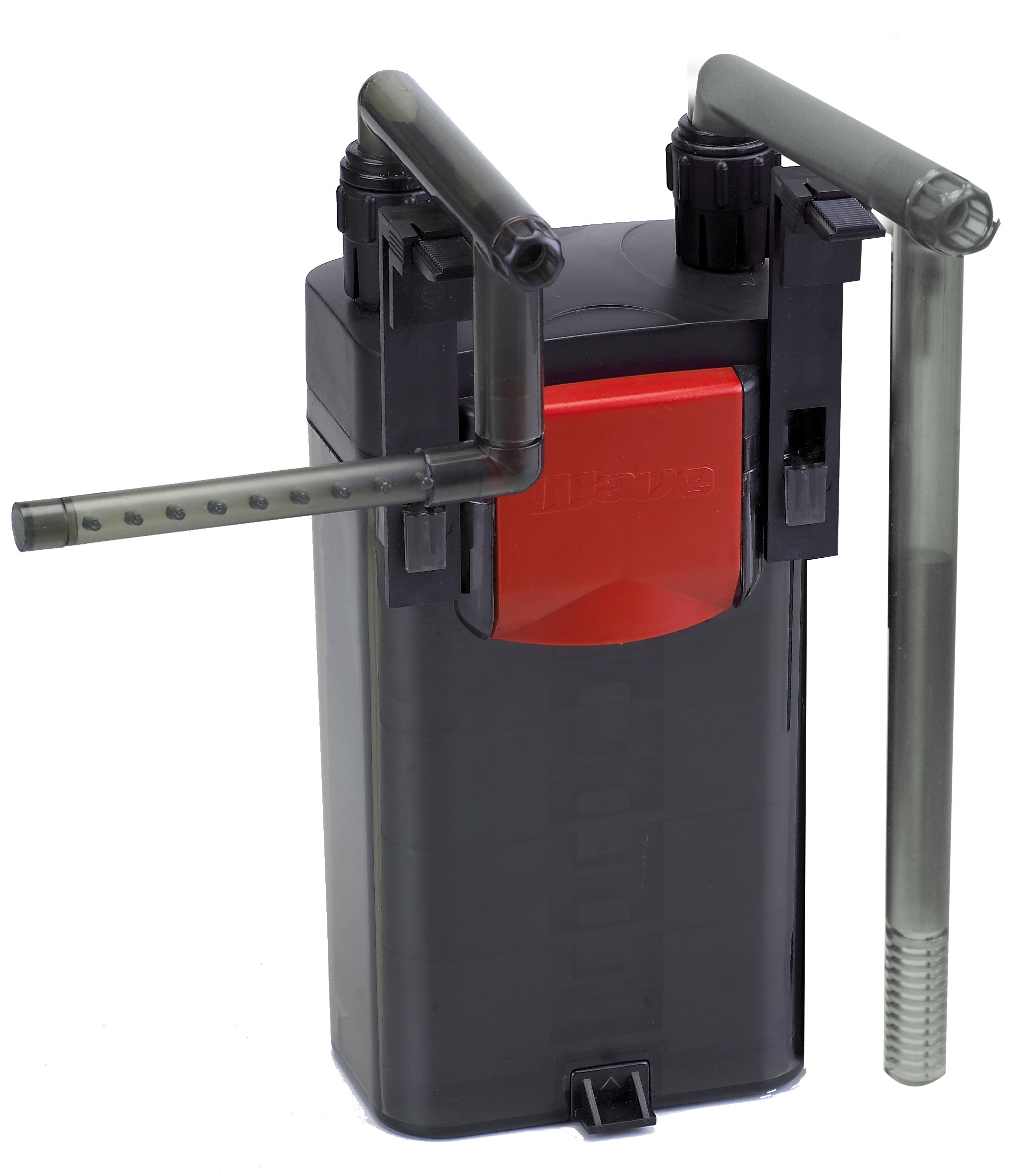
Image: The Wave Monarka 500 External Aquarium Filter shown installed on the side of an aquarium. The filter unit hangs on the rim, with inlet and outlet tubes extending into the water.
Petunjuk Pengoperasian
The Wave Monarka 500 filter is designed for continuous operation. Once properly set up and primed, it will continuously circulate and filter your aquarium water.
- Operasi Berkelanjutan: For optimal water quality, the filter should run 24 hours a day, 7 days a week.
- Penyesuaian Arus: If your model includes a flow adjustment feature, you can regulate the water flow rate to suit your aquarium's needs. Refer to the specific control knob or lever on your unit.
- Pemantauan: Regularly observe the water flow from the outlet to ensure the filter is operating effectively. A reduced flow rate may indicate a need for maintenance.
Pemeliharaan
Regular maintenance is crucial for the efficient operation and longevity of your filter. Perform maintenance at least once a month, or more frequently if water flow decreases significantly.
- Putuskan Daya: Always unplug the filter from the electrical outlet before beginning any maintenance.
- Remove Filter Unit: Carefully lift the filter unit from the aquarium rim.
- Membongkar: Open the filter unit and remove the filter media baskets.
- Clean Mechanical Media: Rinse mechanical filter media (e.g., sponges, filter floss) in old aquarium water (from a water change) to preserve beneficial bacteria. Replace if heavily clogged or deteriorated.
- Replace Chemical Media: Chemical filter media (e.g., activated carbon) should be replaced every 2-4 weeks as per manufacturer recommendations, as its effectiveness diminishes over time.
- Clean Biological Media: Biological media (e.g., ceramic rings, bio-balls) should only be gently rinsed in old aquarium water if heavily fouled, to avoid destroying beneficial bacteria.
- Bersihkan Impeller: Remove the impeller cover and clean the impeller and its housing. Hair or debris can accumulate here and reduce performance.
- Pasang kembali dan mulai ulang: Reassemble the filter, ensuring all media baskets are correctly seated and the lid is securely closed. Reinstall the filter on the aquarium, prime it with water, and plug it back in.
Penyelesaian Masalah
| Masalah | Kemungkinan Penyebab | Larutan |
|---|---|---|
| Filter not starting or no water flow |
|
|
| Aliran air berkurang |
|
|
| Kebisingan yang berlebihan |
|
|
| Air bocor |
|
|
Spesifikasi
| Fitur | Detil |
|---|---|
| Model | Monarka 500 (A6076490) |
| Jenis Filter | External Hang-on Filter |
| Laju Aliran | 500 L/h (Liters per hour) |
| Filtrasi Stages | Mechanical, Chemical, Biological |
| Konsumsi Daya | (Air spesifik)tage not provided in source data) |
| Ukuran | (Specific dimensions not provided in source data) |
| Pabrikan | MELAMBAI |
Garansi dan Dukungan
Wave products are manufactured to high-quality standards. For warranty information, technical support, or to purchase replacement parts, please contact your local Wave dealer or visit the official Wave websitus. Simpan struk pembelian Anda sebagai bukti pembelian untuk klaim garansi.
Catatan: Ketentuan garansi spesifik dapat bervariasi berdasarkan wilayah.
