
1. Produk Lebihview
The Oster Digital French Door Oven is a versatile 8-in-1 countertop appliance designed to simplify your cooking experience. Its elegant stainless steel finish and unique French door mechanism, which allows both doors to open with a single pull, make it a convenient addition to any kitchen. Equipped with digital controls, this oven offers precise temperature and time settings for various cooking functions.
This extra-large convection oven is capable of accommodating two 16-inch pizzas, making it ideal for family meals or entertaining. It utilizes Turbo Convection baking technology to cook food faster and brown more evenly, while consuming up to 50% less energy compared to traditional ovens. The integrated 90-minute timer ensures your food cooks for the desired duration, with an automatic shut-off feature for safety and convenience.
Fitur Utama:
- Single Door Pull: Opens both French doors with one hand for ease of use.
- Kontrol Digital: Provides precise cooking time and temperature settings.
- Turbo Convection Baking Technology: Cooks faster and browns more evenly.
- Dual Racks: Offers maximum cooking flexibility with two included racks.
- Extra-Large Interior: Accommodates up to two 16-inch pizzas.
- Preheat Setting: Ensures precise cooking by reaching the desired temperature before cooking begins.
- Pengatur Waktu 90 Menit: Automatically shuts off the oven when cooking is complete.
- 8-in-1 Functions: Includes Toast, Bake, Broil, Pizza, Defrost, Warm, Dehydrate, and Convection.

Gambar 1: Depan view of the Oster Digital French Door Convection Oven.
2. Komponen dan Aksesoris
Your Oster Convection Oven comes with essential accessories to enhance your cooking versatility.
Komponen yang Termasuk:
- Oven Unit
- Dua Rak Kawat
- Loyang
- Baki Remah yang Dapat Dilepas

Figure 2: Included accessories: baking pan and wire racks.
3. Pengaturan
Before using your new Oster Convection Oven, please follow these setup instructions carefully.
Membongkar dan Penempatan:
- Remove all packaging materials, including any internal packing and protective films.
- Place the oven on a flat, stable, heat-resistant surface. Ensure there is adequate clearance (at least 6 inches) on all sides and above the oven for proper ventilation. Do not place the oven directly against a wall or under cabinets.
- Pastikan kabel daya tidak terjepit atau bersentuhan dengan permukaan yang panas.
Pembersihan Awal:
- Before first use, wipe the interior of the oven, racks, and baking pan with a damp kain dan deterjen ringan. Keringkan secara menyeluruh.
- It is recommended to run the oven empty on the 'Bake' setting at 450°F (232°C) for approximately 15 minutes to burn off any manufacturing residues. A slight odor or smoke may be present during this initial operation; this is normal. Ensure the area is well-ventilated.
4. Petunjuk Pengoperasian
Your Oster Convection Oven features intuitive digital controls for easy operation. Familiarize yourself with the control panel before use.
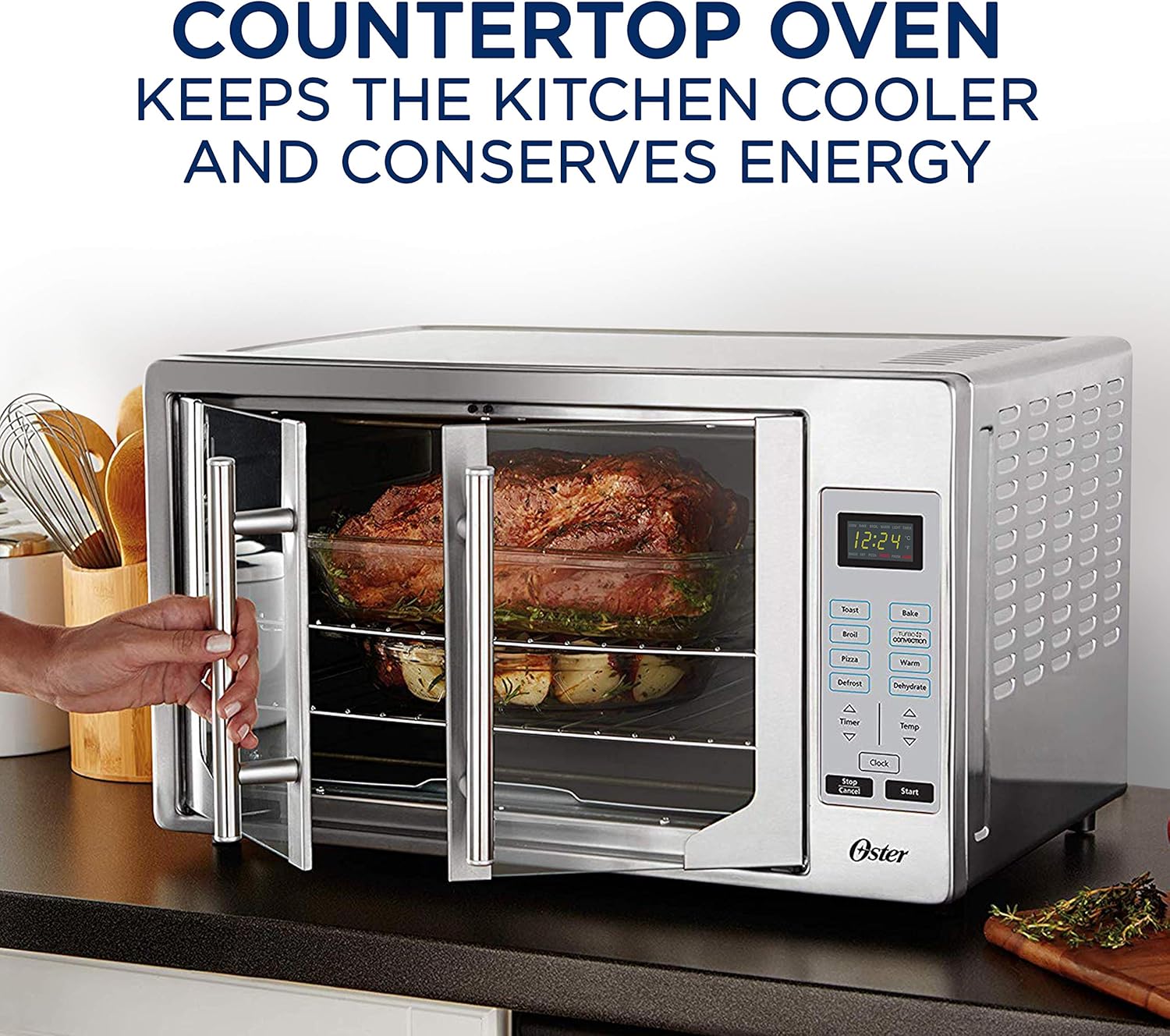
Gambar 3: Lebihview of oven features and digital control panel.
Panel Kontrol Berakhirview:
- Tampilan digital: Shows time, temperature, and selected function.
- Tombol Fungsi: Toast, Broil, Pizza, Defrost, Bake, Turbo Convection, Warm, Dehydrate.
- Timer Arrows (Up/Down): Sesuaikan waktu memasak.
- Temp Arrows (Up/Down): Sesuaikan suhu memasak.
- Tombol Jam: Tetapkan waktu saat ini.
- Tombol Mulai: Memulai siklus memasak yang dipilih.
- Tombol Berhenti/Batal: Stops or cancels the current operation.
Langkah-langkah Operasi Umum:
- Letakkan makanan di rak atau loyang yang sesuai.
- Close the French doors by pulling the single handle.
- Select the desired cooking function (e.g., Bake, Toast, Broil).
- Adjust the temperature using the 'Temp' arrows.
- Adjust the cooking time using the 'Timer' arrows.
- Tekan tombol 'Mulai' untuk memulai memasak.
- The oven will automatically shut off when the timer expires.
Fungsi Spesifik:
- Roti panggang: Ideal for bread, bagels, and frozen waffles. Adjust shade level as desired.
- Memanggang: For general baking needs like cakes, cookies, and casseroles.
- Memanggang: Use for browning, grilling, or toasting open-faced sandwiches.
- Pizza: Pengaturan yang dioptimalkan untuk memasak pizza hingga sempurna.
- Mencairkan: Mencairkan makanan beku secara perlahan.
- Hangat: Menjaga makanan yang sudah dimasak tetap hangat hingga siap disajikan.
- Menjadi kering: Pengaturan suhu rendah untuk mengeringkan buah-buahan, sayuran, dan dendeng.
- Konveksi Turbo: Activates a fan to circulate hot air, cooking food faster and more evenly. This is particularly useful for roasting and baking.

Figure 4: Turbo Convection technology circulates hot air for even cooking.

Figure 5: The French door design allows easy access to the oven interior.
5. Perawatan dan Pembersihan
Regular cleaning and maintenance will ensure the longevity and optimal performance of your Oster Convection Oven.
Petunjuk Pembersihan:
- Selalu cabut steker oven dan biarkan dingin sepenuhnya sebelum dibersihkan.
- Pedalaman: Lap dinding interior dengan iklanamp cloth and mild, non-abrasive detergent. For stubborn stains, a paste of baking soda and water can be used. Avoid using steel wool or abrasive cleaners.
- Luar: Bersihkan permukaan luar dengan kain lembut dan halus.amp kain. Untuk baja tahan karat, gunakan pembersih khusus baja tahan karat untuk menjaga kilauannya.
- Pintu kaca: Wipe the glass doors with a soft cloth and glass cleaner.
- Racks and Pan: The wire racks and baking pan can be washed in warm, soapy water or placed in a dishwasher.
- nampan remah: Pull out the removable crumb tray from the bottom front of the oven. Empty crumbs and wash the tray in warm, soapy water. Ensure it is dry before reinserting.
Note: Do not immerse the oven unit in water or any other liquid.
6. Penyelesaian masalah
If you encounter issues with your Oster Convection Oven, refer to the following common problems and solutions.
Masalah Umum dan Solusinya:
| Masalah | Kemungkinan Penyebab | Larutan |
|---|---|---|
| Ovennya tidak menyala. | Tidak terpasang; daya padamtage; pemutus arus tersandung. | Pastikan oven terhubung dengan aman ke stopkontak yang berfungsi. Periksa pemutus sirkuit rumah Anda. |
| Control buttons are unresponsive. | Temporary electronic glitch; buttons require firm press. | Unplug the oven for 5 minutes, then plug it back in to reset. Ensure you are pressing the touch-sensitive buttons firmly and directly. |
| Makanan tidak dimasak secara merata. | Improper rack position; overcrowding; convection fan issue. | Adjust rack position for optimal heat distribution. Avoid overcrowding the oven. Ensure the convection fan is operating (if using convection mode). |
| Excessive smoke or odor during operation. | Food residue; initial burn-off. | Clean the interior thoroughly, especially the crumb tray and heating elements. If it's the first use, this is normal and will dissipate. Ensure good ventilation. |
| French doors do not stay open. | Doors not opened fully. | Ensure the doors are pushed open completely until they lock into their open position. |
Jika masalah tetap berlanjut setelah mencoba solusi-solusi ini, silakan hubungi dukungan pelanggan Oster.
7. Spesifikasi
Detailed technical specifications for the Oster Digital French Door Convection Oven.
| Spesifikasi | Detil |
|---|---|
| Merek | Oster |
| Nama Model | French Door Convection Countertop and Toaster Oven |
| Nomor Model Barang | TSSTTVFDDG |
| Warna | Baja tahan karat |
| Ukuran | Ekstra besar |
| Dimensi Produk (P x L x T) | 20.15"Panjang x 23.8"Lebar x 15.1"T |
| Berat Barang | 18.1 pon |
| Fitur Khusus | Digital |
| Jenis Kontrol | Kontrol Sentuh |
| Gaya Pintu | Pintu Perancis |
| Jenis Selesai | dipoles |
| Jenis Bahan Pintu | Baja tahan karat |
| Sumber Daya | Listrik |
| UPC | 034264477735 |
8. Garansi dan Dukungan
For detailed warranty information, please refer to the warranty card included with your product or visit the official Oster websitus. Simpan struk pembelian Anda sebagai bukti pembelian untuk klaim garansi apa pun.
Dukungan Pelanggan:
If you require further assistance, have questions about your product, or need to report a defect, please contact Oster customer support. You may also find additional resources and FAQs on the Oster brand weblokasi.
Versi digital dari Panduan Pengguna tersedia untuk diunduh: Oster Convection Oven User Manual (PDF)