
1. Pendahuluan
This manual provides essential instructions for the proper setup, operation, and maintenance of your SentrySafe Executive Security Safe, Model PLX510487. This safe is designed to protect your valuables with an electronic lock and pry-resistant steel construction. Please read this manual thoroughly before using your safe to ensure optimal performance and security.
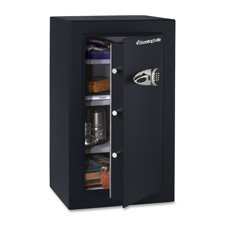
Figure 1: SentrySafe Executive Security Safe (Model PLX510487)
2. Informasi Keselamatan
- Do not store safe keys inside the safe. Always keep override keys in a secure location away from the safe.
- Pastikan brankas terpasang dengan aman untuk mencegah pengambilan yang tidak sah.
- Keep the electronic keypad dry and clean.
- This safe is not water resistant. Do not expose it to water or high humidity.
- Keep children away from the safe and do not allow them to operate the electronic lock.
3. Isi Paket
Verifikasi bahwa semua komponen ada dalam paket:
- SentrySafe Executive Security Safe (PLX510487)
- Tombol Ganti (2)
- Baut Pemasangan (untuk pemasangan di dinding)
- User Manual (dokumen ini)
4. Pengaturan
4.1 Membongkar
- Keluarkan brankas dari kemasannya dengan hati-hati.
- Inspect the safe for any signs of damage. If damaged, contact customer support.
- Simpan bahan kemasan untuk pengiriman selanjutnya jika diperlukan.
4.2 Pemasangan Baterai
The electronic lock requires four (4) AA alkaline batteries (not included).
- Temukan tempat baterai di bagian dalam pintu brankas.
- Buka penutup ruang baterai.
- Masukkan empat baterai alkaline AA baru, pastikan polaritas yang benar (+/-).
- Tutup penutup ruang baterai dengan rapat.
4.3 Memasang Brankas
For enhanced security, it is recommended to wall mount the safe.
- Pilih lokasi yang sesuai untuk pemasangan, pastikan permukaannya kokoh dan mampu menopang berat brankas.
- Open the safe door and locate the pre-drilled mounting holes on the back panel.
- Position the safe against the wall and mark the drilling points through the mounting holes.
- Buat lubang panduan pada dinding di lokasi yang telah ditandai.
- Sejajarkan brankas dengan lubang yang telah dibor dan kencangkan menggunakan baut pemasangan yang disediakan. Kencangkan semua baut dengan kuat.
4.4 Pengaturan Kode Awal
Upon first use, you will need to set your personal electronic access code.
- Dengan pintu brankas terbuka, tekan tombol reset merah yang terletak di bagian dalam pintu, dekat engsel. Lampu indikator kuning pada keypad akan menyala.
- Dalam waktu 5 detik, masukkan kode 3-8 digit yang Anda inginkan pada keypad.
- Press the 'A' or 'B' button to confirm your new code. The yellow light will turn off, and a beep will confirm the code is set.
- Uji kode baru tersebut dengan pintu terbuka sebelum menutupnya.
5. Mengoperasikan Brankas
5.1 Opening the Safe with Electronic Code
- Enter your personal 3-8 digit code on the keypad.
- Press the 'A' or 'B' button. The green indicator light will illuminate, and you will hear a beep.
- Dalam waktu 5 detik, putar pegangan searah jarum jam untuk membuka pintu brankas.
5.2 Opening the Safe with Override Key
In case of forgotten code or battery failure, use the override key.
- Temukan penutup lubang tombol pada panel keypad.
- Lepaskan penutupnya.
- Insert the override key and turn it counter-clockwise.
- While holding the key turned, turn the handle clockwise to open the safe door.
- Remove the key and replace the keyhole cover after use.
5.3 Menutup dan Mengunci Brankas
- Tutup pintu brankas rapat-rapat.
- Turn the handle counter-clockwise until it is fully engaged and the door is secured.
- The safe will automatically lock.
5.4 Mengubah Kode Pengguna
- Open the safe door using your current code or override key.
- Press the red reset button on the inside of the door. The yellow indicator light will illuminate.
- Dalam waktu 5 detik, masukkan kode 3-8 digit baru Anda.
- Press the 'A' or 'B' button to confirm. The yellow light will turn off, and a beep will confirm the new code.
- Test the new code with the door open before closing.
6. Pemeliharaan
6.1 Penggantian Baterai
When the batteries are low, the red indicator light will flash when you enter your code. Replace batteries promptly to avoid lock-out.
- Buka pintu brankas.
- Replace all four AA alkaline batteries as described in Section 4.2.
- Your electronic code will be retained during battery replacement.
6.2 Pembersihan
Bersihkan bagian luar brankas dengan kain lembut dan halus.amp Gunakan kain. Jangan gunakan pembersih abrasif atau pelarut, karena dapat merusak lapisan akhir atau komponen elektronik.
7. Penyelesaian masalah
- Brankas tidak bisa dibuka dengan kode:
- Ensure batteries are fresh and installed correctly. Replace if necessary.
- Re-enter the code carefully. Ensure no buttons are stuck.
- Try using the override key to open the safe. - Keypad does not respond:
- Check battery installation and replace batteries.
- Ensure no debris is obstructing the buttons. - Forgotten code:
- Use the override key to open the safe.
- Once open, follow the steps in Section 5.4 to set a new user code. - Door does not close/lock properly:
- Ensure no items are obstructing the door or locking bolts.
- Check that the handle is fully turned counter-clockwise to engage the locking mechanism.
8. Spesifikasi
| Merek | SentrySafe |
| Nomor Model | PLX510487 |
| Jenis Kunci | Kunci elektronik |
| Kapasitas | 6 Kaki Kubik |
| Bahan | Baja Paduan |
| Jenis Pemasangan | Dudukan Dinding |
| Komponen yang Termasuk | Bolts, Keys |
| Berat Barang | 241 pon |
| Tingkat Tahan Air | Tidak Tahan Air |
| Dimensi Produk | 23.8x21.5x38.3 inci |
| UPC | 635665104871 |
9. Garansi dan Dukungan
SentrySafe products are manufactured to high-quality standards. For specific warranty information, please refer to the warranty card included with your purchase or visit the official SentrySafe website. For technical support, replacement parts, or further assistance, please contact SentrySafe customer service directly.
SentrySafe Official Weblokasi: www.sentrysafe.com