
Perkenalan
This manual provides essential instructions for setting up, operating, and maintaining your Coolpad Note 3 smartphone. Please read this guide thoroughly to ensure proper use and to maximize the features of your device.
Informasi Keselamatan
Peringatan: Jauhkan dari jangkauan anak-anak.
Always handle your device with care. Avoid exposure to extreme temperatures, direct sunlight, and liquids. Do not attempt to disassemble or repair the device yourself, as this will void the warranty and may cause damage or injury.
Isi Paket
Verifikasi bahwa paket Anda berisi item berikut:
- Coolpad Note 3 Handset
- Headset
- Pengisi daya
- Kabel USB
- Film Pelindung
- User Manual (dokumen ini)
- Kartu Garansi
Pengaturan
1. Memasukkan Kartu SIM dan Kartu MicroSD
The Coolpad Note 3 supports dual SIM cards (4G+2G) and a MicroSD card for expandable storage up to 64GB. Ensure the device is powered off before inserting or removing cards.
- Temukan tempat kartu SIM/MicroSD di sisi perangkat.
- Gunakan alat pelepas SIM yang disediakan untuk membuka baki.
- Place your SIM cards into the designated slots. Ensure the gold contacts face downwards.
- Insert your MicroSD card into its slot. For 64GB cards, ensure it is formatted to FAT32 for compatibility.
- Dorong baki kembali ke dalam perangkat dengan hati-hati hingga terdengar bunyi klik pada tempatnya.
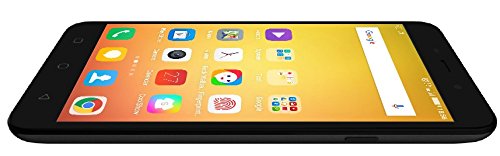
Gambar: Samping view of the Coolpad Note 3, illustrating the location of the SIM/MicroSD card tray and physical buttons.
2. Panduan Pengaktifan dan Pengaturan Awal
- Press and hold the Power button until the Coolpad logo appears.
- Ikuti petunjuk di layar untuk memilih bahasa Anda, terhubung ke Wi-Fi, dan menyiapkan akun Google Anda.
3. Pengaturan Sensor Sidik Jari
The Coolpad Note 3 features a fingerprint sensor for enhanced security and quick access.
- Navigasi ke Pengaturan > Keamanan > Sidik jari.
- Follow the prompts to register your fingerprints. You can register multiple fingers.
- Optionally, customize fingerprints to launch specific applications directly.
Petunjuk Pengoperasian
1. Navigasi Dasar
Your Coolpad Note 3 runs on Android v5.1 Lollipop with the COOLUI 6.0 interface. Use the touchscreen for navigation, tapping icons to open apps, swiping to scroll, and pinching to zoom.

Gambar: Depan view of the Coolpad Note 3, showing the vibrant home screen with various application icons.
2. Penggunaan Kamera
Perangkat ini memiliki kamera belakang 13MP dan kamera depan 5MP.
- Buka Kamera aplikasi.
- Ketuk layar untuk memfokuskan.
- Tekan tombol rana untuk mengambil foto atau memulai/menghentikan perekaman video.
- Beralih antara kamera depan dan belakang menggunakan ikon sakelar kamera.
- Explore various shooting modes available in the camera app.
3. Fingerprint Sensor for Unlocking
To unlock your phone, simply place your registered finger on the fingerprint sensor. The device unlocks in approximately 0.5 seconds. The sensor is designed to detect both dry and wet fingers accurately.
4. Konektivitas
- Wifinya: Pergi ke Pengaturan > Wifi gratis untuk terhubung ke jaringan yang tersedia.
- Data Seluler: Pastikan kartu SIM Anda aktif dan data seluler diaktifkan di Pengaturan > Penggunaan data.
- Bluetooth dapat digunakan untuk berbagai keperluan, seperti: Pasangkan dengan perangkat lain melalui Pengaturan > Bahasa Indonesia: Bluetooth.
- USB OTG: The Micro USB port supports On-The-Go (OTG) functionality for connecting external USB devices (e.g., flash drives) with an adapter.
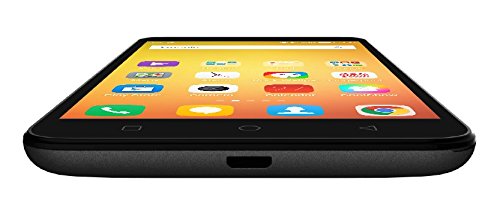
Gambar: Bawah view of the Coolpad Note 3, highlighting the Micro USB port for charging and data transfer.
Pemeliharaan
1. Mengisi Baterai
Use the provided charger and USB cable to charge your Coolpad Note 3. Connect the USB cable to the phone's Micro USB port and the charger to a power outlet. A full charge typically takes approximately 2 hours.
2. Pembaruan Perangkat Lunak
Regularly check for software updates to ensure optimal performance and access to the latest features and security patches. Go to Pengaturan > Tentang telepon > Pembaruan sistem.
3. Membersihkan Perangkat Anda
Gunakan kain lembut dan bebas serat untuk membersihkan layar dan bodi ponsel Anda. Hindari penggunaan bahan kimia keras atau bahan abrasif.
4. Perlindungan Layar
While the device features a durable display, it is recommended to use a tempered glass screen protector and a protective case to prevent scratches and damage from accidental drops.
Penyelesaian Masalah
- Device is heating: It is normal for smartphones to generate some heat during intensive use (e.g., gaming, prolonged video playback). If excessive heating occurs, close background applications and allow the device to cool. Software updates often address heating optimizations.
- Poor camera quality: Ensure good lighting conditions. For potentially improved results, consider using third-party camera applications available on the Google Play Store.
- Network connectivity issues (international travel): The Coolpad Note 3's 3G/4G bands may not be compatible with all international carriers. Verify network compatibility with your service provider before traveling.
- Performa lambat/lag: Close unused applications, clear cache, and restart the device. Ensure sufficient free storage space.
Spesifikasi
| Merek | pendingin |
| Model | Catatan 3 |
| Sistem Operasi | Android v5.1 Lollipop |
| Prosesor | 1.3GHz Cortex-A53 MT6753 Mediatek Octacore |
| RAM | 3 GB |
| Penyimpanan Internal | 16GB (expandable up to 64GB via MicroSD) |
| Ukuran Layar | 5.5 inci (13.97 cm) |
| Resolusi Tampilan | 1280 x 720 piksel (HD) |
| Kamera Belakang | 13MP |
| Kamera Depan | 5MP |
| Kapasitas Baterai | 3000mAh Lithium-Ion |
| Waktu Bicara | Hingga 15 jam |
| Waktu Siaga | Hingga 400 jam |
| Dukungan SIM | SIM Ganda (4G+2G) |
| Keamanan Biometrik | Pengenalan Sidik Jari |
| Sensor | G sensor, Proximity sensor, Light sensor, Gyro sensor, eCompass, Fingerprint sensor |
| Dimensi (P x L x T) | Ukuran 15.2x7.7x0.9 cm |
| Berat | 150 gram |
Informasi Garansi
Your Coolpad Note 3 comes with a manufacturer's warranty:
- Perangkat: Garansi pabrik 1 tahun terhitung sejak tanggal pembelian.
- Aksesori dalam kotak: 6 months manufacturer warranty for accessories including batteries, from the date of purchase.
Harap simpan struk pembelian dan kartu garansi Anda untuk referensi di kemudian hari.
Mendukung
For further assistance, technical support, or service inquiries, please refer to the official Coolpad support channels. Coolpad has partnered with HCL for service in some regions.
Visit the official Coolpad website for the latest support information and contact details.