
Perkenalan
This manual provides comprehensive instructions for the safe and efficient operation, maintenance, and troubleshooting of your KitchenAid 2.0 cu. ft. Over-the-Range Microwave with Sensor Cooking. Please read all instructions carefully before using the appliance and retain this manual for future reference.

Gambar: Depan view of the KitchenAid 2.0 cu. ft. Over-the-Range Microwave in Stainless Steel.
Petunjuk Keselamatan Penting
Saat menggunakan peralatan listrik, tindakan pencegahan keselamatan dasar harus diikuti, termasuk yang berikut ini:
- Baca semua petunjuk sebelum menggunakan alat ini.
- Jangan mengoperasikan oven jika pintu atau segel pintu rusak.
- Jangan memanaskan cairan atau makanan lain dalam wadah tertutup karena dapat meledak.
- Jangan mencoba untuk tampatau melakukan penyesuaian atau perbaikan apa pun pada pintu, panel kontrol, sakelar pengunci pengaman, atau bagian lain oven.
- Hanya izinkan anak-anak menggunakan oven tanpa pengawasan apabila instruksi yang memadai telah diberikan sehingga anak tersebut mampu menggunakan oven dengan cara yang aman dan memahami bahaya penggunaan yang tidak tepat.
- Jangan gunakan bahan kimia korosif atau uap dalam alat ini.
- Always ensure proper ventilation during operation.
Pengaturan
Pembongkaran dan Penempatan
Carefully remove all packaging materials. Ensure the microwave is placed on a flat, stable surface or properly installed over a range. Refer to the separate installation instructions for detailed mounting procedures. Ensure adequate clearance around the appliance for proper ventilation.

Image: KitchenAid microwave installed above a range in a kitchen setting.
Instalasi Meja Putar
Place the turntable support ring in the center of the microwave oven cavity. Position the glass turntable plate securely on the support ring. Ensure the turntable rotates freely.
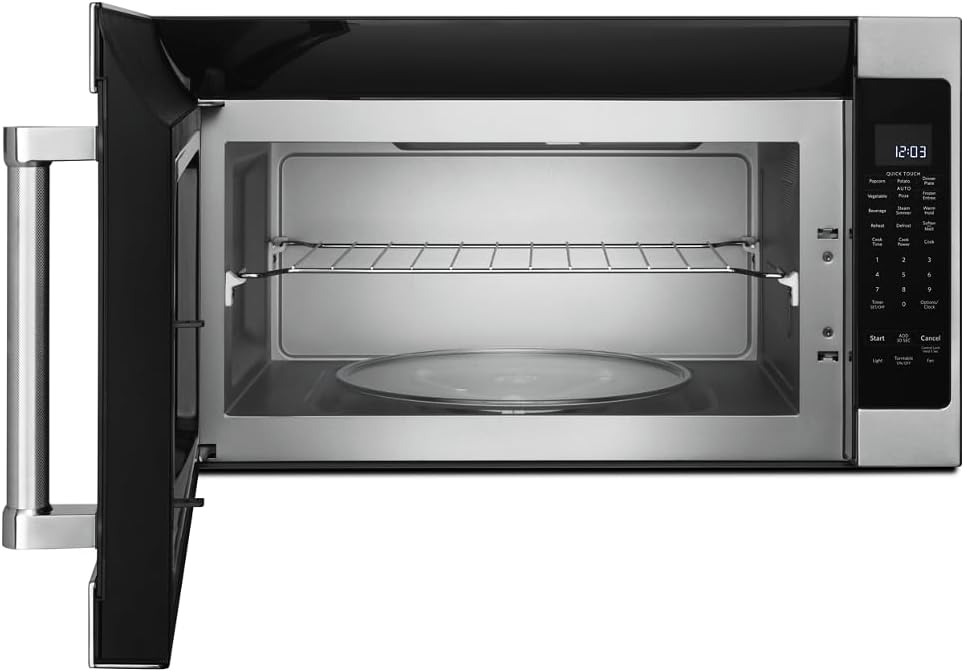
Gambar: Interior view of the microwave showing the glass turntable and support ring.
Petunjuk Pengoperasian
Operasi Dasar
- Mengatur Jam: Press 'Options/Clock', then enter the current time using the number pad. Press 'Options/Clock' again to confirm.
- Mulai Cepat: Press 'Start' to begin cooking immediately for 30 seconds at 100% power. Press 'Add 30 Sec' to add 30 seconds to the cooking time.
- Waktu Memasak: Press 'Cook Time', enter the desired cooking time, then press 'Start'.
- Cook Power: After setting 'Cook Time', press 'Cook Power', enter the desired power level (1-10, 10 being 100%), then press 'Start'.
Gambar: Detail view of the microwave's control panel with various cooking options.
Quick Touch Functions
The microwave features several one-touch cooking options:
- Jagung meletus: For automatic popcorn popping.
- Kentang: Untuk memanggang kentang.
- Pizza: Untuk memanaskan kembali potongan pizza.
- Minuman: Untuk memanaskan minuman.
- Panaskan kembali: For reheating various food items.
- Mencairkan: Untuk mencairkan makanan berdasarkan berat atau waktu.
Memasak dengan Sensor
The sensor cooking feature automatically adjusts cooking time and power levels based on the food's moisture content. Select the desired sensor cooking option (e.g., 'Vegetable', 'Frozen Entree', 'Dinner Plate') and press 'Start'. The microwave will detect when the food is cooked.

Image: Interior of the microwave showing food items on the turntable and a removable rack.
Fitur Khusus
- Steam Simmer: For steaming or simmering foods.
- Tahan Hangat: Keeps cooked food warm for an extended period.
- Melunakkan/Melelehkan: For softening butter, melting chocolate, or other similar tasks.
- Lampu: Controls the under-cabinet light.
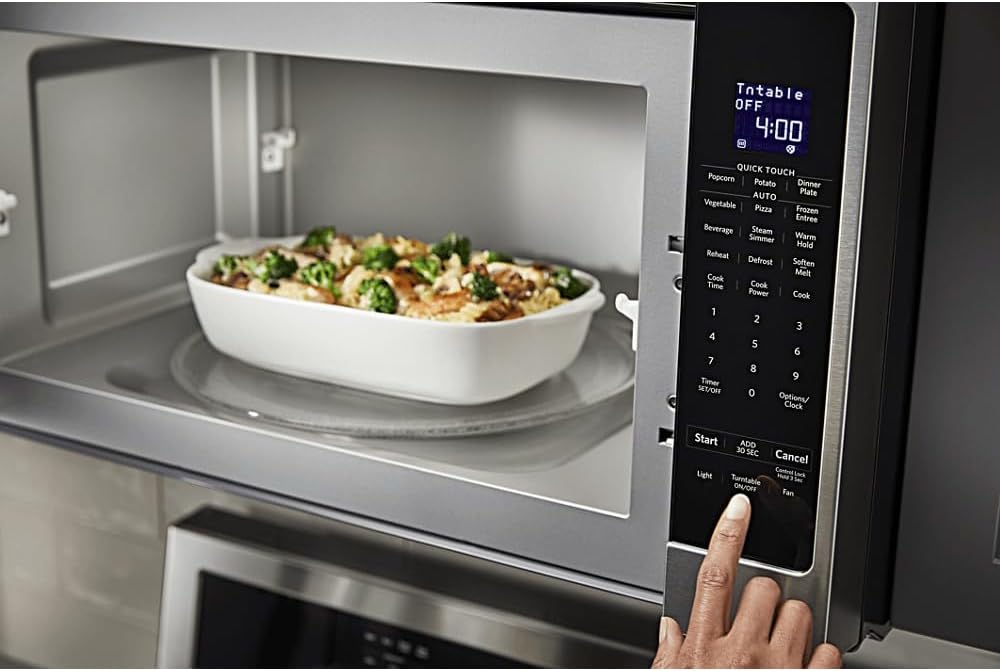
- Menghidupkan/Mematikan Pemutar Piringan Hitam: Memungkinkan Anda untuk menghentikan putaran meja putar untuk hidangan yang lebih besar.
- Kipas: Mengontrol kecepatan kipas pembuangan.

Image: A person's hand operating the control panel of the KitchenAid microwave.
Pemeliharaan
Membersihkan Interior
Clean the interior of the microwave regularly with a mild detergent and a soft cloth. For stubborn food splatters, place a bowl of water with lemon slices inside and microwave for a few minutes to loosen residue, then wipe clean.
Membersihkan Bagian Luar
Wipe the exterior surfaces, including the control panel and door, with a soft cloth and mild detergent. For stainless steel surfaces, use a stainless steel cleaner and polish in the direction of the grain.
Perawatan Filter
The microwave is equipped with grease filters and may have a charcoal filter. Clean the grease filters monthly by washing them in hot, soapy water or in a dishwasher. Replace the charcoal filter (if present) approximately every 6 to 12 months, depending on usage.
Penyelesaian Masalah
If you experience issues with your microwave, consult the following common problems and solutions:
| Masalah | Kemungkinan Penyebab | Larutan |
|---|---|---|
| Microwave tidak menyala | Pintu tidak tertutup dengan benar; Kabel listrik tercabut; Sekring putus/pemutus arus tersandung. | Ensure door is securely closed; Check power connection; Reset circuit breaker or replace fuse. |
| Makanan tidak memanas secara merata | Food not stirred/rotated; Incorrect power level; Turntable not rotating. | Stir or rotate food during cooking; Adjust power level; Ensure turntable is correctly placed and functioning. |
| Suara tidak biasa selama pengoperasian | Piringan putar tidak terpasang dengan benar; Benda asing di dalam rongga. | Pasang kembali meja putar; Periksa dan singkirkan semua penghalang. |
Jika masalah berlanjut setelah mencoba solusi ini, silakan hubungi dukungan pelanggan.
Spesifikasi
| Fitur | Detil |
|---|---|
| Merek | DapurAid |
| Nomor Model | KMHS120ESS |
| Dimensi Produk (P x L x T) | 16.13" x 30" x 17.13" |
| Kapasitas | 2.0 Kaki Kubik |
| Apatage | 1000 watt |
| Bahan | Baja tahan karat |
| Jenis Instalasi | di luar jangkauan |
| Fitur Khusus | Turntable, Sensor Cooking |
| Tipe Pengendali | Tombol |
| Jumlah Program | 10 |
| Fungsi Pengatur Waktu | Tersedia |
| Komponen yang Termasuk | Glass Turntable, Turntable Support Ring, Removable Rack |
Garansi dan Dukungan
Informasi Garansi
This KitchenAid appliance comes with a limited warranty. Please refer to the warranty card included with your product for specific terms, conditions, and duration of coverage. Keep your proof of purchase for warranty claims.
Dukungan Pelanggan
For technical assistance, service, or to order replacement parts, please contact KitchenAid Customer Service. Contact details can typically be found on the manufacturer's websitus atau pada kartu registrasi produk Anda.
Dukungan online: Visit the official KitchenAid website for FAQs, product registration, and service scheduling.
Dukungan Telepon: Lihat dokumentasi produk Anda untuk nomor telepon layanan pelanggan yang sesuai di wilayah Anda.