
1. Pendahuluan
Terima kasih sudah membeliasing the ELECOM M-XGM10DBBK Wireless 5-Button BlueLED Mouse. This mouse is designed for comfort and precision, featuring an ergonomic shape that fits naturally in your hand and BlueLED technology for reliable tracking on various surfaces. This manual provides essential information for proper setup, operation, and maintenance of your device.
2. Produk Lebihview
The M-XGM10DBBK mouse is part of the "EX-G" series, known for its ergonomic design and comfortable grip. It features five buttons, including dedicated back and forward buttons, to enhance productivity.
Fitur Utama:
- Desain Ergonomis: Shaped to fit the hand for ultimate grip comfort.
- Sensor LED Biru: Provides precise tracking on a wide range of surfaces, including glass and fabric.
- Fungsi 5 Tombol: Includes left, right, scroll wheel, and dedicated back/forward buttons.
- Koneksi Nirkabel 2.4GHz: Offers a stable connection with a range of approximately 10 meters (3 meters on steel desks).
- Tombol yang Dapat Disesuaikan: Button functions can be re-assigned using the free "ELECOM Mouse Assistant" software (Windows/Mac only).
- Indikator Baterai: Sebuah lamp indicates remaining battery life.
Komponen:
Familiarize yourself with the mouse components:

Gambar 2.1: Atas view pada mouse, menyoroti tombol-tombol utama.
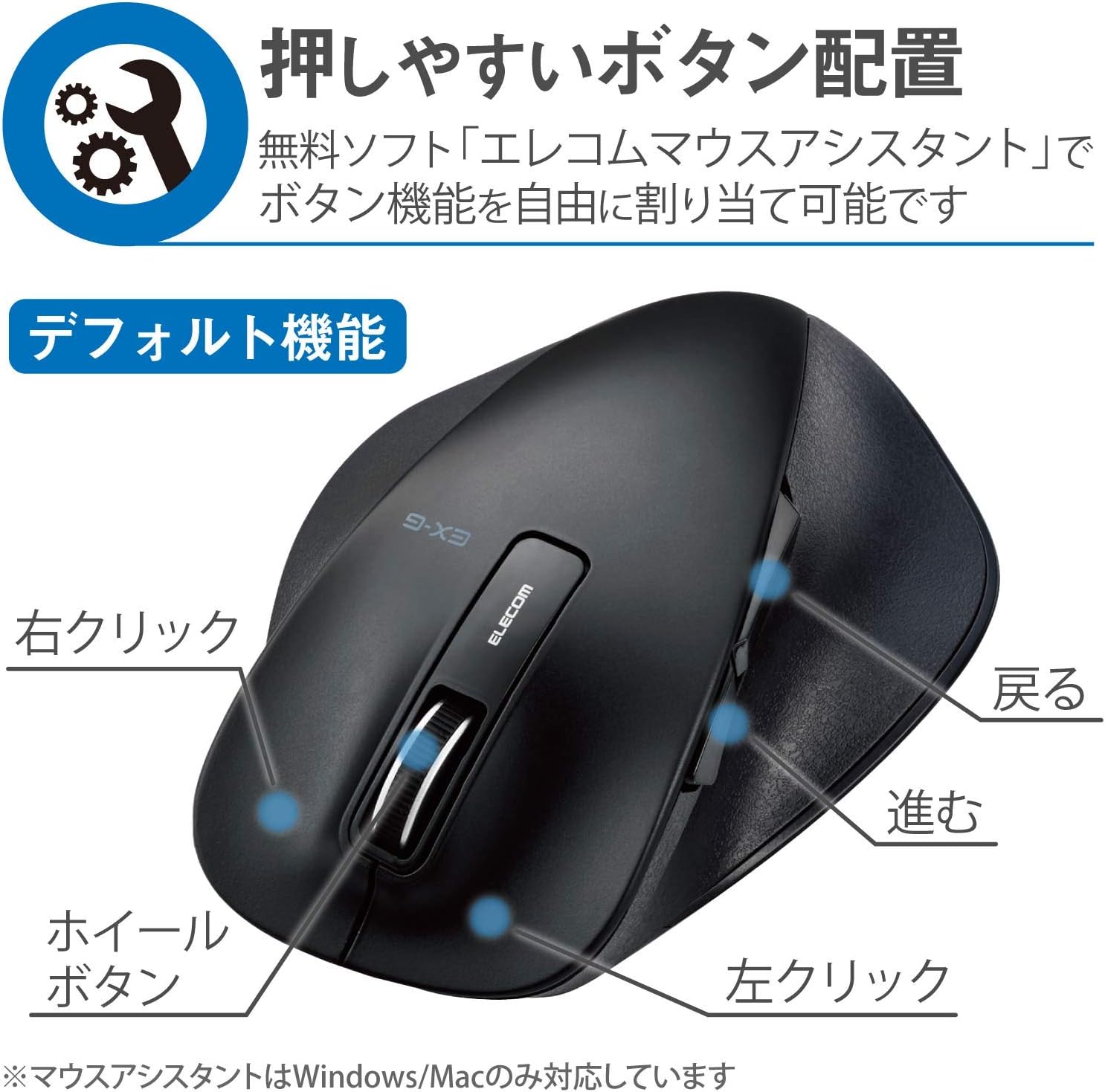
Gambar 2.2: Sisi view of the mouse, showing the back and forward buttons.
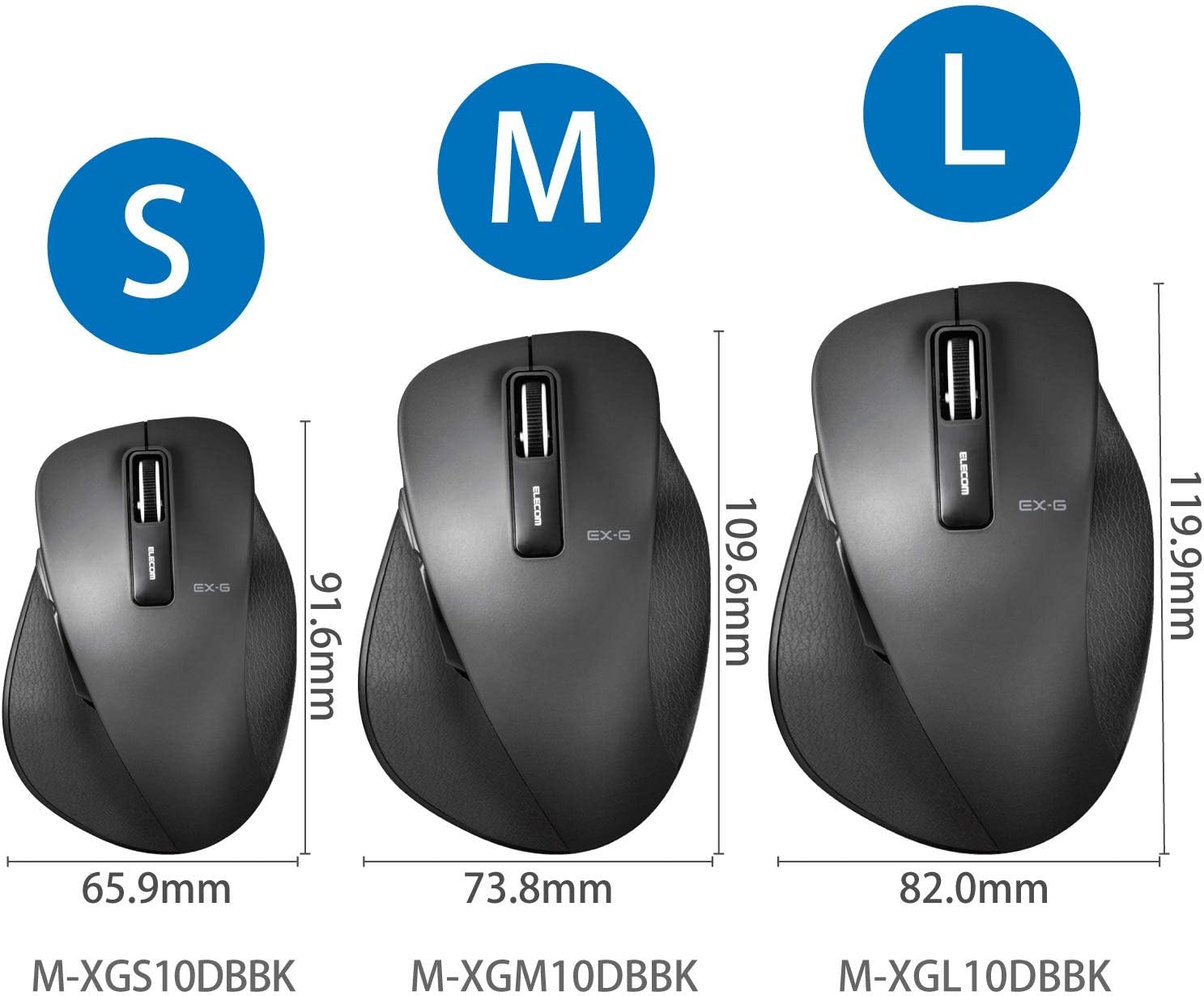
Figure 2.3: Size comparison of EX-G mice (S, M, L). The M-XGM10DBBK is the M size.

Gambar 2.4: Bawah view of the mouse, indicating the optical sensor, power switch, and receiver storage compartment.

Figure 2.5: Illustration of the durable Omron switches used for the left and right click buttons.
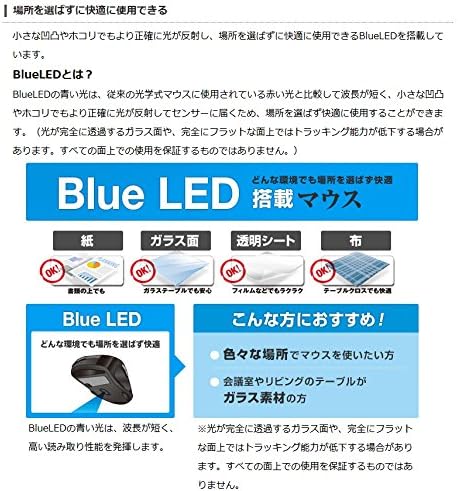
Figure 2.6: Explanation of BlueLED technology, demonstrating its versatility on different surfaces. Note: Tracking performance may decrease on completely transparent or perfectly flat surfaces.

Figure 2.7: Details on 2.4GHz wireless, battery indicator, and 2000 DPI resolution for smooth operation.

Figure 2.8: The ELECOM M-XGM10DBBK mouse is certified to work with Chromebooks.
3. Pengaturan
3.1 Pemasangan Baterai
- Locate the battery cover on the bottom of the mouse.
- Geser penutup terbuka.
- Insert one AA alkaline, manganese, or nickel-metal hydride battery, ensuring correct polarity (+/-).
- Tutup penutup baterai dengan rapat.
3.2 Koneksi Penerima
- Remove the USB receiver from its storage compartment on the bottom of the mouse.
- Hubungkan penerima USB ke port USB-A yang tersedia di komputer Anda.
- Komputer Anda akan secara otomatis mendeteksi dan menginstal driver yang diperlukan. Proses ini mungkin membutuhkan beberapa saat.
3.3 Menghidupkan
- Slide the power switch on the bottom of the mouse to the "ON" position.
- Mouse sekarang siap digunakan.
4. Petunjuk Pengoperasian
4.1 Fungsi Dasar
- Klik kiri: Pemilihan dan aktivasi utama.
- Klik kanan: Membuka menu konteks.
- Roda Gulir: Gulungan dokumen dan web pages vertically. Can also be clicked for middle-click functionality.
4.2 Back/Forward Buttons
The dedicated back and forward buttons located on the side of the mouse allow for quick navigation in web browser dan file penjelajah.
- Tekan tombol Kembali button to go to the previous page or folder.
- Tekan tombol Maju button to go to the next page or folder.
4.3 Customizing Buttons (ELECOM Mouse Assistant)
For advanced customization, download the free "ELECOM Mouse Assistant" software from the official ELECOM website. This software allows you to re-assign functions to the mouse buttons according to your preferences. Please note that this software is compatible with Windows and macOS only.
5. Pemeliharaan
5.1 Pembersihan
Untuk menjaga kinerja dan kebersihan yang optimal, bersihkan mouse Anda secara teratur:
- Matikan mouse menggunakan sakelar daya.
- Gunakan kain lembut dan kering untuk menyeka permukaan mouse.
- Untuk kotoran membandel, sedikit dampBilas kain dengan air atau larutan pembersih ringan, lalu segera lap hingga kering.
- Hindari penggunaan bahan kimia keras, bahan abrasif, atau pelarut.
- Gently clean the optical sensor area on the bottom of the mouse with a cotton swab if tracking issues occur.
5.2 Penggantian Baterai
When the battery indicator lamp flashes or the mouse performance degrades, replace the battery:
- Matikan tetikus.
- Buka penutup baterai.
- Lepaskan baterai lama dan buang sesuai dengan peraturan setempat.
- Masukkan baterai AA baru, pastikan polaritasnya benar.
- Close the battery cover and turn the mouse back on.
6. Penyelesaian masalah
If you encounter issues with your mouse, refer to the following common problems and solutions:
| Masalah | Kemungkinan Penyebab | Larutan |
|---|---|---|
| Tikus tidak merespons | Low battery; Power switch off; Receiver not connected; Receiver interference. | Replace battery; Turn power switch ON; Ensure receiver is firmly plugged in; Try a different USB port; Move closer to the receiver. |
| Gerakan kursor yang tidak menentu | Sensor optik kotor; Permukaan tidak sesuai; Interferensi. | Clean optical sensor; Use on a suitable mouse pad or surface; Reduce interference from other wireless devices. |
| Tombol tidak berfungsi | Konflik perangkat lunak; Masalah driver. | Restart computer; Reinstall mouse drivers; Check for conflicting software. |
| Masalah koneksi nirkabel | Distance too far; Obstructions; Interference. | Ensure mouse is within range (10m); Remove obstructions between mouse and receiver; Avoid using near other 2.4GHz devices. |
7. Spesifikasi
| Fitur | Detil |
|---|---|
| Nomor Model | M-XGM10DBBK |
| Metode Koneksi | Nirkabel 2.4GHz (Penerima USB-A) |
| Jenis Sensor | BlueLED Optical |
| Tombol | 5 buttons (Left, Right, Scroll Wheel, Back, Forward) |
| Resolusi | 2000DPI |
| Dimensi (L x D x T) | 73.8 x 109.6 x 40.8 mm (M Size) |
| Berat | Sekitar 151.95 g (termasuk baterai) |
| Sumber Daya | 1 x AA battery (Alkaline, Manganese, or Ni-MH) |
| Perkiraan Masa Pakai Baterai | Approx. 722 days (based on typical usage) |
| OS yang kompatibel | Windows 11, 10, RT8.1, 8.1, 7, Vista; macOS High Sierra 10.13, OS X 10.10; Chrome OS |
| Warna | Hitam |
8. Garansi dan Dukungan
8.1 Informasi Garansi
Produk ini dilengkapi dengan Garansi 6 bulan Terhitung sejak tanggal pembelian. Harap simpan bukti pembelian Anda untuk klaim garansi. Garansi mencakup cacat produksi dalam penggunaan normal. Garansi tidak mencakup kerusakan yang disebabkan oleh penyalahgunaan, kecelakaan, modifikasi tanpa izin, atau keausan normal.
8.2 Dukungan Pelanggan
For technical assistance, troubleshooting, or warranty inquiries, please visit the official ELECOM website or contact ELECOM customer support. Contact details can typically be found on the ELECOM website under the 'Support' or 'Contact Us' section.