
Perkenalan
This manual provides detailed instructions for the setup, operation, maintenance, and troubleshooting of your EZCAP284 HD 1080P Capture HDMI YPbPr Recorder. Please read this manual thoroughly before using the device to ensure proper functionality and to prevent damage.
Informasi Keselamatan
- Jangan biarkan perangkat terkena kelembapan, hujan, atau suhu ekstrem.
- Hindari menjatuhkan atau membenturkan perangkat dengan keras.
- Gunakan hanya adaptor daya yang telah ditentukan.
- Jangan mencoba membongkar atau memodifikasi perangkat. Ini akan membatalkan garansi.
- Jauhkan perangkat dari jangkauan anak-anak.
Isi Paket
Verifikasi bahwa semua item ada dalam paket Anda:
- EZCAP284 HD 1080P Capture Device
- Kontrol Jarak Jauh
- Adaptor daya (tidak tercantum secara eksplisit tetapi tersirat untuk pengoperasian)
- User Manual (dokumen ini)
Produk Selesaiview
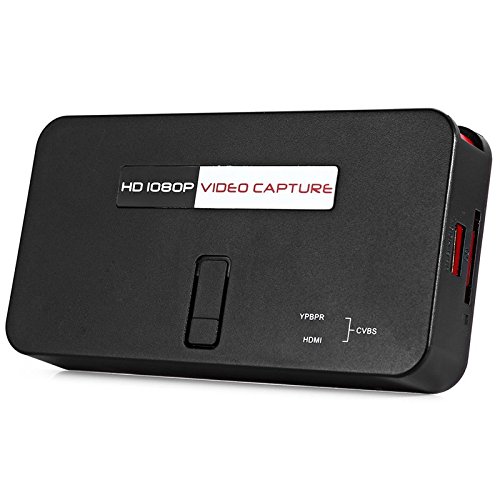
The EZCAP284 is a standalone HD video capture device designed for recording gameplay and other HDMI/YPbPr sources directly to a USB storage device without the need for a PC. It features HDMI pass-through for real-time viewing.

Gambar 1: Atas view of the EZCAP284 device, featuring a prominent record button.

Gambar 2: Rinci view of the input and output ports on the EZCAP284.
Gambar 3: Bawah view of the EZCAP284 device, indicating model and certification information.
Pengaturan
- Hubungkan Sumber Video: Connect your game console (e.g., PS3) or other video source to the HDMI DI or YPbPr IN port on the EZCAP284 using the appropriate cables.
- Hubungkan Layar: Connect your TV or monitor to the KELUARAN HDMI port on the EZCAP284. This allows you to view your gameplay in real-time while recording.
- Hubungkan Penyimpanan USB: Insert a USB flash drive or external hard drive (formatted as FAT32 or NTFS) into the Kabel USB 2.0 port on the EZCAP284. This is where your recordings will be saved.
- Hubungkan Daya: Connect the power adapter to the DC IN port on the EZCAP284 and then plug it into a power outlet. The device will power on.
- Optional Audio Input: If you wish to record live commentary, connect a microphone to the 3.5mm Audio Masuk pelabuhan.
Petunjuk Pengoperasian
Recording Gameplay
- Ensure all connections are secure as described in the Setup section.
- Turn on your video source (e.g., game console) and your display.
- Tekan tombol REKAM button on the EZCAP284 device or the remote control to start recording. The indicator light will change to show recording is in progress.
- Tekan tombol REKAM button again to stop recording. The indicator light will revert to its standby state.
- Your recorded video file will be saved to the connected USB storage device.
Adding Live Commentary
To record your voice along with the gameplay:
- Hubungkan mikrofon ke 3.5mm Audio Masuk port before starting your recording.
- The device will automatically mix the microphone audio with the video source audio during recording.
Pemutaran ulang
Ke view your recorded videos, safely remove the USB storage device from the EZCAP284 and connect it to a computer or a media player that supports the recorded video format.
Pemeliharaan
- Pembersihan: Gunakan kain lembut dan kering untuk membersihkan bagian luar perangkat. Jangan gunakan cairan pembersih atau pelarut.
- Penyimpanan: Simpan perangkat di tempat yang sejuk dan kering, jauhkan dari sinar matahari langsung dan suhu ekstrem saat tidak digunakan.
- Perangkat Lunak: Periksa pabrikannya website periodically for any firmware updates that may improve performance or add features.
Penyelesaian Masalah
| Masalah | Kemungkinan Penyebab | Larutan |
|---|---|---|
| Tidak ada output video pada layar. | Incorrect cable connection; input source not active; display input not selected. | Check HDMI/YPbPr connections. Ensure video source is on. Select correct input on your TV/monitor. |
| Perekaman gagal atau berhenti secara tiba-tiba. | USB storage full; USB drive not compatible; power interruption. | Ensure USB drive has sufficient space. Try a different USB drive (FAT32/NTFS). Check power connection. |
| No audio in recording. | Audio cables not connected; source audio muted; microphone not connected or faulty. | Verify audio connections from source. Ensure source audio is not muted. Check microphone connection and functionality. |
| Kontrol jarak jauh tidak berfungsi. | Batteries low or inserted incorrectly; IR sensor blocked. | Replace batteries. Ensure line of sight to the device's IR sensor. |
Spesifikasi
| Fitur | Keterangan |
|---|---|
| Model | EZCAP284 |
| Jenis | Adapter / Video Capture Device |
| Bahan | Tembaga (komponen internal) |
| Antarmuka | 3.5mm Audio In, HDMI In, HDMI Out, YPbPr In, USB 2.0 |
| Resolusi Pengambilan Video | Hingga 1080p |
| Kompatibilitas Platform | PlayStation (and other HDMI/YPbPr sources) |
| Komponen yang Termasuk | Kontrol Jarak Jauh |
| Warna | Hitam |
| Dimensi (P x L x T) | 14.00 x 7.40 x 2.00 cm (perkiraan) |
| Berat | 0.463 kg (perkiraan berat paket) |
Garansi dan Dukungan
Untuk informasi garansi dan dukungan teknis, silakan merujuk ke dokumentasi yang disertakan dengan pembelian Anda atau hubungi penjual/produsen secara langsung. Simpan bukti pembelian Anda untuk klaim garansi.