
Jenius 31300725108
Genius LuxeMate 100 Keyboard User Manual
Model: 31300725108 | Brand: Genius
Perkenalan
The Genius LuxeMate 100 is a cost-effective USB keyboard designed for comfortable and quiet typing. It features a flat profile, a German standard QWERTZ layout, and adjustable feet for ergonomic positioning. This manual provides essential information for setting up, operating, maintaining, and troubleshooting your keyboard.
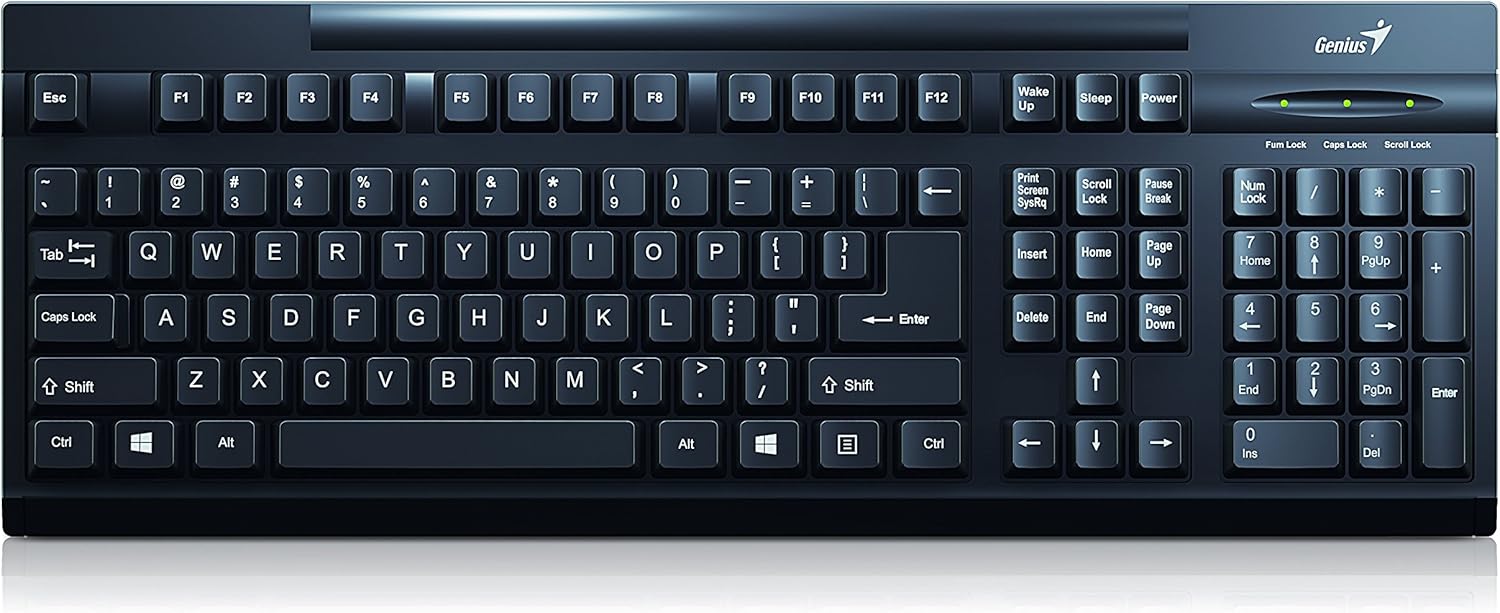
Gambar 1: Atas view of the Genius LuxeMate 100 Keyboard, showing the full German standard layout.
Panduan Pengaturan
The LuxeMate 100 keyboard is designed for simple plug-and-play installation, requiring no additional software drivers. Follow these steps to connect your keyboard:
- Locate an available USB port on your computer (desktop PC, laptop, etc.).
- Insert the USB connector of the LuxeMate 100 keyboard firmly into the USB port.
- Your operating system (e.g., Windows) will automatically detect and install the necessary drivers. This process usually takes a few seconds.
- Once the installation is complete, the keyboard is ready for use.

Gambar 2: Sudut view of the keyboard, highlighting its compact design and USB connection point.
For improved typing comfort, you can adjust the keyboard's angle using the integrated feet located on the underside. Gently pull out the feet until they click into place to elevate the rear of the keyboard.

Gambar 3: Sisi view of the keyboard with its adjustable feet extended, providing an ergonomic typing angle.
Petunjuk Pengoperasian
The LuxeMate 100 keyboard features a standard German QWERTZ layout, providing all essential keys for daily computing tasks. Its low-profile keys offer a comfortable and quiet typing experience.

Gambar 4: Tampilan jarak dekat view of the keyboard keys, showing the German QWERTZ layout and keycap design.
Fungsi Utama:
- Tombol Alfanumerik Standar: Digunakan untuk mengetik huruf, angka, dan simbol.
- Tombol Fungsi (F1-F12): These keys perform various functions depending on the application or operating system.
- Windows Start Screen Button: Activates the Windows Start menu or screen.
- Tombol angka: Located on the right side, for efficient data entry. Ensure Num Lock is active (indicated by an LED light above the keypad).
- Caps Lock, Num Lock, Scroll Lock Indicators: LED lights above the numeric keypad indicate the status of these functions.
Keyboard slim profile contributes to its lightweight design, making it easy to integrate into any workspace.

Gambar 5: Sisi profile of the keyboard, illustrating its ultra-thin and slim design.
Perawatan dan Pemeliharaan
To ensure the longevity and optimal performance of your Genius LuxeMate 100 keyboard, follow these simple maintenance guidelines:
- Pembersihan: Regularly wipe the keyboard surface with a soft, dry, lint-free cloth. For stubborn dirt, slightly dampBasahi kain dengan air atau larutan pembersih ringan yang tidak abrasif. Hindari kelembapan berlebihan.
- Penghilangan Debu: Gunakan udara bertekanan untuk menghilangkan debu dan kotoran dari sela-sela tuts.
- Hindari Cairan: Jangan menumpahkan cairan ke keyboard. Jika terjadi tumpahan, segera cabut keyboard dari komputer Anda dan biarkan hingga benar-benar kering sebelum menyambungkannya kembali.
- Penyimpanan: Bila tidak digunakan dalam jangka waktu lama, simpan keyboard di tempat yang bersih dan kering, jauhkan dari sinar matahari langsung dan suhu ekstrem.
- Penanganan: Avoid dropping the keyboard or subjecting it to strong impacts, as this can damage internal components.
Penyelesaian Masalah
If you encounter issues with your LuxeMate 100 keyboard, try the following troubleshooting steps:
- Keyboard Tidak Merespons:
- Pastikan kabel USB terpasang dengan benar ke port USB yang berfungsi di komputer Anda.
- Coba colokkan keyboard ke port USB yang berbeda.
- Hidupkan ulang komputer Anda.
- Test the keyboard on another computer to determine if the issue is with the keyboard or your computer's setup.
- Keys Not Working or Sticking:
- Check for any visible debris or foreign objects lodged under the keys. Use compressed air to clear them.
- Ensure the keyboard is clean and free from spills.
- Num Lock/Caps Lock/Scroll Lock Lights Not Working:
- Press the respective key (Num Lock, Caps Lock, Scroll Lock) to toggle its status. If the light does not change, refer to "Keyboard Not Responding" steps.
Jika langkah-langkah ini tidak menyelesaikan masalah, silakan merujuk ke bagian dukungan.
Spesifikasi Teknis
| Fitur | Spesifikasi |
|---|---|
| Merek | Jenius |
| Nomor Model | 31300725108 |
| Teknologi Konektivitas | USB (USB-A) |
| Tata Letak Papan Ketik | German Standard (QWERTZ) |
| Bentuk Kancing | Cekung |
| Warna | Hitam |
| Dimensi (P x L x T) | 306 x 155 x 20 mm (as per description) / 34.9 x 18 x 3 cm (as per specifications) |
| Berat | 320 gram |
| Bahan | Plastik |
| Perangkat yang Kompatibel | Laptop, komputer |
| Sistem Operasi | Jendela |
| Isi Paket | LuxeMate 100 Keyboard, Multi-lingual Quick Guide |
Note: Dimensions may vary slightly based on measurement method. The description states 306x155x20 MM, while specifications state 34.9x18x3 cm. Please refer to the product packaging for the most accurate dimensions.
Garansi dan Dukungan
For warranty information and technical support regarding your Genius LuxeMate 100 keyboard, please refer to the documentation included with your product or visit the official Genius website. Contact details for customer service are typically provided in the quick guide or on the manufacturer's support page.
Saat menghubungi dukungan, harap siapkan nomor model produk (31300725108) dan detail pembelian Anda.
Ask a question about this manual
Ask about setup, troubleshooting, compatibility, parts, safety, or missing instructions. Manuals+ will review the question and use this page’s manual context to help answer it.