
LyxPro SPA-5.5
LyxPro SPA-5.5 Manual Instruksi Monitor Speaker PA Kecil
Model: SPA-5.5
1. Pendahuluan
This manual provides detailed instructions for the proper setup, operation, and maintenance of your LyxPro SPA-5.5 Small PA Speaker Monitor. Please read this manual thoroughly before using the device to ensure optimal performance and safety.
The LyxPro SPA-5.5 is a compact and powerful active speaker system featuring a Class-D amplifier, a 3-channel mixer, and a 3-band equalizer. It is designed for various applications including vocal and instrument monitoring, public address, and as a guitar amplifier or karaoke system.
2. Petunjuk Keselamatan
- Sumber Daya: Connect the unit only to the specified power supply (100V – 240V AC). Ensure the power cord is not damaged or pinched.
- Ventilasi: Jangan halangi lubang ventilasi. Pastikan aliran udara di sekitar unit cukup untuk mencegah panas berlebih.
- Air dan Kelembaban: Jangan biarkan unit terkena hujan, kelembapan, atau cairan apa pun. Jangan meletakkan benda berisi cairan di atas unit.
- Sumber Panas: Jauhkan unit dari sumber panas seperti radiator, ventilasi pemanas, kompor, atau peralatan penghasil panas lainnya.
- Pembersihan: Bersihkan hanya dengan kain kering. Putuskan sambungan dari sumber listrik sebelum membersihkan.
- Pelayanan: Jangan mencoba untuk memperbaiki produk ini sendiri. Rujuk semua servis ke personel servis yang berkualifikasi.
- Penempatan: Place the unit on a stable surface. If mounting on a microphone stand, ensure the stand is stable and capable of supporting the unit's weight.
3. Isi Paket
Verifikasi bahwa semua item ada dalam paket:
- LyxPro SPA-5.5 Speaker Monitor
- Kabel listrik
- Microphone Stand Mounting Hardware
- User Manual (dokumen ini)
4. Fitur Produk
- 125W RMS / 150W Peak Class-D Amppengangkat
- Integrated 3-Channel Mixer
- 3-Band Equalizer (Bass, Mid, Treble)
- +48V Phantom Power Supply for Condenser Microphones
- Multiple Inputs: XLR, 1/4" (6.35mm), RCA, and 3.5mm (1/8") Aux
- Instrument Switch for Direct Instrument Connection
- XLR Thru Connection for Daisy-Chaining
- Kontrol Gema
- Konektivitas Bluetooth bawaan
- Kompatibilitas Kartu SD
- Mounts on Standard Microphone Stands
- Durable and Compact Design
5. Kontrol dan Koneksi
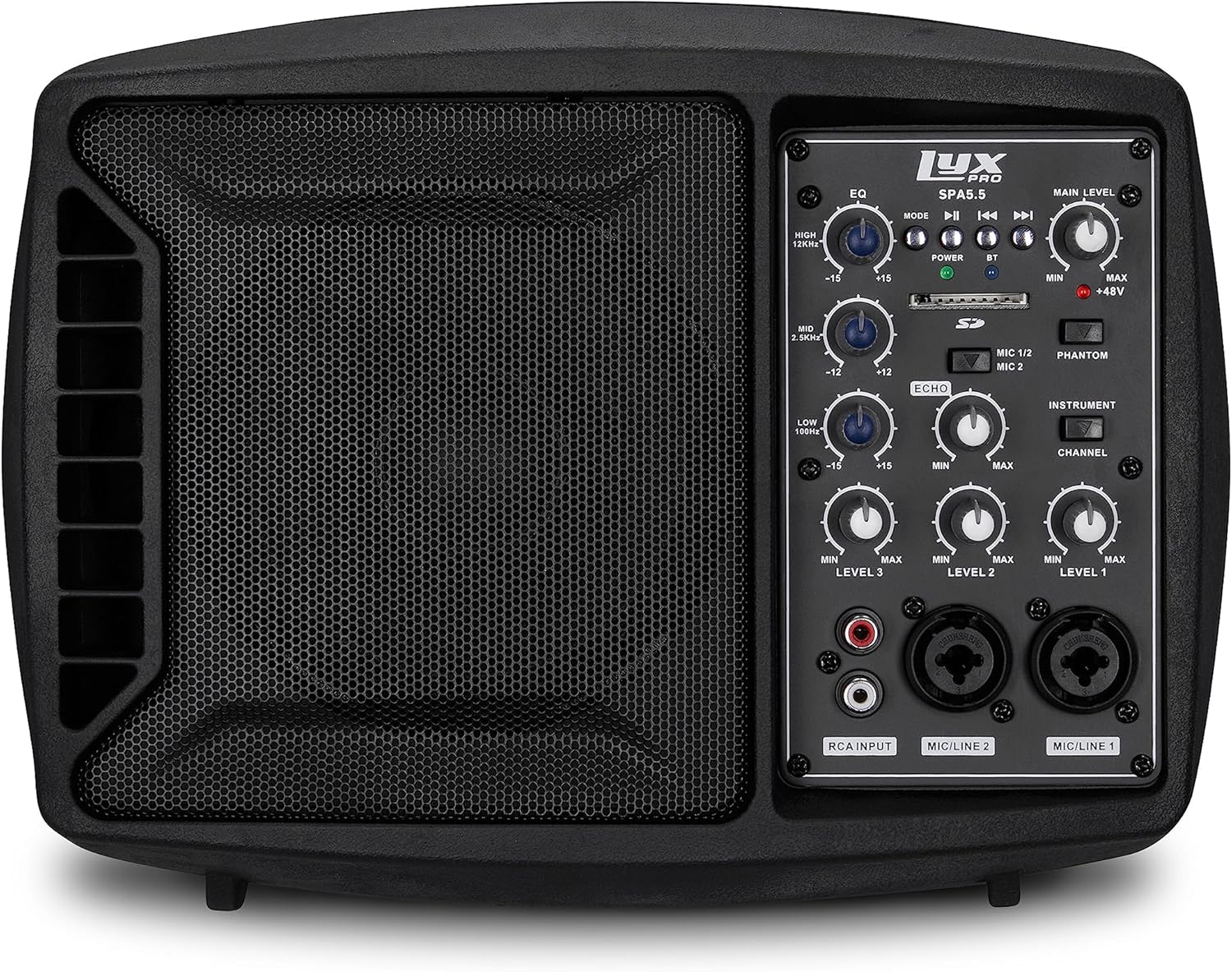
Gambar 5.1: Depan view of the LyxPro SPA-5.5 speaker monitor, showing the speaker grille and control panel.
5.1 Kontrol Panel Depan

Figure 5.2: Detailed diagram of the LyxPro SPA-5.5 front control panel with labeled components.
- Ekualiser (EQ):
- HIGH (12kHz): Adjusts high frequencies. Range: ±15dB.
- MID (2.5kHz): Adjusts mid frequencies. Range: ±15dB.
- LOW (80Hz): Adjusts low frequencies. Range: ±15dB.
- Tingkat Utama: Mengontrol volume keluaran keseluruhan speaker.
- Lampu Daya: Menunjukkan kapan unit dinyalakan.
- BT (Bluetooth) Light: Menunjukkan status koneksi Bluetooth.
- Slot Kartu SD: Untuk memutar audio files dari kartu SD.
- Phantom Power Switch (+48V): Activates +48V phantom power for condenser microphones connected to MIC 1 or MIC 2.
- MIC 1/2 Switch: Selects between MIC 1 and MIC 2 inputs for Channel 1.
- Instrument Switch: Optimizes input impedance for direct connection of instruments (e.g., guitar) to Channel 1.
- Kontrol Gema: Adjusts the level of echo effect applied to microphone inputs.
- Channel Level Controls (LEVEL 1, LEVEL 2, LEVEL 3): Adjusts the individual volume for each input channel.
- RCA Input (LINE 3): Stereo RCA inputs for connecting devices like CD players, MP3 players, or keyboards.
- MIC/LINE 2 Input: Combo XLR/1/4" (6.35mm) input for microphones or line-level devices.
- MIC/LINE 1 Input: Combo XLR/1/4" (6.35mm) input for microphones or line-level devices.
5.2 Sambungan Panel Belakang

Figure 5.3: Detailed diagram of the LyxPro SPA-5.5 rear panel with labeled connections.
- MAIN IN (XLR): Main input for connecting external audio sources.
- MIC/LINE Level Switch: Selects between microphone or line level for the MAIN IN.
- THRU (XLR): XLR output for daisy-chaining to other speakers or sending the mixed signal to another device.
- Saklar daya: Menyalakan atau mematikan unit.
- MASUKAN AC: Power connector for the included AC power cable (100V – 240V AC).
6. Pengaturan
6.1 Penyalaan Awal
- Ensure all level controls (Main Level, Channel Levels) are set to minimum.
- Connect the provided AC power cable to the AC INPUT on the rear panel and then to a suitable power outlet.
- Flip the Power Switch on the rear panel to the "ON" position. The Power Light on the front panel will illuminate.
6.2 Opsi Pemasangan
The SPA-5.5 can be used in various configurations:
- Monitor Lantai: Place the unit on the floor in front of the performer, angled upwards.
- Meja: Posisikan pada permukaan yang datar dan stabil.
- Pemasangan Stand Mikrofon: The unit includes hardware to mount it directly onto a standard microphone stand.

Figure 6.1: The LyxPro SPA-5.5 speaker monitor positioned on a microphone stand, demonstrating its use as a personal monitor for a musician.

Figure 6.2: A band performing outdoors, utilizing the compact LyxPro SPA-5.5 speaker for sound reinforcement.
7. Petunjuk Pengoperasian
7.1 Menghubungkan Mikrofon dan Instrumen
- Mikrofon: Connect dynamic or condenser microphones to the MIC/LINE 1 or MIC/LINE 2 inputs using XLR cables. If using a condenser microphone, activate the +48V Phantom Power Switch. Adjust the corresponding Channel Level control.
- Instrumen: Connect instruments (e.g., guitar, bass) directly to MIC/LINE 1 or MIC/LINE 2 using a 1/4" (6.35mm) cable. Engage the Instrument Switch for optimal impedance matching. Adjust the corresponding Channel Level control.
- Perangkat Tingkat Lini: Connect devices like keyboards or audio interfaces to MIC/LINE 1 or MIC/LINE 2 using 1/4" (6.35mm) cables. Ensure the Instrument Switch is disengaged. Adjust the corresponding Channel Level control.
- Stereo Audio Sources: Connect CD players, MP3 players, or other stereo sources to the RCA Input (LINE 3). Adjust LEVEL 3.
7.2 Menyesuaikan Suara
- Level Saluran: Use the LEVEL 1, LEVEL 2, and LEVEL 3 controls to balance the volume of individual inputs.
- Tingkat Utama: Adjust the Main Level knob to control the overall output volume of the speaker.
- Ekualiser (EQ): Use the HIGH, MID, and LOW knobs to shape the tone of your sound.
- Increase HIGH for brighter sound.
- Adjust MID for vocal clarity or instrument presence.
- Increase LOW for more bass.
- Kontrol Gema: Turn the Echo knob to add a reverberation effect to the microphone inputs.
7.3 Media Playback (SD Card & Bluetooth)

Figure 7.1: Icons indicating SD card compatibility and built-in Bluetooth functionality on the LyxPro SPA-5.5.
- Kartu SD: Masukkan kartu SD yang berisi audio. files into the SD Card Slot. The unit will automatically detect and begin playback. Use the built-in controls (Mode, Play/Pause, Skip) to manage playback.
- Bluetooth dapat digunakan untuk berbagai keperluan, seperti:
- Pastikan unit dihidupkan.
- Aktifkan Bluetooth di perangkat seluler Anda.
- Pencarian untuk "LyxPro SPA-5.5" in your device's Bluetooth settings and pair. The BT light on the unit will indicate a successful connection.
- Play audio from your device. Adjust volume using both your device and the SPA-5.5's Main Level control.

Figure 7.2: A musician utilizing the LyxPro SPA-5.5 as a personal monitor in a studio environment.
8. Pemeliharaan
- Pembersihan: Gunakan kain lembut dan kering untuk membersihkan bagian luar unit. Jangan gunakan cairan pembersih atau aerosol.
- Penyimpanan: Saat tidak digunakan dalam jangka waktu lama, simpan unit di tempat yang sejuk dan kering, jauh dari sinar matahari langsung dan suhu ekstrem.
- Penggantian Sekring: If the unit does not power on, check the fuse located near the AC input. Replace with a fuse of the same type and rating (T 3.15 A H 250V). Refer to qualified personnel if unsure.
9. Penyelesaian masalah
| Masalah | Kemungkinan Penyebab | Larutan |
|---|---|---|
| Tidak ada daya | Kabel daya terputus; Saklar daya mati; Sekring putus | Check power cable connection; Turn power switch on; Replace fuse (refer to Maintenance section) |
| Tidak ada keluaran suara | Main Level or Channel Levels too low; Input device not connected or muted; Incorrect input selected | Increase Main Level and Channel Levels; Check input device connection and volume; Verify correct input is used |
| Suara terdistorsi | Input signal too high; Main Level too high; EQ settings incorrect | Reduce input device volume; Lower Main Level; Adjust EQ settings |
| Mikrofon tidak berfungsi (mikrofon kondensor) | Phantom power not enabled | Activate the +48V Phantom Power Switch |
| Bluetooth tidak terhubung | Unit tidak dalam mode pemasangan; Perangkat terlalu jauh; Perangkat yang dipilih salah | Ensure Bluetooth is active on SPA-5.5 and device; Move device closer; Select "LyxPro SPA-5.5" from device list |
10. Spesifikasi

Figure 10.1: Diagram illustrating the compact dimensions of the LyxPro SPA-5.5 speaker monitor.
| Fitur | Detil |
|---|---|
| Daya Keluaran | 125W RMS / 150W Puncak |
| Ukuran Speaker | 5 inci |
| AmpJenis pengangkat | Kelas-D |
| Respon Frekuensi (-10dB) | Frekuensi 80Hz – 14kHz |
| Respon Frekuensi (-3dB) | Frekuensi 100Hz – 10kHz |
| Maks. SPL | 114dB SPL @ 1M |
| Kekuatan Hantu | +48V |
| Impedansi Masukan | 20K |
| EQ High (12kHz) | ±15dB |
| EQ Mid (2.5kHz) | ±15dB |
| EQ Low (80Hz) | ±15dB |
| Masukan Voltage | 100V - 240V AC |
| Konsumsi Daya | 180W maks. |
| Dimensi (P x L x T) | 13.5" x 9" x 11.8" (34.3 cm x 22.9 cm x 30 cm) |
| Berat | 6.1 pon (2.77 kg) |
11. Garansi dan Dukungan
For warranty information and technical support, please refer to the warranty card included with your product or visit the official LyxPro websitus. Simpan struk pembelian Anda sebagai bukti pembelian.
For further assistance, contact LyxPro customer support.
Ask a question about this manual
Ask about setup, troubleshooting, compatibility, parts, safety, or missing instructions. Manuals+ will review the question and use this page’s manual context to help answer it.