
Perkenalan
Thank you for choosing the Awei A860BL-BK Bluetooth In-Ear Earphones. This manual provides essential information for the proper setup, operation, and maintenance of your device. Please read it thoroughly before use to ensure optimal performance and longevity of your earphones.
Isi Paket
Verifikasi bahwa semua item yang tercantum di bawah ini ada dalam paket Anda:
- Awei A860BL-BK Bluetooth In-Ear Earphones
- Kabel Pengisian Daya USB
- Ujung Telinga (berbagai ukuran)
- Panduan Pengguna

Produk Selesaiview
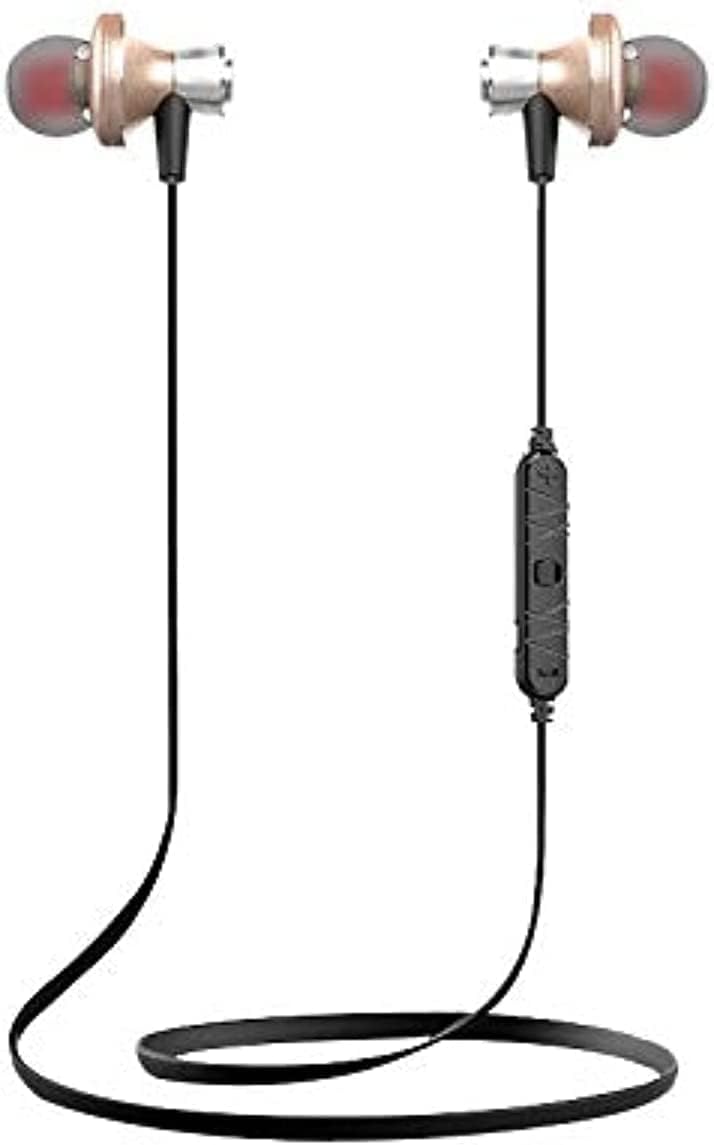
The Awei A860BL-BK earphones are designed for wireless audio playback and hands-free calling. They feature an in-ear design for comfortable fit and sound isolation.

Pengaturan
1. Mengisi Daya Earphone
Before first use, fully charge the earphones. Connect the USB charging cable to the charging port on the earphones and to a compatible USB power source (e.g., computer, wall adapter). The charging indicator light will typically show red during charging and turn off or blue when fully charged.
- Waktu Pengisian: Approximately 1 to 2 hours.
2. Pemasangan Bluetooth
Untuk menghubungkan earphone Anda ke perangkat yang mendukung Bluetooth:
- Ensure the earphones are fully charged and turned off.
- Press and hold the multi-function button on the earphones until the indicator light flashes red and blue alternately, indicating pairing mode.
- Pada perangkat Anda (ponsel pintar, tablet, dll.), aktifkan Bluetooth dan cari perangkat yang tersedia.
- Select "Awei A860BL-BK" from the list of found devices.
- Setelah terhubung, lampu indikator pada earphone biasanya akan berkedip biru perlahan atau mati.
If pairing fails, turn off both devices, restart them, and repeat the pairing process.
Petunjuk Pengoperasian
Daya Hidup/Mati
- Nyalakan: Press and hold the multi-function button for approximately 3 seconds until the indicator light flashes blue.
- Matikan: Press and hold the multi-function button for approximately 3-5 seconds until the indicator light flashes red and then turns off.
Kontrol Musik
- Putar/Jeda: Tekan sebentar tombol multi-fungsi.
- Lagu Berikutnya: Tekan lama tombol Volume +.
- Lagu Sebelumnya: Tekan lama tombol Volume -.
- Volume Naik: Tekan sebentar tombol Volume +.
- Volume Turun: Tekan sebentar tombol Volume -.
Kontrol Panggilan
- Menjawab/Mengakhiri Panggilan: Tekan sebentar tombol multi-fungsi.
- Tolak Panggilan: Tekan lama tombol multifungsi.
- Panggil Ulang Nomor Terakhir: Tekan tombol multifungsi dua kali.
Asisten Suara
- Aktifkan Voice Assistant: Triple-press the multi-function button (functionality depends on your connected device).
Pemeliharaan
Perawatan yang tepat memastikan umur panjang dan kinerja earphone Anda.
- Pembersihan: Use a soft, dry cloth to clean the earphones. Do not use abrasive cleaners or solvents.
- Penyimpanan: Simpan earphone di tempat yang sejuk dan kering, jauhkan dari sinar matahari langsung dan suhu ekstrem.
- Tahan Air: Earphone ini tidak tahan air. Avoid exposure to liquids, moisture, and high humidity.
- Perawatan Kabel: Avoid pulling the cable excessively or bending it sharply to prevent damage.
Penyelesaian Masalah
If you encounter issues with your Awei A860BL-BK earphones, refer to the following common solutions:
| Masalah | Solusi yang mungkin |
|---|---|
| Earphone tidak menyala. | Ensure the earphones are fully charged. Connect to a power source and charge for 1-2 hours. |
| Tidak dapat dipasangkan dengan perangkat. |
|
| Tidak ada suara atau volume rendah. |
|
| Kualitas panggilan buruk. |
|
Spesifikasi
Detailed technical specifications for the Awei A860BL-BK Bluetooth In-Ear Earphones:
- Merek: Awei
- Model: A860BL-BK
- Konektivitas: Nirkabel (Bluetooth)
- Versi Bluetooth: Not specified (assumed standard)
- Jangkauan Nirkabel: Hingga 10 meter
- Mikropon: Ya
- Dukungan Musik: Ya
- Warna: Hitam
- Jenis Earphone: Di telinga
- Waktu Pengisian: 1-2 jam
- Waktu Putar Musik: Sekitar 4 jam
- Waktu Bicara: Sekitar 6 jam
- Kontrol Kebisingan: TIDAK
- Tipe Kontrol: Volume control, Touch
- Tahan Air: Tidak tahan air
- Komponen yang Termasuk: Ujung telinga
Informasi Keselamatan
Harap perhatikan pedoman keselamatan berikut:
- Do not disassemble, repair, or modify the earphones.
- Jauhkan dari suhu ekstrem, sinar matahari langsung, dan api terbuka.
- Hindari paparan air atau cairan lainnya.
- Do not use the earphones at excessively high volumes for prolonged periods to prevent hearing damage.
- Jauhkan dari jangkauan anak-anak dan hewan peliharaan.
Garansi dan Dukungan
Untuk informasi garansi atau dukungan teknis, silakan merujuk ke dokumentasi yang diberikan pada saat pembelian atau hubungi pengecer Anda. Simpan bukti pembelian Anda untuk klaim garansi apa pun.