
1. Produk Lebihview
This document provides essential information for the installation, operation, and maintenance of the Technical Precision Replacement Lamp and Housing for the IIYAMA LPS 130 Projector TV Lamp Bulb. This product is designed as a direct replacement unit, ensuring compatibility and performance for your projector.
The replacement unit includes both the projector lamp and its integrated housing, facilitating a straightforward installation process. Each package contains one complete lamp and housing unit.
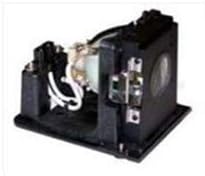
Gambar 1: The Technical Precision Replacement Lamp and Housing for IIYAMA LPS 130. This image shows the complete replacement lamp module, including the bulb and its housing, ready for installation into a compatible projector.
2. Informasi Keselamatan
Harap baca dan pahami semua tindakan pencegahan keselamatan sebelum menangani atau memasang proyektor.amp. Failure to follow these instructions may result in injury or damage to the product or projector.
- Suhu Tinggi: Proyektoramps operate at extremely high temperatures. Always allow the projector and the old lamp to cool down completely (at least 30-60 minutes) before attempting removal or installation.
- Tekanan Tinggi: Proyektoramps contain mercury and are under high pressure. Handle with extreme care. If a lamp breaks, ventilate the room and clean up broken glass and mercury residue carefully, avoiding direct contact. Consult local regulations for disposal.
- Bahaya Sengatan Listrik: Always disconnect the projector from the power outlet before opening the lamp compartment or performing any maintenance.
- Do Not Touch Bulb: Avoid touching the glass part of the new lamp with bare hands. Oils from your skin can cause hot spots and reduce lamp kehidupan. Gunakan sarung tangan atau kain bersih jika perlu.
- Instalasi Profesional: While designed for user replacement, if you are unsure about any step, it is recommended to seek assistance from a qualified technician.
- Kesesuaian: Ini lamp is a replacement for the IIYAMA LPS 130. Using it in incompatible projectors may cause damage.
- Non-OEM Product: This item is a replacement lamp manufactured by Technical Precision and is not an original equipment manufacturer (OEM) product from IIYAMA.
3. Pengaturan dan Instalasi
Follow these steps carefully to replace the projector lamp. Refer to your projector's specific user manual for detailed instructions on accessing the lamp compartment, as procedures may vary by projector model.
- Matikan dan Cabut: Turn off the projector completely and disconnect the power cord from the electrical outlet.
- Biarkan Dingin: Wait at least 30-60 minutes for the projector and the old lamp to cool down. The lamp can be extremely hot immediately after use.
- Temukan Lamp Kompartemen: Identifikasi lamp compartment cover on your projector. This is typically secured by screws.
- Lepaskan Penutup: Use a screwdriver to loosen the screws holding the lamp compartment cover. Carefully remove the cover.
- Hapus L Lamaamp: Loosen the screws that secure the old lamp module (LPS 130 LAMP & HOUSING) in place. Gently pull the handle on the lamp Geser modul tersebut keluar dari proyektor. Jangan dipaksa.
- Pasang L Baruamp: Carefully insert the new Technical Precision Replacement Lamp & Housing (LPS 130 LAMP & HOUSING) into the projector, ensuring it is correctly oriented and fully seated. Do not force it.
- Amankan L Baruamp: Tighten the screws to secure the new lamp modul terpasang.
- Ganti Penutup: Pasang kembali lamp compartment cover and tighten its screws.
- Sambungkan kembali daya: Plug the projector's power cord back into the electrical outlet.
- Setel ulang Lamp Pengatur waktu: Sebagian besar proyektor memiliki alamp timer that needs to be reset after a lamp replacement. Consult your projector's user manual for instructions on how to reset the lamp timer. This step is crucial for accurate lamp life tracking and warning indicators.
4. Mengoperasikan Lamp
Once the Technical Precision Replacement Lamp & Housing is correctly installed and the lamp timer is reset, the lamp will function as an integral part of your IIYAMA LPS 130 projector. The lamp's operation is controlled by the projector's internal systems.
- Nyalakan: Turn on your projector as you normally would. The lamp should illuminate, and an image should be projected.
- Penggunaan Normal: Continue to use your projector according to its manufacturer's instructions.
- Lamp Kehidupan: Lamp has a finite lifespan. The projector's lamp timer will track usage and typically provide warnings as the lamp approaches the end of its life.
For detailed instructions on projector operation, display settings, and input selection, please refer to the original user manual provided with your IIYAMA LPS 130 projector.
5. Pemeliharaan
Proper maintenance can help maximize the lifespan of your projector lamp and ensure optimal projector performance.
- Periode Pendinginan: Always allow the projector to complete its cool-down cycle after turning it off. Do not unplug the projector immediately after turning it off, as this can prevent proper cooling and shorten lamp kehidupan.
- Filter Udara Bersih: Regularly clean or replace your projector's air filters. Clogged filters can lead to overheating, which significantly reduces lamp life. Refer to your projector's manual for filter maintenance.
- Hindari Siklus Hidup/Mati yang Sering: Turning the projector on and off frequently can stress the lamp and shorten its lifespan. Try to minimize unnecessary power cycles.
- Penyimpanan yang Tepat: If you have a spare lamp, store it in its original packaging in a cool, dry place away from direct sunlight and extreme temperatures.
- Penanganan: Saat menangani lamp, always hold it by its housing, not the glass bulb.
6. Penyelesaian masalah
If you encounter issues after installing the new lampPertimbangkan langkah-langkah pemecahan masalah berikut:
| Masalah | Kemungkinan Penyebab | Larutan |
|---|---|---|
| Lamp tidak menyala. |
|
|
| Image is dim or faded. |
|
|
| Lamp warning light is on. |
|
|
If these steps do not resolve the issue, please consult your projector's user manual or contact Technical Precision customer support.
7. Spesifikasi
| Merek | Presisi Teknis |
| Nomor Bagian / Model | LPS 130 LAMP & HOUSING |
| Kesesuaian | Replacement for IIYAMA LPS 130 Projector TV Lamp Bohlam |
| Jumlah Paket Barang | 1 |
| Bahan | Kaca |
| Penggunaan Khusus | Lamp |
| Baterai Termasuk/Diperlukan | TIDAK |
| Jenis Bohlam | Proyektoramps |
| Fluks Bercahaya | 130 lumens |
| Apatage | 130 watt |
| ASIN | B01LXMMO69 |
| Tanggal Pertama Tersedia | 23 Oktober 2016 |
8. Garansi dan Dukungan
For specific warranty information regarding your Technical Precision Replacement Lamp & Housing, please refer to the documentation included with your purchase or contact Technical Precision directly. Warranty terms typically cover manufacturing defects.
If you require technical assistance or have questions not covered in this manual, please contact Technical Precision customer support through their official channels. You can often find contact information on the product packaging or the seller's weblokasi.