
Perkenalan
The Original KW820 Car Scanner Tool is a powerful diagnostic device designed to help technicians and home users accurately diagnose vehicle issues. It supports all nine OBDII test modes on OBDII EOBD compliant vehicles, providing fast and easy access to engine-based fault codes. This manual provides detailed instructions for the proper use and maintenance of your KW820 scanner.
Informasi Keselamatan
Always follow basic safety precautions when operating the KW820 scanner to prevent personal injury or damage to the vehicle or scanner.
- Pastikan kendaraan diparkir pada permukaan datar dengan rem parkir diaktifkan.
- Do not wear loose clothing or jewelry when working near the engine.
- Keep the scanner away from water, oil, and extreme temperatures.
- Never connect or disconnect the scanner while the vehicle's ignition is on, unless instructed otherwise.
- Lihat buku panduan servis kendaraan Anda untuk prosedur diagnostik spesifik dan peringatan keselamatan.
Isi Paket
Verifikasi bahwa semua item yang tercantum di bawah ini disertakan dalam paket Anda:
- 1 x KW820 Code Scanner Unit
- 1 x OBD II Cable
- 1 x Kotak Pembawa
- 1 x Panduan Pengguna (dokumen ini)

Image: The KW820 scanner unit, its OBD II cable, a black carrying case, and the user manual are shown together.
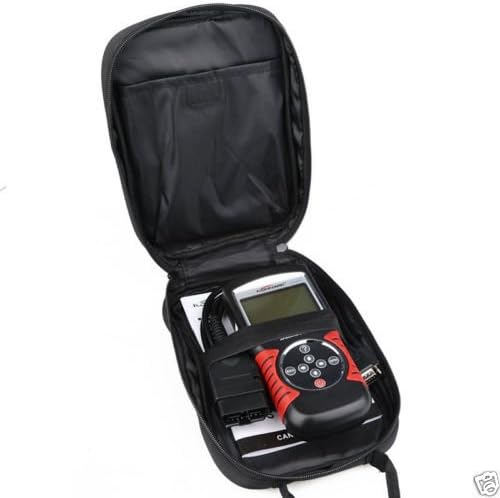
Image: The KW820 scanner and its cable neatly stored inside the zippered carrying case.
Produk Selesaiview
The KW820 scanner features a robust design with an easy-to-read backlit LCD screen and intuitive button layout.

Image: A close-up of the KW820 scanner, highlighting its LCD screen and the circular array of navigation buttons (ESC, ENTER, up, down, left, right) and power button.
- Layar LCD: Large, backlit display for clear viewing of diagnostic information.
- Tombol Navigasi: Used to scroll through menus and data.
- Tombol ENTER: Mengkonfirmasi pilihan atau masuk ke sub-menu.
- Tombol ESC: Kembali ke layar sebelumnya atau membatalkan operasi.
- Tombol Daya: Turns the device on/off (though it primarily powers via OBDII connection).
- OBD II Cable: Connects the scanner to the vehicle's OBD II port.
- Diagnostic Interface: 15-pin connector for the OBD II cable.

Gambar: Sisi A view of the KW820 scanner, clearly showing the 15-pin diagnostic interface where the OBD II cable connects.
Pengaturan
- Temukan Port OBD II: The OBD II port is typically located under the dashboard on the driver's side of the vehicle. Refer to your vehicle's manual if you cannot find it.
- Hubungkan Pemindai: With the vehicle's ignition off, firmly plug the KW820's OBD II cable into the vehicle's OBD II port.
- Nyalakan: Turn the vehicle's ignition to the "ON" position (do not start the engine). The scanner will automatically power on and establish communication with the vehicle's onboard computer.
- Pemilihan Bahasa: If prompted, select your preferred language using the navigation buttons and press ENTER. The scanner supports English, Spanish, French, and German.
Petunjuk Pengoperasian
The KW820 scanner provides various diagnostic functions. Navigate through the menus using the directional buttons and confirm selections with the ENTER button.

Image: The KW820 scanner's screen showing the "OBDII" logo, indicating it is ready for diagnostic operations.
1. Membaca Kode Masalah Diagnostik (DTC)
- From the main menu, select "Read Codes" or a similar option.
- The scanner will display any stored generic (P0, P2, P3, U0) and manufacturer-specific (P1, P3, U1) codes.
- Use the navigation buttons to scroll through the codes and their definitions.
2. Menghapus Kode Masalah Diagnostik (DTC)
Clearing DTCs will turn off the Check Engine Light (MIL) and reset monitors. Ensure the underlying issue has been resolved before clearing codes.
- From the main menu, select "Erase Codes" or "Clear DTCs".
- Konfirmasikan pilihan Anda saat diminta.
- The scanner will clear the codes and reset the vehicle's monitors.
3. Viewmembekukan Data Bingkai
Freeze Frame Data records engine conditions at the moment a DTC was set, providing valuable information for diagnosis.
- Select "Freeze Frame" from the main menu.
- The scanner will display parameters such as engine RPM, vehicle speed, coolant temperature, and fuel system status at the time of the fault.
4. Live PCM Datastream
View real-time sensor data from the vehicle's Powertrain Control Module (PCM).
- Select "Live Data" or "Data Stream" from the main menu.
- The scanner will display various parameters like engine RPM, oxygen sensor voltages, calculated load value, and short-term fuel trim.
- Data can be displayed numerically or graphically (for 1996 and newer vehicles).
5. Status Kesiapan I/M
Check the status of the vehicle's emission-related monitors to determine if the vehicle is ready for an emissions test.
- Pilih "Kesiapan I/M" dari menu utama.
- The scanner will indicate whether each monitor (e.g., O2 Sensor, EVAP System) is "OK" (complete), "INC" (incomplete), or "N/A" (not applicable).
6. O2 Sensor Test Data
Access the results of the oxygen sensor monitor test.
- Select "O2 Sensor Test" from the main menu.
- Review the oxygen sensor readings to diagnose potential issues with the sensor or catalytic converter.
7. Informasi kendaraan
Retrieve important vehicle identification information.
- Select "Vehicle Info" from the main menu.
- The scanner will display the Vehicle Identification Number (VIN), Calibration ID (CIN), and Calibration Verification Number (CVN).
Pemeliharaan
Pembaruan Perangkat Lunak
The KW820 scanner's software is upgradeable via the internet to ensure compatibility with new vehicles and diagnostic protocols.
- Visit the official manufacturer's website (if available, otherwise search for "KW820 software update").
- Download the update software and instructions to your PC.
- Connect the KW820 scanner to your PC using a compatible USB cable (not included, typically a standard mini-USB to USB-A cable).
- Follow the on-screen instructions provided by the update software to complete the process.
Pembersihan
To maintain the scanner's performance and appearance:
- Gunakan yang lembut, damp kain untuk membersihkan bagian luar pemindai.
- Jangan gunakan pembersih atau pelarut yang bersifat abrasif.
- Keep the screen free of dust and smudges for optimal readability.
Penyelesaian Masalah
If you encounter issues with your KW820 scanner, refer to the following common problems and solutions:
- Pemindai tidak menyala:
- Ensure the OBD II cable is securely connected to both the scanner and the vehicle's OBD II port.
- Pastikan kunci kontak kendaraan dalam posisi "ON".
- Check the vehicle's fuse for the OBD II port (refer to your vehicle's manual).
- Pesan "Kesalahan Tautan" atau "Kesalahan Komunikasi":
- Confirm the vehicle supports the OBD II protocol (most vehicles 1996 and newer in the US, Europe, and Asia).
- Ensure the ignition is "ON" and the engine is off.
- Try connecting to a different OBD II compliant vehicle to rule out a vehicle-specific issue.
- Inspect the OBD II cable for any damage.
- Screen is blank or unreadable:
- Adjust the screen contrast if available in the settings menu.
- Ensure the scanner is receiving power.
Spesifikasi
| Fitur | Keterangan |
|---|---|
| Model | KW820 |
| Merek | Asli |
| Protokol yang Didukung | ISO15765-4 (CAN), and all other current OBD-II protocols |
| Antarmuka | 15-pin Diagnostic Interface, Wired Output Protocol |
| Kecepatan Baud | Kecepatan 115200bps |
| Bekerja Voltage | Tegangan DC 12V |
| Panjang Kabel | 56.7 inci (149 cm) |
| Ukuran Layar | 2.8 Inches (backlit LCD) |
| Fitur | Reads/clears DTCs, views freeze frame data, live PCM datastream, O2 sensor test, I/M readiness, vehicle info (VIN, CIN, CVN), multilingual menu, software upgradeable. |
| Compatible Makes | BMW, Volvo, Chevrolet, Universal, Honda, Toyota, VW, Benz, Hyundai, Buick, Audi, Ford, and other OBDII compliant vehicles. |
Mendukung
For further assistance or technical support, please refer to the manufacturer's official website or contact their customer service department. Keep your product model number (KW820) and purchase information readily available when seeking support.