
Technical Precision DMIL-AZ-D89E-7
Technical Precision Replacement for Leica Dmil Light Bulb Instruction Manual
Model: DMIL-AZ-D89E-7 | Brand: Technical Precision
1. Pendahuluan
This manual provides essential information for the safe and effective use of your Technical Precision Replacement for Leica Dmil Halogen Light Bulb. Please read these instructions carefully before installation and retain for future reference.
2. Produk Lebihview
The Technical Precision Replacement for Leica Dmil Light Bulb is a 35W, 6V halogen bulb designed for microscope lighting applications. It features a T3 bulb shape with a 2-pin G4 base, providing clear illumination.
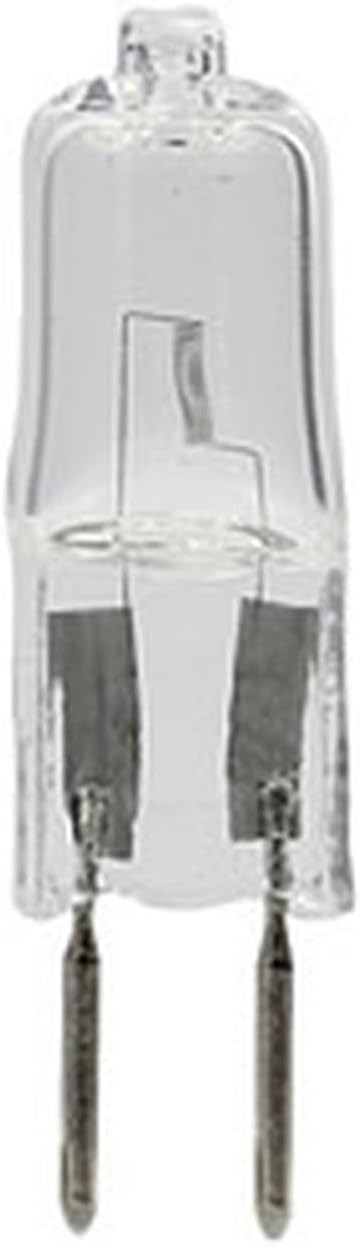
Gambar 2.1: Depan view of the Technical Precision Replacement Halogen Bulb, showing its clear glass and two-pin G4 base.

Gambar 2.2: Sudut view of the Technical Precision Replacement Halogen Bulb, highlighting the internal filament structure.
3. Informasi Keselamatan
Selalu perhatikan tindakan pencegahan keselamatan berikut:
- Risiko Luka Bakar: Lampu halogen beroperasi pada suhu tinggi. Biarkan lampu mendingin sepenuhnya sebelum dipegang.
- Bahaya Sengatan Listrik: Always disconnect power to the fixture before installing, removing, or inspecting the bulb.
- Tangani dengan hati-hati: Avoid touching the glass part of the bulb with bare hands. Oils from your skin can create hot spots, leading to premature failure. Use a clean cloth or gloves when handling.
- Pembuangan yang Benar: Buang bohlam bekas sesuai dengan peraturan setempat.
- Kesesuaian: Ensure the replacement bulb's specifications (voltage, apatage, base type) match the requirements of your equipment.
4. Instalasi
Follow these steps to install the replacement halogen bulb:
- Putuskan Daya: Turn off and unplug the microscope or lighting fixture from the power source.
- Izinkan Pendinginan: If the previous bulb was in use, wait for it to cool down completely to avoid burns.
- Akses Bulb: Buka l dengan hati-hatiamp housing or access panel to expose the old bulb. Refer to your microscope's or fixture's manual for specific instructions on accessing the bulb.
- Lepaskan Bohlam Lama: Gently pull the old bulb straight out from its G4 base. Avoid twisting or bending the pins.
- Pasang Bohlam Baru: Holding the new bulb with a clean cloth or gloves, align the two pins with the holes in the G4 socket. Gently push the bulb straight into the socket until it is firmly seated. Do not force it.
- Perumahan Aman: Close and secure the lamp housing or access panel.
- Pulihkan Daya: Plug the microscope or lighting fixture back into the power source.
5. Operasi
Once installed, the halogen bulb operates as part of your microscope or lighting fixture. Simply turn on the device's power switch to illuminate the bulb. Adjust brightness settings as per your equipment's controls.
6. Pemeliharaan
Halogen bulbs generally require minimal maintenance. However, periodic checks can prolong their lifespan and ensure optimal performance:
- Pembersihan: If the bulb's glass surface becomes dusty or smudged, ensure the bulb is cool and power is disconnected. Gently wipe the glass with a clean, lint-free cloth moistened with rubbing alcohol. Allow to dry completely before re-energizing.
- Inspeksi: Periodically inspect the bulb and its socket for any signs of damage, corrosion, or loose connections. Replace the bulb if the glass is cracked or the filament is broken.
7. Penyelesaian masalah
If the bulb does not light up after installation, consider the following:
- Tidak Ada Daya: Ensure the microscope or lighting fixture is properly plugged in and the power switch is on. Check the power outlet.
- Instalasi yang salah: Verify that the bulb is fully and correctly seated in its socket. The pins must make proper contact.
- Blown Fuse/Circuit Breaker: Check the fuse or circuit breaker for the lighting fixture or the electrical circuit it is connected to.
- Defective Bulb: Although rare, a new bulb can sometimes be defective. If possible, test with another known-good bulb.
- Fixture Issue: If all else fails, the issue might be with the lighting fixture itself (e.g., faulty socket, wiring, or internal component). Consult a qualified technician.
8. Spesifikasi
| Atribut | Nilai |
|---|---|
| Merek | Presisi Teknis |
| Nomor Model | DMIL-AZ-D89E-7 |
| Jenis Cahaya | Halogen |
| Apatage | 35 Watt |
| Jil.tage | 6 Volts (as per product title) |
| Bentuk Bohlam Ukuran | T3 |
| Basis Bohlam | G4 (2-Pin) |
| Kecerahan | 1585 lumen cahaya |
| Jenis Selesai | Jernih |
| Jumlah Satuan | Paket 1 |

Figure 8.1: Lighting Facts for the bulb, detailing brightness, estimated life, and energy usage.
9. Garansi dan Dukungan
For information regarding warranty, returns, or technical support, please refer to the official Technical Precision webAnda dapat mengunjungi situs web mereka atau menghubungi layanan pelanggan mereka secara langsung. Anda juga dapat mengunjungi situs web tersebut. Technical Precision Store on Amazon untuk lebih jelasnya.
Ask a question about this manual
Ask about setup, troubleshooting, compatibility, parts, safety, or missing instructions. Manuals+ will review the question and use this page’s manual context to help answer it.