
Perkenalan
This manual provides essential information for the safe and effective use of your Technical Precision replacement light bulb for the Bell & Howell TDC Headliner 303 projector. Please read these instructions carefully before installation and retain for future reference.
Informasi Keselamatan
- Pemutusan Daya: Always ensure the projector is unplugged from the power source before attempting any installation or maintenance.
- Periode Pendinginan: Allow the old bulb to cool completely before handling to prevent burns.
- Tangani dengan hati-hati: Light bulbs, especially incandescent types, are fragile. Avoid touching the glass portion of the new bulb directly with bare hands, as oils can create hot spots and reduce bulb life. Use a clean cloth or gloves.
- Benar Apatage/Voltage: Ensure the replacement bulb matches the specifications of your projector to prevent damage or malfunction. This bulb is rated for 300 watts and 125 volts.
- Pembuangan: Buang bohlam bekas sesuai dengan peraturan setempat.
Produk Selesaiview
This product is a direct replacement incandescent light bulb designed for the Bell & Howell TDC Headliner 303 projector. It features a tubular shape with a clear finish and a copper base.

Gambar: Depan view of the Technical Precision replacement light bulb, showing its tubular shape and base.
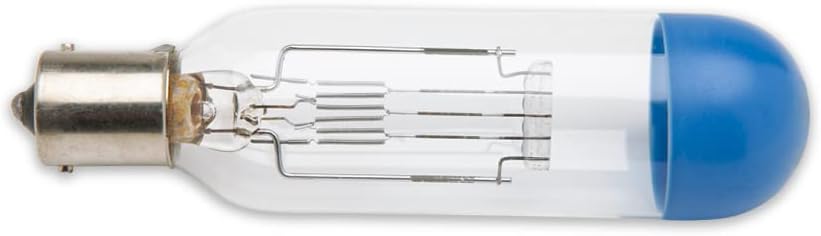
Gambar: Samping view of the replacement light bulb, highlighting the internal filament structure and the blue-capped end.
Pengaturan dan Instalasi
- Matikan: Ensure the Bell & Howell TDC Headliner 303 projector is completely turned off and unplugged from the electrical outlet.
- Pendinginan: Allow sufficient time for the projector and the old bulb to cool down. This can take several minutes.
- Access Bulb Compartment: Refer to your Bell & Howell TDC Headliner 303 projector's original manual for instructions on how to safely access the lamp compartment. This usually involves opening a cover or panel.
- Lepaskan Bohlam Lama: Carefully remove the old bulb. Depending on the projector model, this might involve twisting, pulling, or releasing a clip. Handle the old bulb by its base if possible.
- Pasang Bohlam Baru: Using a clean cloth or gloves, gently insert the new Technical Precision replacement bulb into the socket. Ensure it is seated firmly and correctly. Do not force the bulb.
- Kompartemen Aman: Close and secure the lamp compartment cover or panel.
- Nyalakan: Plug the projector back into the electrical outlet and turn it on to test the new bulb.
Petunjuk Pengoperasian
Once the replacement bulb is installed, operate your Bell & Howell TDC Headliner 303 projector as per its original operating instructions. The Technical Precision bulb is designed to function identically to the original bulb.
- Penyalaan Awal: After installation, turn on the projector. The bulb should illuminate immediately.
- Kecerahan: The bulb provides 300 watts of illumination, ensuring optimal brightness for your projector.
- Siklus Pendinginan: Always allow the projector's internal fan to complete its cool-down cycle after turning off the projector. This helps extend the life of the bulb.
Pemeliharaan
Proper maintenance can extend the life of your projector and the replacement bulb.
- Pembersihan: Periodically clean the projector's air filters to ensure proper ventilation and prevent overheating, which can shorten bulb life.
- Penanganan Bohlam: When replacing the bulb, always use a clean, lint-free cloth or gloves to avoid leaving fingerprints or oils on the glass, which can cause premature failure.
- Penyimpanan: If storing the projector for an extended period, ensure it is in a cool, dry place.
Penyelesaian Masalah
| Masalah | Kemungkinan Penyebab | Larutan |
|---|---|---|
| Bohlam tidak menyala. | Projector not plugged in or turned on. Bulb not seated correctly. Faulty bulb. Projector issue. | Check power connection and switch. Re-seat the bulb firmly. If still not working, contact Technical Precision support or a qualified technician. |
| Bohlam cepat terbakar. | Overheating due to poor ventilation. Fingerprints/oils on bulb glass. Incorrect voltage. | Clean projector filters. Ensure proper handling during installation. Verify projector voltage matches bulb specifications. |
| Dim or inconsistent light. | Bulb nearing end of life. Projector optics dirty. | Replace bulb if it has many hours of use. Clean projector lenses and mirrors (refer to projector manual). |
Spesifikasi
- Merek: Presisi Teknis
- Model: TDC HEADLINER 303 (Replacement)
- Jenis: Bohlam Pijar
- Apatage: 300 Watt
- Jil.tage: 125 Volt
- Membentuk: Berbentuk tabung
- Bahan: Copper (base), Glass (bulb)
- Menyelesaikan: Jernih
- Suhu Warna: 3200 Kelvin
- Komponen yang Termasuk: 1 Replacement Part
Garansi dan Dukungan
For warranty information or technical support regarding your Technical Precision replacement bulb, please contact Technical Precision directly. Refer to the contact information provided with your purchase or visit the official Technical Precision weblokasi.
Anda juga dapat mengunjungi Technical Precision Store on Amazon untuk informasi lebih lanjut.
Informasi Tambahan

Image: Technical Precision brand banner with the slogan "Bringing Energy to Life!".
Technical Precision specializes in providing unique lighting and energy solutions. For a wider range of products, please visit their storefront.