
1. Pendahuluan
Thank you for choosing the HTC USB Type-C Hi-Res Earphones, Model 99H20317-00. These earphones are designed to provide a high-quality audio experience with their advanced features and ergonomic design. This manual provides essential information for the proper setup, operation, maintenance, and troubleshooting of your new earphones.
Fitur utama meliputi:
- Concert hall design for unparalleled sound.
- Larger 13mm speakers for a fuller sound profile.
- Enhanced port optimization for improved bass reproduction.
- Lighter and thinner aerospace polymer diaphragm to increase sound frequency response.
- Ergonomic design for maximum comfort during extended use.
2. Informasi Keselamatan
Please read and follow these safety guidelines to ensure safe and optimal use of your earphones:
- Perlindungan Pendengaran: Hindari mendengarkan dengan volume tinggi dalam waktu lama untuk mencegah kerusakan pendengaran.
- Kesadaran lingkungan: Jangan gunakan earphone dalam situasi di mana ketidakmampuan mendengar suara sekitar dapat membahayakan, seperti saat mengemudi, bersepeda, atau berjalan di tengah kemacetan.
- Pembersihan: Clean the earphones regularly with a soft, dry cloth. Do not use liquid cleaners or solvents.
- Paparan Air: Earphone ini tidak tahan air. Hindari paparan air atau kelembapan berlebihan.
- Anak-anak: Jauhkan dari jangkauan anak kecil karena terdapat bagian-bagian kecil yang dapat menyebabkan bahaya tersedak.
3. Isi Paket
Verifikasi bahwa semua item ada dalam paket Anda:
- HTC USB Type-C Hi-Res Earphones (Model: 99H20317-00)
- Additional ear tips (if included)
- User Manual (dokumen ini)
4. Pengaturan
These earphones are designed for simple plug-and-play operation.
- Menghubungkan: Insert the USB Type-C connector of the earphones into the USB Type-C port of your compatible device (Smartphone, Laptop, Tablet).
- Pengenalan Perangkat: Your device should automatically recognize the earphones. If prompted, select the earphones as the audio output device.
- Sesuaikan Volume: Begin playback at a low volume and gradually increase to a comfortable listening level.
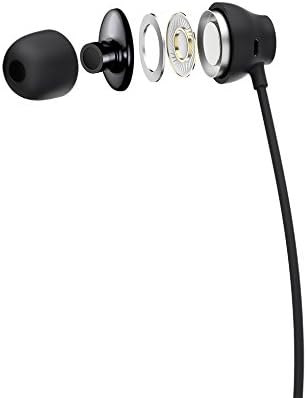
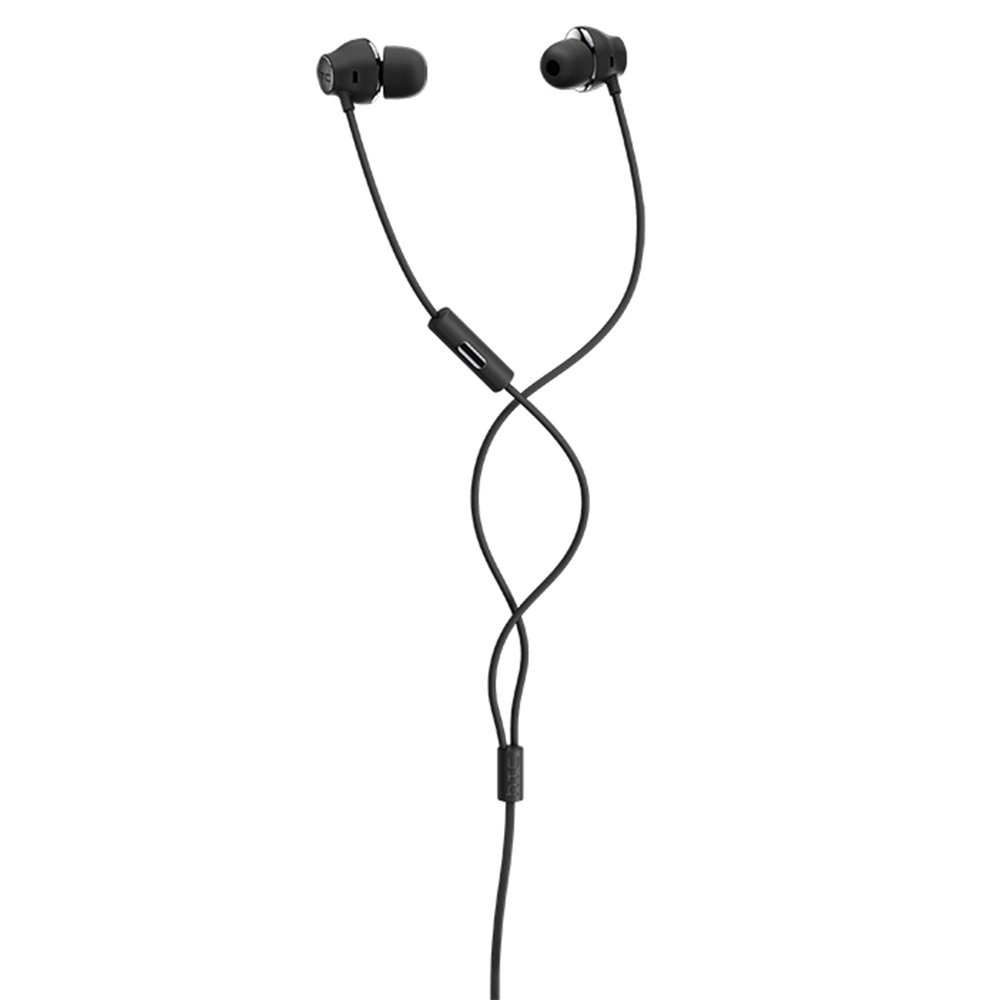
Figure 1: HTC USB Type-C Hi-Res Earphones connected to a device.
5. Petunjuk Pengoperasian
Once connected, your earphones are ready for use.
- Pemutaran Audio: Play audio from your connected device. The sound will be routed through the earphones.
- Manajemen Panggilan: For devices supporting call functions, you can typically answer/end calls using the device's interface.
- Kontrol Aplikasi: This model supports control via an application. Refer to your device's app store for any official HTC audio control applications that may offer additional features or sound customization.
6. Pemeliharaan dan Perawatan
Proper care extends the lifespan of your earphones:
- Tips Membersihkan Telinga: Gently remove ear tips and clean them with a mild soap solution and water. Ensure they are completely dry before reattaching.
- Cara Membersihkan Bodi Earphone: Wipe the earphone body and cable with a soft, dry, lint-free cloth. Do not use abrasive materials or harsh chemicals.
- Penyimpanan: When not in use, store the earphones in a clean, dry place, preferably in a protective pouch to prevent tangling and damage.
- Manajemen Kabel: Avoid tightly winding the cable or subjecting it to sharp bends, which can damage internal wires.
Gambar 2: Meledak view of earphone components, highlighting the 13mm speaker and aerospace polymer diaphragm.
7. Penyelesaian masalah
Jika Anda mengalami masalah, lihat masalah umum dan solusi berikut:
| Masalah | Kemungkinan Penyebab | Larutan |
|---|---|---|
| Tidak ada suara | Earphones not properly connected; device volume too low; incorrect audio output selected on device. | Ensure the USB Type-C connector is fully inserted. Increase device volume. Check device audio settings to confirm earphones are selected as output. |
| Kualitas suara buruk | Dirty ear tips; damaged cable; low-quality audio source. | Clean ear tips. Inspect the cable for visible damage. Try a different audio source or file. |
| Earphones uncomfortable or fall out | Ukuran ujung earphone tidak sesuai. | Try different sized ear tips (if provided) to find the best fit for your ears. |
8. Spesifikasi
| Fitur | Detil |
|---|---|
| Merek | HTC |
| Nomor Model | 99H20317-00 |
| Teknologi Konektivitas | Berkabel (USB Tipe-C) |
| Ukuran Speaker | 13 mm |
| Bahan | Synthetic leather (ear tips/housing accents) |
| Berat | 50 gram |
| Dimensi Produk | 0.1 x 0.1 x 0.1 cm (packaging/shipping dimensions, actual earphone size is compact) |
| Metode Kontrol | Aplikasi |
| Dukungan Bluetooth | TIDAK |
| Baterai Diperlukan | TIDAK |
| Perangkat yang Kompatibel | Smartphone, Laptop, Tablet with USB Type-C audio output |
| Warna | Abu-abu gelap |
| Penempatan Telinga | Di telinga |
9. Garansi dan Dukungan
For warranty information and technical support, please refer to the documentation provided with your purchase or visit the official HTC support websitus. Simpan bukti pembelian Anda untuk klaim garansi.