
Unknown Yu- TLXgo-2201
Wireless Bluetooth Headset User Manual
Model: Yu- TLXgo-2201 | Brand: Unknown
Perkenalan
Terima kasih sudah membeliasing the Wireless Bluetooth Headset. This manual provides essential information for the proper use, setup, and maintenance of your new headset. Please read it thoroughly before use to ensure optimal performance and longevity of the product.
Isi Paket
Harap verifikasi bahwa semua item yang tercantum di bawah ini disertakan dalam paket Anda:
- Wireless Bluetooth Headset (2 units)
- Kabel Pengisian USB (2 unit)
- Panduan Pengguna

Image: Contents of the headset package, showing one black headset and a white USB charging cable.
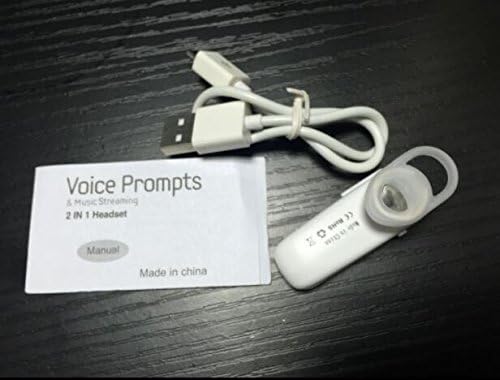
Image: Contents of the headset package, showing one white headset, a white USB charging cable, and the printed user manual.
Produk Selesaiview
The Wireless Bluetooth Headset is designed for convenience and portability, ideal for sports, driving, and daily use. It features a super mini design and supports voice prompts and music streaming.

Gambar: Depan view of the product packaging, displaying the black wireless Bluetooth headset inside its clear plastic casing.
Spesifikasi
| Fitur | Keterangan |
|---|---|
| Versi Bluetooth | V3.0 + EDR |
| Dukungan Profiles | Headset, Handsfree, A2DP |
| Talk Time/Playing Time | Hingga 5 jam |
| Waktu Siaga | Hingga 80 jam |
| Sumber Daya | Baterai Li-ion Isi Ulang Terpadu |
| Teknologi Konektivitas | Nirkabel |
| Faktor Bentuk | Di Telinga |
| Berat Barang | 15.8 ounces (for 2 units) |
| Dimensi Paket | 1.97x1.57x1.18 inci |
| Nomor Model | Yu- TLXgo-2201 |

Image: Back of the product packaging, displaying a list of product specifications including Bluetooth version, talk time, and power source.
Pengaturan
Mengisi Daya Headset
- Hubungkan ujung kecil kabel pengisi daya USB ke port pengisian daya pada headset.
- Hubungkan ujung kabel pengisi daya USB yang lebih besar ke sumber daya USB (misalnya, port USB komputer, adaptor dinding USB).
- The indicator light on the headset will illuminate during charging. It will change color or turn off once fully charged.
- Pengisian daya penuh biasanya memakan waktu sekitar 1-2 jam.
Memasangkan dengan Perangkat Bluetooth
- Ensure the headset is fully charged before initial pairing.
- With the headset turned off, press and hold the Multi-function Button (MFB) for approximately 5-7 seconds until the indicator light flashes red and blue alternately. This indicates the headset is in pairing mode.
- On your Bluetooth-enabled device (smartphone, tablet, etc.), go to the Bluetooth settings and ensure Bluetooth is enabled.
- Pencarian untuk available devices. The headset should appear in the list, typically named "MBT2013" or similar.
- Select the headset from the list to connect. If prompted for a password, enter "0000" (four zeros).
- Once successfully paired, the indicator light will stop flashing and may show a steady blue light, and you may hear a voice prompt confirming the connection.
- The headset will automatically connect to the last paired device when turned on, if the device's Bluetooth is active and within range.
Petunjuk Pengoperasian
Daya Hidup/Mati
- Nyalakan: Press and hold the Multi-function Button (MFB) for about 3 seconds until the blue indicator light flashes and you hear a voice prompt.
- Matikan: Press and hold the MFB for about 3-4 seconds until the red indicator light flashes and you hear a voice prompt.
Manajemen Panggilan
- Menjawab Panggilan: Tekan MFB sekali.
- Akhiri Panggilan: Tekan tombol MFB sekali selama panggilan berlangsung.
- Tolak Panggilan: Press and hold the MFB for about 2 seconds during an incoming call.
- Panggil Ulang Nomor Terakhir: Double-press the MFB when not on a call.
Putar Musik
- Putar/Jeda: Press the MFB once during music playback.
Note: Volume control may be managed directly from your connected device.
Pemeliharaan
- Pembersihan: Gunakan kain lembut dan kering untuk membersihkan headset. Jangan gunakan bahan kimia keras atau bahan abrasif.
- Penyimpanan: Simpan headset di tempat yang sejuk dan kering, jauhkan dari sinar matahari langsung dan suhu ekstrem.
- Perawatan Baterai: To prolong battery life, charge the headset regularly, even if not in frequent use. Avoid fully discharging the battery for extended periods.
- Tahan Air: Headset ini tidak tahan air. Hindari paparan air atau kelembapan berlebihan.
Penyelesaian Masalah
- Headset tidak menyala:
- Pastikan headset terisi penuh. Sambungkan ke sumber daya dan coba lagi.
- Tidak dapat dipasangkan dengan perangkat:
- Ensure the headset is in pairing mode (red and blue lights flashing alternately). Make sure Bluetooth is enabled on your device and it is within range (typically 10 meters). Try restarting both the headset and your device.
- Tidak ada suara atau kualitas suara buruk:
- Check the volume levels on both the headset and your connected device. Ensure the headset is properly connected to your device. Move closer to your device to avoid interference.
- Headset sering terputus:
- Ensure the headset is within range of your device. Check for potential interference from other wireless devices. Try re-pairing the headset.
Informasi Keselamatan
- Do not disassemble, repair, or modify the headset. This may cause fire, electronic breakdown, or complete damage to the product.
- Jauhkan headset dari suhu ekstrem, kelembapan, dan zat korosif.
- Hindari menjatuhkan atau membenturkan headset ke benda keras.
- Do not expose the headset to open flames or dispose of it in fire.
- Buang produk dan baterainya secara bertanggung jawab sesuai dengan peraturan setempat.
Garansi dan Dukungan
Untuk informasi garansi atau dukungan teknis, silakan merujuk ke detail kontak yang diberikan oleh pengecer Anda atau situs resmi produsen. websitus. Harap simpan bukti pembelian Anda untuk klaim garansi.
Ask a question about this manual
Ask about setup, troubleshooting, compatibility, parts, safety, or missing instructions. Manuals+ will review the question and use this page’s manual context to help answer it.