
1. Pendahuluan
Thank you for choosing the EXMAX® EXG-108 Wireless Portable Pocket DSP FM Stereo Radio Digital Receiver. This compact and versatile device is designed for various applications, including tour guiding, teaching, meetings, and personal listening. It features advanced Digital Signal Processing (DSP) technology for enhanced reception and clear audio. Please read this manual carefully before operating the device to ensure proper use and optimal performance.
2. Produk Lebihview
2.1 Isi Paket
- EX102 FM Radio Receiver (Gray)
- In-ear Stereo Earphone
- Tali gantungan
- Panduan Pengguna Bahasa Inggris
2.2 Fitur Utama
- Pocket Portable Design: Compact and lightweight for easy carrying.
- FM Frequency Range: Supports FM broadcast reception (no AM).
- DSP Technology: Utilizes Digital Signal Processing for improved sensitivity and signal analysis.
- 5 Station Presets: Manually store and quickly access five favorite FM stations.
- Mono/Stereo Selectable: Choose between mono and stereo audio output.
- 24-Hour Digital Clock: Integrated clock display.
- 30-Level Volume Control: Precise audio level adjustment.
- Lock Switch: Prevents accidental operation.
- 3.5mm Headphone Jack: For connecting the included earphone or other compatible headphones.
- Detachable Battery Power Supply: Powered by 2 AAA batteries (not included).
- Durable ABS Plastic Material: Sturdy and long-lasting construction.
2.3 Diagram Produk

Figure 2.3.1: EXMAX EXG-108 Receiver with labeled components.
- Kunci stasiun 1
- Kunci stasiun 2
- Kunci stasiun 3
- Kunci stasiun 4
- Station 5 key/time-setting key
- Channel memory key (MEM)
- Volume key (reduction) (VOL-)
- Lock key (LOCK)
- Frequency/time minus (TUN-)
- Stereo/mono switch key (S/M)
- Frequency/time plus (TUN+)
- Volume key (increase) (VOL+)
- Power on/off key (Power button)
- Layar tampilan
- Klip sabuk
- Lubang tali
- Soket headphone 3.5 mm

Figure 2.3.2: EXMAX EXG-108 Receiver showing compact size and dimensions (93mm/3.7in height, 52mm/2.1in width, 23mm/0.9in depth).
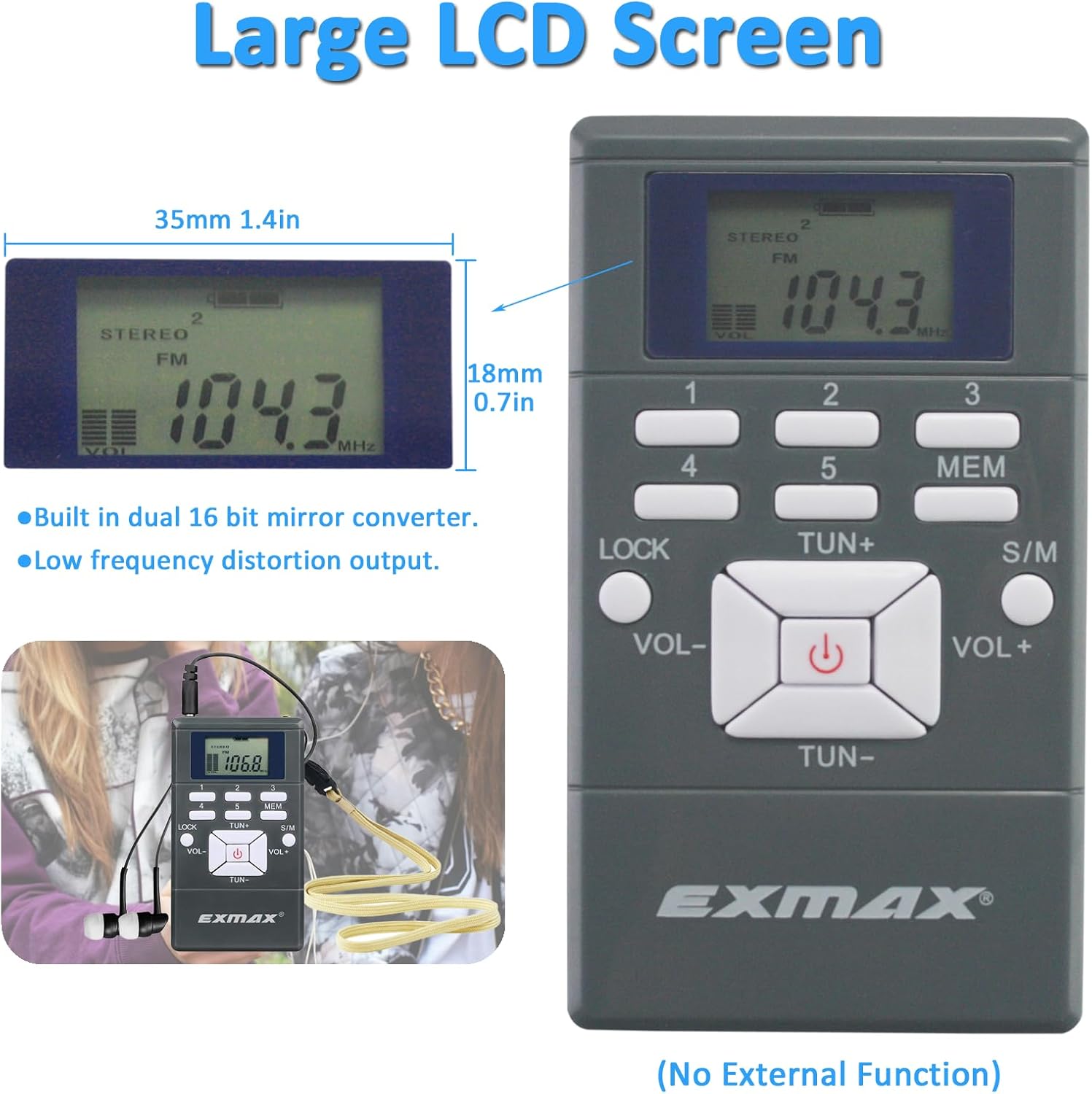
Figure 2.3.3: EXMAX EXG-108 Receiver's large LCD screen, measuring 35mm (1.4in) wide and 18mm (0.7in) high.
3. Pengaturan
3.1 Pemasangan Baterai

Figure 3.1.1: EXMAX EXG-108 Receiver with open battery compartment.
- Buka penutup baterai di bagian belakang penerima.
- Insert two AAA batteries (not included) into the compartment, ensuring correct polarity (+/-).
- Tutup penutup baterai dengan rapat.
Catatan: If the screen becomes unstable or the power is low, replace the batteries.
3.2 Connecting Earphones and Lanyard
- Insert the 3.5mm plug of the included earphone into the headphone jack on the side of the receiver.
- Attach the lanyard to the designated lanyard hole for convenient carrying around the neck.
4. Petunjuk Pengoperasian
4.1 Daya Hidup/Mati
- To turn on the receiver, press the Kekuatan button (13) located in the center of the control panel.
- To turn off the receiver, press and hold the Kekuatan button (13) for a few seconds until the display turns off.
4.2 Kontrol Volume
- Untuk menambah volume, tekan tombol VOL+ tombol (12).
- Untuk mengecilkan volume, tekan tombol VOL- tombol (7).
- The receiver offers 30 levels of volume adjustment.
4.3 Station Searching

Figure 4.3.1: EXMAX EXG-108 Receiver illustrating manual, automatic, and preset station searching.
- Penyetelan Manual: Tekan tombol TUN+ button (11) to search for channels upwards or the TONG BESAR- button (9) to search for channels downwards.
- Penyetelan Otomatis: Tekan dan tahan tombol TUN+ button (11) for 2 seconds to start automatic upward channel searching. Press and hold the TONG BESAR- button (9) for 2 seconds for automatic downward channel searching. The search will stop automatically once a station is found.
4.4 Stasiun Preset
The receiver allows you to store up to 5 favorite stations for quick access.
- Untuk Menyelamatkan Sebuah Stasiun: Tune to the desired FM station. Press the MEM button (6). Then, press one of the number keys Nomor telepon 1-5 (1, 2, 3, 4, 5) to save the current station to that preset number.
- Untuk Mengingat Kembali Sebuah Stasiun: Simply press the corresponding number key Nomor telepon 1-5 (1, 2, 3, 4, 5) to quickly select a stored station.
4.5 Mono/Stereo Selection
- Tekan tombol Ukuran S/M button (10) to switch between mono and stereo audio output. The display will indicate the current mode.
4.6 Mengatur Jam
Radio mengadopsi format waktu 24 jam. Ini mulai berjalan dari pukul 12:00 saat Anda memasang baterai.
- Klik tombol 5 key (5) once or twice. The screen digits (Hour/Minutes) will start flashing.
- Gunakan TUN+ tombol (11) atau TONG BESAR- button (9) to increase or decrease the numbers.
- Tekan tombol 5 key (5) again to confirm the setting.
4.7 Sakelar Kunci
- Untuk mencegah penekanan tombol yang tidak disengaja, geser KUNCI switch (8) to the locked position.
- To unlock, slide the KUNCI switch (8) back to the unlocked position.
5. Pemeliharaan
- Pembersihan: Use a soft, dry cloth to clean the surface of the receiver. Do not use abrasive cleaners or solvents.
- Perawatan Baterai: Lepaskan baterai jika perangkat tidak akan digunakan dalam jangka waktu lama untuk mencegah kebocoran.
- Penyimpanan: Simpan penerima di tempat yang sejuk dan kering, jauhkan dari sinar matahari langsung dan suhu ekstrem.
- Avoid dropping the device or exposing it to water or excessive moisture.
6. Penyelesaian masalah
| Masalah | Kemungkinan Penyebab | Larutan |
|---|---|---|
| Tidak ada daya/Perangkat tidak menyala. | Baterai mati atau tidak terpasang dengan benar. | Ganti baterai dengan yang baru, pastikan polaritasnya benar. |
| Penerimaan sinyal buruk/Gangguan statis. | Weak signal, interference, or earphone not fully inserted. | Move to an area with better signal. Ensure earphone is fully plugged in as it acts as the antenna. Try automatic tuning. |
| Tidak ada suara dari earphone. | Volume too low, earphones faulty, or not properly connected. | Increase volume. Check earphone connection. Try different earphones. |
| Tombol tidak responsif. | Saklar pengunci terpasang. | Lepaskan sakelar pengunci. |
7. Spesifikasi
| Fitur | Detil |
|---|---|
| Dimensi Produk | 2.13 x 0.9 x 3.7 inci (5.4 x 2.3 x 9.4 cm) |
| Berat Barang | 5.6 ons (158.7 gram) |
| Nomor Model | EX102ReceiverGray |
| Merek | EXMAX |
| Warna | Gray (2 Receivers pack) |
| Fitur Khusus | Portabel |
| Teknologi Konektivitas | Auxiliary (3.5mm headphone jack) |
| Teknologi Penyetel | FM |
| Gaya | Kompak |
| Sumber Daya | Ditenagai baterai (2 x AAA, tidak termasuk) |
| Band Radio Didukung | FM |
| Tanggal Pertama Tersedia | 18 Juli 2017 |
8. Garansi dan Dukungan
8.1 Informasi Garansi
EXMAX provides a Garansi 24 bulan from the date of purchase for this product. This warranty covers manufacturing defects and issues arising from normal use. Please retain your proof of purchase for warranty claims.
8.2 Dukungan Pelanggan
For any questions, technical assistance, or warranty claims, please contact EXMAX customer support. Refer to the contact information provided with your product packaging or visit the official EXMAX websitus untuk rincian lebih lanjut.