
Perkenalan
Terima kasih sudah membeliasing the SAMVIX BT Box BASS X65 Wireless Bluetooth Speaker System. This manual provides essential information for setting up, operating, and maintaining your speaker. Please read it carefully to ensure optimal performance and longevity of your device.
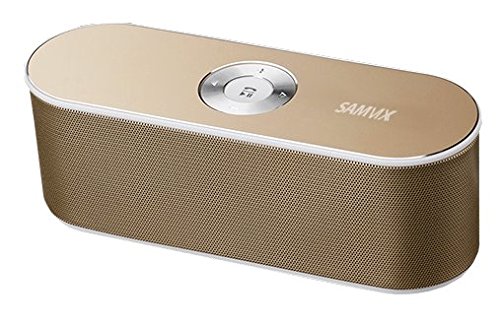
Image: The SAMVIX BT Box BASS X65 speaker in gold, positioned next to a laptop and a smartphone, demonstrating its portable design and connectivity.
Produk Selesaiview: Kontrol dan Port
Familiarize yourself with the speaker's controls and connection ports for proper operation.

Image: A detailed diagram illustrating the top and rear panels of the SAMVIX BT Box BASS X65 speaker, labeling the 3.5mm audio port, Line In/On/Off switch, USB port, Micro SD port, Micro USB input, and the central control buttons for volume, track navigation, and play/pause/answer.
- Central Control Buttons:
- Putar/Jeda/Jawab: Tekan untuk memutar atau menjeda musik. Tekan untuk menjawab atau mengakhiri panggilan.
- Meneruskan: Tekan untuk melompat ke trek berikutnya.
- Sebelumnya: Tekan untuk pergi ke trek sebelumnya.
- Peningkatan Volume: Tekan untuk meningkatkan volume.
- Penurunan Volume: Tekan untuk mengurangi volume.
- 3.5 mm Audio Port (AUX-IN): Untuk koneksi kabel ke perangkat audio.
- Line In / On / Off Switch: Power switch for the speaker.
- Port USB: Untuk memutar musik dari flash drive USB.
- Micro SD Port (TF Card): Untuk memutar musik dari kartu Micro SD.
- Micro USB Input (DC IN): Untuk mengisi daya speaker.
Pengaturan
1. Mengisi Speaker
Before first use, fully charge the speaker. Connect the provided Micro USB cable to the speaker's Micro USB Input port and the other end to a USB power source (e.g., computer USB port, USB wall adapter). The charging indicator will illuminate during charging and turn off when fully charged. A full charge provides approximately 8 hours of playback at 50% volume.
2. Menghidupkan/Mematikan
Locate the Line In / On / Off switch on the rear panel. Slide the switch to the 'On' position to power on the speaker. Slide it to 'Off' to power off.
Petunjuk Pengoperasian
1. Pemasangan Bluetooth
To connect your speaker wirelessly via Bluetooth:
- Pastikan speaker dalam keadaan menyala. Speaker akan secara otomatis memasuki mode pemasangan Bluetooth, yang ditunjukkan oleh lampu LED yang berkedip.
- Pada telepon pintar, tablet, atau perangkat lain yang mendukung Bluetooth, buka pengaturan Bluetooth.
- Pencarian untuk available devices and select "SAMVIX X65" (or similar) from the list.
- Setelah terhubung, speaker akan mengeluarkan nada konfirmasi, dan lampu LED akan berhenti berkedip.

Image: A silver SAMVIX BT Box BASS X65 speaker next to a smartphone, illustrating the wireless Bluetooth connection process.
The speaker has a wireless Bluetooth range of up to 100 unobstructed feet.
2. Koneksi AUX-IN
For devices without Bluetooth, use the 3.5mm audio port:
- Connect one end of a 3.5mm audio cable (not included) to the speaker's 3.5 mm Audio Port.
- Hubungkan ujung lainnya ke jack headphone atau output audio perangkat Anda.
- Speaker akan otomatis beralih ke mode AUX.
3. Pemutaran dari USB Flash Drive
Untuk memutar musik dari flash drive USB:
- Masukkan flash drive USB yang berisi audio filemasukkan ke dalam Port USB.
- The speaker will automatically detect the drive and begin playing music.
4. Pemutaran Kartu Micro SD
To play music from a Micro SD (TF) card:
- Insert a Micro SD card containing audio files into the Micro SD Port.
- Speaker akan secara otomatis mendeteksi kartu dan mulai memutar musik.

Image: A blue SAMVIX speaker in a living room, with graphics indicating its multi-function music capabilities including USB Flash, TF Micro Card, Audio AUX, and Wireless BT inputs.
5. Fungsi Speakerphone
When connected via Bluetooth, the speaker can be used as a speakerphone:
- Menjawab Panggilan: Press the central Play/Pause/Answer button once.
- Mengakhiri Panggilan: Press the central Play/Pause/Answer button once during a call.
- Menolak Panggilan: Press and hold the central Play/Pause/Answer button.
Pemeliharaan
- Jauhkan speaker dari air, kelembapan, dan suhu ekstrem.
- Bersihkan speaker dengan kain lembut dan kering. Jangan gunakan pembersih atau pelarut abrasif.
- Hindari menjatuhkan speaker atau membuatnya terkena benturan keras.
- Saat tidak digunakan dalam jangka waktu lama, simpan speaker di tempat yang sejuk dan kering, serta isi daya secara berkala untuk menjaga kesehatan baterai.
Penyelesaian Masalah
| Masalah | Kemungkinan Penyebab | Larutan |
|---|---|---|
| Speaker tidak menyala. | Baterai habis. | Charge the speaker for at least 2-3 hours. |
| Tidak dapat dipasangkan melalui Bluetooth. | Speaker tidak dalam mode berpasangan atau terlalu jauh dari perangkat. | Ensure speaker is on and in pairing mode. Move speaker closer to the device (within 10m/33ft). Restart both devices. |
| Tidak ada suara. | Volume terlalu rendah, mode input tidak tepat, atau perangkat tidak memutar musik. | Increase speaker and device volume. Ensure correct input mode (Bluetooth, AUX, USB, SD) is selected. Check if the source device is playing audio. |
| Kualitas audio yang buruk. | Device too far, interference, or low battery. | Move device closer to speaker. Avoid obstacles. Charge the speaker. |
Spesifikasi
| Fitur | Detil |
|---|---|
| Nama Model | BT Box BASS X65 |
| Merek | SAMVIX |
| Teknologi Konektivitas | Bluetooth, Tambahan, USB |
| Versi Bluetooth | 4.0 |
| Range Nirkabel | Hingga 100 kaki (tanpa halangan) |
| Daya Keluaran Speaker | 6 Watts (3W + 3W) |
| Jenis Baterai | 1500mAh Lithium-ion (rechargeable) |
| Daya Tahan Baterai | Hingga 8 jam (pada volume 50%) |
| Masukan | Micro USB (charging), USB (playback), Micro SD (playback), 3.5mm AUX-IN |
| Ukuran | Ukuran kurang lebih 20 cm (Panjang) x 7.5 cm (Lebar) x 6 cm (Tinggi) |
| Berat | 128 gram |
| Jenis Pembicara | Outdoor/Indoor Portable |
| Fitur Khusus | Built-in Microphone (Speakerphone) |
Garansi dan Dukungan
SAMVIX offers a full warranty on its Bluetooth speaker range. If you encounter any issues or are not completely satisfied with your purchase, please contact SAMVIX customer support for assistance. Refer to your purchase documentation for specific warranty terms and contact information.