
Sephia A11
Sephia A11 Portable Bluetooth Speaker
Panduan Pengguna
Perkenalan
Thank you for choosing the Sephia A11 Portable Bluetooth Speaker. This manual provides essential information for setting up, operating, and maintaining your speaker to ensure optimal performance and longevity. The Sephia A11 offers versatile connectivity options, including Bluetooth, USB, Micro SD, and AUX input, delivering clear and powerful audio in a compact design.
Apa yang ada di dalam kotak
- Sephia A11 Bluetooth Speaker
- Kabel Pengisian Daya
- Kabel Aux
- User Manual (dokumen ini)

Image: The Sephia A11 Portable Bluetooth Speaker, showcasindengan desain hitam ramping dan gril depan.
Produk Selesaiview
Familiarize yourself with the buttons and ports on your Sephia A11 speaker.
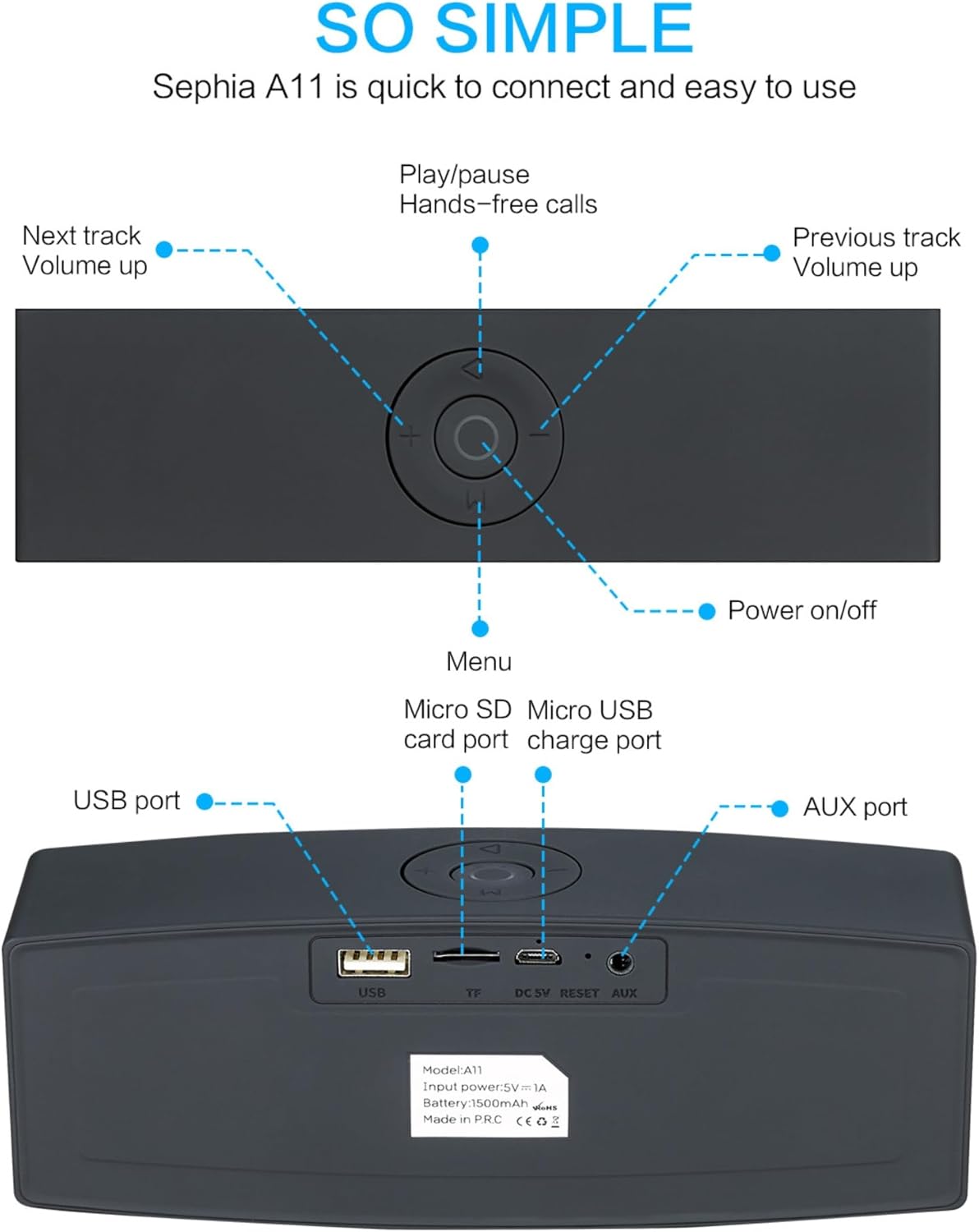
Image: Detailed diagram illustrating the top control panel and rear input/output ports of the Sephia A11 speaker.
Kontrol Atas:
- Tombol Daya Hidup/Mati: Tekan dan tahan untuk menghidupkan atau mematikan speaker.
- Tombol Putar/Jeda: Press to play or pause audio. Also used for hands-free calls (answer/end).
- Previous Track / Volume Down Button (-): Tekan sebentar untuk lagu sebelumnya, tekan lama untuk mengecilkan volume.
- Next Track / Volume Up Button (+): Tekan sebentar untuk lagu berikutnya, tekan lama untuk menaikkan volume.
- Tombol Menu (M): Press to switch between input modes (Bluetooth, USB, Micro SD, AUX).
Port Belakang:
- Port USB: For playing audio from a USB drive or charging external devices.
- Micro SD Card Slot (TF): Untuk memutar audio dari kartu Micro SD.
- Micro USB Charge Port (DC 5V): Untuk mengisi daya speaker.
- Tombol Reset: Lubang kecil untuk mengatur ulang perangkat jika diperlukan.
- Pelabuhan AUX: For wired audio connection using the provided 3.5mm AUX cable.
Pengaturan
1. Mengisi Speaker
- Connect the supplied charging cable to the Micro USB Charge Port (DC 5V) on the rear of the speaker.
- Hubungkan ujung kabel pengisi daya lainnya ke adaptor daya USB (tidak termasuk) atau port USB komputer.
- The charging indicator light will illuminate. Once fully charged, the light will change or turn off (refer to specific model behavior if indicated by LED). A full charge provides up to 8 hours of playtime.
2. Menghidupkan/Mematikan
- To power on, press and hold the Power On/Off button on the top panel until you hear an audible prompt or see an indicator light.
- To power off, press and hold the Power On/Off button again until the speaker shuts down.
3. Pemasangan Bluetooth
- Ensure the speaker is powered on and in Bluetooth mode. If not, press the 'M' (Menu) button to switch to Bluetooth mode. The speaker will enter pairing mode, indicated by a flashing LED light and an audible prompt.
- Pada perangkat seluler Anda (ponsel pintar, tablet, laptop), aktifkan Bluetooth dan cari perangkat yang tersedia.
- Select "Sephia A11" from the list of found devices.
- Once successfully paired, the speaker will provide an audible confirmation, and the LED indicator will stop flashing.
- Speaker ini memiliki jangkauan Bluetooth hingga 10 meter (33 kaki).
4. Wired Connections (AUX, USB, Micro SD)
- Masukan AUX: Connect one end of the supplied 3.5mm AUX cable to the AUX port on the speaker and the other end to the audio output of your device (e.g., MP3 player, computer). The speaker will automatically switch to AUX mode or can be selected using the 'M' button.
- Pemutaran USB: Masukkan flash drive USB yang berisi audio fileColokkan kabel ke port USB. Speaker akan secara otomatis mendeteksi dan memutar audio. files.
- Pemutaran Kartu Micro SD: Insert a Micro SD card containing audio files into the Micro SD (TF) slot. The speaker will automatically detect and play the audio files.
Mengoperasikan Speaker
Pemutaran Audio
- Putar/Jeda: Press the Play/Pause button to toggle between playing and pausing audio.
- Penyesuaian Volume: Long press the '+' button to increase volume, and long press the '-' button to decrease volume.
- Trek Berikutnya / Sebelumnya: Short press the '+' button for the next track, and short press the '-' button for the previous track.

Image: A hand demonstrating how to interact with the top control buttons of the Sephia A11 speaker.
Panggilan Bebas Genggam
- When a call comes in while connected via Bluetooth, press the Play/Pause button to answer the call.
- Tekan tombol Putar/Jeda lagi untuk mengakhiri panggilan.
- Mikrofon internal memungkinkan komunikasi yang jernih.
Pemeliharaan
- Pembersihan: Gunakan kain lembut dan kering untuk membersihkan permukaan speaker. Jangan gunakan pembersih abrasif, alkohol, atau pelarut kimia, karena dapat merusak lapisan permukaannya.
- Penyimpanan: Simpan speaker di tempat yang sejuk dan kering, jauhkan dari sinar matahari langsung dan suhu ekstrem.
- Perawatan Baterai: To prolong battery life, avoid fully discharging the speaker frequently. Charge the speaker regularly, even if not in use for extended periods.
- Tahan Air: Speaker ini tidak tahan air. Hindari paparan air atau kelembapan berlebihan.
Penyelesaian Masalah
| Masalah | Kemungkinan Penyebab | Larutan |
|---|---|---|
| Speaker tidak menyala. | Baterai lemah; Tombol daya tidak ditahan cukup lama. | Isi daya speaker hingga penuh. Tekan dan tahan tombol Daya selama 3-5 detik. |
| Tidak ada suara dari speaker. | Volume terlalu rendah; Mode input tidak tepat; Perangkat tidak terhubung dengan benar. | Increase speaker and device volume. Press 'M' button to select correct input mode. Re-pair Bluetooth or re-connect AUX/USB/SD. |
| Pemasangan Bluetooth gagal. | Speaker tidak dalam mode berpasangan; Perangkat terlalu jauh; Gangguan. | Ensure speaker is in Bluetooth pairing mode (flashing LED). Move speaker closer to device. Turn off other Bluetooth devices. Try forgetting "Sephia A11" on your device and re-pairing. |
| Kualitas suara yang buruk. | Low battery; Device volume too high (distortion); Interference. | Charge the speaker. Adjust volume on both speaker and device. Move away from sources of interference. |
Spesifikasi
| Nama Model | Nomor telepon A11 |
| Ukuran | Ukuran 18x7x5 cm |
| Berat | 426 gram |
| Teknologi Konektivitas | Bluetooth, USB, Mikro SD, AUX |
| Daya Keluaran Speaker | 6 Watt (2 driver 3W) |
| Respon Frekuensi | 20 Hz - 20 kHz |
| Jenis Baterai | Ion Litium |
| Waktu bermain | Hingga 8 jam |
| Jangkauan Bluetooth | Hingga 10 meter (33 kaki) |
| Fitur Khusus | Bass Boost, Portable, Hi-Res Audio, Built-in Microphone, Shockproof |

Image: Visual representation of the Sephia A11 speaker's dimensions.
Garansi dan Dukungan
The Sephia A11 Portable Bluetooth Speaker comes with a Garansi 12 bulan sejak tanggal pembelian, mencakup cacat produksi. Harap simpan bukti pembelian Anda untuk klaim garansi.
For technical support, warranty inquiries, or further assistance, please refer to the contact information provided with your purchase or visit the official Sephia weblokasi.
Ask a question about this manual
Ask about setup, troubleshooting, compatibility, parts, safety, or missing instructions. Manuals+ will review the question and use this page’s manual context to help answer it.