
1. Pendahuluan
Thank you for choosing the ILC GU10 LED Color Changing Light Bulb. This remote-controlled LED bulb offers versatile lighting with 12 color options, dimmable warm white (2700K), and dynamic RGB effects. Designed for various applications, it provides an energy-efficient lighting solution with convenient features like timing functions and multi-bulb synchronization. Please read this manual thoroughly before installation and use to ensure proper operation and safety.
2. Informasi Keselamatan
- Pastikan aliran listrik dimatikan sebelum memasang atau mengganti bohlam.
- Bola lampu ini dirancang hanya untuk penggunaan di dalam ruangan.
- Do not use with standard dimmer switches. Brightness adjustment is controlled via the provided remote control. Using a dimmer switch may damage the bulb.
- Avoid looking directly into the light source when it is on, as it may cause eye strain.
- Keep the remote control away from water and high temperatures.
- Do not disassemble the bulb or remote control.
3. Isi Paket
Paket Anda meliputi:
- ILC GU10 LED Color Changing Light Bulbs (8 Count)
- Remote Control(s) (Note: One remote control can operate all bulbs.)
4. Fitur Produk
- Basis GU10: Standard GU10 twist-and-lock base for easy installation in compatible fixtures.
- Perubahan Warna (RGB): Offers 12 vibrant colors to create various atmospheres.
- Putih Hangat (2700K): Provides a comfortable 2700K warm white light, equivalent to a 40W incandescent bulb.
- Dapat diredupkan: Adjust brightness levels (3 levels) using the remote control.
- Mode Dinamis:
- Flash Mode: Menyediakan sebagaitage effect, ideal for parties or dynamic settings.
- Modus Halus: Automatically cycles through colors, creating a relaxing ambiance.
- Fungsi Memori: Remembers the last color or mode used when turned off and on.
- Sinkronisasi: Multiple bulbs can be controlled simultaneously with one remote, ensuring consistent color changes in dynamic modes.
- Fungsi Pengaturan Waktu: Set the bulb to turn off automatically after a specified number of hours. A 24-hour cycle timing option allows for daily automatic on/off schedules.
- Indeks Rendering Warna Tinggi (CRI): CRI 85+ ensures accurate color representation.
- Bebas kedip: Provides stable light output at all brightness levels, preventing visible flicker in photos or videos.
- Sudut Pancaran: 45-degree beam angle for focused spotlighting.

Image: ILC GU10 LED bulbs illuminating different rooms with various color settings, demonstrating versatile application.
5. Pengaturan
5.1 Instalasi
- Matikan Daya: Before installation, ensure the power supply to the light fixture is completely turned off at the circuit breaker.
- Lepaskan Bohlam Lama: Carefully remove the existing GU10 bulb from the fixture.
- Masukkan Bohlam Baru: Align the two pins of the ILC GU10 LED bulb with the sockets in the fixture. Push the bulb into the socket and twist clockwise to lock it into place.
- Pulihkan Daya: Once the bulb is securely installed, restore power to the light fixture.

Image: Illustration of a person installing a GU10 bulb into a recessed ceiling fixture, highlighting the plug-and-play design.
5.2 Important Note on Dimmer Switches
This ILC GU10 LED bulb is NOT compatible with traditional dimmer switches. All dimming and brightness adjustments are performed using the included remote control. Using the bulb with an external dimmer switch may cause malfunction or damage to the bulb and void the warranty.

Image: A visual guide indicating the correct GU10 base type and explicitly showing that the bulb is not compatible with dimmer switches.
6. Petunjuk Pengoperasian
The ILC GU10 LED bulb is operated using the provided remote control. Ensure the remote has a working CR2032 battery (not included with all packs) and is pointed towards the bulb(s) you wish to control.
6.1 Fungsi Dasar
- Daya Hidup/Mati: Tekan tombol ON button to turn the bulb on, and the MATI tombol untuk mematikannya.
- Pemilihan Warna: Press any of the 12 color buttons (e.g., Red, Green, Blue) to change the bulb's color.
- Putih Hangat: Tekan tombol Putih Hangat button to switch to 2700K warm white light.
- Penyesuaian Kecerahan: Gunakan Dim Up Dan redupkan buttons to adjust the brightness (3 levels available).
6.2 Mode Dinamis
- Flash Mode: Tekan tombol Kilatan button to activate a rapid color-changing effect.
- Modus Halus: Tekan tombol Mulus button for a gradual, automatic cycle through colors.
- Speed Adjustment (Dynamic Modes): While in Flash or Smooth mode, use the Mempercepat Dan Mempercepat Bawah buttons to control the transition speed.
6.3 Fungsi Pengaturan Waktu
- One-Off Timing: Tekan tombol 1H button to set the bulb to turn off automatically after 1 hour.
- Daily Cycle Timing: Tekan tombol 24 jam button to activate a daily recurring timer. The bulb will turn on and off automatically at the set times each day.

Image: An illustration demonstrating the daily cycle timing function, showing lights turning on at 6:00 PM and off at 5:00 AM automatically.

Image: An illustration of the delay turning off function, showing lights on at 10:00 PM and off at 11:00 PM for peaceful sleep.
7. Fungsi Remote Control
The remote control provides full command over your ILC GU10 LED bulbs. Below is a detailed overview of its buttons:

Image: A detailed diagram of the remote control, showing all buttons and their corresponding functions for the ILC GU10 LED bulb.
- AKTIF/NONAKTIF: Power on/off the bulb.
- Modus hemat energi: Mengurangi konsumsi daya.
- Flash mode (C): Activates rapid color cycling.
- Smooth mode (S): Activates gradual color cycling.
- Timer, daily cycle mode (24H): Sets a daily recurring timer.
- One-Off timing (1H): Sets a 1-hour auto-off timer.
- Dim Up (Speed up flash): Increases brightness or flash speed.
- Dim Down (Speed down flash): Decreases brightness or flash speed.
- R, G, B: Direct selection for Red, Green, Blue colors.
- Fixed Preset Colors: 12 buttons for direct selection of various static colors.
- Mode Pencahayaan: Cycles through different lighting effects.
8. Pemeliharaan
- Pembersihan: Pastikan bohlam mati dan dingin sebelum dibersihkan. Lap dengan kain lembut dan kering. Jangan gunakan cairan pembersih.
- Penggantian Bohlam: The average lifespan of these LED bulbs is approximately 2 years. When replacement is needed, follow the installation steps in Section 5.1.
- Baterai Jarak Jauh: The remote control requires one CR2032 battery. Replace the battery when the remote's range or responsiveness decreases.
9. Penyelesaian masalah
| Masalah | Kemungkinan Penyebab | Larutan |
|---|---|---|
| Lampu tidak menyala. | No power to the fixture, bulb not installed correctly, or bulb is faulty. | Check power supply, ensure bulb is securely twisted into the socket, try another bulb if available. |
| Kontrol jarak jauh tidak berfungsi. | Remote battery is dead, remote is too far from the bulb, or obstruction between remote and bulb. | Replace CR2032 battery, move closer to the bulb, remove any obstructions. |
| Bulb flickers or behaves erratically. | Used with a standard dimmer switch, unstable power supply. | Ensure the bulb is not connected to a dimmer switch. Check power source stability. |
| Colors are not consistent across multiple bulbs. | Bulbs may be out of sync. | Turn all bulbs off and then on again simultaneously using the remote to re-synchronize. |
10. Spesifikasi
| Fitur | Detil |
|---|---|
| Merek | ILC |
| Nomor Model | BR16-SSDQ |
| Basis Bohlam | Lampu GU10 |
| Bentuk Bohlam Ukuran | PAR16 |
| Jenis Cahaya | Color Changing (RGB), Warm White |
| Suhu Warna | 2700 Kelvin (Putih Hangat) |
| Apatage | 5 Watt |
| Setara Pijar | 40 Watt |
| Kecerahan | 450 lumen cahaya |
| Jil.tage | 85-265 Volts AC (Accepted frequency: 50-60 Hertz) |
| Metode Kontrol | Kontrol Jarak Jauh |
| Dapat diredupkan | Yes, via remote control (Not compatible with wall dimmers) |
| Indeks Renderasi Warna (CRI) | 85+ |
| Sudut Balok | 45 Derajat |
| Kehidupan Rata-rata | 2 Years (approx. 25,000+ hours) |
| Penggunaan Dalam/Luar Ruangan | Dalam |
| Bahan | Besi |
| Dimensi Produk | 0.01"W x 2.16"H (50mm Diameter x 55mm Height) |
| Berat Barang | 13.4 ons (untuk kemasan) |
| Baterai jarak jauh | 1 CR2032 battery required (not always included) |

Image: Detailed diagram illustrating the dimensions (50mm diameter, 55mm height) and key electrical specifications (Voltage AC 85V-265V, Wattage 5W, Brightness 450LM) of the ILC GU10 LED bulb.
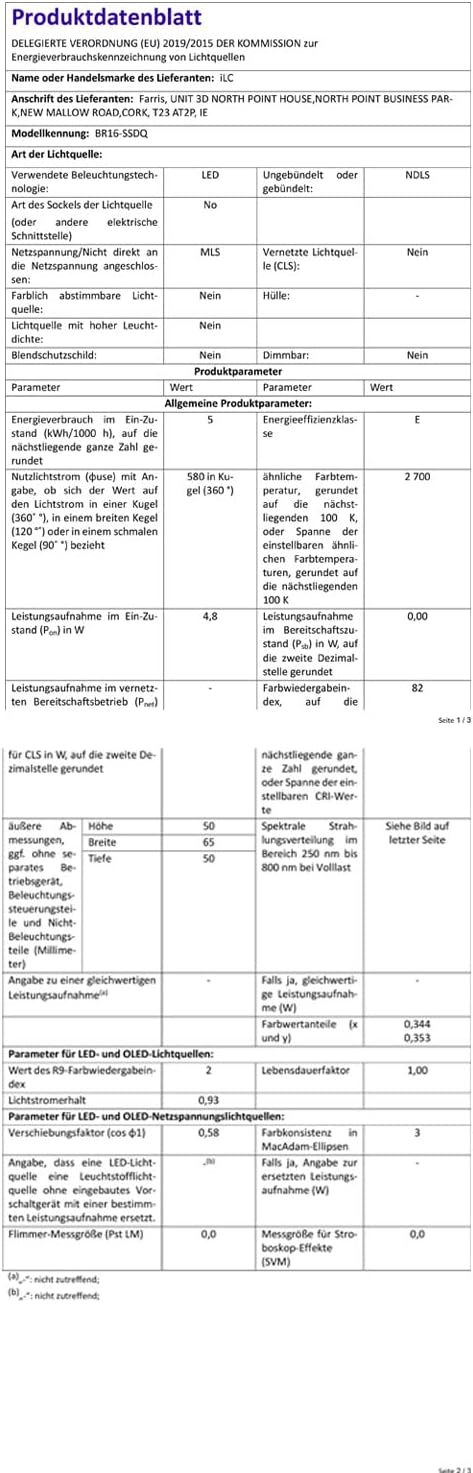
Image: German Product Data Sheet for the ILC BR16-SSDQ LED bulb. This document provides detailed technical specifications in German.

Image: EU Energy Label for the ILC BR16-SSDQ LED bulb, indicating an energy efficiency class of E and consumption of 5 kWh/1000h. For more details, visit eprel.ec.europa.eu/qr/1054441.
11. Garansi dan Dukungan
ILC products are designed for reliability and performance. While specific warranty details are not provided in the product information, the average life of these bulbs is stated as 2 years. For any product inquiries, technical support, or warranty claims, please contact ILC customer service through their official channels or the retailer where the product was purchased.
You can visit the ILC Store for more information: ILC Store
12. Video Produk
Color Changing GU10 LED Lights with Remote
Video: This video demonstrates the color-changing capabilities of the ILC GU10 LED bulbs installed in a track lighting fixture. It showcases various colors and the soft white option, highlighting the versatility for creating different ambiances.