
DEWENWILS HU03E
DEWENWILS Indoor In-Wall Programmable Digital Timer Switch
Model: HU03E
Merek: DEWENWILS
Produk Selesaiview
The DEWENWILS Indoor In-Wall Programmable Digital Timer Switch is designed to automate the control of lights, fans, and motors within your home. This device offers advanced scheduling capabilities, including up to 7 ON/OFF programs per day, repeating weekly, to enhance convenience and energy efficiency. It features a clear digital display, a built-in battery backup to retain settings during power outages, and specialized modes like Daylight Saving Time (DST) and Random (RDM) for added security and flexibility.

Gambar: Depan view of the DEWENWILS In-Wall Programmable Digital Timer Switch, showing its digital display and control buttons.
Informasi Keselamatan
Before installation or operation, please read all safety instructions carefully. Failure to follow these instructions may result in electric shock, fire, or property damage.
- Kabel Netral yang Diperlukan: This timer switch requires a neutral wire for proper operation. Ensure your electrical box has a neutral wire (typically white) before attempting installation.
- Pemutusan Daya: Always turn off power at the circuit breaker before installing or servicing the switch. Verify power is off using a voltage penguji.
- ETL Terdaftar: This product is ETL listed, ensuring it meets recognized safety standards.
- Hanya untuk penggunaan dalam ruangan: This timer switch is designed for indoor use in dry locations. Do not expose to water or excessive humidity.
- Peringkat Listrik: Do not exceed the maximum electrical ratings: 1875W, 1000W Tungsten, 500VA Electronic Ballast, 1/2HP, 60Hz 8.3A Ballast.
- Instalasi Profesional: Jika Anda ragu tentang bagian mana pun dari proses pemasangan, konsultasikan dengan teknisi listrik yang berkualifikasi.
Pengaturan dan Instalasi
This section provides instructions for installing your DEWENWILS In-Wall Timer Switch. All necessary accessories, including wire caps and screws, are included.
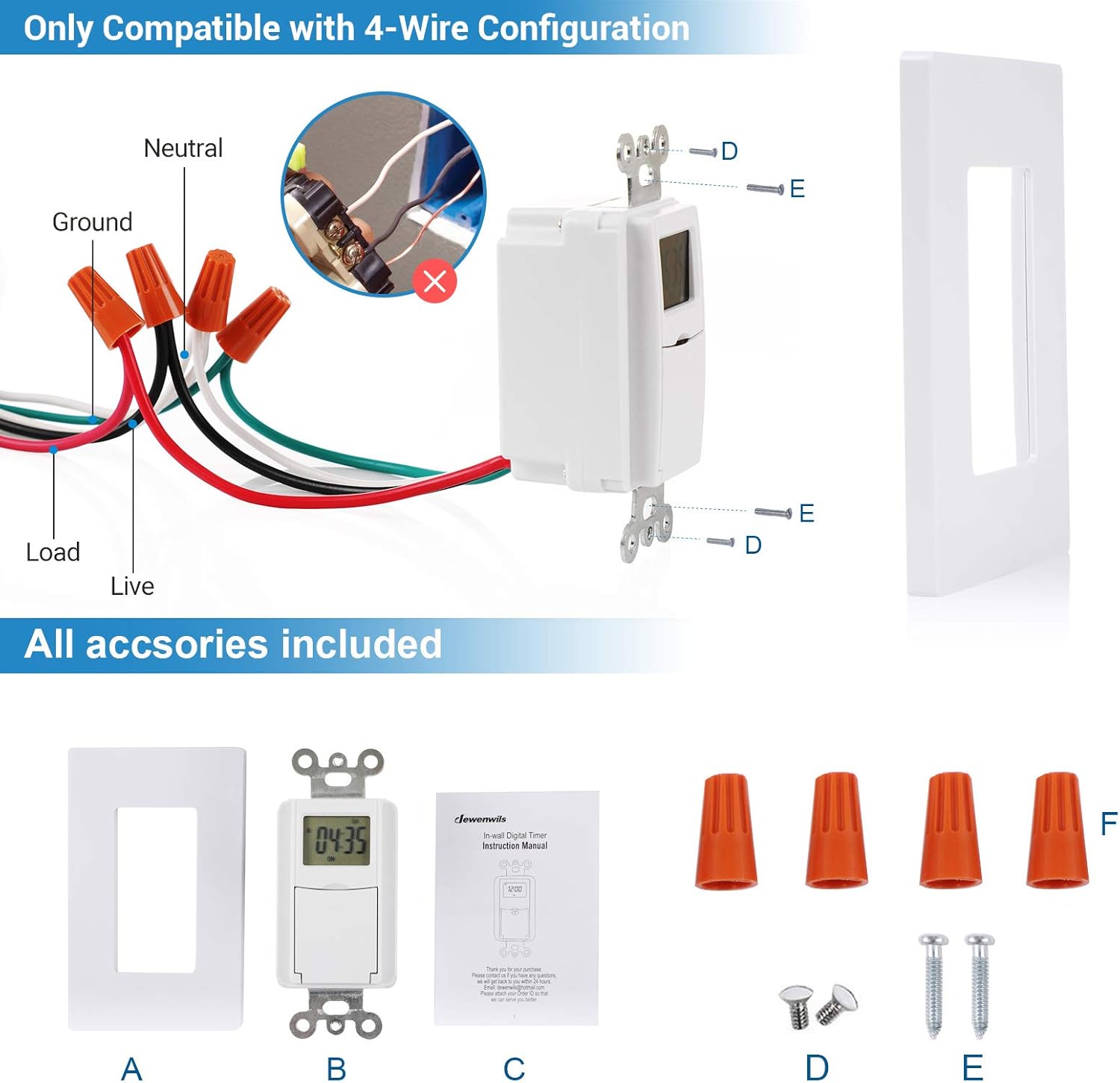
Image: Detailed wiring diagram showing connections for Live, Load, Neutral, and Ground wires, along with included accessories like wire caps and mounting screws.
Langkah-langkah Instalasi:
- Matikan Daya: Locate the circuit breaker that controls the switch you are replacing and turn it off. Verify the power is off at the switch location using a voltage penguji.
- Hapus Sakelar Lama: Lepaskan pelat dinding yang ada dengan hati-hati dan lepaskan sakelar lama dari kotak listrik. Lepaskan kabel dari sakelar lama, perhatikan sambungannya.
- Identifikasi Kabel: Identify the Live (Hot), Load, Neutral, and Ground wires in your electrical box.
- Live (Hot) Wire: Biasanya berwarna hitam, menghantarkan daya dari pemutus sirkuit.
- Beban Kawat: Typically black, connects to the light fixture or appliance.
- Kabel Netral: Typically white, required for this timer switch.
- Kabel tanah: Biasanya tembaga polos atau berwarna hijau.
- Hubungkan Sakelar Baru: Connect the wires from your electrical box to the corresponding wires on the DEWENWILS timer switch using the provided wire caps. This switch is compatible with 4-wire configurations.
- Connect the Live wire to the timer's Live wire.
- Connect the Load wire to the timer's Load wire.
- Connect the Neutral wire to the timer's Neutral wire.
- Connect the Ground wire to the timer's Ground wire.
- Sakelar Pemasangan: Carefully push the wired switch into the electrical box. Secure it with the provided mounting screws.
- Pasang Pelat Dinding: Attach the new wall plate over the switch.
- Pulihkan Daya: Turn the power back on at the circuit breaker. The timer's display should illuminate.
The timer has a built-in backup battery that retains settings for up to 3 months in case of a power outage, eliminating the need for reprogramming after short power interruptions.
Petunjuk Pengoperasian
The DEWENWILS timer switch offers intuitive programming for daily and weekly schedules. The control panel is located behind a small door on the front of the switch.

Gambar: Close-up view of the DEWENWILS timer switch control panel, showing the display and buttons for programming and manual control.
Mengatur Waktu Saat Ini:
To set the current day, hour, and minute:
- Tekan dan tahan tombol JAM tombol.
- Saat memegang JAM, tekan HARI untuk mengatur hari saat ini dalam seminggu.
- Saat memegang JAM, tekan JAM to set the current hour (12-hour format with AM/PM).
- Saat memegang JAM, tekan MENIT untuk mengatur menit saat ini.
Programming ON/OFF Times:
Pengatur waktu ini memungkinkan hingga 7 program ON/OFF. Setiap program terdiri dari waktu ON dan waktu OFF.
- Tekan tombol PROG Tekan tombol sekali. Layar akan menampilkan "1 ON".
- Tekan HARI to select the day(s) for this program (e.g., MO, TU, WE, TH, FR, SA, SU, or combinations like MO-FR, SA-SU, MO-SA, etc.).
- Tekan JAM untuk mengatur jam ON yang diinginkan.
- Tekan MENIT untuk mengatur menit ON yang diinginkan.
- Tekan PROG lagi. Layar akan menampilkan "1 OFF".
- Ulangi langkah 2-4 untuk mengatur hari, jam, dan menit MATI yang diinginkan untuk program ini.
- Lanjutkan menekan PROG to cycle through programs 2 ON, 2 OFF, up to 7 ON, 7 OFF. After setting all desired programs, press JAM to return to the current time display.
Mode Khusus:
- Random (RND) Mode:
Untuk mengaktifkan, tekan RND button. The display will show "RND". In this mode, the timer will turn the connected device ON/OFF randomly within +/- 30 minutes of your programmed times. This feature can simulate occupancy for security purposes.
Untuk menonaktifkan, tekan RND lagi.
- Daylight Saving Time (DST) Mode:
Untuk mengaktifkan, tekan Waktu Standar Waktu Standar (DST) button. The display will show "DST". This will automatically adjust the time forward by one hour for Daylight Saving Time.
Untuk menonaktifkan, tekan Waktu Standar Waktu Standar (DST) lagi.
Kontrol manual:
The timer switch allows for manual override of programmed settings.

Image: A hand pressing the lower part of the timer switch's cover to manually toggle the connected light, demonstrating the manual override feature.
- To manually turn the connected device ON or OFF, simply press the lower part of the cover that conceals the programming buttons. Each press will toggle the state (ON to OFF, or OFF to ON).
- If you manually turn the device ON and leave it, it will switch OFF at the next scheduled OFF program.
- If you manually turn the device OFF and leave it, it will switch ON at the next scheduled ON program.
Menyetel Ulang Pengatur Waktu:
To clear all programmed settings and reset the timer to its default state, use a pointed object (like a paperclip) to press the MENGATUR ULANG tombol yang terletak di panel kontrol.
Pemeliharaan
The DEWENWILS In-Wall Timer Switch is designed for long-lasting performance with minimal maintenance.
- Pembersihan: To clean the surface of the timer switch, use a soft, dry cloth. Do not use abrasive cleaners, solvents, or excessive moisture, as these can damage the unit.
- Baterai cadangan: The internal battery backup is designed to maintain programmed settings for approximately 3 months during a power outage. This battery is not user-replaceable. If the display remains blank after power is restored or settings are consistently lost, the unit may need replacement.
- Kondisi Lingkungan: Ensure the timer is installed in a dry, indoor environment. Avoid locations with high humidity, extreme temperatures, or direct exposure to sunlight.
Penyelesaian Masalah
If you encounter issues with your DEWENWILS In-Wall Timer Switch, refer to the following common problems and solutions:
| Masalah | Kemungkinan Penyebab | Larutan |
|---|---|---|
| Layar kosong atau tidak berfungsi. | No power to the switch; incorrect wiring; internal battery depleted. | Check circuit breaker. Verify wiring connections (Live, Neutral, Load, Ground). If power is present and wiring is correct, the internal battery may be fully depleted; allow time for it to charge or consider replacement if issue persists. |
| Programs are not activating. | Incorrect programming; manual override engaged; Random mode active. | Review programming steps carefully. Ensure the current time is set correctly. Check if the device was manually turned ON/OFF, as this overrides programs until the next scheduled event. Deactivate Random (RND) mode if not desired. |
| Light/device does not turn ON/OFF manually. | Incorrect wiring; faulty switch. | Ensure Load wire is correctly connected. Verify the light fixture or device is functional. If all connections are correct, the switch may be faulty. |
| Pengaturan akan hilang setelah pemadaman listrik.tage. | Daya yang diperpanjang outage; internal battery depleted. | The internal battery holds settings for up to 3 months. For longer outages or if the battery is old, settings may be lost. Reprogram the timer. If this happens frequently with short outages, the battery may be at the end of its life. |
| Control cover feels flimsy or breaks easily. | Manufacturing variation or excessive force. | Handle the control cover gently when opening or closing. Avoid applying excessive force. |
Spesifikasi
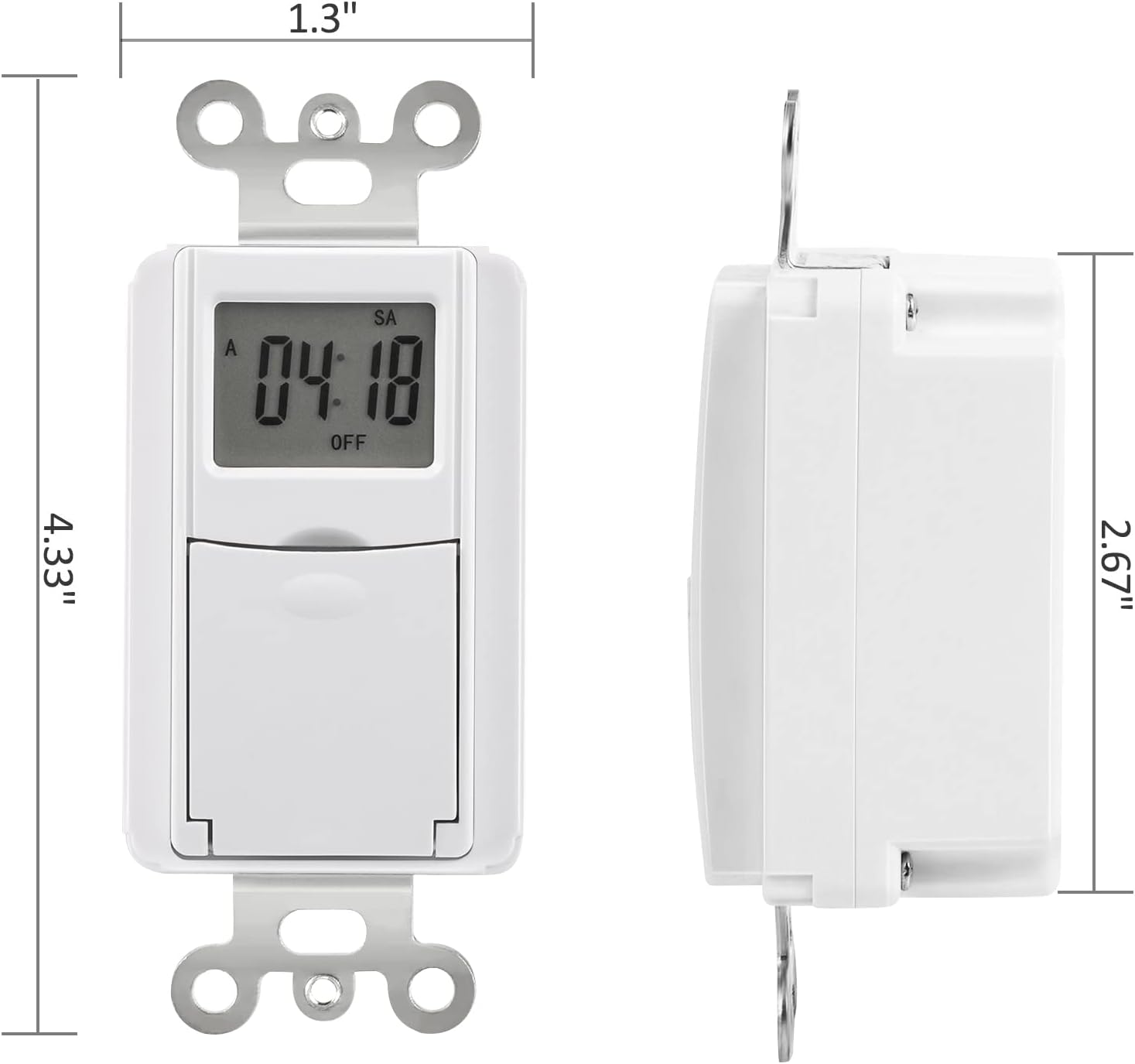
Image: Diagram showing the dimensions of the DEWENWILS In-Wall Timer Switch, including front and side views dengan pengukuran.
| Fitur | Detil |
|---|---|
| Nomor Model | HU03E |
| Merek | DEWENWIL |
| Warna | Putih |
| Bahan | Akrilonitril Butadiena Stirena (ABS) |
| Dimensi Produk (P x L x T) | 5.63" x 3.27" x 2.17" |
| Berat Barang | 5.6 ons |
| Jumlah Pengaturan | 7 ON/OFF programs per day |
| Ukuran Layar | 3.27 Inci (LCD) |
| Peringkat listrik | 1875W, 1000W Tungsten, 500VA Electronic Ballast, 1/2HP, 60Hz 8.3A Ballast |
| Sertifikasi | ETL Terdaftar |
| Baterai Cadangan | Retains settings for up to 3 months during power outage |
| UPC | 611901251981 |
Garansi dan Dukungan
DEWENWILS products are designed for reliability and durability. For specific warranty details or technical support, please refer to the official DEWENWILS websitus atau hubungi layanan pelanggan mereka secara langsung.
Anda dapat mengunjungi DEWENWILS Store on Amazon untuk informasi lebih lanjut dan pembaruan produk.
When contacting support, please have your product model number (HU03E) and purchase information readily available.
Ask a question about this manual
Ask about setup, troubleshooting, compatibility, parts, safety, or missing instructions. Manuals+ will review the question and use this page’s manual context to help answer it.