
Perkenalan
Thank you for choosing the Awei B923BL Wireless Magnetic Sports Bluetooth Earphones. This manual provides essential information for setting up, operating, maintaining, and troubleshooting your new earphones. Please read it carefully before use to ensure optimal performance and longevity of your device.
Isi Paket
Silakan periksa paket untuk item berikut:
- Awei B923BL Wireless Magnetic Sports Bluetooth Earphones
- Kabel Pengisian Daya USB
- Berbagai Ukuran Ujung Telinga
- Panduan Pengguna
Produk Selesaiview
The Awei B923BL earphones are designed for active lifestyles, featuring a wireless Bluetooth connection and a magnetic design for convenient storage around your neck when not in use. They include an integrated microphone for hands-free calling.

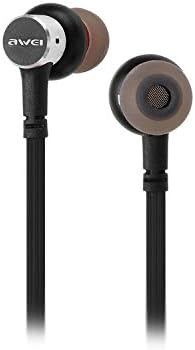
Pengaturan
1. Mengisi Daya Earphone
Before first use, fully charge your earphones. Connect the provided USB charging cable to the charging port on the earphones and the other end to a USB power source (e.g., computer USB port, wall adapter). The indicator light will show charging status and turn off or change color when fully charged.
2. Pemasangan Bluetooth
- Pastikan earphone dimatikan.
- Press and hold the multi-function button (usually the power button) until the indicator light flashes red and blue alternately, indicating pairing mode.
- Di ponsel atau perangkat berkemampuan Bluetooth Anda, buka pengaturan Bluetooth dan aktifkan Bluetooth.
- Pencarian untuk available devices. You should see "Awei B923BL" or a similar name in the list.
- Select "Awei B923BL" to connect. Once connected, the indicator light will usually flash blue slowly or turn off, and you may hear a confirmation tone.
- Jika diminta kata sandi, masukkan "0000".
Once paired, the earphones will automatically connect to the last paired device when turned on, if the device's Bluetooth is active and within range.
Petunjuk Pengoperasian
Daya Hidup/Mati
- Nyalakan: Press and hold the multi-function button for approximately 3 seconds until the blue indicator light flashes.
- Matikan: Press and hold the multi-function button for approximately 5 seconds until the red indicator light flashes and then turns off.
Putar Musik
- Putar/Jeda: Tekan tombol multifungsi sekali.
- Lagu Berikutnya: Tekan dan tahan tombol Volume +.
- Lagu Sebelumnya: Tekan dan tahan tombol Volume -.
Manajemen Panggilan
- Menjawab/Mengakhiri Panggilan: Tekan tombol multifungsi sekali.
- Tolak Panggilan: Tekan dan tahan tombol multifungsi selama kurang lebih 2 detik.
- Panggil Ulang Nomor Terakhir: Tekan tombol multifungsi dua kali.
Kontrol Volume
- Tingkatkan Volume: Tekan tombol Volume +.
- Kurangi Volume: Tekan tombol Volume -.
Pemeliharaan
- Clean the earphones regularly with a soft, dry cloth. Do not use harsh chemicals or abrasive materials.
- Lepaskan ujung telinga dan bersihkan dengan sabun lembut dan air jika perlu, pastikan benar-benar kering sebelum dipasang kembali.
- Simpan earphone di tempat yang sejuk dan kering, jauhkan dari sinar matahari langsung dan suhu ekstrem.
- Avoid exposing the earphones to water or excessive moisture.
- Do not attempt to disassemble or modify the earphones, as this will void the warranty.
Penyelesaian Masalah
- Earphone tidak menyala: Pastikan earphone terisi penuh.
- Tidak dapat dipasangkan dengan perangkat:
- Make sure the earphones are in pairing mode (flashing red and blue).
- Pastikan Bluetooth diaktifkan pada perangkat Anda.
- Dekatkan earphone ke perangkat Anda.
- Try restarting both the earphones and your device.
- Hapus koneksi Bluetooth sebelumnya di perangkat Anda jika Anda memiliki terlalu banyak koneksi.
- Tidak ada suara atau volume rendah:
- Periksa level volume pada earphone dan perangkat yang terhubung.
- Pastikan earphone terhubung dengan benar ke perangkat Anda.
- Cobalah memutar sumber audio yang berbeda.
- Masalah kualitas panggilan:
- Pastikan mikrofon tidak terhalang.
- Pindah ke area yang lebih sedikit gangguannya.
Spesifikasi
| Fitur | Detil |
|---|---|
| Nama Merek | Awei |
| Nomor Model | B923BL |
| Warna | Hitam |
| Faktor Bentuk Headphone | Di Telinga |
| Teknologi Konektivitas | Nirkabel |
| Teknologi Komunikasi Nirkabel | Nirkabel |
| Deskripsi Rentang Usia | Dewasa |
| Bahan | Karet |
| Perangkat yang Kompatibel | Ponsel |
| Fitur Kabel | Tanpa Kabel |
| Metode Kontrol | Menyentuh |
| Jumlah Barang | 1 |
| Pabrikan | Awei |
| Fitur Khusus | Microphone Included (Note: This model does not feature active noise cancellation as per product description.) |
Garansi dan Dukungan
Informasi Garansi
This product comes with a 1-year manufacturer's warranty from the date of purchase. For warranty claims or service, please contact the manufacturer or their authorized service agent. For further details, you may also contact the retailer where the product was purchased.
Dukungan Pelanggan
If you encounter any issues not covered in this manual or require further assistance, please refer to the contact information provided with your product packaging or visit the official Awei websitus untuk sumber daya dukungan.