
Perkenalan
This manual provides detailed instructions for the proper use and care of your Vivitar DVR917HD 4K Action Camera. Please read this manual thoroughly before operating the device to ensure safe and effective use. The Vivitar DVR917HD is designed to capture high-quality video and photos in various environments, including underwater, thanks to its durable waterproof casing and versatile mounting options.
Fitur Produk
- Layar LCD berwarna 2 inci: For precise image capture, video playback, and photo viewing.
- Rekaman Video 4K: Capture stunning video at 4640 x 3480 resolution, along with 1080p and 720p options.
- 16 Megapixel CMOS Sensor: For high-resolution still photographs.
- Casing Tahan Air: Enables use in wet conditions and underwater adventures.
- Wi-Fi bawaan: Allows direct streaming of content to compatible smartphones or tablets.
- Lensa Sudut Lebar: Designed for capturing expansive scenes.
- Beberapa Antarmuka: Supports microSD, microSDHC, HDMI, and USB 2.0.
- Desain Kompak: Dimensions of 2.6 inches x 2.5 inches x 1.5 inches and a weight of 0.5 pounds.
Isi Paket
Verifikasi bahwa semua item yang tercantum di bawah ini disertakan dalam paket Anda:
- Vivitar DVR917HD 4K Action Camera
- Perumahan Tahan Air
- Kontrol Jarak Jauh Nirkabel
- Adaptor Daya AC
- Kabel USB
- Kabel HDMI
- Helmet Mounting Kit
- Gunung Sepeda

Image: The Vivitar DVR917HD camera shown with its full set of accessories, including the waterproof case, remote, various mounts, and cables.
Pengaturan
1. Memasukkan Kartu MicroSD
- Temukan slot kartu microSD di sisi kamera.
- Gently insert a compatible microSD or microSDHC card (Class 4 or higher recommended) into the slot until it clicks into place. Ensure the card is oriented correctly.
2. Mengisi Baterai
- Connect the camera to the AC power adapter using the provided USB cable.
- Colokkan adaptor daya AC ke stopkontak dinding.
- The charging indicator light will illuminate. Charging is complete when the light changes color or turns off.
3. Menggunakan Casing Tahan Air
- Buka kait pada wadah kedap air tersebut.
- Letakkan kamera dengan hati-hati di dalam wadahnya, pastikan terpasang dengan rapat.
- Close the latch securely. Before first use in water, perform a leak test without the camera inside.
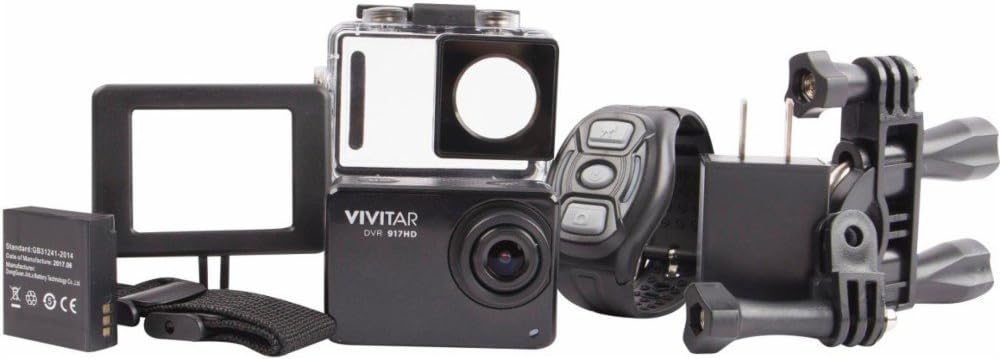
Image: The Vivitar DVR917HD camera positioned within its clear waterproof housing, with the back cover open.
4. Memasang Dudukan
The camera comes with a helmet mounting kit and a bicycle mount. Follow the instructions provided with each mount to securely attach the camera for your desired activity.

Image: The Vivitar DVR917HD camera enclosed in its waterproof case, securely attached to a mounting accessory.

Image: A person wearing a ski helmet with the Vivitar DVR917HD action camera visibly mounted on the top, against a snowy mountain backdrop.
Petunjuk Pengoperasian
1. Menghidupkan/Mematikan
- To power on, press and hold the Power/Mode button (usually labeled 'MODE') until the screen illuminates.
- To power off, press and hold the Power/Mode button again until the screen turns off.

Gambar: Close-up view of the Vivitar DVR917HD action camera, highlighting its front lens and top control buttons.
2. Merekam Video
- Ensure the camera is in video recording mode. Use the Mode button to cycle through modes if necessary.
- Press the 'OK' button to start recording. A red indicator light or on-screen icon will typically show recording is active.
- Press the 'OK' button again to stop recording.
3. Mengambil Foto
- Switch the camera to photo mode using the Mode button.
- Atur komposisi bidikan Anda menggunakan layar LCD 2 inci.
- Press the 'OK' button to capture a photo.

Image: The Vivitar DVR917HD camera's rear screen displaying a live view from a first-person perspective of someone riding a bicycle.
4. Konektivitas Wi-Fi
- Enable Wi-Fi on the camera through the settings menu.
- On your smartphone or tablet, search for the camera's Wi-Fi network and connect to it.
- Open the Vivitar app (if available) or a compatible action camera app to stream content or control the camera remotely.
5. Menggunakan Remote Kontrol Nirkabel
The included wireless remote control allows for convenient operation of the camera from a distance. Refer to the remote control's specific instructions for pairing and function details.
Pemeliharaan
Cleaning the Camera and Housing
- Use a soft, lint-free cloth to clean the camera body and lens. Avoid abrasive materials.
- For the waterproof housing, rinse with fresh water after use in saltwater and allow to air dry. Ensure the O-ring seal is free of debris.
Perawatan Baterai
- Isi daya baterai hingga penuh sebelum setiap penggunaan.
- Jangan biarkan baterai terkena suhu ekstrim.
- Jika menyimpan kamera untuk jangka waktu yang lama, lepaskan baterai.
Penyimpanan
Store the camera in a cool, dry place away from direct sunlight and excessive humidity. Keep it protected from dust and impacts.
Penyelesaian Masalah
- Kamera tidak menyala: Pastikan baterai terisi dan terpasang dengan benar.
- Masalah perekaman: Check if a microSD card is inserted and has sufficient free space. Ensure the card is not corrupted.
- Kualitas suara buruk: The waterproof housing can significantly muffle sound. For better audio, use the camera outside the housing in dry conditions.
- Masalah koneksi Wi-Fi: Ensure Wi-Fi is enabled on the camera and your smart device. Try restarting both devices.
- Kamera membeku: Lepaskan dan masukkan kembali baterai untuk mengatur ulang kamera.
Spesifikasi
| Fitur | Spesifikasi |
|---|---|
| Nama Model | DVR917HD |
| Nomor Model Barang | 3216565590 |
| Resolusi Diam Efektif | 16 MP |
| Resolusi Pengambilan Video | 4K, 1080p, 720p |
| Format Pengambilan Video | MP4 |
| Teknologi Sensor Foto | Bahasa Indonesia: CMOS |
| Ukuran Layar | 2 inci |
| Teknologi Konektivitas | Wifi gratis |
| Jenis Memori Flash | Mikro SD |
| Fitur Khusus | Tahan air |
| Jenis Lensa | Sudut Lebar |
| Tipe Fokus | Fokus Otomatis |
| Kontrol Paparan | Otomatis |
| Berat Barang | 717 gram |
| Ukuran | 2.6 x 2.5 x 1.5 inci (perkiraan) |
Informasi Garansi
For detailed warranty information regarding your Vivitar DVR917HD 4K Action Camera, please refer to the warranty card included in your product packaging or visit the official Vivitar websitus. Syarat dan ketentuan garansi dapat bervariasi berdasarkan wilayah dan tanggal pembelian.
Dukungan Pelanggan
If you require further assistance, have questions not covered in this manual, or need technical support, please contact Vivitar customer service. Contact details can typically be found on the Vivitar official websitus atau pada kemasan produk Anda.