
Informasi Keselamatan Penting
Read all instructions carefully before using this product. Keep this manual for future reference.
- Hindari memaparkan headset pada suhu atau kelembapan ekstrem.
- Jangan membongkar atau mencoba memperbaiki headset sendiri.
- Clean the headset with a soft, dry cloth. Do not use liquid cleaners.
- Mendengarkan dalam waktu lama pada tingkat volume tinggi dapat menyebabkan kerusakan pendengaran.
Isi Paket
Verifikasi bahwa semua item ada dalam paket:
- NUBWO HW02 USB Computer Headset
- Kabel USB
- User Manual (dokumen ini)
Pengaturan
Menghubungkan ke Komputer (USB)
- Temukan port USB yang tersedia di komputer Anda.
- Plug the USB connector of the NUBWO HW02 headset into the USB port.
- The operating system will typically install the necessary drivers automatically. This may take a few moments.
- Once installed, the headset should be recognized as an audio input and output device.
- You may need to select the "NUBWO HW02" headset as your default audio device in your computer's sound settings.
Connecting to a Device (3.5mm Jack)
The NUBWO HW02 headset features a 3.5mm jack for broader compatibility.
- Locate the 3.5mm audio jack on your device (e.g., gaming console controller, smartphone, tablet).
- Insert the 3.5mm connector from the headset into the device's audio jack.
- Pastikan koneksi aman.
- Adjust audio settings on your device as needed to select the headset for input and output.
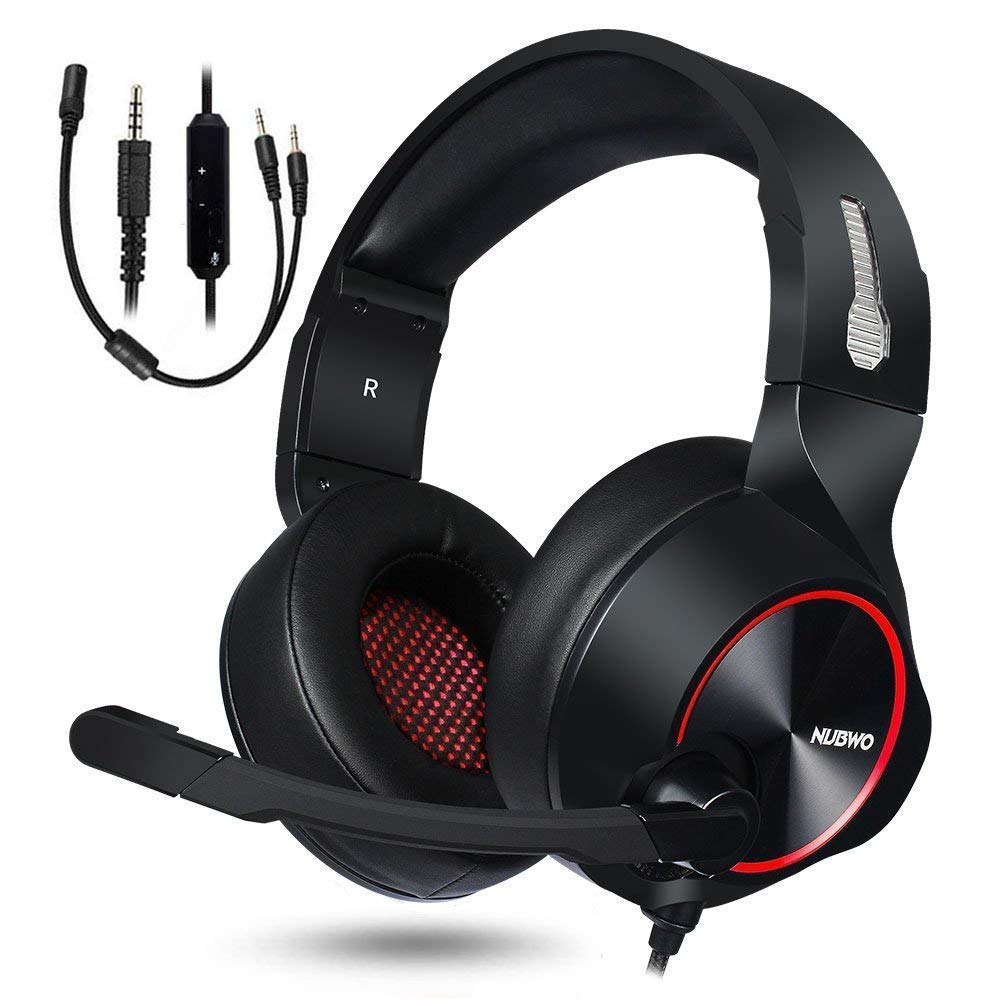
Image: NUBWO HW02 USB Computer Headset. This image displays the overall design of the headset, featuring orange accents on the earcups and headband, with a flexible microphone arm.
Petunjuk Pengoperasian
Menyesuaikan Headset
- Penyesuaian ikat kepala: Gently slide the earcups up or down along the headband to achieve a comfortable fit over your ears.
- Penempatan Mikrofon: Bend the flexible microphone arm to position the microphone approximately 1-2 inches from your mouth for optimal voice clarity.
Kontrol Volume
The NUBWO HW02 headset features an in-line volume control.
- Tingkatkan Volume: Roll the volume wheel upwards.
- Kurangi Volume: Roll the volume wheel downwards.
Fungsi Bisu Mikrofon
An in-line switch allows you to mute or unmute the microphone.
- Bisukan Mikrofon: Slide the switch to the "Mute" position.
- Aktifkan Mikrofon: Slide the switch to the "Unmute" position.
Pemeliharaan
- Pembersihan: Use a soft, dry, lint-free cloth to wipe down the earcups and headband. Do not use abrasive cleaners, alcohol, or solvents.
- Penyimpanan: When not in use, store the headset in a clean, dry place away from direct sunlight and extreme temperatures.
- Perawatan Kabel: Hindari tekukan tajam atau tarikan berlebihan pada kabel untuk mencegah kerusakan.
Penyelesaian Masalah
| Masalah | Kemungkinan Penyebab | Larutan |
|---|---|---|
| Tidak ada suara dari headset | Headset tidak terhubung dengan benar. Volume terlalu rendah. Perangkat output audio yang dipilih salah. | Ensure USB or 3.5mm jack is fully inserted. Increase volume using in-line control and computer/device settings. Select "NUBWO HW02" as the default playback device in your sound settings. |
| Mikrofon tidak berfungsi | Mikrofon dimatikan. Perangkat input audio yang dipilih salah. Mikrofon diposisikan secara salah. | Check the in-line mute switch. Select "NUBWO HW02" as the default recording device in your sound settings. Sesuaikan posisi mikrofon agar lebih dekat ke mulut Anda. |
| Kualitas suara buruk atau terdistorsi | Volume terlalu tinggi. Koneksi longgar. Gangguan. | Turunkan volumenya. Re-seat the USB or 3.5mm connection. Cobalah menghubungkan ke port USB atau perangkat lain. |
Spesifikasi
- Model: HW02
- Konektivitas: Berkabel (USB, Jack 3.5mm)
- Penempatan Telinga: Di Atas Telinga
- Kontrol Kebisingan: Peredam Kebisingan Aktif
- Kompatibilitas Platform: Konsol Game, PC
- Bahan: Silikon
- Berat Barang: 1.11 pon
- Dimensi Produk: 9x7x4 inci
Garansi dan Dukungan
For warranty information or technical support, please refer to the NUBWO official websitus web atau hubungi layanan pelanggan mereka. Simpan struk pembelian Anda sebagai bukti pembelian.
NUBWO Official Weblokasi: Visit the NUBWO Store on Amazon