
1. Pendahuluan
This manual provides instructions for the proper setup, operation, and maintenance of your Acer B247Y 23.8-inch LED LCD Monitor. Please read this manual thoroughly before using your monitor to ensure optimal performance and to prevent damage.
The Acer B247Y is a 23.8-inch Full HD (1920 x 1080) monitor featuring an IPS panel for wide viewing angles, an anti-glare display, and a frameless design on three sides. It includes multiple connectivity options and an ergonomic stand for comfortable viewing.
2. Isi Paket
Pastikan semua barang ada di dalam paket Anda. Jika ada barang yang hilang atau rusak, hubungi pengecer Anda.
- Acer B247Y 23.8-inch LED LCD Monitor
- Dudukan Monitor (Alas dan Leher)
- Power Adapter (Internal) and Power Cable
- Kabel VGA
- Kabel DisplayPort 1.2
- Kabel HDMI
- Audio-in Cable (if included)
- Audio-out Cable (if included)
- User Manual (dokumen ini)
3. Pengaturan
3.1 Merakit Dudukan Monitor
The monitor comes with a detachable foot stand. Follow these steps to assemble:
- Keluarkan komponen monitor dan dudukan secara hati-hati dari kemasannya.
- Pasang leher penyangga ke panel monitor. Pastikan terpasang dengan aman dan berbunyi klik.
- Pasang alas penyangga ke leher penyangga. Kencangkan sekrup jika ada, biasanya terletak di bagian bawah alas.
- Letakkan monitor yang sudah dirakit pada permukaan yang stabil dan datar.
Catatan: The monitor also supports VESA mount (100 x 100 mm) for wall or arm mounting. Refer to your VESA mount kit instructions for installation.
3.2 Menghubungkan Monitor
Sambungkan monitor ke komputer atau perangkat lain menggunakan kabel yang sesuai.
- Koneksi Video:
- Hubungkan salah satu ujung kabel DisplayPort ke output DisplayPort pada komputer Anda dan ujung lainnya ke input DisplayPort pada monitor.
- Alternatively, connect an HDMI cable from your computer's HDMI output to the monitor's HDMI input.
- For older systems, connect a VGA cable from your computer's VGA output to the monitor's VGA input.
- Koneksi Audio:
- If using VGA or DisplayPort without audio, connect an audio cable from your computer's audio output to the monitor's audio-in port for integrated speakers.
- To connect external speakers or headphones, use the monitor's audio-out port.
- Sambungan Daya:
- Hubungkan kabel daya ke input daya monitor, lalu colokkan ujung lainnya ke stopkontak listrik yang memiliki ground.

Figure 3.2.1: Acer B247Y Monitor with Stand. This image illustrates the overall appearance of the monitor when fully assembled on its stand.
4. Petunjuk Pengoperasian
4.1 Menghidupkan/Mematikan
Tekan tombol daya, yang biasanya terletak di bagian kanan bawah atau belakang monitor, untuk menghidupkan atau mematikan monitor. Lampu indikator daya akan menyala saat monitor aktif.
4.2 Adjusting Monitor Settings (OSD)
The monitor features an On-Screen Display (OSD) menu for adjusting various settings. Use the control buttons (typically located near the power button) to navigate and select options within the OSD menu.
Pengaturan OSD umum meliputi:
- Gambar: Brightness, Contrast, Color Temperature, Gamma, Acer eColor Management modes (e.g., Dark Room, Eco).
- Suara: Volume control for integrated speakers or audio-out.
- Masukan: Select the active video input source (VGA, DisplayPort, HDMI).
- OSD: Batas waktu OSD, bahasa.
- Pengelolaan: Setel ulang ke default pabrik.
4.3 Penyesuaian Ergonomis
The Acer B247Y monitor stand offers several ergonomic adjustments to optimize your viewpengalaman ing:
- Memiringkan: Adjust the screen angle from -5 degrees to 25 degrees (forward/backward).
- Memutar: Rotate the monitor horizontally up to +/- 45 degrees.
- Penyesuaian Ketinggian: Sesuaikan tinggi layar hingga 120mm.
- Poros: Putar layar 90 derajat untuk tampilan potret. viewing.
5. Pemeliharaan
Perawatan yang tepat memastikan umur panjang dan kinerja monitor Anda yang optimal.
- Membersihkan Layar: Usap layar secara perlahan menggunakan kain lembut bebas serat. Untuk noda membandel, dampen the cloth with a small amount of water or a non-abrasive screen cleaner. Do not spray liquid directly onto the screen.
- Membersihkan Casing: Gunakan kain lembut dan kering untuk membersihkan monitor.asing. Hindari penggunaan deterjen kuat atau pembersih abrasif.
- Ventilasi: Pastikan lubang ventilasi pada monitor tidak terhalang untuk mencegah panas berlebih.
- Matikan: Selalu matikan monitor dan cabut kabelnya dari stopkontak sebelum membersihkan atau saat tidak digunakan dalam waktu lama.
6. Penyelesaian masalah
Jika Anda mengalami masalah dengan monitor Anda, ikuti langkah-langkah pemecahan masalah umum berikut:
- No Power / Monitor Does Not Turn On:
- Ensure the power cable is securely connected to both the monitor and a working electrical outlet.
- Verifikasi apakah stopkontak berfungsi dengan mencolokkan perangkat lain.
- Tekan tombol daya dengan kuat.
- No Image / "No Signal" Message:
- Check that the video cable (DisplayPort, HDMI, or VGA) is securely connected to both the monitor and your computer.
- Pastikan komputer Anda dalam keadaan menyala dan tidak dalam mode tidur.
- Gunakan menu OSD untuk memilih sumber input yang benar secara manual.
- Cobalah kabel video atau port yang berbeda jika tersedia.
- Image is Distorted or Unclear:
- Pastikan resolusi tampilan pada komputer Anda diatur ke resolusi asli monitor (1920 x 1080).
- Adjust brightness, contrast, and other picture settings via the OSD menu.
- Check for any physical damage to the screen or cables.
- Tidak Ada Suara dari Speaker:
- Increase the volume using the OSD menu or your computer's sound settings.
- Pastikan kabel audio (jika digunakan) terhubung dengan benar.
- Pastikan perangkat output audio yang benar telah dipilih di pengaturan suara komputer Anda.
7. Spesifikasi
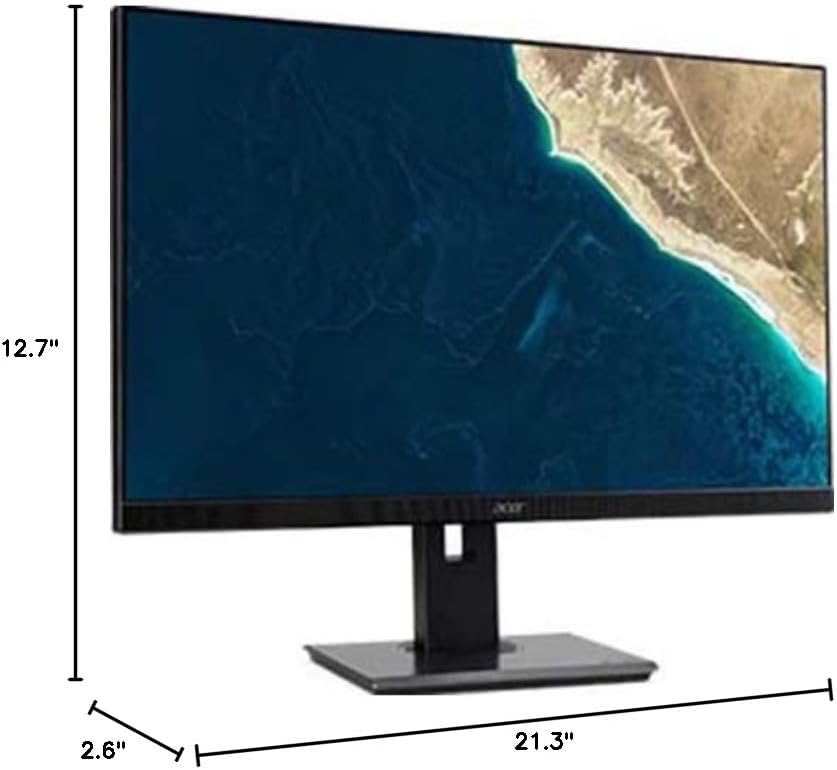
Figure 7.1.1: Acer B247Y Monitor Dimensions. This image shows the approximate height (12.7"), width (21.3"), and depth (2.6") of the monitor without the stand.
| Fitur | Spesifikasi |
|---|---|
| Nomor Model | B247Y |
| Ukuran Layar | 23.8 inci (60.5 cm) |
| Jenis Tampilan | LED LCD, IPS Panel, Anti-glare (AG) |
| Resolusi Maksimum | 1920x1080 (HD Penuh) |
| Rasio Aspek | 16:9 |
| Tingkat Penyegaran | 75Hz |
| Waktu Respon | 4ms (gray-to-gray) |
| Kecerahan (khas) | 250 cd/m² |
| Rasio Kontras Asli | 1,000:1 |
| Rasio Kontras Dinamis | 100,000,000:1 |
| ViewSudut ing (H/V) | 178° / 178° |
| Konektivitas | VGA, DisplayPort 1.2, HDMI, Audio-in, Audio-out |
| Speaker Terpadu | 2x2.0W |
| Penyesuaian Ergonomis | Tilt (-5° to 25°), Swivel (+/- 45°), Height Adjustment (120mm), Pivot (90°) |
| VESA Mount Support | Ukuran: 100x100mm |
| Dimensi dengan Penyangga (L x T x D) | 21.3" x 14.9"~19.6" x 7.6" (54.0cm x 37.9cm~49.9cm x 19.3cm) |
| Berat dengan Stand | 12.3 pon (5.6 kg) |
| Adaptor Daya | Intern |
| Warna | Hitam |
8. Garansi dan Dukungan
Your Acer B247Y monitor comes with a Limited Three-Year Warranty. Please retain your proof of purchase for warranty claims.
For technical support, service, or warranty inquiries, please refer to the official Acer support website or contact their customer service department. Contact information can typically be found on the Acer websitus web atau di kartu garansi yang disertakan bersama produk Anda.
Kunci Kensington: The monitor supports a Kensington lock for security. Attach a compatible Kensington lock (sold separately) to the security slot on the monitor to deter theft.