
AWEI T5
AWEI T5 True Wireless Earbuds User Manual
Perkenalan
This manual provides detailed instructions for the AWEI T5 True Wireless Earbuds. Please read this guide carefully before using the product to ensure proper operation and to maximize your listening experience.
Isi Paket
Verifikasi bahwa semua item yang tercantum di bawah ini ada dalam paket Anda:
- AWEI T5 True Wireless Earbuds (Left and Right)
- Kotak Pengisian Daya
- Kabel Pengisian Daya USB
- Panduan Pengguna
- Tersedia berbagai ukuran ujung telinga.

Image: AWEI T5 True Wireless Earbuds retail packaging, showing the brand logo and product model.
Produk Selesaiview
Familiarize yourself with the components of your AWEI T5 True Wireless Earbuds and charging case.

Image: The AWEI T5 True Wireless Earbuds inside their charging case, with an additional image showing an earbud being worn by a user.

Gambar: Close-up view of the AWEI T5 True Wireless Earbuds and their charging case resting on a laptop keyboard.
The earbuds are designed for a secure and comfortable fit, and the charging case provides both protection and power on the go.
Pengaturan
1. Pengisian Awal
Sebelum penggunaan pertama, isi daya earbud dan casing pengisi daya hingga penuh.
- Tempatkan kedua earbud ke dalam wadah pengisi daya.
- Hubungkan kabel pengisian daya USB ke wadah pengisian daya dan sumber daya.
- The indicator lights on the case and earbuds will show charging status.
- Setelah terisi penuh, lepaskan kabelnya.
2. Memasangkan dengan Perangkat
To connect your AWEI T5 earbuds to a Bluetooth-enabled device:
- Pastikan earbud terisi dayanya.
- Buka wadah pengisi daya dan keluarkan kedua earbud. Earbud akan secara otomatis memasuki mode pemasangan.
- Pada perangkat Anda (smartphone, tablet, dll.), buka pengaturan Bluetooth dan aktifkan Bluetooth.
- Pencarian untuk Perangkat yang tersedia dan pilih "AWEI T5" dari daftar.
- Once connected, you will hear a confirmation tone, and the indicator lights on the earbuds will change.
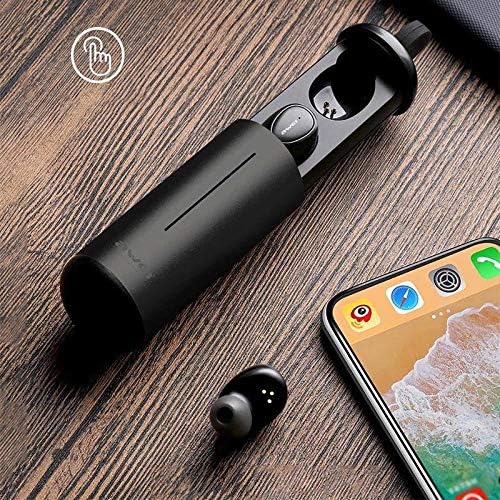
Image: AWEI T5 Earbuds in their charging case, positioned next to a smartphone, illustrating the pairing process.
Petunjuk Pengoperasian
Kontrol Dasar
The AWEI T5 earbuds feature touch controls for various functions:
- Putar/Jeda: Ketuk sekali di salah satu earbud.
- Lagu Berikutnya: Ketuk dua kali earbud kanan.
- Lagu Sebelumnya: Ketuk dua kali earbud kiri.
- Menjawab/Mengakhiri Panggilan: Tap once on either earbud during an incoming call.
- Tolak Panggilan: Tekan dan tahan salah satu earbud selama 2 detik selama panggilan masuk.
- Aktifkan Voice Assistant: Ketuk tiga kali salah satu earbud.
Mode Earbud Tunggal
You can use either the left or right earbud independently:
- Remove one earbud from the charging case. It will automatically connect to the last paired device.
- The other earbud can remain in the case or be turned off.
Mode Earbud Ganda
For a stereo audio experience, use both earbuds:
- Remove both earbuds from the charging case. They will automatically connect to each other and then to the last paired device.
Pemeliharaan dan Perawatan
To ensure the longevity and optimal performance of your AWEI T5 earbuds:
- Pembersihan: Bersihkan earbud dan casing pengisi daya secara teratur dengan kain lembut, kering, dan bebas serat. Jangan gunakan bahan kimia keras atau bahan abrasif.
- Penyimpanan: Jika tidak digunakan, simpan earbud dalam kotak pengisi dayanya untuk melindunginya dari debu dan kerusakan.
- Perawatan Baterai: Avoid fully discharging the battery frequently. Charge the earbuds and case regularly, even if not used for extended periods.
- Tahan Air: The earbuds are rated IPX4, meaning they are resistant to splashing water from any direction. Do not submerge them in water or expose them to heavy rain.

Image: AWEI T5 Earbuds with water droplets, indicating their IPX4 splash-resistant rating.
Penyelesaian Masalah
If you encounter issues with your AWEI T5 earbuds, refer to the following common problems and solutions:
| Masalah | Larutan |
|---|---|
| Earbud tidak berpasangan dengan perangkat. | Ensure earbuds are charged. Turn off and on Bluetooth on your device. Forget "AWEI T5" from your device's Bluetooth list and re-pair. |
| Hanya satu earbud yang berfungsi. | Place both earbuds back into the charging case, close the lid, then open and remove them together. Ensure both are charged. |
| Tidak ada suara atau volume rendah. | Periksa level volume pada perangkat Anda dan earbud. Pastikan earbud terhubung dengan benar. |
| Kotak pengisi daya tidak mengisi daya. | Verify the USB cable is securely connected to both the case and the power source. Try a different cable or power adapter. |
Spesifikasi
Technical details for the AWEI T5 True Wireless Earbuds:
| Fitur | Detil |
|---|---|
| Nomor Model | T5 |
| Konektivitas | Bahasa Indonesia: Bluetooth |
| Faktor Bentuk | Di telinga |
| Bahan | Plastik |
| Warna | Hitam |
| Dimensi (Produk) | Ukuran 4x10x16.5 cm |
| Berat (Produk) | 4.54 gram |
| Jenis Baterai | 1 Lithium Ion (per earbud, typically) |
| Peringkat Tahan Air | IPX4 (Tahan cipratan) |
Garansi dan Dukungan
Untuk informasi garansi dan dukungan pelanggan, silakan merujuk ke dokumen yang disertakan dengan pembelian Anda atau hubungi pengecer. Simpan bukti pembelian Anda untuk klaim garansi apa pun.
Ask a question about this manual
Ask about setup, troubleshooting, compatibility, parts, safety, or missing instructions. Manuals+ will review the question and use this page’s manual context to help answer it.