
Perkenalan
This manual provides essential instructions for the safe and effective use of your Surker HC-7098 Waterproof Rechargeable Hair Clipper. Please read this manual thoroughly before first use and retain it for future reference.
Petunjuk Keselamatan Penting
- Do not immerse the appliance in water while it is connected to the charging adapter.
- Jauhkan alat ini dari jangkauan anak-anak.
- Use only the charging adapter supplied with this product.
- Cabut peralatan dari stopkontak sebelum membersihkan atau melakukan perawatan apa pun.
- Jangan gunakan alat ini jika mata pisaunya rusak atau patah, karena dapat menyebabkan cedera.
- Avoid using the appliance in extremely hot or cold environments.
- Jika kabel pengisi daya rusak, kabel tersebut harus diganti oleh produsen, agen servisnya, atau orang yang berkualifikasi serupa untuk menghindari bahaya.
Produk Selesaiview dan Komponen
The Surker HC-7098 is a waterproof, rechargeable hair clipper designed for efficient hair and beard trimming. Its adjustable length settings and stainless steel blade ensure precise results.
Isi Paket:
- 1 x Surker HC-7098 Hair Clipper
- 1 x Charging Adapter Cable
- 2 x Limit Combs (for various length settings)
- 1 x Sikat Pembersih
- 1 x Sisir
- 1 x Panduan Pengguna Bahasa Inggris (dokumen ini)
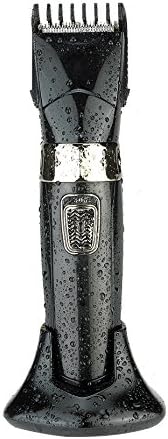
Image: Surker HC-7098 hair clipper on its charging stand, covered in water droplets, highlighting its waterproof design.
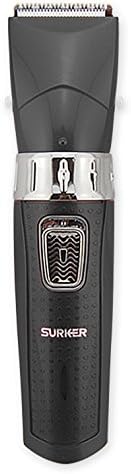
Gambar: Depan view of the Surker HC-7098 hair clipper, showing the power button and 'SURKER' branding.
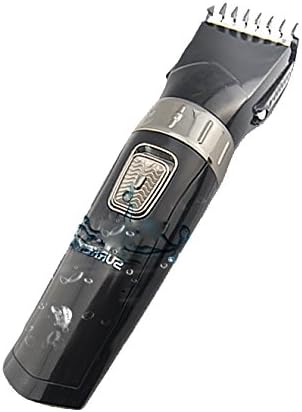
Gambar: Samping view of the Surker HC-7098 hair clipper with an adjustable limit comb attached, demonstrating the length setting mechanism.
Pengaturan
Pengisian Awal:
- Sebelum digunakan pertama kali, isi daya alat cukur rambut hingga penuh.
- Connect the charging adapter cable to the clipper and plug it into a suitable power outlet (220V).
- The charging indicator light will illuminate. Allow sufficient time for a full charge as indicated by the device (refer to charging section for details).
Cara Memasang Sisir Pembatas:
- Ensure the clipper is turned off before attaching or detaching any accessories.
- Align the desired limit comb with the clipper head and gently push it until it clicks into place.
- To remove, gently pull the comb away from the clipper head.
Petunjuk Pengoperasian
Mengisi Daya Clipper:
Connect the charging adapter to the clipper and a power source. The charging indicator will show the charging status. A full charge typically takes several hours. Do not operate the clipper while it is charging.
Menyalakan/Mematikan:
Tekan tombol daya yang terletak di bagian depan alat pencukur untuk menyalakannya. Tekan tombol lagi untuk mematikannya.
Adjusting Hair Length:
The Surker HC-7098 offers 10 adjustable length settings using the two included limit combs. These settings allow for precise trimming from 4mm to 30mm.
| Sisir Batas | Adjustable Lengths (mm) |
|---|---|
| Sisir 1 | Ukuran 4mm, 7mm, 10mm, 13mm, 16mm |
| Sisir 2 | Ukuran 18mm, 21mm, 24mm, 27mm, 30mm |
To select a length, attach the appropriate limit comb and adjust the setting on the comb or clipper body (depending on the comb design) to your desired length. Always start with a longer setting if you are unsure.
Memangkas Rambut/Jenggot:
- Pastikan rambut bersih dan kering untuk hasil terbaik.
- Select the desired cutting length using the limit comb.
- Nyalakan alat cukur.
- Hold the clipper with the blades pointing upwards and move it against the direction of hair growth.
- Gunakan sapuan yang halus dan merata.
- Untuk detail atau garis luar, lepaskan sisir pembatas dan gunakan mata pisau tanpa pelindung dengan hati-hati.
Pemeliharaan
Pembersihan:
The Surker HC-7098 is waterproof, allowing for easy cleaning.
- Turn off the clipper and disconnect it from the charging adapter.
- Lepaskan sisir pembatas.
- Use the provided cleaning brush to remove loose hairs from the blades and clipper body.
- Rinse the clipper head and blades under running water. Ensure the charging port is covered or dry before charging again.
- Biarkan alat pemotong rumput mengering sepenuhnya sebelum disimpan atau diisi ulang dayanya.
Penyimpanan:
Store the clipper in a cool, dry place, away from direct sunlight and extreme temperatures. Ensure it is fully charged before long-term storage to maintain battery health.
Penyelesaian Masalah
- Mesin cukur tidak menyala: Ensure the clipper is charged. Connect it to the charger and check if the charging indicator lights up.
- Kinerja pemotongan yang buruk: Clean the blades thoroughly. Ensure no hair is stuck. The blades may need oiling (if applicable, though not specified for this model, it's a common clipper maintenance step). Ensure the battery is sufficiently charged.
- Mesin cukur tidak mengisi daya: Check the charging adapter and cable for damage. Ensure the power outlet is functional.
Jika masalah berlanjut, hubungi dukungan pelanggan.
Spesifikasi
| Fitur | Detil |
|---|---|
| Merek | Surker |
| Model | HC-7098 |
| Warna | Hitam |
| Ukuran | Ukuran 20x4cm |
| Berat | 700 gram |
| Sumber Daya | Dapat diisi ulang |
| Daya Terukur | 3W |
| Jil.tage | 220V |
| Bahan Pisau | Baja tahan karat |
Garansi dan Dukungan
For warranty information and customer support, please refer to the documentation included with your purchase or visit the official Surker websitus. Simpan bukti pembelian Anda untuk klaim garansi.