
Perkenalan
Thank you for choosing the SIMOLIO Kids Wireless Headphones Model JH-711. This manual provides essential information for the proper setup, operation, and maintenance of your headphones. Please read it carefully to ensure safe and optimal use.
Fitur Produk
- 3-Level Volume Limiting: Protects children's hearing with switchable volume limits (75dB for toddlers, 85dB for kids, 94dB for adults). This feature is active in both wired and wireless modes.
- Isolasi Kebisingan: Over-ear design provides passive noise reduction, helping to block external sounds for improved listening focus.
- Wireless & Wired Modes: Offers Bluetooth connectivity for wireless use and includes a 3.5mm audio cable for wired connection when the battery is depleted or for non-Bluetooth devices.
- Mikrofon internal: Enables hands-free calling and voice chat.
- Port Berbagi Audio: Allows another headphone to connect and share audio from the same device.
- Durable & Flexible Design: Constructed with memory stainless steel strips in the headband for impressive durability and flexibility, designed to withstand active use. Earmuffs feature an anti-shedding design.
- Dapat dilipat & kompak: Easy to fold and store in the included EVA carrying case, ideal for travel and school.
- Daya Tahan Baterai yang Lama: Hingga 15 jam waktu pemutaran dengan sekali pengisian daya.

The headphones feature a 3-level volume limiter to protect hearing, adjustable for toddlers, kids, and adults.
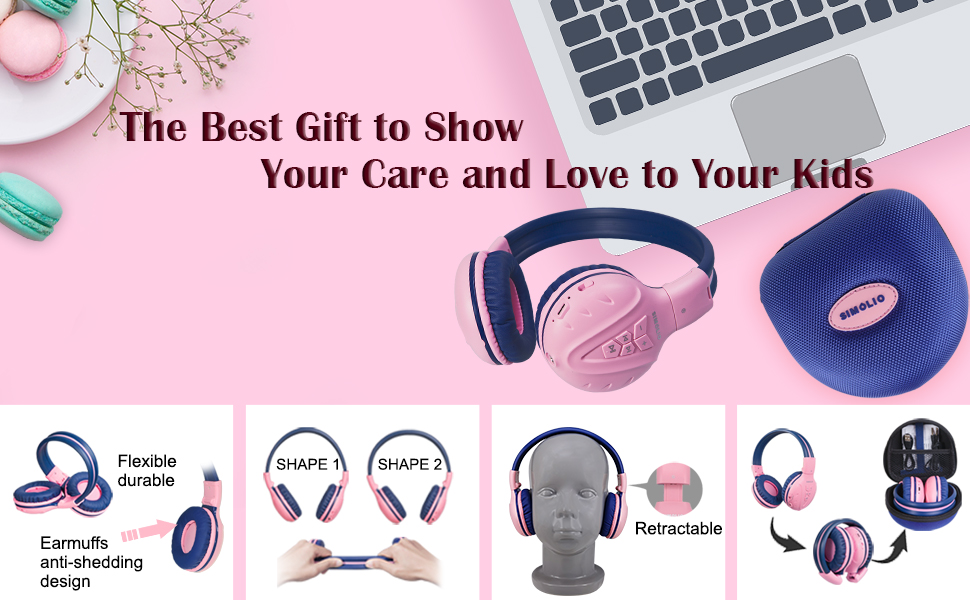
The flexible and durable design allows the headphones to withstand bending and twisting.
Apa yang ada di dalam kotak
Paket ini berisi barang-barang berikut:
- SIMOLIO Kids Wireless Headphones JH-711
- Kabel Pengisian Daya (USB)
- Kabel AUX (kabel audio 3.5 mm)
- Panduan Pengguna
- Carrying EVA Case
Pengaturan
1. Mengisi Daya Headphone
Before first use, fully charge the headphones. Connect the provided USB charging cable to the charging port on the headphones and to a USB power source (e.g., computer, wall adapter). The LED indicator will show charging status and turn off when fully charged.
2. Pemasangan Bluetooth
- Pastikan headphone dimatikan.
- Press and hold the Multi-Function Button (MFB) until the LED indicator flashes blue and red alternately, indicating pairing mode.
- Pada perangkat Anda (ponsel pintar, tablet, dll.), aktifkan Bluetooth dan cari perangkat yang tersedia.
- Pilih "SIMOLIO JH-711" dari daftar perangkat.
- Setelah terhubung, indikator LED akan berkedip biru perlahan.
3. Koneksi Mode Berkabel
To use the headphones in wired mode, connect one end of the 3.5mm AUX cable to the audio jack on the headphones and the other end to the audio output of your device. The headphones will automatically switch to wired mode, even if the battery is dead.

The headphones support both wireless Bluetooth mode and wired mode via the included AUX cable.
4. Volume Limiter Adjustment
Locate the 3-level volume limiter switch on the headphones. Adjust the switch to the desired maximum volume level:
- 75dB (S): Recommended for toddlers or very quiet environments.
- 85dB (M): Recommended for children in general listening environments.
- 94dB (L): Recommended for adults or noisy environments.

Adjust the physical switch to select the appropriate volume limit.
5. Using the Sharing Port
The headphones feature an additional sharing jack on the right side. To share audio, plug another headphone into this port. This allows two users to listen to the same audio source simultaneously.

Connect another headphone to the sharing port to share audio with a friend.
Petunjuk Pengoperasian
1. Daya Hidup/Mati
- Nyalakan: Tekan dan tahan tombol MFB selama kurang lebih 3 detik hingga indikator LED menyala.
- Matikan: Tekan dan tahan tombol MFB selama kurang lebih 3 detik hingga indikator LED mati.
2. Pemutaran Musik
- Putar/Jeda: Tekan sebentar MFB.
- Lagu Berikutnya: Tekan sebentar tombol "+".
- Lagu Sebelumnya: Tekan sebentar tombol "-".
- Volume Naik: Tekan lama tombol "+".
- Volume Turun: Tekan lama tombol "-".
3. Manajemen Panggilan
Saat terhubung melalui Bluetooth:
- Menjawab/Mengakhiri Panggilan: Tekan sebentar MFB.
- Tolak Panggilan: Tekan lama tombol MFB.

Mikrofon internal memungkinkan panggilan bebas genggam.
Pemeliharaan
- Bersihkan headphone dengan kain lembut dan kering. Jangan gunakan pembersih abrasif atau pelarut.
- Hindari memaparkan headphone pada suhu ekstrem, kelembapan, atau sinar matahari langsung.
- Store the headphones in the provided EVA carrying case when not in use to protect them from dust and damage.
- Jangan mencoba membongkar atau memodifikasi headphone, karena hal ini akan membatalkan garansi dan dapat menyebabkan kerusakan.

The headphones fold compactly and fit into the included EVA case for easy storage and transport.
Penyelesaian Masalah
| Masalah | Kemungkinan Penyebab | Larutan |
|---|---|---|
| Headphone tidak menyala. | Baterai lemah. | Isi daya headphone hingga penuh. |
| Tidak dapat dipasangkan melalui Bluetooth. | Headphone tidak dalam mode berpasangan; Bluetooth perangkat mati; terlalu jauh dari perangkat. | Pastikan headphone dalam mode pemasangan (lampu merah/biru berkedip). Aktifkan Bluetooth perangkat. Dekatkan headphone ke perangkat (dalam jarak 9 meter). |
| Tidak ada suara dalam mode nirkabel. | Volume terlalu rendah; tidak terhubung; output audio yang dipilih pada perangkat salah. | Naikkan volume headphone dan perangkat. Pasangkan ulang headphone. Periksa pengaturan audio perangkat. |
| Tidak ada suara dalam mode kabel. | Kabel AUX tidak terpasang sepenuhnya; kabel rusak; volume perangkat terlalu rendah. | Ensure AUX cable is securely connected at both ends. Try a different AUX cable. Increase device volume. |
Spesifikasi
| Fitur | Detil |
|---|---|
| Nama Model | Kids Bluetooth Headphones JH-711 |
| Teknologi Konektivitas | Nirkabel (Bluetooth), Berkabel (Jack 3.5 mm) |
| Versi Bluetooth | 4.0 |
| Jangkauan Bluetooth | 9 Meter |
| Kontrol Kebisingan | Isolasi Suara |
| Kepekaan | 94 dB (Maks) |
| Daya Tahan Baterai | 15 Jam |
| Waktu Pengisian Daya | 3 Jam |
| Berat Barang | 187 Gram (6.6 ons) |
| Dimensi Produk | 5.51x3.15x5.31 inci |
| Bahan | Nylon, Stainless Steel (headband) |
| Bahan Tas Pembawa | EVA |
| Fitur Khusus | 3 Adjustable Volume Limited, Microphone, Durable, Flexible, Foldable, Wired & Wireless, Share Port, EVA Case |
Video Produk Resmi
Video ini memberikan gambaran visualview of the SIMOLIO Bluetooth Headphones for Kids with Case JH-711, demonstrating its features and functionality.
Garansi dan Dukungan
SIMOLIO products are designed for quality and reliability. For specific warranty information, please refer to the warranty card included with your product or visit the official SIMOLIO website. If you encounter any issues or require technical assistance, please contact SIMOLIO customer support through their official channels.