
EXMAX EXD-6824
Panduan Pengguna Sistem Pemandu Wisata Nirkabel 2.4G EXMAX EXD-6824
Model: EXD-6824
Perkenalan
The EXMAX EXD-6824 2.4G Wireless Tour Guide System is designed for clear, hands-free audio transmission from a presenter to an audience. This system is ideal for various applications including guided tours, simultaneous interpretation, training, and assistive listening, ensuring your message is heard clearly without interference.
This manual provides detailed instructions for the proper setup, operation, and maintenance of your EXMAX EXD-6824 system. Please read it thoroughly before use to ensure optimal performance and longevity of the product.
Produk Selesaiview
The EXMAX EXD-6824 system includes transmitters, receivers, and a 64-slot charging case. It operates on a 2.4GHz frequency, offering 9999 selectable channels to accommodate multiple groups simultaneously without interference.

Fitur Utama:
- Dual Transmitter Support: Allows two transmitters to operate simultaneously on the same channel, enabling two speakers or a speaker with background audio.
- Wide Channel Selection: 9999 available 2.4GHz channels for interference-free operation across multiple groups.
- Jangkauan Transmisi Panjang: Hingga 150 meter (492 kaki) di area terbuka.
- Daya Tahan Baterai Lebih Lama: Transmitters offer up to 25 hours, and receivers up to 23 hours on a single charge.
- Fungsi Bisu: Transmitter includes a mute button for privacy.
- Masukan AUX: Transmitter features an AUX input for connecting external audio sources like MP3 players or smartphones.
- Desain Ringan: Receivers weigh only 18g for comfortable wear.
Identifikasi Komponen
Transmitter (EXMAX EXD-6824)

The transmitter is the device used by the speaker or guide. It features:
- Layar LCD: Shows channel ID, transmitting signal, and battery power indicator.
- Tombol Daya (M): Turns the unit on/off and confirms settings.
- Volume Down / ID Setting Button (Left Arrow): Adjusts volume down or navigates channel digits.
- Volume Up / ID Setting Button (Right Arrow): Adjusts volume up or changes channel digits.
- Port Pengisian Daya Mini USB: Untuk mengisi daya baterai internal.
- Tombol Reset (RST): Mengatur ulang perangkat.
- Masukan AUX: Jack 3.5 mm untuk menghubungkan sumber audio eksternal.
- Jack Mikrofon 3.5mm: Untuk menghubungkan mikrofon yang disertakan.
Receiver (EXMAX EXD-6824)

The receiver is worn by the audience members. It features:
- Saklar daya: Menghidupkan/mematikan unit.
- Volume + Tombol: Increases listening volume.
- Tombol Volume: Decreases listening volume.
- Port Pengisian Daya Mini USB: Untuk mengisi daya baterai internal.
- Ear-hook Headphone: Integrated for comfortable listening.
Kotak Pengisian 64 Slot

The robust aluminum alloy charging case allows for simultaneous charging of all transmitters and receivers, ensuring the system is always ready for use.
Petunjuk Pengaturan
1. Mengisi Daya Perangkat
Before initial use, fully charge all transmitters and receivers using the provided 64-slot charging case. Connect the charging case to a power outlet. The charging indicator on each device will show its charging status. A full charge takes approximately 3-6 hours for individual charging or 6 hours using the charging case.

2. Menghidupkan/Mematikan
- Pemancar: Press and hold the 'M' button for a few seconds until the LCD screen illuminates. To power off, press and hold the 'M' button again.
- Penerima: Slide the power switch to the 'ON' position. To power off, slide the switch to the 'OFF' position.
3. Setting the Channel ID on the Transmitter
- Nyalakan pemancar.
- Press and hold both the 'Left Arrow' (Volume Down) and 'Right Arrow' (Volume Up) buttons simultaneously until the channel icon on the screen changes from "M" to "ID". Release both buttons. The transmitter is now in channel setting mode, and the right-most digit of the channel number will be flashing.
- Click the 'Left Arrow' button to select the digit you wish to change. Each click moves the selection from right to left. The selected digit will flash.
- Click the 'Right Arrow' button to change the value of the selected digit (0-9).
- After setting the desired four-digit channel ID (e.g., 0001 to 9999), press and hold the 'M' button for approximately 3 seconds until the four-digit channel starts flashing. Release the 'M' button. The transmitter has now entered wireless channel matching mode.
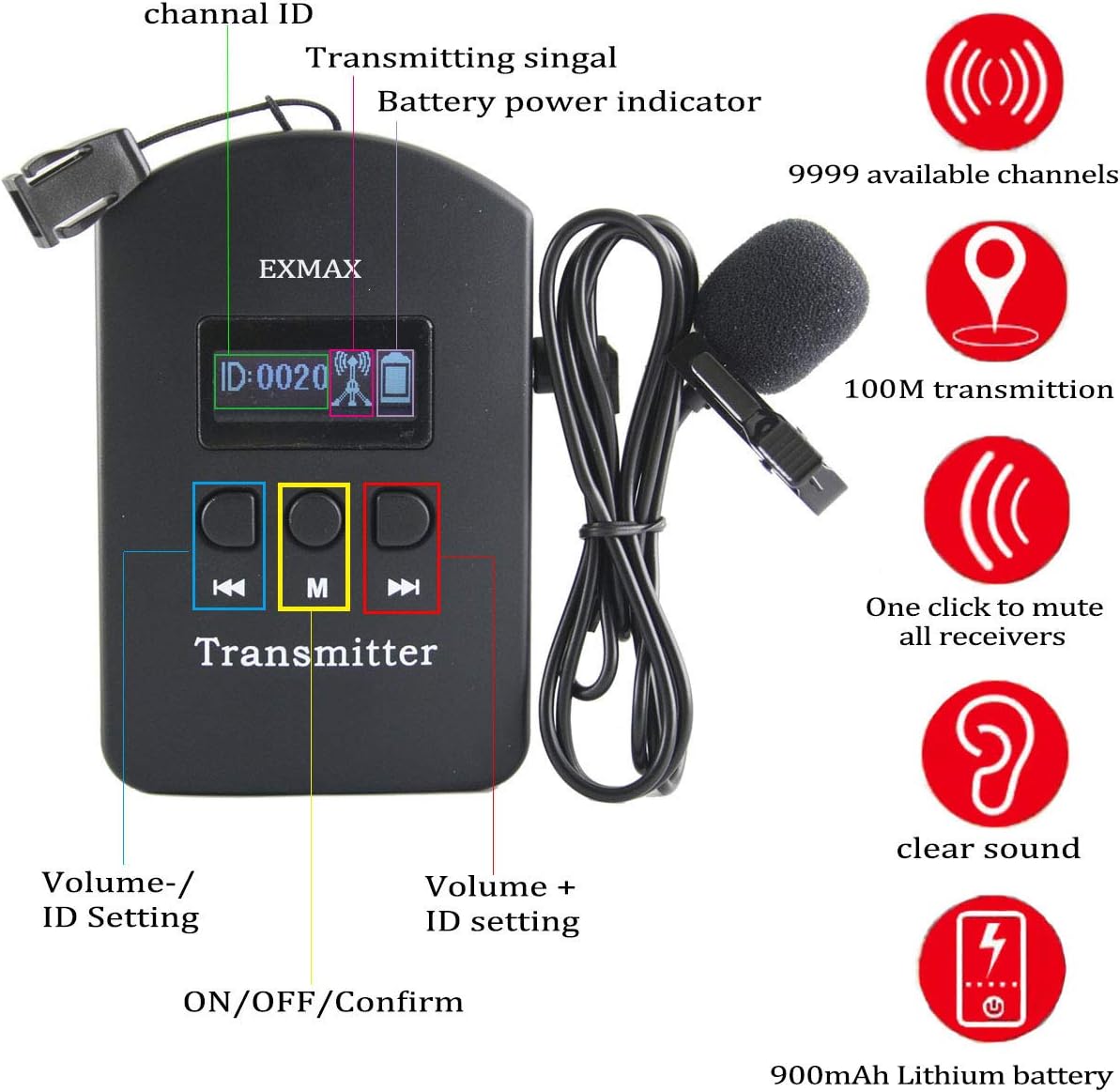
4. Matching Receivers to the Transmitter Channel
- Ensure all receivers are turned on.
- While the transmitter is in channel matching mode (channel ID flashing), place the receivers close to the transmitter (within 1 meter).
- The receivers' channels will automatically match the transmitter's channel. The flashing blue light on the receivers will turn to a stable blue light, indicating successful channel matching.
- Once matching is complete, click the transmitter's 'M' button to exit channel matching mode and return to normal working mode.
Penting: For different groups operating in the same area, ensure each group uses a unique channel ID to prevent interference.
Petunjuk Pengoperasian
1. Single Transmitter Operation
After successful channel matching, speak into the microphone connected to the transmitter. All receivers tuned to the same channel will receive the audio. Adjust the volume on the receivers using their respective '+' and '-' buttons.
2. Two Transmitters Simultaneous Operation
The EXD-6824 system supports two transmitters working simultaneously on the same channel within one group. This allows two speakers to talk concurrently or take turns, with all listeners hearing both.
- Turn on the first transmitter. Its display will show "M" as the first letter.
- After the first transmitter is fully on, turn on the second transmitter. Its display will show "S" as the first letter.
- Catatan: Do not turn on both transmitters at the exact same time. If both display "M", turn one off and then on again to ensure one displays "S". If both display "M", only one transmitter's voice will be heard.

3. Mute Function (Transmitter)
To temporarily stop audio transmission, press the 'M' button on the transmitter. The antenna icon on the display will flash, indicating that the audio is muted. Press the 'M' button again to unmute and resume transmission.
4. AUX Input Usage (Transmitter)
Connect an external audio device (e.g., MP3 player, smartphone) to the transmitter's AUX input using a 3.5mm audio cable. The audio from the external device will be transmitted to all connected receivers. This is useful for playing background music or pre-recorded messages.
Aplikasi
The EXMAX EXD-6824 Wireless Tour Guide System is versatile and suitable for a wide range of environments where clear, direct communication to a group is essential:
- Guided Tours: Museums, city tours, noisy factories, historical sites.
- Interpretasi Simultan: Multilingual meetings, church translation, international conferences.
- Training & Education: Factory field trips, school audio-visual laboratories, special job training, industrial tourism seminars.
- Assistive Listening: For individuals with hearing impairments in various settings.
- Acara: Exhibitions, silent conferences, corporate events, private speeches.

Pemeliharaan
1. Pembersihan
Wipe the devices with a soft, dry cloth. Do not use liquid cleaners or solvents, as they may damage the electronic components. Ensure devices are dry before charging or storing.
2. Perawatan Baterai
- To prolong battery life, avoid fully discharging the devices frequently.
- Charge the devices regularly, even if not in constant use, to maintain battery health.
- Store devices in a cool, dry place when not in use for extended periods.
3. Penyimpanan
Store the system components in the provided charging case to protect them from dust, moisture, and physical damage. Ensure all devices are powered off before storage.
Penyelesaian Masalah
No Sound from Receivers
- Periksa Daya: Ensure both the transmitter and receivers are powered on and have sufficient battery charge.
- Verify Channel Match: Confirm that all receivers are tuned to the exact same channel ID as the transmitter. Re-perform the channel matching procedure if necessary.
- Transmitter Mute: Check if the transmitter's mute function is active (flashing antenna icon). Press the 'M' button to unmute.
- Koneksi Mikrofon: Ensure the microphone is securely plugged into the transmitter's 3.5mm jack.
- Tingkat Volume: Adjust the volume on both the transmitter and receivers.
Interference or Poor Audio Quality
- Ganti Saluran: If experiencing interference, try changing the channel ID on the transmitter and re-matching all receivers to the new channel.
- Jarak: Ensure the transmitter and receivers are within the effective transmission range (up to 150 meters). Obstacles can reduce this range.
- Faktor Lingkungan: 2.4GHz systems can be affected by other 2.4GHz devices (Wi-Fi, Bluetooth). Try to minimize proximity to such devices.
- Two Transmitters Issue: If using two transmitters, ensure they were powered on sequentially (one "M", one "S"). If both show "M", only one will transmit effectively. Power cycle one transmitter to correct this.
Perangkat Tidak Mengisi Daya
- Sambungan Daya: Verify the charging case is properly plugged into a working power outlet.
- Penempatan Perangkat: Ensure devices are correctly seated in their slots within the charging case.
- Kabel Pengisian: If charging individually, check the Mini USB cables for damage and ensure they are securely connected.
Spesifikasi
| Fitur | Detil |
|---|---|
| Nomor Model | EXD-6824 |
| Pita Frekuensi | 2.4 GHz |
| Saluran yang Tersedia | 9999 |
| Rentang Transmisi | Hingga 150 meter (492 kaki) di area terbuka |
| Baterai Pemancar | 900mAh Lithium Polymer (up to 25 hours working time) |
| Baterai Penerima | 380mAh Lithium Polymer (up to 23 hours working time) |
| Waktu Pengisian Daya | 3-6 hours (individual), approx. 6 hours (charging case) |
| Berat Penerima | 18 gram |
| Dimensi Produk (Pemancar) | 2.6 x 1.3 x 0.7 inci (kira-kira 63 mm x 97 mm) |
| Berat Barang (Total Sistem) | 14.77 pon |
| Keluaran Wattage | 5 Watt |
Garansi dan Dukungan
For warranty information and technical support, please refer to the documentation included with your purchase or visit the official EXMAX website. If you encounter any issues not covered in this manual, please contact EXMAX customer service for assistance.
EXMAX Customer Service: Please refer to your product packaging or the EXMAX brand store on Amazon for the most current contact information.
Ask a question about this manual
Ask about setup, troubleshooting, compatibility, parts, safety, or missing instructions. Manuals+ will review the question and use this page’s manual context to help answer it.