
1. Pendahuluan
This manual provides comprehensive instructions for the setup, operation, and maintenance of your EXMAX EXD-6824 2.4G Wireless Tour Guide System. Please read this manual carefully before using the system to ensure proper functionality and to maximize your user experience.
2. Isi Paket
The EXMAX EXD-6824 system typically includes the following components:
- Transmitters (quantity varies by kit, e.g., 2)
- Receivers (quantity varies by kit, e.g., 50)
- Charging Case (e.g., 64-slot)
- Mikrofon Lavalier
- Head-mounted Microphones
- Tali gantungan
- Kabel Pengisian Daya
- Panduan Pengguna

Gambar 2.1: Lebihview of EXMAX EXD-6824 system components.
3. Produk Lebihview
3.1 Pemancar
The transmitter is used by the speaker or tour guide to broadcast audio. It features a display screen, control buttons, a microphone jack, a charging port, and an AUX input.

Gambar 3.1: Depan view of the EXMAX EXD-6824 Transmitter with key dimensions.

Gambar 3.2: Rinci view of Transmitter controls and ports, including volume, ID setting, ON/OFF/Confirm, transmitting signal, battery indicator, and channel ID.
3.2 Penerima
The receivers are worn by listeners to hear the broadcasted audio. They are designed for comfort and ease of use, featuring volume controls and a power button.
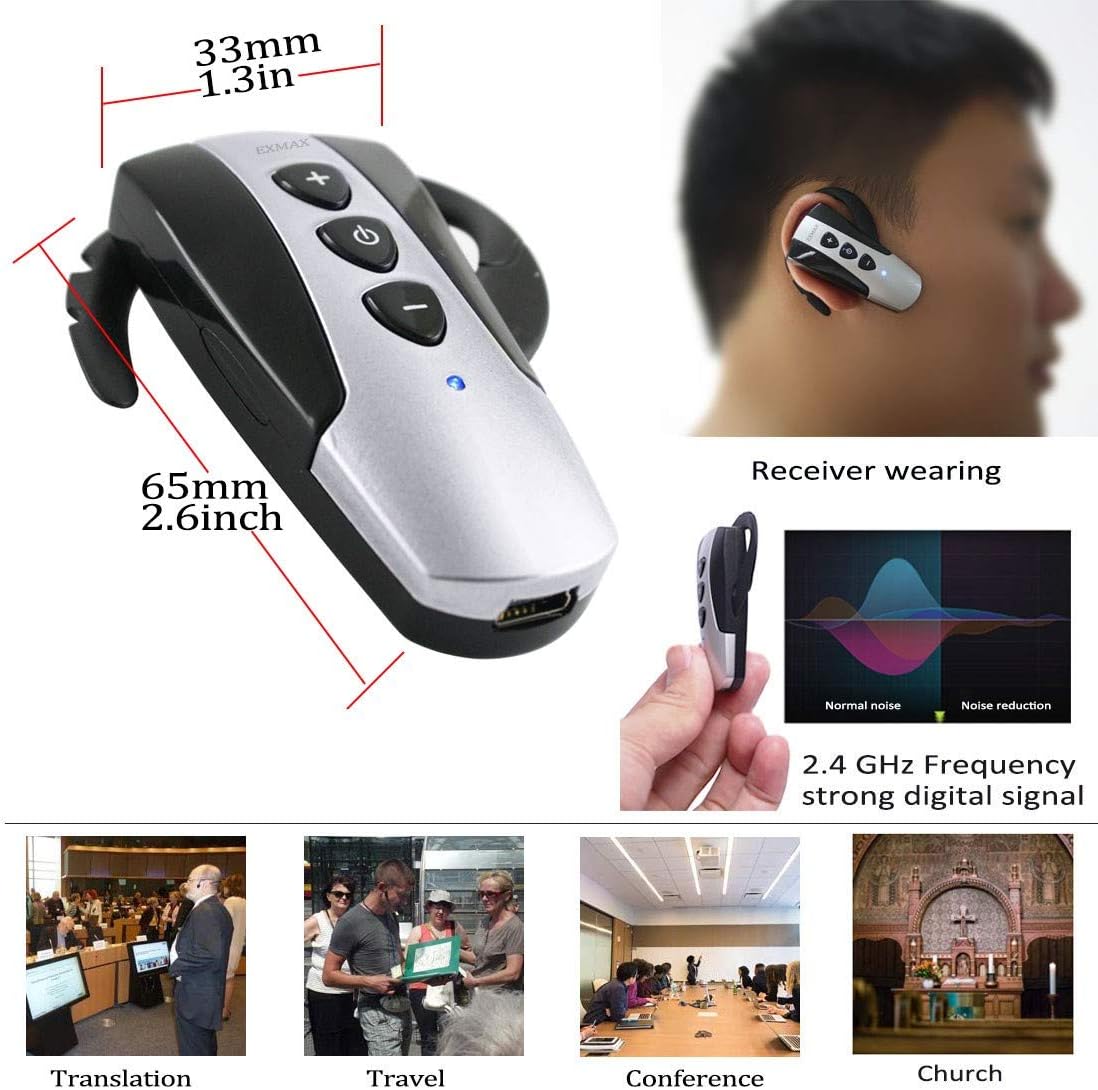
Gambar 3.3: Sisi view of the EXMAX EXD-6824 Receiver with key dimensions.

Gambar 3.4: Depan dan belakang view of the EXMAX EXD-6824 Receiver, highlighting the power switch, volume controls, and mini USB charging port.
4. Pengaturan
4.1 Mengisi Daya Perangkat
Before initial use, ensure all transmitters and receivers are fully charged. The system includes a charging case for convenient simultaneous charging.
- Place the transmitters and receivers into their designated slots in the charging case.
- Connect the charging case to a power source using the provided power cable.
- The indicator lights on the devices will show charging status (e.g., red for charging, blue for fully charged).

Figure 4.1: The 64-slot charging case for the EXMAX EXD-6824 system, capable of charging multiple transmitters and receivers simultaneously.
Video 4.1: Demonstrates the EXMAX EXD-6824 Wireless Guide System and its Charging Case, showing how to place devices for charging.
4.2 Menghubungkan Mikrofon
Connect the desired microphone (lavalier or head-mounted) to the transmitter's microphone jack.
- Locate the microphone jack on the side of the transmitter.
- Insert the 3.5mm plug of the lavalier or head-mounted microphone firmly into the jack.
Video 4.2: Illustrates the operating mode of the EXMAX EXD-6824 wireless guidance system, including microphone connection.
4.3 Memakai Perangkat
The transmitter can be worn around the neck using the provided lanyard. Receivers are designed as ear-hook style for comfortable, hands-free use.
- Pemancar: Attach the lanyard to the designated loop on the transmitter and wear it around your neck.
- Penerima: Place the ear-hook receiver over your ear. The design is sweat-proof and easy to clean.
5. Operasi
5.1 Daya Hidup/Mati
To power on or off the devices:
- Pemancar: Long press the "M" button for approximately two seconds to power on. Hold the "M" button for two seconds to shut down.
- Penerima: Long press the power button (center button) for approximately two seconds to power on. Hold the power button for two seconds to shut down.
Video 5.1: Demonstrates how to turn on and off the EXMAX EXD-6824 wireless tour guide system.
5.2 Channel Synchronization (Pairing)
To ensure all receivers hear the transmitter, they must be synchronized to the same channel ID.
- Set Transmitter Channel:
- Nyalakan pemancar.
- Simultaneously press and hold the left (◀◀) and right (▶▶) buttons for approximately 3 seconds until the channel icon on the screen changes from "M" to "ID" and the right-most digit of the channel number starts flashing. Release both buttons. The transmitter is now in channel setting mode.
- Use the left (◀◀) button to select the digit you wish to change (it will flash).
- Use the right (▶▶) button to change the value of the selected digit (0-9).
- Repeat until your desired 4-digit channel ID (0001 to 9999) is set.
- Enter Wireless Channel Matching Mode:
- After setting the channel ID, press and hold the "M" button for about 3 seconds until the four-digit channel starts flashing. Release the "M" button. The transmitter is now in wireless channel matching mode.
- Synchronize Receivers:
- Ensure all receivers are turned on.
- Place the receivers close to the transmitter (within 1 meter). The receivers' channels will automatically match the transmitter's channel.
- The receivers' flashing blue light will turn to a stable blue light once synchronization is complete.
- Exit Matching Mode: Click the "M" button on the transmitter to exit the channel matching mode and return to normal working mode.
Note: Different groups should use different frequency Channel IDs to avoid interference.
Video 5.2: Demonstrates how to adjust and synchronize channels on the EXMAX EXD-6824 wireless guide system.
5.3 Menyesuaikan Volume
Listeners can adjust the volume on their individual receivers:
- On the receiver, press the "+" button to increase volume.
- Press the "-" button to decrease volume.
5.4 Fungsi Bisu
The transmitter features a mute function to temporarily stop audio transmission to receivers.
- To mute, click the right (▶▶) button on the transmitter. The mute icon (a crossed-out speaker) will appear on the display.
- To unmute, click the right (▶▶) button again. The mute icon will disappear.
5.5 Using Two Transmitters Simultaneously
The EXMAX EXD-6824 system supports two transmitters operating on the same channel, allowing two speakers to talk simultaneously or take turns.
- Turn on the first transmitter. Its display will show "M" as the first letter.
- After the first transmitter is fully on, turn on the second transmitter. Its display will show "S" as the first letter.
- If both transmitters display "M", turn off one and then turn it on again to ensure one displays "S". Otherwise, only one transmitter's voice will be heard.

Figure 5.1: System diagrams illustrating various configurations, including two transmitters talking simultaneously in a group.
5.6 Playing External Audio (AUX Input)
The transmitter includes an AUX input for connecting external audio devices like MP3 players, smartphones, or computers to play background music or pre-recorded messages.
- Locate the AUX input port on the transmitter.
- Connect your external audio device using a compatible 3.5mm audio cable.
- Adjust the volume on your external device as needed.
5.7 Shutting Down All Receivers
For convenience, you can shut down all synchronized receivers from the transmitter.
- On the transmitter, long press the left (◀◀) button for 5 seconds. The display will flash, and all connected receivers will power off.
6. Pemeliharaan
To ensure the longevity and optimal performance of your EXMAX EXD-6824 system, follow these maintenance guidelines:
- Pembersihan: Use a soft, dry cloth to clean the devices. Avoid using harsh chemicals or abrasive materials. The ear-hook receivers are designed to be sweat-proof and easy to clean.
- Penyimpanan: Store the system in its charging case or a dry, cool place when not in use. Avoid extreme temperatures and direct sunlight.
- Perawatan Baterai: Fully charge the devices before long periods of storage. Recharge periodically (e.g., every 3 months) to maintain battery health.
- Penanganan: Handle devices with care to prevent damage from drops or impacts.
7. Penyelesaian masalah
If you encounter issues with your EXMAX EXD-6824 system, refer to the following common problems and solutions:
| Masalah | Kemungkinan Penyebab | Larutan |
|---|---|---|
| No sound from receivers. |
|
|
| Gangguan atau kualitas suara yang buruk. |
|
|
| Receivers not shutting down with transmitter. |
|
|
8. Spesifikasi
| Fitur | Detil |
|---|---|
| Nomor Model | EXD-6824 |
| Pita Frekuensi | 2.4 GHz (Worldwide license-free) |
| Saluran | 9999 saluran yang dapat dipilih |
| Rentang Transmisi | Up to 150 meters (492 ft) in open areas |
| Baterai Pemancar | 900mAh Lithium Polymer (Up to 25 hours operating time) |
| Baterai Penerima | 380mAh Lithium Polymer (Up to 23 hours operating time) |
| Waktu Pengisian Pemancar | Approx. 3 hours (6 hours via charging case) |
| Waktu Pengisian Penerima | Approx. 2 hours (4 hours via charging case) |
| Dimensi Pemancar | Kira-kira 2.6 x 0.7 x 1.3 inci (63mm x 18mm x 33mm) |
| Berat Pemancar | Kira-kira 70g (0.15 pon) |
| Berat Penerima | Kira-kira 18g (0.04 pon) |
9. Garansi dan Dukungan
For warranty information and technical support, please refer to the official EXMAX websitus web atau hubungi penjual Anda. Simpan struk pembelian Anda untuk klaim garansi.
EXMAX Contact Information:
- Weblokasi: www.exmax.com
- E-mail: sales@exmax.com