
1. Pendahuluan
This manual provides instructions for the installation, operation, and maintenance of the Cisco CP-68KEM-3PCC Expansion Module. This module is designed to enhance the functionality of your Cisco IP Phone 6851 by providing additional programmable keys.
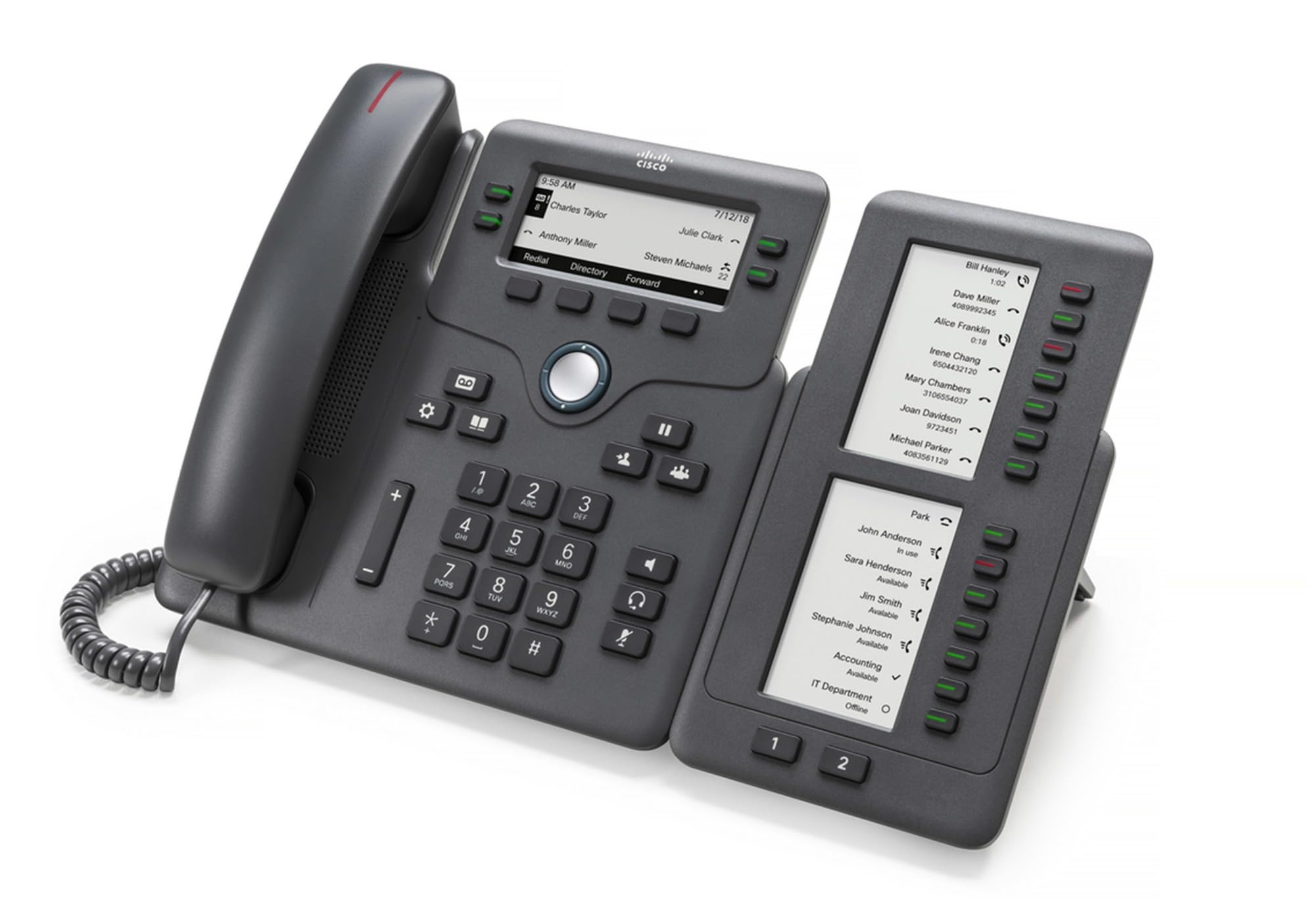
Figure 1: Cisco CP-68KEM-3PCC Expansion Module. This image shows the front view of the expansion module with its grayscale LCD screen and programmable keys.
The Cisco CP-68KEM-3PCC Expansion Module adds 14-line keys and 2-page keys, totaling 28 additional keys, with an easy-to-read grayscale LCD screen. It is ideal for monitoring and managing call status, directory numbers, and speed dial functions.
2. Apa yang ada di dalam kotak
Buka kotak dengan hati-hati dan pastikan semua barang ada di dalamnya:
- Cisco CP-68KEM-3PCC Phone Expansion Module
- Connecting Cable (typically included for linking to the phone)
- Documentation (this user manual, safety information)
Jika ada barang yang hilang atau rusak, segera hubungi vendor atau dukungan Cisco Anda.
3. Petunjuk Penyiapan
Follow these steps to connect your Cisco CP-68KEM-3PCC Expansion Module to your Cisco IP Phone 6851.
- Prepare the IP Phone: Ensure your Cisco IP Phone 6851 is powered off and disconnected from the network.
- Connect the Expansion Module: Locate the expansion port on the back or side of your Cisco IP Phone 6851. Connect the provided connecting cable from the expansion module to this port.
- Amankan Koneksi: Pastikan kabel terpasang dengan aman untuk mencegah terlepasnya kabel secara tidak sengaja.
- Nyalakan: Reconnect your Cisco IP Phone 6851 to the network and power it on. The expansion module should be detected automatically.
- Verifikasi Fungsionalitas: Once the phone has booted, check the expansion module's display and keys to ensure they are responsive.
For detailed visual instructions, refer to the official Cisco documentation or support weblokasi.
4. Operating the Expansion Module
The expansion module provides additional keys for various functions, enhancing your call management capabilities.
4.1 Tombol yang Dapat Diprogram
The 28 programmable keys (14 keys across 2 pages) can be configured for:
- Directory Numbers (DNs): Assign specific phone lines or extensions.
- Panggilan cepat: Program frequently called numbers for quick access.
- Feature Keys: Assign functions like call transfer, conference, or call park.
- Call Status Monitoring: Monitor the status of other lines (e.g., busy, ringing).
4.2 Page Navigation
Use the dedicated page keys (usually located near the display) to switch between the two pages of programmable keys. The grayscale LCD screen will update to show the labels for the currently active page.
4.3 Konfigurasi
Configuration of the programmable keys is typically managed through your organization's phone system administrator or via the web interface of the Cisco IP Phone 6851. Consult your IT department for specific configuration instructions.
5. Pemeliharaan
To ensure the longevity and optimal performance of your Cisco CP-68KEM-3PCC Expansion Module, follow these maintenance guidelines:
- Pembersihan: Use a soft, dry, lint-free cloth to clean the exterior surfaces. For stubborn marks, slightly dampBasahi kain dengan air. Hindari penggunaan bahan kimia keras, pembersih abrasif, atau pelarut, karena dapat merusak lapisan akhir dan komponen elektronik.
- Lingkungan: Simpan modul di lingkungan yang bersih dan kering, jauhkan dari sinar matahari langsung, panas berlebihan, dan kelembapan.
- Penanganan: Tangani modul ini dengan hati-hati. Hindari menjatuhkannya atau membuatnya terkena benturan keras.
- Manajemen Kabel: Ensure connecting cables are not kinked, pinched, or under strain.
There are no user-serviceable parts inside the expansion module. Do not attempt to open or repair the device yourself.
6. Penyelesaian masalah
If you encounter issues with your expansion module, try the following troubleshooting steps:
| Masalah | Kemungkinan Penyebab | Larutan |
|---|---|---|
| Modul tidak dikenali oleh telepon. | Loose cable connection, phone not restarted, incompatible phone model. |
|
| Kunci tidak responsif | Software glitch, configuration issue. |
|
| Layar kosong atau berkedip | Masalah daya, kesalahan internal. |
|
If these steps do not resolve the issue, please contact Cisco technical support or your authorized reseller.
7. Spesifikasi
| Fitur | Detil |
|---|---|
| Nomor Model | CP-68KEM-3PCC |
| Merek | Bahasa Indonesia: Cisco |
| Perangkat yang Kompatibel | Cisco IP Telepon 6851 |
| Warna | Hitam |
| Bahan | Logam |
| Dimensi Barang (PxLxT) | Ukuran 5.1x10.2x20.3 cm |
| Sumber Daya | Corded (powered via host IP Phone) |
| Jumlah Kunci | 28 (14 keys across 2 pages) |
| Menampilkan | LCD skala abu-abu |
| GTIN/UPC | 889728068383 |
8. Informasi Garansi
The Cisco CP-68KEM-3PCC Expansion Module comes with a Garansi produk 2 tahun Terhitung sejak tanggal pembelian. Garansi ini mencakup kerusakan material dan pengerjaan dalam penggunaan normal. Garansi ini tidak mencakup kerusakan yang disebabkan oleh penyalahgunaan, kecelakaan, modifikasi tanpa izin, atau penyebab eksternal.
For warranty claims or detailed terms and conditions, please refer to the official Cisco warranty policy available on their websitus atau hubungi tempat pembelian Anda.
9. Dukungan
For technical assistance, product information, or to report issues, please contact Cisco support:
- Dukungan Cisco Weblokasi: Kunjungi situs resminya Dukungan Cisco weblokasi for documentation, downloads, and contact options.
- Authorized Reseller: Contact the reseller from whom you purchased the product.
When contacting support, please have your product model (CP-68KEM-3PCC) and serial number ready.