REMAX RB-M26 Multifunction Bluetooth Speaker with FM Radio and Alarm Clock
Panduan Pengguna
Perkenalan
Terima kasih sudah membeliasing the REMAX RB-M26 Multifunction Bluetooth Speaker. This device combines a portable Bluetooth speaker, FM radio, and a dual alarm clock, with additional support for TF card and USB audio playback. This manual provides detailed instructions to help you set up and operate your speaker effectively.
Isi Paket
REMAX RB-M26 Bluetooth Speaker
Kabel Pengisian Daya USB
Kabel Audio (AUX)
Panduan Pengguna
Produk Selesaiview
Biasakan diri Anda dengan komponen dan kontrol speaker.
Figure 1: REMAX RB-M26 Clock Speaker retail packaging, showing the product and key features.
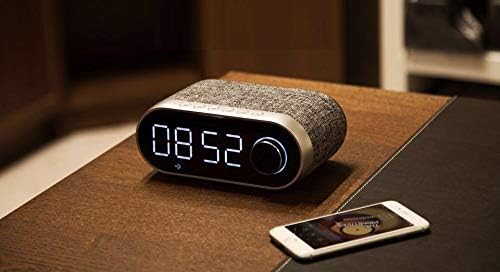
The speaker features a large LED display for time and mode information, along with intuitive buttons and a rotary knob for control. The top panel typically includes buttons for power, mode selection, play/pause, volume, and alarm settings. The rear or side panel houses ports for USB, TF card, AUX input, and charging.
Pengaturan
1. Mengisi Speaker
Hubungkan ujung kecil kabel pengisi daya USB ke port pengisian daya pada speaker.
Hubungkan ujung kabel USB yang lebih besar ke adaptor daya USB (tidak termasuk) atau port USB komputer.
Indikator pengisian daya akan menyala. Indikator akan mati atau berubah warna setelah terisi penuh.
2. Menghidupkan/Mematikan
To power on, press and hold the Power button until the display lights up.
Untuk mematikan daya, tekan dan tahan tombol Daya lagi hingga layar mati.
3. Mengatur Waktu
Figure 2: The REMAX RB-M26 speaker on a bedside table, showing the digital clock display.
In clock mode, press and hold the 'Time Set' button (or a similar button, refer to your specific unit's markings).
The hour digits will start flashing. Use the '+' and '-' buttons or the rotary knob to adjust the hour.
Press the 'Time Set' button again to move to minute adjustment. Adjust minutes similarly.
Press 'Time Set' once more to confirm and exit.
Petunjuk Pengoperasian
1. Pemasangan Bluetooth
Figure 3: The REMAX RB-M26 speaker connected via Bluetooth to a smartphone.
Nyalakan speaker. Speaker akan secara otomatis memasuki mode pemasangan Bluetooth, yang ditunjukkan oleh ikon Bluetooth yang berkedip di layar.
Pada ponsel pintar, tablet, atau laptop Anda, aktifkan Bluetooth dan cari perangkat yang tersedia.
Select "REMAX RB-M26" from the list of devices.
Once paired, the Bluetooth icon will stop flashing and remain solid, and you will hear a confirmation tone.
2. Pengoperasian Radio FM
Tekan tombol 'Mode' untuk beralih ke mode Radio FM.
Tekan dan tahan tombol 'Putar/Jeda' untuk secara otomatis memindai dan menyimpan stasiun FM yang tersedia.
Use the 'Next/Previous' buttons to navigate between saved stations.
For manual tuning, short press the 'Next/Previous' buttons.
3. TF Card / USB Audio Playback
Insert a TF card (MicroSD) or a USB flash drive with MP3 audio fileke dalam slot yang sesuai.
The speaker will automatically switch to TF card or USB mode and begin playback. If not, press the 'Mode' button to select the correct source.
Use the 'Play/Pause' button to control playback.
Use the 'Next/Previous' buttons to skip tracks.
4. Masukan AUX
Hubungkan salah satu ujung kabel audio 3.5 mm ke port AUX pada speaker.
Hubungkan ujung lainnya ke output audio perangkat eksternal Anda (misalnya, pemutar MP3, komputer).
Press the 'Mode' button to switch to AUX mode.
Audio playback will be controlled from your external device.
5. Fungsi Jam Alarm
Mengatur Alarm 1/2: In clock mode, short press the 'Alarm Set' button (or similar). The alarm time will flash. Use the '+' and '-' buttons or rotary knob to set the hour and minutes. Press 'Alarm Set' again to confirm. Repeat for a second alarm if desired.
Mengaktifkan/Menonaktifkan Alarm: After setting, press the 'Alarm Set' button to toggle the alarm on/off. An alarm icon will appear/disappear on the display.
Fungsi Tunda: When the alarm sounds, press any button (except power off) to activate snooze. The alarm will sound again after a few minutes.
Alarm Berhenti: To stop the alarm completely, press and hold the 'Alarm Set' button when it is sounding.
Pemeliharaan
Bersihkan speaker dengan kain lembut dan kering. Jangan gunakan pembersih atau pelarut abrasif.
Hindari memaparkan speaker pada suhu ekstrem, sinar matahari langsung, atau kelembapan tinggi.
Jangan merendam speaker dalam air.
Simpan speaker di tempat yang sejuk dan kering bila tidak digunakan dalam jangka waktu lama.
Penyelesaian Masalah
Masalah
Larutan
Speaker tidak menyala.
Pastikan speaker terisi daya. Sambungkan ke sumber daya menggunakan kabel USB.
Tidak ada suara dari speaker.
Check the volume level on both the speaker and the connected device. Ensure the correct mode (Bluetooth, FM, TF, USB, AUX) is selected.
Pemasangan Bluetooth gagal.
Pastikan speaker dalam mode pemasangan Bluetooth. Matikan dan hidupkan Bluetooth di perangkat Anda. Dekatkan perangkat ke speaker.
Penerimaan sinyal radio FM buruk.
Adjust the speaker's position. Extend any built-in antenna if available. Try scanning for stations again.
TF card/USB not playing.
Ensure the TF card/USB is inserted correctly and contains compatible audio files (e.g., MP3). Check if the speaker is in the correct mode.
Spesifikasi
Merek: REMAX
Model: RB-M26
Teknologi Konektivitas: Bahasa Indonesia: Bluetooth
Tipe Pemasangan: Meja
Tipe Pembicara: Suara Sekitar
Fitur Khusus: FM Radio, Alarm Clock
Perangkat yang Kompatibel: Tablet, Laptop, Ponsel Pintar
Tipe Kontrol: Integrated Buttons/Knob (Note: Some models may include a remote control, please check your package contents.)
Pemutaran Audio: Supports TF Card, USB Audio
Garansi dan Dukungan
The REMAX RB-M26 speaker comes with a standard manufacturer's warranty. Please refer to the warranty card included in your package for specific terms and conditions. For technical support or service inquiries, please contact your local REMAX distributor or the retailer where you purchased the product.
Ask a question about this manual
Ask about setup, troubleshooting, compatibility, parts, safety, or missing instructions. Manuals+ will review the question and use this page’s manual context to help answer it.