1. Pendahuluan
The PenPower Write2Go Anywhere is an intelligent digital memo writing pad designed to enhance productivity. Utilizing LCD eWriter Technology, it allows for instant on-screen writing. This device facilitates signing digital documents, taking and saving handwritten memos, and managing to-do lists efficiently on a computer.

Image: The PenPower Write2Go Anywhere pad in use, showing a user writing a memo while connected to a laptop.
2. Apa yang ada di dalam kotak
Verifikasi bahwa semua item berikut disertakan dalam paket Anda:
- 1 x PenPower Write2Go Anywhere Digital Memo Writing Pad
- 1 x Lite2Go Anywhere Digital Pen
- 1 x Panduan Memulai Cepat

Gambar: Jelas view of the PenPower Write2Go Anywhere pad and its accompanying digital pen.
3. Pengaturan
Follow these steps to set up your Write2Go Anywhere device:
- Hubungkan Perangkat: Plug the Write2Go Anywhere pad into your computer using the provided USB cable.
- Instalasi Perangkat Lunak: Install the necessary drivers and software for your operating system (Windows/Mac). Refer to the Quick Start Guide for detailed instructions on software installation.
- Kalibrasi Awal: Once the software is installed, you may be prompted to calibrate the digital pen with the pad for optimal accuracy.
4. Petunjuk Pengoperasian
4.1 Taking and Saving Memos
The Write2Go Anywhere allows you to freely write and save memos directly on the pad, even without a computer connection. When connected, these handwritten memos can be instantly converted into a digital format.

Image: Digital memos created with the Write2Go Anywhere pad are displayed as sticky notes on a computer desktop.
4.2 Scheduling Memos and Reminders
Memos can be pinned to your computer desktop for quick reminders. With a simple click, you can save and schedule these memos in Google or Outlook Calendar online, ensuring your schedule is updated across all your devices.
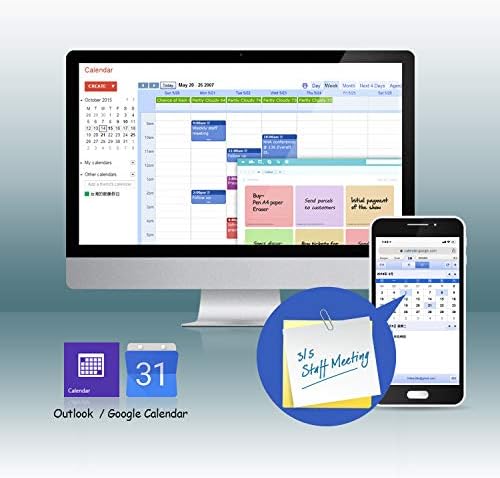
Image: The Write2Go Anywhere integrates with digital calendars, allowing memos to be scheduled and viewed on both computer and mobile devices.
4.3 Signing Digital Documents
The device allows for quick and easy signing of digital files. It supports various formats including PDF, Word, Excel, and image files (JPEG, PNG, TIFF).
Video: This video demonstrates how to use the PenPower Write2Go Anywhere to sign a PDF document, showcasing the process from opening the file to applying and saving the signature.

Image: A user digitally signs a document displayed on a laptop, with their handwriting appearing on the screen via the connected Write2Go Anywhere pad.
4.4 Sending Inking Messages
You can send handwritten messages through PC versions of communication applications like LINE, Facebook Messenger, Skype, QQ, and WeChat. This feature is particularly useful for conveying complex ideas or designs visually.
4.5 Eco-Friendly Usage
The Write2Go Anywhere is designed as an eco-friendly tool, supporting over 50,000 erase cycles, reducing the need for paper.
Video: This video highlights the ease of signing and quick memo-taking capabilities of the PenPower Write2Go Anywhere, demonstrating its efficiency for various tasks.
5. Pemeliharaan
- Pembersihan: Use a soft, dry cloth to clean the writing surface and the device body. Avoid abrasive cleaners or solvents.
- Penyimpanan: Simpan perangkat di tempat yang sejuk dan kering, jauhkan dari sinar matahari langsung dan suhu ekstrem.
- Perawatan Pena: Ensure the digital pen is stored securely when not in use to prevent damage to the tip.
6. Penyelesaian masalah
- Perangkat Tidak Merespons: Ensure the USB cable is securely connected to both the pad and the computer. Restart the software or your computer if the issue persists.
- Writing Not Appearing: Check if the digital pen is functioning correctly. Ensure the writing surface is clean and free from obstructions.
- Masalah Perangkat Lunak: If you experience software glitches, try reinstalling the latest drivers from the PenPower official weblokasi.
7. Spesifikasi
| Fitur | Detil |
|---|---|
| Merek | Kekuatan Pena |
| Nama Model | 4710837753012 |
| Teknologi Konektivitas | USB |
| Sistem Operasi | [Multiple] (Windows/Mac) |
| Fitur Khusus | Portabel |
| Penggunaan Khusus Untuk Produk | Writing, Editing, Remote Work |
| Jenis Tampilan | Layar LCD |
| Perangkat yang Kompatibel | Komputer Pribadi |
| Ukuran Layar | 7 inci |
| Berat Barang | 95 gram |
| Luas Permukaan Aktif | 5.81 inci persegi |
| Warna | Hitam |
| Pabrikan | Kekuatan Pena |
8. Garansi & Dukungan
For warranty information and technical support, please refer to the official PenPower websitus web atau kartu garansi yang disertakan dalam kemasan produk Anda. Anda juga dapat mengunjungi PenPower Store on Amazon untuk sumber daya tambahan.