
Perkenalan
The MUSKY DY28 is a versatile device combining a Bluetooth speaker, smart touch lamp, alarm clock, and MP3 player into a single unit. This manual provides instructions for its setup, operation, and maintenance to ensure optimal performance.
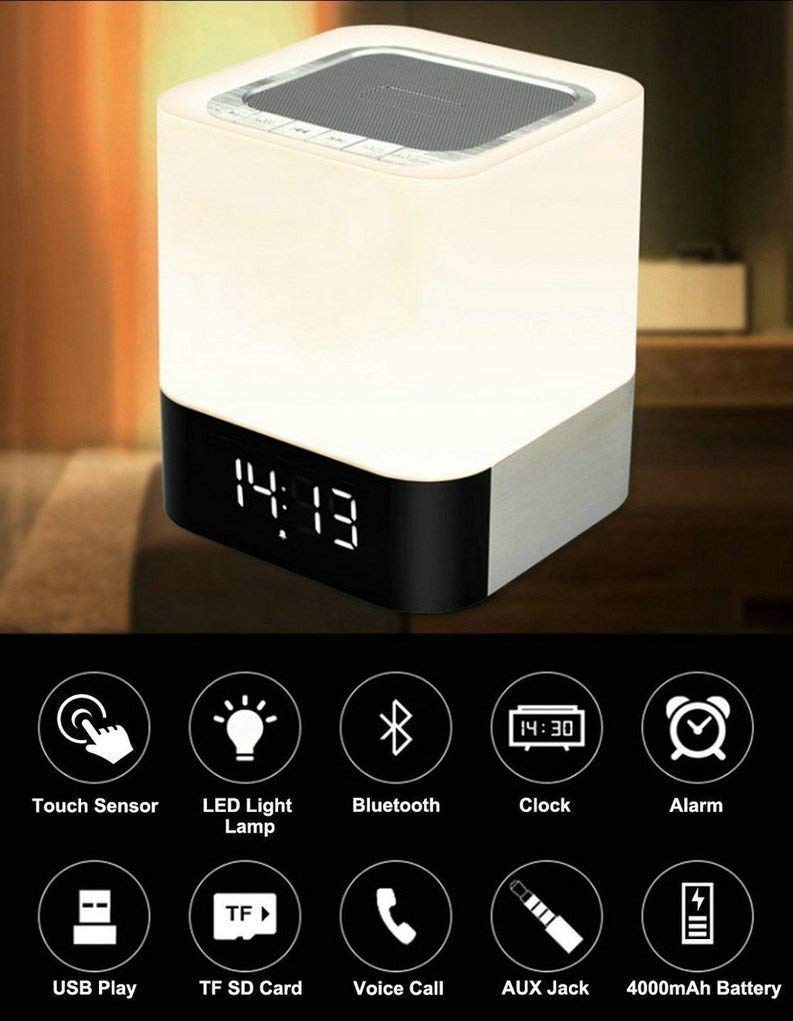
Image: The MUSKY DY28 device, showcasing its integrated clock display and touch-sensitive light panel.
Isi Kotak
- MUSKY DY28 Bluetooth Speaker
- Panduan Pengguna
- Kabel Pengisian Daya
Fitur Produk
- Multifungsi: Bluetooth speaker, smart touch lamp, alarm clock, and MP3 player.
- Bluetooth 4.0: Easy and stable connection with Bluetooth-enabled devices.
- Lampu LED yang dapat disesuaikan: Warm LED light with adjustable brightness (Max 20 Lumen) via touch sensor.
- Jam Digital & Alarm: Big digit 12/24H alarm clock with calendar, alarm, and sleep mode functions.
- Beberapa Mode Pemutaran: Supports MP3 playback via USB, micro TF/SD Card, and 3.5mm AUX input.
- Kualitas Audio: 5W single acoustic driver with enhanced passive low-frequency radiator for clear sound and solid bass.
- Daya Tahan Baterai yang Lama: Built-in 4000mAh battery provides up to 15 hours of lighting or 9 hours of music playback (depending on usage).
- Panggilan bebas genggam: Integrated microphone for answering calls.
Pengaturan
1. Mengisi Daya Perangkat
Before first use, fully charge the speaker. Connect the provided USB charging cable to the charging port on the device and to a standard USB power adapter (not included) or a computer's USB port. The charging indicator will show the charging status.
2. Daya Hidup/Mati
Locate the Power On/Off switch on the device. Slide the switch to the 'ON' position to power on the speaker. Slide it to 'OFF' to power off.
3. Pemasangan Bluetooth
- Ensure the speaker is powered on and in Bluetooth mode (indicated by a flashing blue light or voice prompt).
- Di perangkat seluler Anda, aktifkan Bluetooth dan cari perangkat yang tersedia.
- Select 'MUSKY DY28' from the list of devices.
- Once paired, the speaker will indicate a successful connection (e.g., solid blue light or voice prompt).
4. Mengatur Waktu dan Alarm
Refer to the detailed control diagram for button locations. Use the 'Mode' button to cycle through functions until the clock setting is displayed. Use the 'Previous' and 'Next' buttons to adjust hours and minutes, and the 'Play/Pause' button to confirm. For alarm settings, follow a similar procedure, activating the alarm function and setting the desired time.

Gambar: Detail view of the MUSKY DY28's control panel, highlighting buttons for power, charging, audio inputs, playback, volume, and the touch sensor.
Petunjuk Pengoperasian
1. Pemutaran Musik
The DY28 supports multiple music sources:
- Mode Bluetooth: After successful pairing, play music from your connected device. Use the speaker's 'Play/Pause', 'Previous', and 'Next' buttons to control playback.
- Input USB: Masukkan USB flash drive yang berisi MP3 fileColokkan kabel ke port USB. Speaker akan secara otomatis beralih ke mode USB dan mulai memutar musik.
- Micro TF/SD Card: Insert a micro TF/SD card with MP3 files into the Micro SD Slot. The speaker will automatically switch to TF/SD card mode and play music.
- Masukan AUX: Connect an external audio device using a 3.5mm AUX cable to the AUX port. The speaker will switch to AUX mode. Control playback from your external device.

Image: Visual guide demonstrating the three primary ways to play music on the DY28: via Bluetooth, Micro SD card, and USB drive.
2. Pengoperasian Lampu
The top panel of the speaker features a touch sensor for controlling the LED light. Tap the touch sensor to turn the light on/off and cycle through different brightness levels. The light offers a warm glow suitable for various environments.

Image: The MUSKY DY28 speaker illuminated, serving as a night light with its digital clock display visible in a low-light environment.
3. Fungsi Jam Alarm
Once the alarm is set, it will sound at the designated time. To snooze, tap the touch sensor. To turn off the alarm, press the 'Mode' button or power off the device. The sleep mode feature allows the lamp and speaker to automatically turn off after a set period.
4. Panggilan Bebas Genggam
When a call comes in while connected via Bluetooth, the speaker will ring. Press the 'Play/Pause' button to answer the call. Press it again to end the call. The integrated microphone allows for hands-free conversation.
Spesifikasi
| Fitur | Detil |
|---|---|
| Merek | Musky |
| Nomor Model | Nomor DY28 |
| Teknologi Konektivitas | Tambahan, Bluetooth, USB |
| Jenis Teknologi Nirkabel | Bahasa Indonesia: Bluetooth |
| Jenis Pemasangan | Dudukan Meja |
| Jenis Pembicara | Rak Buku |
| Fitur Produk | Light for emergency use |
| Tipe Pengendali | Papan sentuh |
| Metode Kontrol | Menyentuh |
| Warna | Putih |
| Kapasitas Baterai | 4000mAh (bawaan) |
| Battery Life (Lighting) | Hingga 15 jam |
| Daya Tahan Baterai (Pemutaran Musik) | Hingga 9 jam |
| Waktu Pengisian Daya | 2-4 jam |
| Jangkauan Bluetooth | 33 kaki / 10 meter |
| Sumber Daya | Bertenaga Baterai |
| Jumlah Saluran Audio | 5watt |
| Tahan air | BENAR |
| Berat Barang | 700 gram |
| Perangkat yang Kompatibel | Pemutar MP3, Ponsel Pintar, Tablet |
Penyelesaian Masalah
- Tidak Ada Daya: Ensure the device is fully charged. Check the power switch is in the 'ON' position.
- Tidak Dapat Memasangkan Bluetooth: Make sure the speaker is in Bluetooth pairing mode. Ensure your device's Bluetooth is enabled and within range (10 meters). Try restarting both devices.
- Tidak ada suara: Check the volume level on both the speaker and your connected device. Ensure the correct input mode (Bluetooth, USB, TF/SD, AUX) is selected.
- Lampu Tidak Berfungsi: Tap the touch sensor on the top of the speaker. Ensure the device has sufficient battery charge.
- Alarm Tidak Berbunyi: Pastikan waktu alarm telah diatur dengan benar dan fungsi alarm telah diaktifkan.
Pemeliharaan
- Bersihkan perangkat dengan kain lembut dan kering. Jangan gunakan pembersih atau pelarut abrasif.
- Hindari memaparkan speaker pada suhu ekstrem, sinar matahari langsung, atau kelembapan tinggi.
- Simpan perangkat di tempat yang sejuk dan kering saat tidak digunakan dalam jangka waktu lama.
- Jangan mencoba membongkar atau memperbaiki perangkat sendiri, karena hal ini akan membatalkan garansi.
Video Produk Resmi
Video: Official product video demonstrating the key features and functions of the MUSKY DY28 Bluetooth Speaker, Smart Touch Lamp, and Alarm Clock.
Garansi dan Dukungan
Untuk informasi garansi dan dukungan pelanggan, silakan merujuk ke dokumen yang disertakan dengan pembelian Anda atau hubungi langsung produsen. Simpan bukti pembelian Anda untuk klaim garansi apa pun.