
Uniden R7
Detektor Laser/Radar Jarak Jauh Uniden R7 EKSTRIM
Panduan Pengguna
Perkenalan
The Uniden R7 is an advanced laser and radar detector designed to provide comprehensive protection and real-time alerts for drivers. Featuring dual antennas for 360-degree detection, built-in GPS for intelligent false alert filtering, and a vibrant OLED display with directional arrows, the R7 offers industry-leading performance and situational awareness. This manual provides essential information for setting up, operating, maintaining, and troubleshooting your Uniden R7 detector.
Pengaturan
Proper installation ensures optimal performance of your Uniden R7. Choose a mounting location that provides a clear view of the road ahead and behind, typically high on the windshield near the rearview cermin.

Figure 1: Uniden R7 with single suction cup mount. Ensure a clear line of sight for optimal detection.

Figure 2: Uniden R7 with dual suction cup mount. This mount provides enhanced stability.
Isi Paket:
- Uniden R7 Radar Detector
- Cigarette Adapter with Mute Key and USB Jack
- Single Suction Cup Bracket
- Dual Suction Cup Bracket
- Neoprene Carrying Case
- Kabel USB

Figure 3: Included accessories with the Uniden R7. Ensure all components are present before installation.
Langkah-langkah Instalasi:
- Clean the windshield area where the detector will be mounted to ensure proper adhesion of the suction cups.
- Attach the desired suction cup bracket (single or dual) to the Uniden R7 unit.
- Press the suction cups firmly against the windshield to secure the detector.
- Connect the cigarette adapter to the R7's power input and plug the other end into your vehicle's 12V power outlet.
- Position the detector to be level and have an unobstructed view.
Petunjuk Pengoperasian
The Uniden R7 is designed for intuitive operation, providing clear alerts and customizable settings to enhance your driving experience.
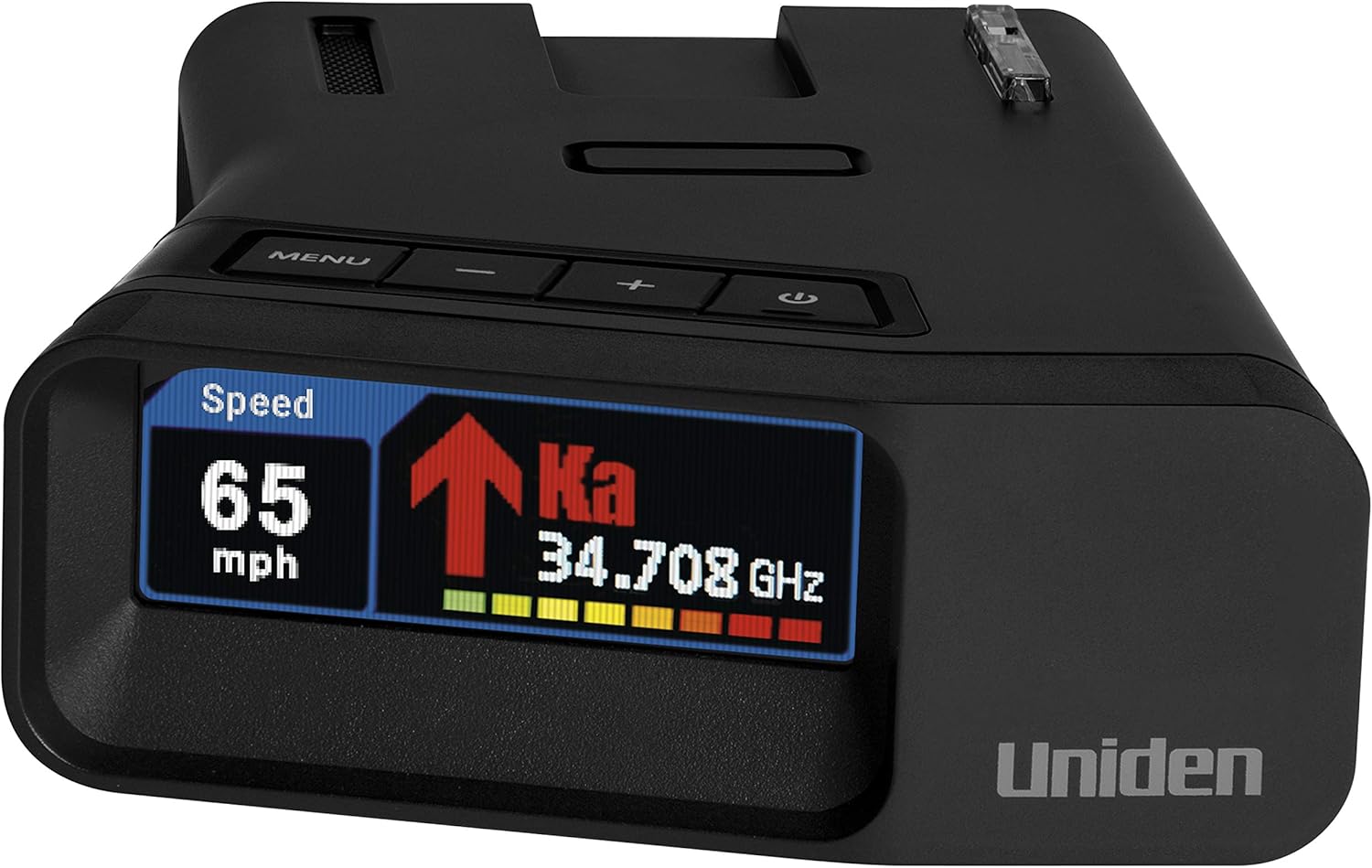
Figure 4: The R7's multi-color OLED display provides real-time information including speed, detected band, frequency, and signal strength.
Menyalakan/Mematikan:
- The unit powers on automatically when connected to a powered 12V outlet.
- To manually power off, press and hold the power button (usually located on the top of the unit).
Display and Alerts:
- Multi-Color OLED Display: Shows current speed, detected radar/laser band (X, K, Ka, Laser), frequency, and signal strength.
- Panah Arah: Indicate the direction of the threat (front, rear, side). This feature is crucial for understanding the source of an alert.

Figure 5: Directional arrows on the R7 display, providing visual cues for threat location.
Fitur Utama:
- Xtreme Range: Provides early warning for radar and laser threats.
- GPS Technology: Allows for marking specific locations to mute common false alerts (e.g., automatic doors) and provides red light and speed camera alerts.
- Peringatan Suara: Provides clear voice announcements for detected threats and settings changes.
- Advanced K/KA Band Filter: Helps reduce false alerts from vehicle blind spot monitoring systems and other radar sources.
- Quiet Ride (Speed-based Auto Mute): Automatically mutes alerts below a user-defined speed, useful in urban areas or traffic.
Navigasi Menu:
Use the 'MENU' button to access settings. The '+' and '-' buttons navigate through options, and the 'PWR' button (or a dedicated 'SEL' button if present) confirms selections. Refer to the on-screen prompts for detailed menu options.
Pemeliharaan
Regular maintenance ensures the longevity and optimal performance of your Uniden R7.
Pembersihan:
- Lap bagian luar unit dengan lembut, damp kain.
- Jangan gunakan pembersih abrasif atau pelarut, karena dapat merusak layar atau komponen lainnya.asing.
- Ensure the lens area is clean for accurate laser detection.
Pembaruan Firmware:
Uniden periodically releases firmware updates to improve performance, add features, and update the red light/speed camera database. It is recommended to keep your device's firmware up to date.
- Visit the official Uniden websitus untuk firmware dan petunjuk pembaruan terkini.
- Typically, updates require connecting the R7 to a computer via the provided USB cable.
Penyelesaian Masalah
If you encounter issues with your Uniden R7, refer to the following common problems and solutions:
| Masalah | Kemungkinan Penyebab | Larutan |
|---|---|---|
| Tidak Ada Daya | Loose power connection, faulty 12V outlet, damaged power cable. | Check power cable connection. Test 12V outlet with another device. Try a different power cable if available. |
| Peringatan Palsu yang Sering Terjadi | Automatic door sensors, vehicle blind spot monitors, strong signal interference. | Utilize the GPS Lockout feature for common false alert locations. Enable K/KA band filtering. Adjust sensitivity settings (e.g., City mode). |
| No Radar/Laser Detection | Unit not powered on, obstructed view, incorrect band settings. | Ensure unit is powered. Verify clear line of sight. Check menu settings to ensure desired bands are enabled. |
| GPS Not Functioning | Poor satellite signal, unit indoors. | Ensure unit has a clear view of the sky. Move to an open area. Allow time for GPS acquisition. |
Spesifikasi
Detailed technical specifications for the Uniden R7 Laser/Radar Detector.
| Fitur | Detil |
|---|---|
| Dimensi Produk | 4.81 x 1.38 x 3.88 inci (PxLxT ... |
| Berat Barang | 6.7 ons |
| Nomor Model | R7 |
| Jenis Tampilan | OLED (Multi-Color) |
| Sumber Daya | Arus searah (12 Volt) |
| Pita Frekuensi yang Didukung | K, Ka, Laser |
| GPS Terintegrasi | Yes (for Red Light/Speed Camera Alerts, GPS Lockouts) |
| Panah Arah | Ya |
| Pabrikan | Uniden |
| Negara Asal | Korea, Republik |
Informasi Garansi
Uniden products are manufactured to high quality standards. For specific warranty terms and conditions, please refer to the warranty card included with your product or visit the official Uniden websitus. Simpan struk pembelian Anda sebagai bukti pembelian untuk klaim garansi apa pun.
Mendukung
For further assistance, technical support, or to download the latest user manual PDF, please visit the official Uniden support weblokasi:
Anda juga dapat menemukan Panduan Pengguna resmi dalam format PDF. Di Sini.