
1. Pendahuluan
This manual provides detailed instructions for the operation and maintenance of your Trexonic TRX-68B-AMZ 3-Speed Turntable System. Please read this manual thoroughly before using the product to ensure proper function and to prevent damage.
2. Petunjuk Keselamatan
- Jangan biarkan unit terkena hujan atau kelembapan.
- Jangan halangi lubang ventilasi apa pun.
- Pastikan kabel listrik tidak terjepit atau terinjak.
- Cabut unit saat terjadi badai petir atau saat tidak digunakan dalam waktu lama.
- Serahkan semua servis kepada teknisi servis yang berkualifikasi.
3. Isi Paket
Verifikasi bahwa semua item ada dalam kemasan:
- Trexonic TRX-68B-AMZ Main Unit
- Wired Shelf Speakers (2)
- Kontrol Jarak Jauh
- User Manual (dokumen ini)
- Adaptor Daya

Figure 3.1: Trexonic TRX-68B-AMZ Turntable System with included wired shelf speakers.
4. Produk Lebihview: Kontrol dan Fitur
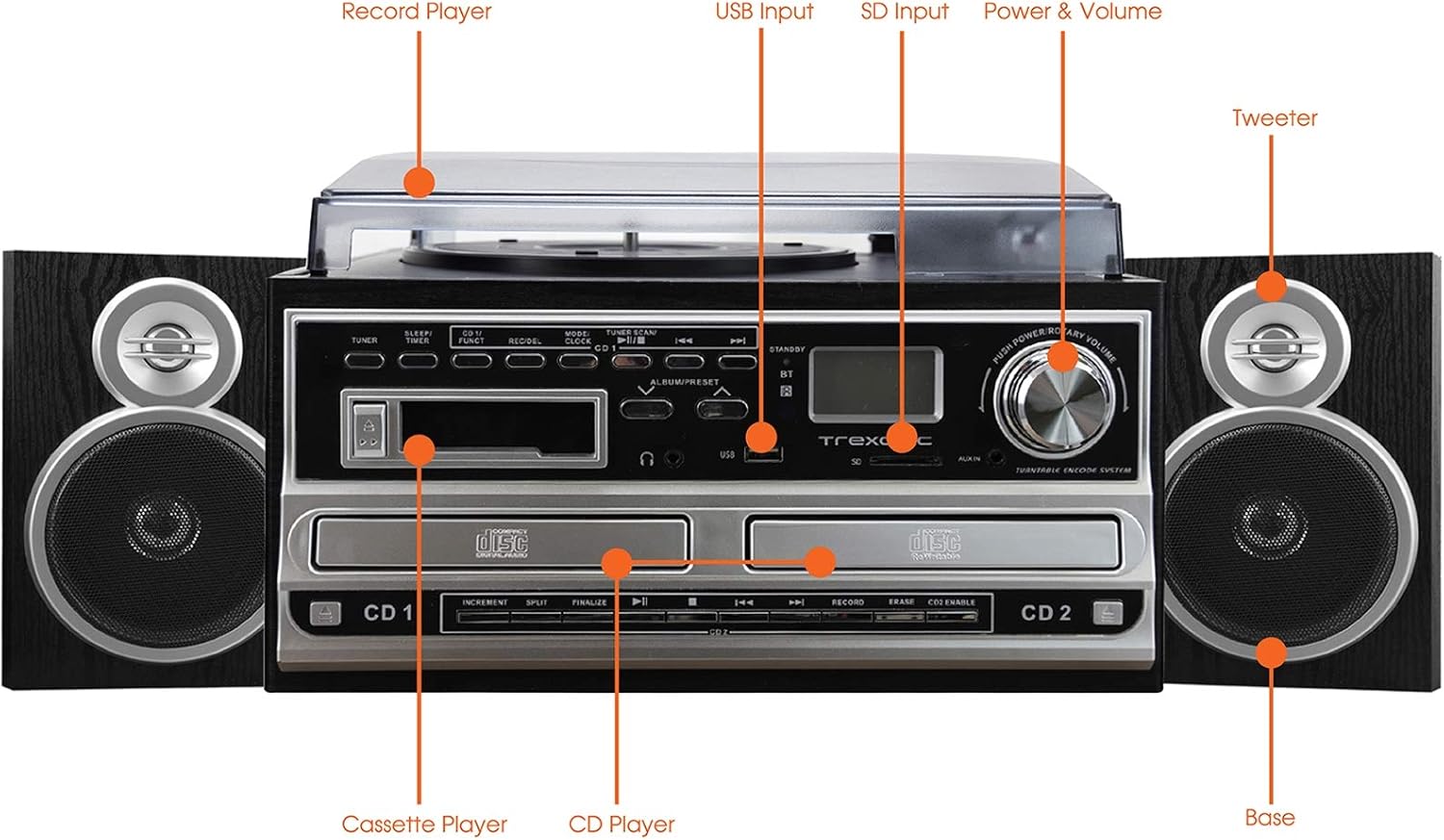
Figure 4.1: Front panel and top view of the Trexonic TRX-68B-AMZ with key components labeled.
- Pemutar Rekaman: For playing vinyl records.
- Input USB: Connect USB drives for playback or recording.
- Masukan SD: Insert SD cards for playback or recording.
- Tombol Daya & Volume: Mengontrol daya hidup/mati dan volume audio.
- Tweeter: High-frequency speaker component.
- Base (Woofer): Low-frequency speaker component.
- CD player: For playing audio CDs and CD recording.
- Pemutar Kaset: Untuk memutar dan merekam kaset.
5. Pengaturan
5.1 Membongkar
Keluarkan semua komponen dari kemasan dengan hati-hati. Simpan bahan kemasan untuk pengangkutan atau penyimpanan di masa mendatang.
5.2 Koneksi Speaker
Connect the wired shelf speakers to the speaker output terminals on the rear of the main unit. Ensure correct polarity (positive to positive, negative to negative) for optimal sound quality.
5.3 Sambungan Daya
Plug the power adapter into the DC IN jack on the back of the unit, then plug the other end into a standard wall outlet (AC 100-240V, 50/60Hz).
6. Petunjuk Pengoperasian
6.1 Kontrol Umum
- Kenop Daya/Volume: Rotate to turn the unit on/off and adjust volume.
- Tombol Mode/Fungsi: Press to cycle through different modes (Turntable, CD, Cassette, FM, USB, SD, AUX, Bluetooth).
6.2 Pengoperasian Meja Putar

Gambar 6.1: Tampilan jarak dekat view of the turntable platter and tonearm.
- Angkat penutup debu.
- Tempatkan catatan di piring.
- Pilih kecepatan yang sesuai (33, 45, atau 78 RPM) menggunakan sakelar pemilih kecepatan.
- Move the tonearm to the desired position on the record. The platter will begin to spin automatically.
- Lower the tonearm gently onto the record.
- Untuk menghentikan pemutaran, angkat lengan pemutar dan kembalikan ke posisi semula.
6.3 Pengoperasian Pemutar CD
- Press the Mode/Function button to select CD mode.
- Tekan tombol OPEN/CLOSE untuk membuka baki CD.
- Letakkan CD dengan sisi label menghadap ke atas.
- Press the OPEN/CLOSE button to close the tray. The CD will begin playing automatically.
- Use the PLAY/PAUSE, STOP, SKIP FORWARD, and SKIP BACKWARD buttons for control.
6.4 Pengoperasian Pemutar Kaset

Gambar 6.2: Tampilan jarak dekat view of the cassette player slot.
- Press the Mode/Function button to select Cassette mode.
- Insert a cassette tape into the cassette slot.
- Use the PLAY, PAUSE, FAST FORWARD, REWIND, and STOP buttons for control.
Operasi Radio FM 6.5
- Press the Mode/Function button to select FM Radio mode.
- Use the TUNER knob or SEEK buttons to find radio stations.
- Press the PRESET button to save or recall favorite stations.
6.6 Pemutaran USB/SD
- Insert a USB drive into the USB port or an SD card into the SD slot.
- Press the Mode/Function button to select USB or SD mode.
- Perangkat ini akan secara otomatis mendeteksi dan memutar audio yang kompatibel. files.
- Use the PLAY/PAUSE, STOP, SKIP FORWARD, and SKIP BACKWARD buttons for control.
6.7 Fungsi Perekaman
The Trexonic TRX-68B-AMZ allows recording from various sources to USB or SD card.
- Recording from Vinyl, CD, Cassette, or AUX to USB/SD:
- Insert a USB drive or SD card into the respective slot.
- Select the desired source mode (Turntable, CD, Cassette, or AUX).
- Begin playback of the source material.
- Press the RECORD button. The recording indicator will illuminate.
- Tekan tombol STOP untuk mengakhiri perekaman.
7. Pemeliharaan
7.1 Membersihkan Unit
Wipe the unit with a soft, dry cloth. Do not use abrasive cleaners or solvents. For the dust cover, use a soft cloth and a mild detergent solution if necessary, then wipe dry.
7.2 Stylus Care and Replacement
The turntable stylus (needle) is a delicate component. Clean it periodically with a soft brush, brushing from back to front. A worn stylus can damage records and degrade sound quality. Replace the stylus approximately every 300-500 hours of playback, or if you notice a decrease in sound quality or increased record wear.
8. Penyelesaian masalah
| Masalah | Kemungkinan Penyebab | Larutan |
|---|---|---|
| Tidak ada daya | Kabel daya tidak tersambung; Stopkontak rusak | Pastikan kabel daya terhubung dengan aman; Coba stopkontak lain. |
| Tidak ada suara | Volume too low; Speakers not connected; Incorrect mode selected | Increase volume; Check speaker connections; Select correct input mode. |
| Pemutar piringan tidak berputar | Unit not powered on; Tonearm not moved over platter | Turn on unit; Move tonearm over the record to activate platter. |
| CD tidak dapat diputar | CD inserted incorrectly; CD scratched/dirty; Incorrect mode | Reinsert CD correctly; Clean or replace CD; Select CD mode. |
| Masalah perekaman | USB/SD full or incompatible; Source not playing | Check USB/SD capacity and format; Ensure source is playing during recording. |
9. Spesifikasi
| Fitur | Spesifikasi |
|---|---|
| Merek | Trexonik |
| Nomor Model | TRX-68B-AMZ |
| Kecepatan Meja Putar | 33/45/78 RPM |
| Format Perekaman | MP3 (to USB/SD) |
| Media Pemutaran | Vinyl, CD, Cassette, FM Radio, USB, SD, AUX, Bluetooth |
| Komponen yang Termasuk | Remote Control, Wired Shelf Speakers |
| Sumber Daya | Listrik Kabel |
| Dimensi (Paket) | Ukuran 56.64x35.56x26.67 cm |
| Berat (Paket) | 6.89 kg |
10. Informasi Garansi
Trexonic products are designed and manufactured to the highest quality standards. For specific warranty details, please refer to the warranty card included with your product or contact Trexonic customer support. Keep your purchase receipt as proof of purchase.
11. Dukungan Pelanggan
If you encounter any issues not covered in this manual or require further assistance, please contact Trexonic customer support. Contact information can typically be found on the manufacturer's official websitus atau pada kemasan produk.