
Hodozzy youyuekeji
Hodozzy 7 Inch Bluetooth Car Radio User Manual
Model: youyuekeji
Perkenalan
This manual provides detailed instructions for the installation, operation, and maintenance of your Hodozzy 7 Inch Bluetooth Car Radio. Please read this manual thoroughly before using the product to ensure proper function and safety. This unit features a 7-inch HD touch screen, Bluetooth 4.0, Mirror Link functionality for Android/iOS devices, FM radio, and support for USB, TF card, and AUX inputs.

Depan view of the Hodozzy 7 Inch Bluetooth Car Radio, showing the touch screen interface with various application icons and physical buttons on the left side.
Isi Produk
Paket ini berisi barang-barang berikut:
- Hodozzy 7 Inch Bluetooth Car Radio Head Unit
- Kontrol Jarak Jauh
- Wiring Cable (ISO connector)
- Kabel Listrik
- User Manual (dokumen ini)

Image showing the main head unit, remote control, wiring cables, and the user manual included in the product package.
Pengaturan dan Instalasi
Ukuran
The installation dimension of the head unit is approximately 178mm (7.0 inches) in width and 100mm (3.93 inches) in height. Please ensure your car's dashboard opening is compatible with these dimensions. Some car models may require a separate dash kit for proper installation.
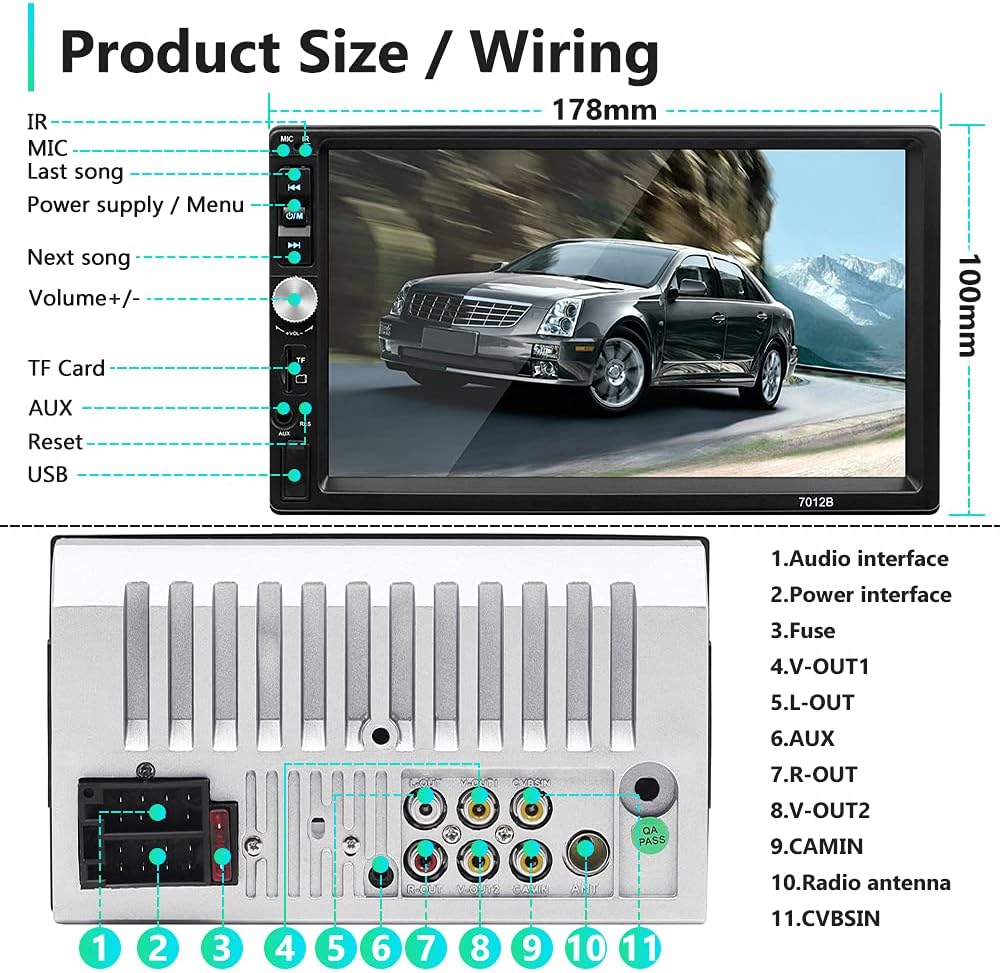
Diagram illustrating the product dimensions (178mm x 100mm) and the layout of the rear panel connections, including audio interfaces, power, fuse, and various input/output ports.
Diagram Pengkabelan
Refer to the following diagram for correct wiring connections. Incorrect wiring can damage the unit or your vehicle's electrical system. It is recommended to have installation performed by a qualified professional.
- Koneksi Pembicara:
- Purple / Purple-Black: Rear Right Speaker (+/-)
- Gray / Gray-Black: Front Right Speaker (+/-)
- White / White-Black: Front Left Speaker (+/-)
- Green / Green-Black: Rear Left Speaker (+/-)
- Koneksi Daya:
- Yellow: +12V Constant Power Supply (B+)
- Red: +12V Ignition Switch (ACC)
- Black: Ground Wire (B-)
- Blue: Power Antenna / Amplifier Turn-on
- Koneksi Lain:
- Pink: Brake Line
- Orange Line: Small Light Line
- Brown: Backing Line (for reverse camera trigger)
- Steering Wheel Control Line: Connect to vehicle's steering wheel control interface.

Comprehensive wiring diagram indicating connections for speakers, power supply, ignition, ground, antenna, brake, small light, backing line, and steering wheel control.
Petunjuk Pengoperasian
Fungsionalitas Bluetooth
The unit features built-in Bluetooth 4.0 for hands-free calling and audio streaming. To connect your device:
- Nyalakan perangkat dan aktifkan Bluetooth di perangkat seluler Anda.
- Pencarian untuk available Bluetooth devices on your phone. The unit's name will typically appear as "CAR BT" or similar.
- Select the unit and pair. A confirmation message may appear on the screen.
- Once paired, you can make/receive calls and stream music through the car's speakers.

The Bluetooth interface on the car radio, displaying options for making calls, accessing the phone book, and controlling music playback.
Fungsi Mirror Link
Mirror Link allows you to display your smartphone's screen on the car radio's display. This unit supports two-way sharing for Android phones (Android 10 and below) and one-way control for iPhones (iPhone 13 and below). Use an original USB cable for optimal performance.
- Untuk Android: Connect your Android phone via USB. Follow the on-screen prompts to enable USB debugging and allow mirroring.
- Untuk iOS: Connect your iPhone via USB. The screen will mirror automatically. Note that control is one-way (from phone to radio).
Note: This unit is not an Android radio and does not support built-in GPS. GPS navigation can be displayed via Mirror Link from your phone.

Illustration of the Mirror Link function, demonstrating how a smartphone's display is mirrored onto the car radio screen for both Android and Apple devices.

The Mirror Link feature in use, showing a navigation application from a smartphone displayed on the car radio's screen.
Radio FM Indonesia
The unit includes an FM radio receiver with automatic and semi-automatic channel search modes. You can listen to music, news, and traffic information.
- Press the "FM" button to enter radio mode.
- Use the arrow buttons to manually tune or long-press for automatic station scanning.
- Simpan stasiun favorit Anda ke tombol yang telah ditetapkan untuk akses cepat.

The FM radio interface, showing the current frequency, tuning controls, and a visual equalizer display.
USB, TF Card, and AUX Input
The multimedia player supports various external media inputs:
- Disk USB: Insert a USB flash drive into the USB port to play audio or video files.
- Kartu TF: Insert a TF (microSD) card into the TF card slot to play media files.
- Masukan AUX: Connect external audio devices (e.g., MP3 players) via the 3.5mm AUX input jack.

Visual representation of the external multimedia input options: USB charging, USB drive, AUX input, and TF card slot.
Kontrol Roda Kemudi (SWC)
The unit supports original car steering wheel control. After proper wiring (refer to the wiring diagram), you can map your steering wheel buttons to control functions like volume, track skipping, and call answering/ending directly from your steering wheel.

An illustration demonstrating the convenience of steering wheel controls for managing calls, adjusting volume, and navigating tracks without taking hands off the wheel.
Belakang View Masukan Kamera
Unit ini mendukung bagian belakang. view camera input. When a compatible camera (not included) is connected correctly and the vehicle is put into reverse gear, the screen will automatically display the rearview image, assisting with parking and maneuvering.

The car radio display showing the reversing image with parking guidelines, as seen when a rear view camera is connected and active.
Pemeliharaan
To ensure the longevity and optimal performance of your Hodozzy car radio, follow these maintenance guidelines:
- Membersihkan Layar: Gunakan kain lembut bebas serat untuk menyeka layar sentuh dengan lembut. Untuk noda membandel, usap sedikitampBersihkan kain dengan air atau pembersih yang aman untuk layar. Hindari bahan abrasif atau bahan kimia keras.
- Pembersihan Umum: Jaga unit tetap bersih dari debu dan kotoran. Gunakan sikat lembut atau udara bertekanan untuk membersihkan area di sekitar tombol dan port.
- Suhu: Hindari memaparkan unit ke suhu ekstrem, baik panas maupun dingin, karena hal ini dapat memengaruhi kinerja dan masa pakainya.
- Catu Daya: Ensure stable power supply to prevent electrical damage. If you notice any unusual behavior, check the wiring connections.
Penyelesaian Masalah
| Masalah | Kemungkinan Penyebab | Larutan |
|---|---|---|
| Unit tidak menyala. | Incorrect wiring (power/ground), blown fuse, vehicle battery issue. | Check all power and ground connections. Verify the fuse in the unit and vehicle's fuse box. Ensure vehicle battery is charged. |
| Tidak ada suara. | Kabel speaker terputus, volume terlalu rendah, mute diaktifkan, sumber audio tidak tepat. | Check speaker wiring. Increase volume. Deactivate mute. Select correct audio source (FM, USB, AUX, BT). |
| Bluetooth not connecting or unstable. | Device not in pairing mode, interference, outdated phone OS (for Mirror Link). | Ensure Bluetooth is enabled on both devices and in pairing mode. Try forgetting the device on your phone and re-pairing. Move closer to the unit. For Mirror Link, ensure your phone's OS version is within supported limits (Android 10 and below, iPhone 13 and below). Try a different USB cable. |
| Mirror Link tidak berfungsi. | Incompatible phone model/OS, non-original USB cable, USB debugging not enabled (Android). | Verify phone compatibility (Android 10/iOS 13 or below). Use the original USB cable that came with your phone. For Android, enable USB debugging in developer options. Restart both phone and head unit. |
| Steering Wheel Control not responding. | Incorrect wiring, vehicle not supported, SWC learning not performed. | Check SWC wiring connections. Some vehicles may require an additional interface. Refer to the unit's settings for SWC learning/mapping. |
| Belakang view Kamera tidak menampilkan gambar. | Camera not connected, incorrect wiring (video input/trigger), faulty camera. | Ensure camera is properly connected to the "CAMIN" input and the backing line (Brown wire) is connected to the reverse light trigger. Test camera functionality. |
Spesifikasi
| Fitur | Detil |
|---|---|
| Menampilkan | 7-inch HD LCD Touch Screen |
| Versi Bluetooth | 4.0 (A2DP, Hands-free, Phone Book, Music) |
| Mirror Link Compatibility | Android (10 and below, two-way), iOS (iPhone 13 and below, one-way) |
| Penyetel Radio | FM (Automatic/Semi-automatic search) |
| Supported Media Inputs | USB Disk, TF Card, AUX (3.5mm Jack) |
| Pengkodean Audio | Stereo |
| Mode Keluaran Audio | Stereo |
| Konfigurasi Saluran Suara Surround | 4.0 |
| Pengkodean Video | RM, RMVB, AVI, MP4, MKV, 3GP |
| Fitur Khusus | Touchscreen, DAB (Digital Audio Broadcasting - if supported by region/adapter) |
| Nomor Model Barang | youyuekeji |
| Dimensi (kira-kira) | 178mm (L) x 100mm (T) |
| Berat Barang | 1.1 pon |
Garansi dan Dukungan
For warranty information and technical support, please refer to the contact details provided with your purchase or visit the official Hodozzy store on Amazon. If you encounter any issues not covered in this manual, please contact customer service for assistance.
Hodozzy Store Link: Visit the Hodozzy Store
Ask a question about this manual
Ask about setup, troubleshooting, compatibility, parts, safety, or missing instructions. Manuals+ will review the question and use this page’s manual context to help answer it.