
1. Pendahuluan
Thank you for choosing the iProven DTR-1835 Digital Oral Thermometer. This device is designed to provide fast, accurate, and reliable temperature measurements for adults, children, and infants. Its flexible tip ensures comfort during use, and the integrated smiley fever indicator offers a clear visual interpretation of readings. Please read this manual thoroughly before using the thermometer to ensure proper operation and to maintain its accuracy and longevity.

Image 1: iProven DTR-1835 Digital Thermometer and its packaging, highlighting key features like fast and accurate readings, smiley indicator, and flexible tip.
2. Informasi Keselamatan
- The iProven DTR-1835 thermometer contains no mercury, making it safe for use with children and adults.
- Keep the thermometer out of reach of small children to prevent accidental ingestion of small parts.
- Jangan menggigit ujung termometer.
- Axillary (underarm) measurement is not recommended as it may not provide reliable or accurate readings.
- Consult a medical professional for any health concerns or if you have questions about temperature readings.
3. Fitur Produk
The iProven DTR-1835 Digital Thermometer is equipped with several features designed for user convenience and accuracy:
- Sistem Membaca Cepat: Provides temperature readings in approximately 20 seconds.
- Akurasi Tinggi: Measures with an accuracy of ± 0.1 ℃ / ± 0.2 ℉.
- Tip Fleksibel: Ensures comfortable and safe measurement.
- Smiley Fever Indicator: Visually indicates if the reading is normal, slightly elevated, or elevated.
- Desain tahan air: Memungkinkan pembersihan mudah di bawah air mengalir.
- Operasi Satu Tombol: Simple to use with a single power button.
- Last Reading Memory: Automatically stores the last measured temperature.
- Sakelar Fahrenheit/Celcius: Beralih antar satuan suhu dengan mudah.
- Pematian Otomatis: Conserves battery life by turning off automatically after a period of inactivity.
- Peringatan Baterai Lemah: Memberitahu Anda saat baterai perlu diganti.
- Protective Hardcase: Included for hygienic storage.

Image 2: Visual breakdown of the iProven DTR-1835 thermometer's key features and functions.
4. Pengaturan
4.1 Penggunaan Awal
- The thermometer comes with a battery pre-installed.
- Before first use, and after each subsequent use, clean the thermometer tip as described in the 'Maintenance' section.
- Tekan tombol daya (⑂) to turn on the thermometer. A short beep will sound, and the display will show the last measured temperature for 2 seconds, followed by 'L℃' or 'L℉' with a flashing degree symbol, indicating it is ready for measurement.
4.2 Beralih Antara Fahrenheit dan Celsius
To switch between Fahrenheit (℉) and Celsius (℃):
- With the thermometer turned off, press and hold the power button for approximately 3 seconds until the display shows '℃' or '℉'.
- Release the button, and the unit will be set to the desired scale.
5. Petunjuk Pengoperasian
The iProven DTR-1835 supports oral and rectal temperature measurement. Axillary measurement is not recommended due to potential inaccuracies.

Gambar 3: Selesaiview of temperature measurement methods and their suitability.
5.1 Oral Measurement (Recommended for ages 4+)
- Ensure the thermometer is clean.
- Tekan tombol daya (⑂) untuk menyalakan termometer.
- Place the flexible tip of the thermometer under the tongue, in one of the two heat pockets at the base of the tongue.
- Close your mouth and hold the thermometer in place. Avoid talking or moving during measurement.
- Wait for the thermometer to beep, indicating the measurement is complete (approximately 20 seconds).
- Remove the thermometer and read the temperature displayed.
5.2 Rectal Measurement (Recommended for children under 4)
Rectal measurement is generally considered the most accurate method for infants and young children.
- Ensure the thermometer is clean.
- Apply a small amount of water-soluble lubricant (e.g., petroleum jelly) to the flexible tip.
- Tekan tombol daya (⑂) untuk menyalakan termometer.
- Gently insert the lubricated tip into the rectum, no more than half an inch (1.25 cm). Do not force the thermometer.
- Hold the thermometer in place until it beeps (approximately 20 seconds).
- Remove the thermometer carefully and read the temperature displayed.
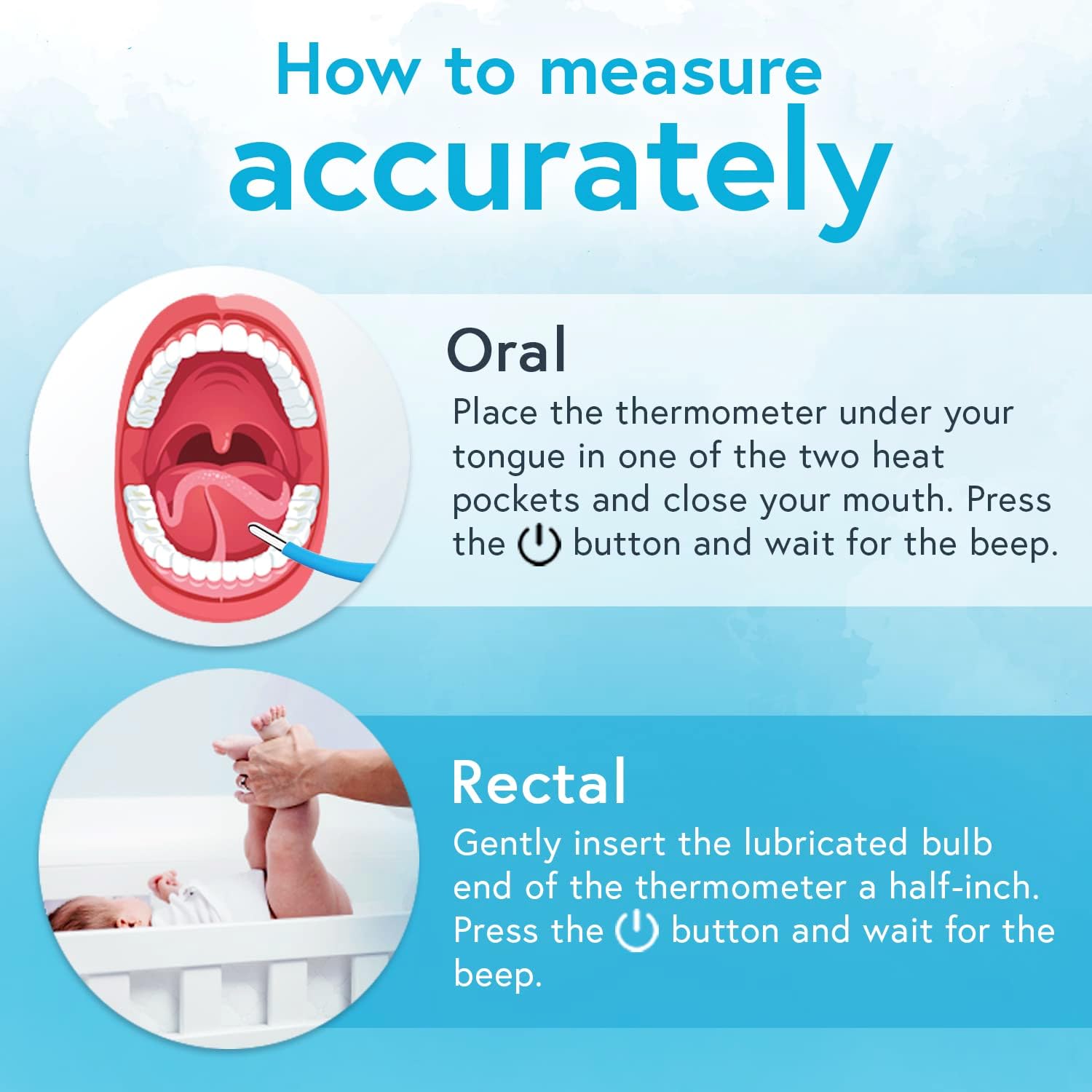
Image 4: Step-by-step visual guide for oral and rectal temperature measurement.
6. Memahami Bacaan
6.1 Smiley Fever Indicator
The DTR-1835 features a visual smiley indicator to help interpret temperature readings:
- Happy Face: Menunjukkan suhu normal.
- Neutral Face: Menunjukkan suhu yang sedikit lebih tinggi.
- Sad Face: Indicates an elevated temperature (fever).
Always consult a medical professional for accurate diagnosis and advice, especially if a fever is indicated.
6.2 Last Reading Memory
When you turn on the thermometer, it will briefly display the last measured temperature before entering measurement mode. This allows you to track changes in temperature over time.
7. Pemeliharaan
7.1 Pembersihan
The thermometer is waterproof, making cleaning simple and hygienic:
- After each use, wipe the thermometer tip with a soft cloth or cotton swab moistened with rubbing alcohol (70% isopropyl alcohol).
- Alternatively, you can wash the tip under running tap water with a mild soap.
- Bilas sampai bersih dengan air bersih.
- Dry the thermometer completely with a clean, soft cloth before storing.
- Jangan merendam seluruh termometer dalam air untuk waktu yang lama.
7.2 Penyimpanan
Store the thermometer in its protective hardcase in a cool, dry place, away from direct sunlight and extreme temperatures. Keep it out of reach of children.
7.3 Penggantian Baterai
When the low battery indicator appears on the display, the battery needs to be replaced. Refer to the product packaging or contact customer support for specific battery type and replacement instructions.
8. Penyelesaian masalah
- No Display / Thermometer won't turn on: Periksa apakah baterai terpasang dengan benar atau perlu diganti.
- Pembacaan yang Tidak Akurat: Ensure the thermometer tip is properly placed (oral or rectal) and held steady during measurement. Avoid talking or moving during oral measurement. Ensure the thermometer is clean.
- 'Lo' or 'Hi' on Display: 'Lo' indicates a temperature below the measurable range, and 'Hi' indicates a temperature above the measurable range. Ensure proper contact and placement.
- Pesan Kesalahan: If an error message appears, turn the thermometer off and then on again. If the error persists, contact customer support.
9. Spesifikasi
| Fitur | Spesifikasi |
|---|---|
| Nomor Model | DTR-1835 |
| Rentang Pengukuran | 32.0℃ - 42.9℃ (89.6℉ - 109.2℉) |
| Ketepatan | ± 0.1℃ (35.5℃ - 42.0℃) ± 0.2℉ (95.9℉ - 107.6℉) |
| Waktu pengukuran | Kira-kira 20 detik |
| Jenis Tampilan | Layar LCD |
| Sumber Daya | Bertenaga Baterai |
| Dimensi Produk | Ukuran 22.86x0.03x0.03 cm |
| Berat Barang | 50 gram |
| Fitur Khusus | Fast Reading System, Flexible tip, High Accuracy, No mercury, Smiley Fever Indicator |
10. Garansi dan Dukungan
For warranty information, technical support, or any questions regarding your iProven DTR-1835 Digital Oral Thermometer, please refer to the warranty card included with your product or visit the official iProven website. You may also contact iProven customer service directly for assistance.