
Perkenalan
This manual provides essential instructions for the safe and effective installation, operation, and maintenance of your Technical Precision replacement lamp and housing for the HITACHI CP-X417 projector. Please read this manual thoroughly before attempting any installation or operation to ensure proper function and to prevent damage to the product or your projector.
Informasi Keselamatan
WARNING: Risk of electric shock and burns. Always disconnect power to the projector before attempting to replace the lamp. Allow the projector and old lamp dinginkan sepenuhnya sebelum ditangani.
- Ensure the projector is unplugged from the power outlet and has been off for at least 30 minutes to allow the lamp untuk mendinginkan.
- Do not touch the glass part of the new lamp directly with bare hands. Oils from your skin can reduce lamp life. Use gloves or a clean cloth.
- Buang lamps according to local regulations. They may contain mercury.
- Do not operate the projector with the lamp penutup dilepas.
Pengaturan dan Instalasi
Follow these steps carefully to replace the projector lamp.
- Siapkan Proyektor: Ensure the projector is turned off and unplugged from the power source. Allow it to cool down for at least 30 minutes.
- Temukan Lamp Menutupi: Refer to your HITACHI CP-X417 projector's original manual to locate the lamp Penutup. Biasanya diamankan dengan satu atau lebih sekrup.
- Hapus Lamp Menutupi: Using an appropriate screwdriver, carefully loosen and remove the screws securing the lamp cover. Set the screws and cover aside in a safe place.
- Hapus L Lamaamp: lamp module will have a handle or a set of screws holding it in place. Loosen these screws and gently pull the old lamp module straight out of the projector. Avoid forcing it.
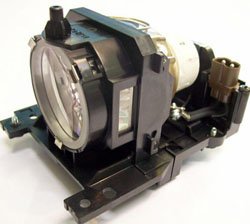
Figure 1: Technical Precision Replacement Lamp and Housing. This image shows the complete lamp module, ready for installation into the projector.
- Install the New Lamp: Carefully insert the new Technical Precision lamp module into the projector slot. Ensure it slides in smoothly and is seated firmly. Do not force it.
- Amankan L Baruamp: Kencangkan sekrup yang menahan l baruamp modul terpasang.
- Ganti Lamp Menutupi: Pasang kembali lamp cover and secure it with the screws removed earlier. Ensure it is properly closed to prevent dust entry and ensure safe operation.
- Setel ulang Lamp Pengatur waktu: Setelah mengganti lamp, sangat penting untuk mengatur ulang lamp timer in your projector's menu. Consult your HITACHI CP-X417 projector's manual for specific instructions on how to access and reset the lamp timer. This ensures accurate tracking of new lamp kehidupan.
Petunjuk Pengoperasian
Setelah l baruamp dipasang dan lamp timer is reset, you can resume normal operation of your projector.
- Penggunaan Pertama: L baruamp may appear slightly brighter or have a different color temperature during its initial hours of use. This is normal as the lamp menstabilkan.
- Kinerja Optimal: Untuk memaksimalkan lamp life and maintain optimal performance, avoid frequent on/off cycles. Allow the projector to run for at least 15-20 minutes before turning it off.
- Periode Pendinginan: Always allow the projector to complete its cool-down cycle after turning it off. Do not unplug the projector until the cooling fans have stopped.
Pemeliharaan
Proper maintenance helps extend the life of your projector and the replacement lamp.
- Pembersihan: Periodically clean the projector's air filters according to your projector's manual. Clogged filters can lead to overheating, which shortens lamp kehidupan.
- Lamp Perumahan: Jangan mencoba membuka lamp housing or replace the bare bulb inside the module. This replacement unit is designed as a complete module.
- Penyimpanan: If the projector will not be used for an extended period, store it in a cool, dry, dust-free environment.
Penyelesaian Masalah
If you encounter issues after installing the new lamp, lihat masalah umum dan solusi berikut:
| Masalah | Kemungkinan Penyebab | Larutan |
|---|---|---|
| Lamp tidak menyala. |
|
|
| Image is dim or poor quality. |
|
|
| Projector displays a lamp pesan kesalahan. |
|
|
Spesifikasi
Key specifications for the Technical Precision Replacement Lamp and Housing for HITACHI CP-X417:
- Merek: Presisi Teknis
- Nama Model: CP-X417 LAMP & HOUSING
- Nomor Bagian: CP-X417 LAMP & HOUSING
- Bahan: Kaca
- Jumlah Paket Barang: 1
- Jenis Sumber Cahaya: Proyektoramps
- ASIN: B07RXR3FD2
Garansi dan Dukungan
For warranty information or technical support regarding your Technical Precision replacement lamp, please refer to the documentation provided with your purchase or contact Technical Precision customer service directly. Contact details are typically available on the manufacturer's websitus atau melalui pengecer Anda.
For general projector operation or issues unrelated to the lamp, please consult your original HITACHI CP-X417 projector manual or contact HITACHI support.