
1. Pendahuluan
This manual provides essential information for setting up, operating, maintaining, and troubleshooting your Lenovo ThinkPad E495 laptop. Please read this guide thoroughly to ensure proper use and to maximize the performance and longevity of your device.
The Lenovo ThinkPad E495 is a 14-inch Full HD laptop powered by an AMD Ryzen 5 3500U processor, equipped with 8GB of memory and a 256GB SSD, running Windows 10 Pro.
2. Produk Lebihview
Familiarize yourself with the main components of your ThinkPad E495 laptop.
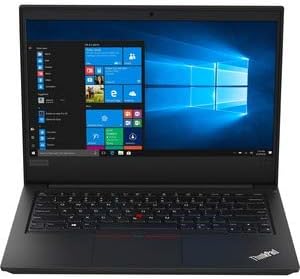
Gambar 2.1: Depan view of the Lenovo ThinkPad E495 laptop, open with the screen displaying the Windows 10 desktop and the keyboard visible.
2.1 Komponen Utama
- Menampilkan: 14-inch Full HD (1920x1080) LCD screen.
- Papan ketik: Chiclet-style keyboard with TrackPoint.
- Papan sentuh: Multi-touch enabled touchpad for navigation.
- Webkamera: Terintegrasi webkamera untuk konferensi video.
- Pelabuhan: USB ports, HDMI output, Ethernet, Audio jack.
- Tombol Daya: Located on the side or top deck.
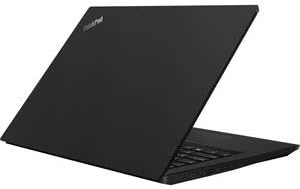
Gambar 2.2: Sisi view of the Lenovo ThinkPad E495 laptop in a closed position, highlighting its slim profile.
3. Pengaturan
3.1 Membuka Kotak
Keluarkan laptop dan semua aksesori dari kemasan dengan hati-hati. Pastikan barang-barang berikut ada:
- Lenovo ThinkPad E495 Laptop
- Adaptor AC
- Kabel listrik
- Battery (may be integrated)
3.2 Menghubungkan Daya
- Hubungkan kabel daya ke adaptor AC.
- Hubungkan adaptor AC ke stopkontak.
- Connect the AC adapter's output plug to the power input port on your laptop.
- Biarkan baterai terisi daya setidaknya selama 30 menit sebelum penggunaan pertama, atau hingga indikator baterai menunjukkan daya yang cukup.
3.3 Initial Boot-Up and Windows Setup
- Tekan tombol power untuk menghidupkan laptop.
- Follow the on-screen instructions to complete the Windows 10 Pro setup process. This typically involves selecting your region, language, accepting terms, and creating a user account.
- Connect to a Wi-Fi network when prompted to ensure updates can be downloaded.
4. Mengoperasikan Laptop Anda
4.1 Manajemen Daya
- Nyalakan: Tekan tombol daya.
- Mode tidur: Tutup penutupnya atau tekan Tombol Fn+F4 (atau tombol tidur yang setara).
- Menutup: Klik tombol Mulai, lalu Daya > Matikan.
- Mulai ulang: Klik tombol Mulai, lalu Daya > Mulai Ulang.
4.2 Keyboard dan Perangkat Input
- Papan ketik: Use the full-sized keyboard for typing. Function keys (F1-F12) often have secondary functions accessible via the Fn kunci.
- TrackPoint: The red pointing stick in the center of the keyboard allows for precise cursor control. Use the associated buttons below the spacebar for left, right, and middle clicks.
- Papan sentuh: The multi-touch touchpad supports gestures for scrolling, zooming, and other functions. Refer to Windows settings for customization.
4.3 Menghubungkan Periferal
Your ThinkPad E495 supports various external devices:
- Perangkat USB: Connect USB drives, mice, keyboards, or other USB accessories to the available USB ports.
- HDMI: Use the HDMI port to connect to an external monitor or projector.
- Wifinya: Connect to wireless networks via the built-in Wi-Fi. Access Wi-Fi settings through the Windows taskbar network icon.
- Bluetooth dapat digunakan untuk berbagai keperluan, seperti: Pair Bluetooth-enabled devices such as headphones, speakers, or mice. Enable Bluetooth in Windows settings.
- Eternet: Connect to a wired network using the Ethernet port.

Figure 4.1: The Lenovo ThinkPad E495 laptop in use, displaying a video conference application on its screen.
5. Pemeliharaan
5.1 Membersihkan Laptop Anda
- Layar: Gunakan kain yang lembut dan tidak berbulu secara tipis dampBersihkan dengan air atau cairan pembersih layar. Jangan menyemprotkan cairan langsung ke layar.
- Keyboard dan Sasis: Gunakan kain lembut, sedikit kering.ampened with water or a mild cleaning solution. Avoid excessive moisture. An air duster can remove debris from between keys.
- Pelabuhan: Jaga agar port bebas dari debu dan kotoran. Gunakan udara bertekanan jika perlu.
5.2 Pembaruan Perangkat Lunak
Perbarui sistem operasi dan driver Anda secara berkala untuk memastikan kinerja dan keamanan yang optimal.
- Pembaruan Windows: Go to Start > Settings > Update & Security > Windows Update.
- Pembaruan Driver: Kunjungi dukungan resmi Lenovo. website for the latest drivers for your ThinkPad E495 model.
5.3 Pencadangan Data
Cadangkan data penting Anda secara teratur ke drive eksternal atau penyimpanan cloud untuk mencegah kehilangan data.
6. Penyelesaian masalah
| Masalah | Larutan |
|---|---|
| Laptop tidak menyala. | Pastikan adaptor AC terhubung dengan aman ke laptop dan stopkontak yang berfungsi. Periksa apakah stopkontak berfungsi. Coba stopkontak lain. |
| Screen is blank or not displaying. | Tekan Tombol Fn+F7 (or the display toggle key) to cycle through display modes. Ensure the laptop is not in sleep mode. Connect to an external monitor to check if the issue is with the laptop's display. |
| Masalah koneksi Wi-Fi. | Check if Wi-Fi is enabled in Windows settings. Restart your router and modem. Ensure you are within range of a Wi-Fi network. Update Wi-Fi drivers from the Lenovo support weblokasi. |
| Keyboard atau touchpad tidak merespons. | Restart laptop. Periksa apakah ada halangan fisik. Pastikan driver sudah diperbarui. |
| Sistem lambat atau tidak responsif. | Close unnecessary applications. Check Task Manager for processes consuming high CPU or memory. Run a virus scan. Ensure Windows and drivers are updated. Consider freeing up disk space. |
Untuk pemecahan masalah yang lebih detail, silakan merujuk ke dukungan Lenovo. websitus atau hubungi layanan pelanggan.
7. Spesifikasi
| Fitur | Detil |
|---|---|
| Merek | Lenovo |
| Nama Model | Lenovo ThinkPad E495 |
| Nomor Model | 20NE0002US |
| Ukuran Layar | 14 inci |
| Resolusi Tampilan | 1920 x 1080 Piksel (HD Penuh) |
| Model CPU | AMD Ryzen 5 3500U (2.1 GHz, hingga 3.7 GHz) |
| Memori RAM | 8 GB DDR4 (2400 MHz) |
| Ukuran Hard Disk | SSD berkapasitas 256GB |
| Sistem Operasi | Windows 10 Pro |
| Koprosesor Grafis | AMD Radeon Vega 8 (Terintegrasi) |
| Konektivitas | Bluetooth 5.0, Ethernet (1 Gbps), USB, Wi-Fi |
| Pelabuhan | HDMI, USB ports, Headphones (Audio Output) |
| Webkamera | Ya |
| Baterai | 3-cell, 45 Watt Hours |
| Berat Barang | 3.86 pon |
| Dimensi (P x L x T) | 14.14" x 9.28" x 0.78" |
| UPC | 193386253563 |
8. Garansi dan Dukungan
8.1 Garansi Produk
Your Lenovo ThinkPad E495 laptop comes with a 1-year limited warranty. This warranty covers manufacturing defects and hardware failures under normal use conditions. For specific terms and conditions, please refer to the warranty documentation included with your product or visit the official Lenovo support weblokasi.
8.2 Dukungan Pelanggan
For technical assistance, warranty claims, or additional support, please visit the official Lenovo support webAnda dapat menemukan driver, FAQ, dan informasi kontak layanan pelanggan di sana.
Dukungan Lenovo Weblokasi: dukungan.lenovo.com