
1. Produk Lebihview
The OOYCYOO 100 Amp MPPT Solar Charge Controller, Model KP60 100, is designed for efficient management of solar power systems. It automatically identifies 12V or 24V battery systems and is compatible with various battery types, including AGM, Sealed, Gel, Flooded, and Lithium. This controller features advanced Maximum Power Point Tracking (MPPT) technology to maximize energy harvest from solar panels, ensuring optimal charging for your battery bank.
Key features include a backlit LCD display for real-time monitoring, enhanced safety protections, and a high DC/DC transfer efficiency of up to 98.7%.

Gambar 1: Depan view of the OOYCYOO 100 Amp MPPT Solar Charge Controller, showing the LCD display and connection terminals.
2. Petunjuk Keselamatan
Please read all instructions and warnings carefully before installation and operation. Failure to follow these instructions may result in electric shock, fire, or severe injury.
- Pastikan semua kabel terpolarisasi dengan benar dan terhubung dengan aman untuk mencegah kerusakan pada pengontrol dan perangkat yang terhubung.
- Always disconnect the solar panel array and battery before installing or adjusting the controller.
- Pasang pengontrol di area yang berventilasi baik, jauhkan dari bahan yang mudah terbakar dan sinar matahari langsung.
- Do not disassemble or attempt to repair the controller. Refer to qualified personnel for service.
- Use appropriate circuit breakers or fuses for all connections to protect against overcurrent.
- Wear appropriate personal protective equipment, including eye protection and insulated gloves, during installation.
3. Komponen dan Koneksi Produk
The controller features clearly labeled terminals for solar panel input, battery connection, and load output. It also includes a remote temperature sensor port and USB charging ports.

Gambar 2: Rinci view of the controller's LCD display, 5S Reset button, Solar Panel Terminal, Battery Terminal, Load Terminal, USB 5V2A ports, Remote Temp Sensor port, and RS485 Communication Port.
Isi Paket:
- 1 x OOYCYOO 100A MPPT Solar Charge Controller (Model K2500W)
- 1 x Sensor Suhu
- 1 x Buku Panduan Pengguna (Bahasa Inggris)
4. Spesifikasi Teknis
The following table outlines the technical specifications for the OOYCYOO 100 Amp MPPT Solar Charge Controller (Model KP60 100).
| Parameter | Spesifikasi |
|---|---|
| Arus Pengisian Terukur | 100A |
| Nominal Sistem Voltage | 12V/24VDC Auto Identifying |
| 12V System Max. PV Input Power | 1300W |
| 24V System Max. PV Input Power | 2600W |
| Maks. PV Sirkuit Terbuka Voltage (Vok) | Tegangan 100VDC |
| Vol bateraitage Rentang | 9V ~ 32V |
| Power Terminal Wire Gauge | 10 AWG |
| Dimensi (P x L x T) | 12 x 7.8 x 3.2 inci (30.5 x 19.8 x 8.1 cm) |
| Berat | 8.84 pon (4 kg) |
| Jenis Tampilan | Layar LCD |
| Suhu Operasional | Hingga 45°C (113°F) |
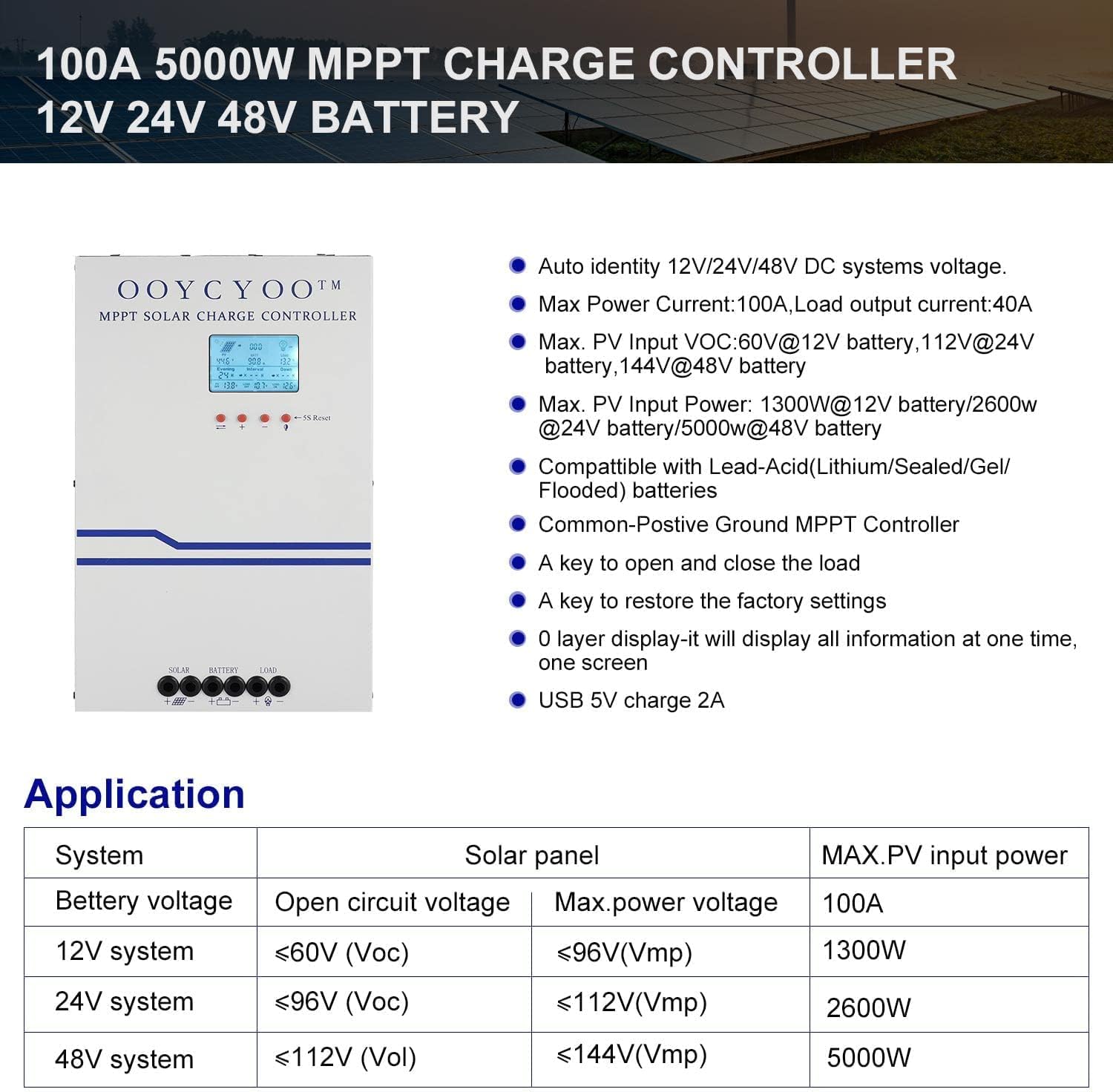
Figure 3: Application table detailing maximum PV input power and voltage for 12V, 24V, and 48V systems.
5. Panduan Instalasi
Proper installation is crucial for the safe and efficient operation of your solar charge controller. Follow these steps carefully:
5.1 Memasang Pengontrol
- Choose a dry, well-ventilated location, protected from direct sunlight, high temperatures, and moisture.
- Ensure sufficient clearance around the controller for proper airflow, especially around the cooling vents.
- Mount the controller vertically on a non-flammable surface using appropriate fasteners.
5.2 Koneksi Kabel
Connect the components in the following order: Battery > Solar Panel > Load. Always ensure correct polarity.
- Hubungkan Baterai: Connect the battery cables to the battery terminals on the controller. Ensure the positive (+) and negative (-) terminals are correctly matched. The controller will automatically detect the battery voltage (12V atau 24V).
- Hubungkan Panel Surya: Connect the solar panel cables to the PV input terminals on the controller. Verify correct polarity. Ensure the open circuit voltage (Voc) of your solar array does not exceed 100VDC.
- Hubungkan Beban: Connect your DC load to the load output terminals. Ensure the load current does not exceed the controller's rated load current.
- Hubungkan Sensor Suhu: Plug the remote temperature sensor into its designated port. This sensor helps the controller optimize charging based on battery temperature.
The controller is compatible with various battery types:

Figure 4: The controller supports AGM, Sealed, Gel, Flooded, and Lithium-Iron phosphate batteries for 12V/24V/48V systems.
6. Panduan Operasi
Once installed, the controller will begin operation. The LCD display provides real-time system status and allows for configuration.
Layar LCD 6.1
The backlit LCD display shows various parameters such as battery voltage, arus pengisian, tegangan panel suryatage, load status, and accumulated energy (KWH). Use the buttons below the display to navigate through the different screens and access settings.
6.2 Pengaturan Dasar
The controller allows users to set parameters for different battery types (Lithium, LiFePO4, Li(NiCoMn)O2, Flooded, Sealed, Gel). Refer to the on-screen menu for specific adjustments to absorption voltage, volume mengambangtage, dan volume rendahtage disconnect settings. A load timer function is also available for controlling DC loads.
6.3 Pengoperasian Kipas Pendingin
The built-in cooling fan activates automatically when the internal temperature exceeds 45°C (113°F) and turns off when the temperature drops below 40°C (104°F). This mechanism ensures optimal performance and extends the lifespan of the controller.
7. Pemeliharaan
Regular maintenance helps ensure the longevity and optimal performance of your solar charge controller.
- Pembersihan: Periodically clean the controller's exterior with a dry cloth. Ensure cooling vents are free from dust and debris.
- Koneksi: Annually inspect all wiring connections for tightness and corrosion. Loose connections can cause overheating and damage.
- Lingkungan: Verify that the installation environment remains dry and well-ventilated.
8. Penyelesaian masalah
The controller incorporates multiple protection functions to safeguard your system. If an issue arises, check the LCD display for error codes or indicators.
8.1 Fungsi Perlindungan
- PV Over Current/Power Protection
- PV Short Circuit Protection
- Perlindungan Polaritas Terbalik PV
- Night Reverse Charging Protection
- Perlindungan Polaritas Terbalik Baterai
- Baterai Lebih Voltage Perlindungan
- Perlindungan Baterai Lebih Discharge
- Battery Overheating, Controller Overheating Protection
- Lithium Battery Low Temperature Protection
- Proteksi Hubungan Pendek Beban
- Perlindungan Kelebihan Beban
- TVS Volume Tinggitage Perlindungan Sementara
8.2 Permasalahan Umum
- Tanpa Pengisian: Check solar panel connections, ensure sufficient sunlight, and verify battery voltage berada dalam jangkauan operasional.
- Beban Tidak Berfungsi: Check load connections, ensure battery voltage berada di atas vol rendahtage disconnect setting, and verify load timer settings.
- Terlalu panas: Ensure adequate ventilation around the controller and that cooling vents are clear.
- Vol salahtagBacaan elektronik: Verify all connections are secure and the temperature sensor is properly installed.
If issues persist after checking these points, please contact customer support.
9. Garansi dan Dukungan
The OOYCYOO 100 Amp MPPT Solar Charge Controller is a professional product. For any questions or technical assistance, please contact us directly via email. We are committed to providing prompt support and ensuring your satisfaction.
Silakan merujuk pada dokumentasi pembelian Anda untuk syarat dan ketentuan garansi tertentu.